To win back customers on WhatsApp, start with people who already bought from you and agreed to hear from you. Sort them by last visit, send a short personal check-in, follow a week later with one fair offer, then stop. Each marketing message is illustrated here at RM0.35 in Malaysia, so a focused list beats a mass blast — and keeping customers is far cheaper than finding new ones.
RM0.35 and RM0.06 in this article and its supplied illustrations are planning assumptions, not verified current Meta quotations. Gupshup's October announcement describes 1,000 free service replies per business phone number per month, then eligible service charges from 1 October 2026. Utility templates do not use that allowance. Inbound messages and qualifying 72-hour free entry point messages remain exempt. Confirm the recipient market, applicable rate card, free allowance and provider fees before budgeting. Figures below exclude tax and any unlisted costs.
- Your past customers are your warmest leads: they already know your service, price and location.
- Sort customers by last visit — active, at risk, lapsed — and message each group differently.
- Re-engagement messages are marketing templates under Meta’s rules and need opt-in, even for past customers.
- Use a two-message sequence: a personal check-in first, one fair offer a week later, then stop.
- Always include an easy opt-out and honour it; it protects your quality rating and follows PDPA.
- Track replies and rebookings in Google Sheets so you know which message actually worked.
Why should you re-engage old customers before chasing new ones?
Your warmest leads are not on Facebook Ads — they are already in your WhatsApp chat list.
Every business has them: customers who came once or twice, were happy, and simply never came back. They were not unhappy. Life got busy, a competitor sent a promo at the right moment, or they forgot your name.
Research summarised in Harvard Business Review (mostly from US and European markets) puts the cost of acquiring a new customer at five to 25 times more than keeping an existing one, and cites Bain & Company work showing that a 5% rise in retention can lift profits by 25% to 95%. The exact numbers vary by industry, but the direction is clear: bringing back someone who already trusts you is usually the cheapest sale you can make.
In Malaysia, that conversation naturally happens on WhatsApp. Your old customers still have your number saved, and a message from you lands between their family group and their colleagues — not in a promotions folder.
Who counts as a lapsed customer?
Every WhatsApp win back customers campaign starts with a clean list. Before sending anything, sort your customers by when they last bought. The right gap depends on how often people normally return. A pet groomer might expect a visit every 6–8 weeks; a furniture shop might expect years between purchases.
| Segment | Example for a pet groomer | What to send | Tone |
|---|---|---|---|
| Active | Last visit under 60 days | Nothing extra — normal reminders only | Service |
| At risk | 60–120 days | A friendly check-in and booking link | Personal |
| Lapsed | 120–365 days | Check-in, then one fair offer | Warm, direct |
| Lost | Over 1 year | One “we’d love to see you again” message, or none | Light |
The day ranges above are only an example — set your own based on your normal repeat cycle. If your customer list lives in Google Sheets, a “Last visit” column is all you need to build these segments.
Message the at-risk group first. They still remember you, so they respond best — and it costs less than winning back someone who left a year ago.
Do you need opt-in to send WhatsApp re-engagement messages?
Yes. Under Meta’s rules, a message that tries to bring back a past customer — with an offer, a “we miss you” note or a call to book — is a marketing message, even if the person bought from you before. Meta’s template categorization guide lists retargeting people who engaged with you before as marketing.
Marketing messages outside the 24-hour chat window must be sent as approved templates, and Meta’s opt-in policy requires that the person agreed to receive messages from your business, with your business name stated clearly.
- Collect opt-in at the moment of sale. “Can we WhatsApp you reminders and occasional offers from Harum Pet Grooming? Reply YES.” Record the answer in your sheet.
- Do not buy or import contact lists. People who never agreed will block and report you, which lowers your quality rating.
- Give an easy way out. Add “Reply STOP to stop offers”, and have your team mark every opt-out in the sheet before the next send. Malaysia’s Personal Data Protection Act gives customers the right to stop direct marketing.
Using the official WhatsApp Business API and messaging only opted-in customers keeps the risk low — no provider can promise zero risk, and unofficial blasting tools and unwanted messages are what put a number in danger.
How do you run a WhatsApp win back customers sequence step by step?
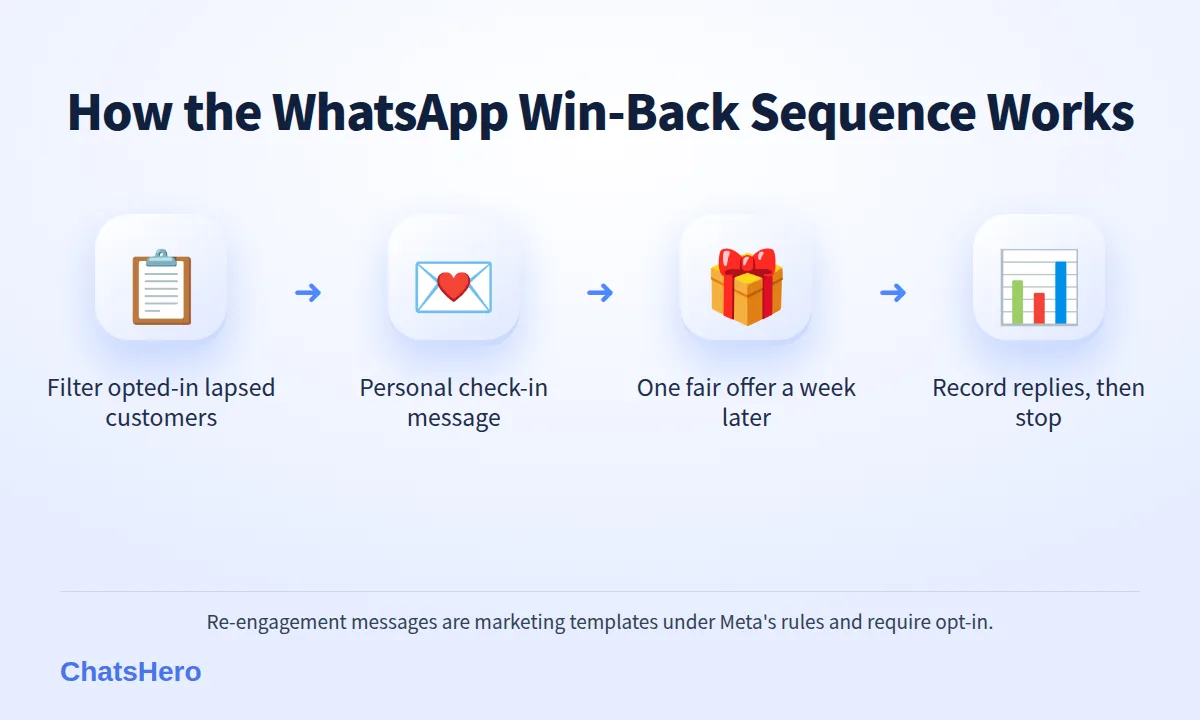
Segment → Check in → One offer → Stop
This is the WhatsApp win back customers routine we recommend. It uses the fewest messages that still feel personal, which keeps both your costs and your block rate down.
- Pull the list. Filter your Google Sheet for opted-in customers whose last visit falls in your “at risk” or “lapsed” range.
- Send a personal check-in. Use their name and something specific: the pet, the car, the last service. Offer an easy action: “Reply 1 to book, 2 for not now.”
- Let the AI handle replies. When customers answer, the chatbot answers price questions in English, Malay or Chinese, offers the slots your team has listed and records the booking — at any hour.
- Send one offer to those who stayed silent. About a week later, a single fair offer with a real end date.
- Stop and record. No reply after two messages? Mark them “no response” and leave them alone for a few months.
What the conversation looks like
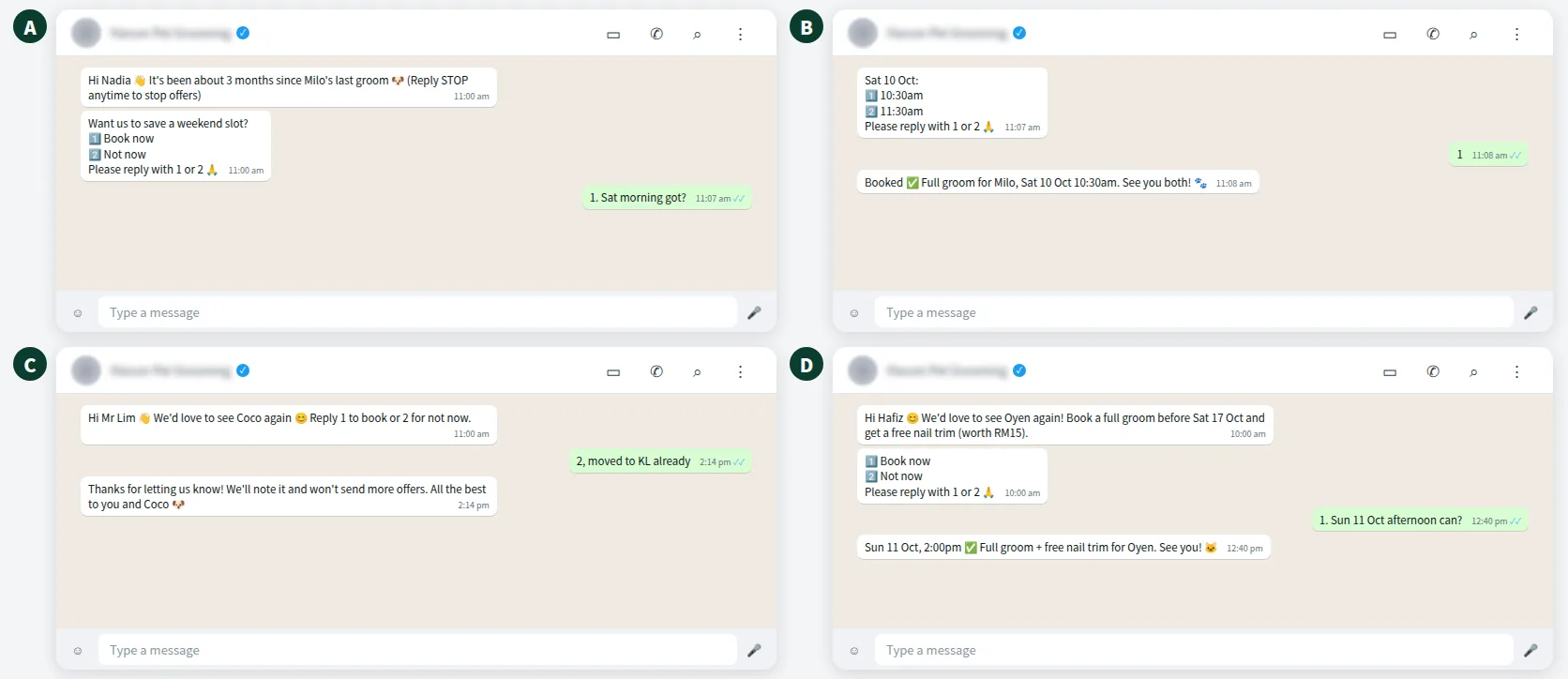
Here is an illustrative exchange for a fictional pet grooming shop in Johor Bahru, from the first check-in to a confirmed booking — and a polite “not now”.
What should a WhatsApp marketing template for win-back say?
Short, personal and easy to answer. Avoid long paragraphs, capital letters and “LAST CHANCE!!!” energy. Three templates you can adapt:
Check-in (at risk): “Hi Nadia 👋 It’s been about 3 months since Milo’s last groom at Harum Pet Grooming 🐶 Want us to save a weekend slot? Reply 1 to book or 2 for not now. Reply STOP to stop offers.”
One offer (lapsed): “Hi Nadia, we’d love to see Milo again 😊 Book any full groom before Sat 17 Oct and get a free nail trim (worth RM15). Reply 1 to book.”
Feedback (optional): “Hi Nadia, may we ask what made you stop visiting? Your answer helps us improve 🙏” — the replies often tell you more than any survey.
Write each language version properly rather than machine-translating it; Meta approves each language version of a template separately. The replies will come back in whatever mix the customer likes, which the AI can follow (here is how).
Want to see how this looks with your own business? WhatsApp us and chat with the ChatsHero AI.
How much does it cost to re-engage old customers on WhatsApp?
On the official API, each marketing template is illustrated here at RM0.35 in Malaysia; see Meta’s pricing page. These fees are billed by Meta to your own WhatsApp Business account, separate from your ChatsHero plan, and they can change. From 1 October 2026, eligible service replies above the monthly 1,000-message allowance per phone number inside the customer-service window are also charged per message, using an illustrative utility-rate assumption of RM0.06 (see this summary of the change).
Here is an example calculation — the rebooking rate is purely illustrative, so use your own numbers:
| Item | Example figure |
|---|---|
| Opted-in lapsed customers | 500 |
| Marketing templates (500 check-ins + 300 follow-up offers to non-repliers) | 800 × RM0.35 = RM280 |
| 150 eligible service replies: RM0 if the monthly allowance is unused; otherwise up to an illustrative RM9 before other exemptions. | RM0 if allowance unused |
| Customers who rebook (example: 4%) | 20 |
| Average ticket | RM90 |
| Revenue from the campaign | 20 × RM90 = RM1,800 (vs an illustrative RM280 in marketing fees when the service allowance is unused) |
The lesson is not the exact figure — it is that a small, well-chosen list with a personal message can pay for itself, while a blast to thousands of cold numbers rarely does. Compare our plans and pricing to see what is included; all plans come with unlimited messages and blasting within the platform, with Meta’s fees billed separately.
How do you track which lapsed customers came back?
If you cannot see who replied and who rebooked, you cannot improve your next WhatsApp win back customers campaign. With ChatsHero, each reply is recorded in Google Sheets against the customer: segment, message sent, reply, booking and status.
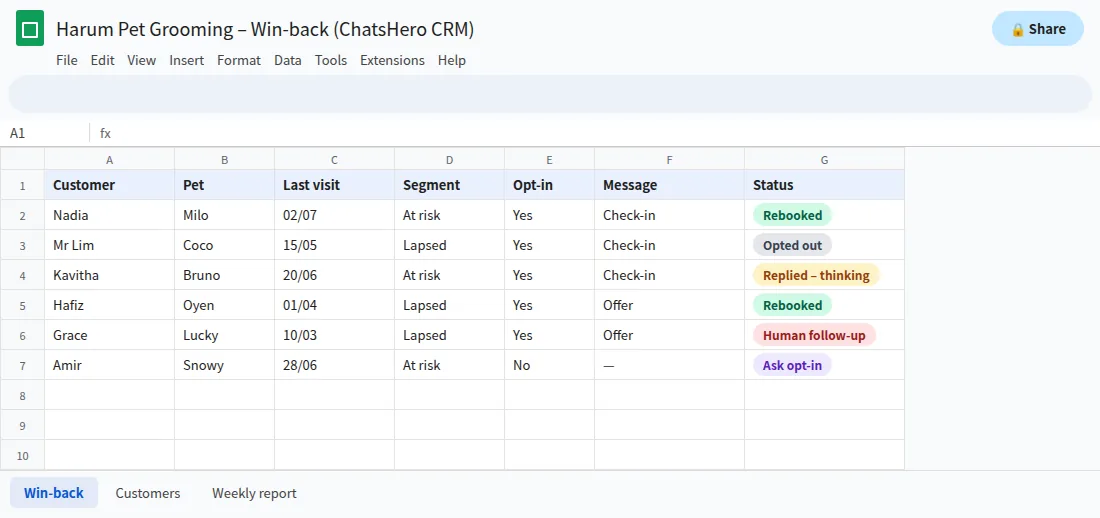
- Which segment answered?Compare reply rates for at-risk vs lapsed before the next campaign.
- Which message worked?Check-in or offer: the Message column shows which one earned the booking.
- Who said no?Your team keeps the Opt-in column current so “STOP” customers are skipped next time.
Pay special attention to replies like “the last groom was not good”. A lapsed customer who complains is giving you a second chance — a person from your team should answer that one personally.
What mistakes make a win-back campaign backfire?
- Messaging everyone at once. A blast to your entire contact list, including people who never opted in, is the fastest way to get blocked and reported.
- Too many messages. Two messages per campaign is plenty. Meta may also limit how many marketing messages one person receives, so extra sends can simply go undelivered.
- Mixing offers into reminders. A service reminder with a promo attached is charged as marketing. Keep them separate.
- Fake urgency. “Only 2 slots left!” when you have 20 damages trust. Use a genuine end date instead.
- Ignoring opt-outs. Every “STOP” should be marked in your sheet by the team and respected — it protects your number and your reputation.
Can a chatbot help with customer retention on WhatsApp all year?
Yes — and that is where the real gains are. A win-back campaign fixes customers who already drifted away. Good follow-up stops them drifting in the first place: fast replies, timely reminders and a personal thank-you after each visit.
A simple rhythm works for a groomer like Harum: a thank-you after each visit, a reminder when the next groom is due, and a win-back check-in only for those who slip past their cycle. ChatsHero handles the reminders and records each visit in Google Sheets, so the win-back list almost builds itself. If you want to see how a team like ours sets this up, start on our About page.
Frequently Asked Questions
How do I use WhatsApp to win back customers who stopped buying?
Start with opted-in customers who have not returned within their normal cycle. Send a short personal check-in with an easy reply option, follow up once with a fair offer about a week later, then stop and record the results.
Can I message old customers on WhatsApp without opt-in?
You should not. Meta treats re-engagement as marketing and requires opt-in that names your business, and Malaysia’s PDPA lets customers refuse direct marketing. Ask for opt-in at the next visit or when they next message you.
How many win-back messages should I send?
Two per campaign is usually enough: a check-in and one offer. More messages raise costs and block rates, and Meta may limit how many marketing messages each person receives.
How much does a WhatsApp win-back message cost?
A marketing template is illustrated here at RM0.35 per message in Malaysia on the official API. Meta sets and bills this on your own WhatsApp account, separate from your ChatsHero plan, and prices can change.
When is a customer considered lapsed?
When they miss their normal repeat cycle. For a service people use every six to eight weeks, 60–120 days without a visit is a good ‘at risk’ signal; for rarer purchases the gap is longer.
Can the chatbot reply to customers who answer the campaign?
Yes. ChatsHero replies 24/7 in English, Bahasa Melayu and Chinese, offers the slots your team has set, records bookings and hands complaints or special requests to your team.