A WhatsApp sales funnel in Google Sheets is one row per lead with a Stage dropdown — New, Quoted, Booked, Won, Lost — plus columns for source, value and next follow-up date. A few COUNTIF formulas then show how many leads sit in each stage and your conversion rate. It costs RM0 to build, and a chatbot can fill it automatically.
Examples show a proposed workflow, not a guarantee that every account or plan supports it. Ask our team to confirm the channel, integration, permissions and delivery method for your setup. Staff-group notifications and group assistants require separate eligibility and integration checks; a standard one-to-one WhatsApp API account should not be assumed to access every existing staff group. Use approved individual notifications or a staff dashboard if group delivery is unavailable. Test the workflow and human handover before use.
- One row per lead, one Stage column with a dropdown — that is the heart of the funnel.
- Five stages are enough for most SMEs: New, Quoted, Booked, Won, Lost.
- Add Source and RM Value columns so you can see which ads and channels actually bring sales.
- COUNTIF and SUMIF formulas turn the list into a live funnel summary.
- Protect key columns and share the sheet only with staff who need it — it holds personal data.
- A WhatsApp chatbot can write each new lead into the sheet and record bookings; your team marks Won after verifying payment.
What is a WhatsApp sales funnel, and why track it in Google Sheets?
If you can’t see where your leads are, you can’t see where your sales are leaking.
A sales funnel is simply the path from “first message” to “paid”. On WhatsApp, that path is hidden inside hundreds of chats. Some customers asked for a price and vanished. Some booked a site visit. Some paid last week. Unless someone writes it down, nobody on the team knows how many leads are stuck at each step.
Google Sheets is a good first home for that information because it’s free, your team probably already knows it, it works on a phone, and the whole team can see the same list at the same time. You don’t need an expensive CRM on day one — you need a clear, shared list with a stage for every lead. A proper WhatsApp sales funnel Google Sheets layout gives you exactly that.
In this guide we use a fictional example: Kasa Aircond Services in Shah Alam, which gets most of its installation and servicing jobs from Facebook ads that open a WhatsApp chat.
Which stages should a WhatsApp sales funnel have?
Keep the stages few and clear. If your team argues about which stage a lead belongs in, you have too many. Five stages work for most service and retail businesses:
| Stage | Meaning | Next action |
|---|---|---|
| New | Customer messaged, not yet qualified | Reply, ask area, need and budget |
| Quoted | Price or quotation sent | Follow up within 24 hours |
| Booked | Site visit, appointment or order confirmed | Remind the day before |
| Won | Paid or job completed | Ask for a review, schedule the next service |
| Lost | Said no, or no reply after follow-ups | Record the reason |
The Lost stage matters as much as Won. A short “lost reason” — too expensive, chose another shop, no reply — tells you what to fix. If the sheet shows that lost leads often had no follow-up at all, you have found your first fix.
A stage is a promise of a next action. Every lead in the sheet should have exactly one stage and one next step.
How do you build a WhatsApp sales funnel Google Sheets template step by step?
You can build the whole thing in about 30 minutes. Here is how:
- Create the columns. In row 1, type: Date, Customer, WhatsApp, Source, Need, Stage, RM Value, Next follow-up, Owner, Lost reason.
- Add a Stage dropdown. Select column F, then Insert → Dropdown, and add New, Quoted, Booked, Won and Lost. Give each a colour. Google explains the options in its guide to creating an in-cell dropdown list.
- Add a Source dropdown. Do the same for column D: Facebook ad, TikTok, Instagram, Google, Referral, Walk-in.
- Freeze the header row (View → Freeze → 1 row) so the column names stay visible on a phone.
- Create a “Summary” tab for the funnel formulas below.
- Protect the columns that only managers should edit, such as RM Value and Owner (Data → Protect sheets and ranges).
Resist the urge to add twenty columns. Every extra field is one more thing a busy salesperson will leave blank. Start small and add a column only when you know you will use it.
Which Google Sheets formulas show your funnel at a glance?
On the Summary tab, a few formulas turn your lead list into a live funnel. Assuming your data is on a tab called Leads:
- Leads in each stage:
=COUNTIF(Leads!F:F,"Quoted")— repeat for New, Booked, Won and Lost. See Google’s COUNTIF help page. - Total leads:
=COUNTA(Leads!B2:B) - Conversion rate: Won ÷ Total leads, formatted as a percentage.
- Revenue won:
=SUMIF(Leads!F:F,"Won",Leads!G:G) - Leads by source:
=COUNTIFS(Leads!D:D,"Facebook ad",Leads!F:F,"Won")shows how many paying jobs each channel produced.
Here is what that looks like with example numbers for one month at Kasa Aircond (illustrative only):
| Stage | Leads that reached this stage | % of all leads |
|---|---|---|
| New | 200 | 100% |
| Quoted | 120 | 60% |
| Booked | 60 | 30% |
| Won | 40 | 20% |
Note: COUNTIF counts the leads currently in each stage. To get “reached this stage” figures like the table above, add the later stages together (for example, Booked reached = Booked + Won), or add a Yes/No column such as “Quoted?” that stays ticked when the lead moves on.
The biggest drop in this example is between Quoted and Booked — so the first fix is a better follow-up after the quotation, not more ads.
How does a chatbot fill the Google Sheet automatically?
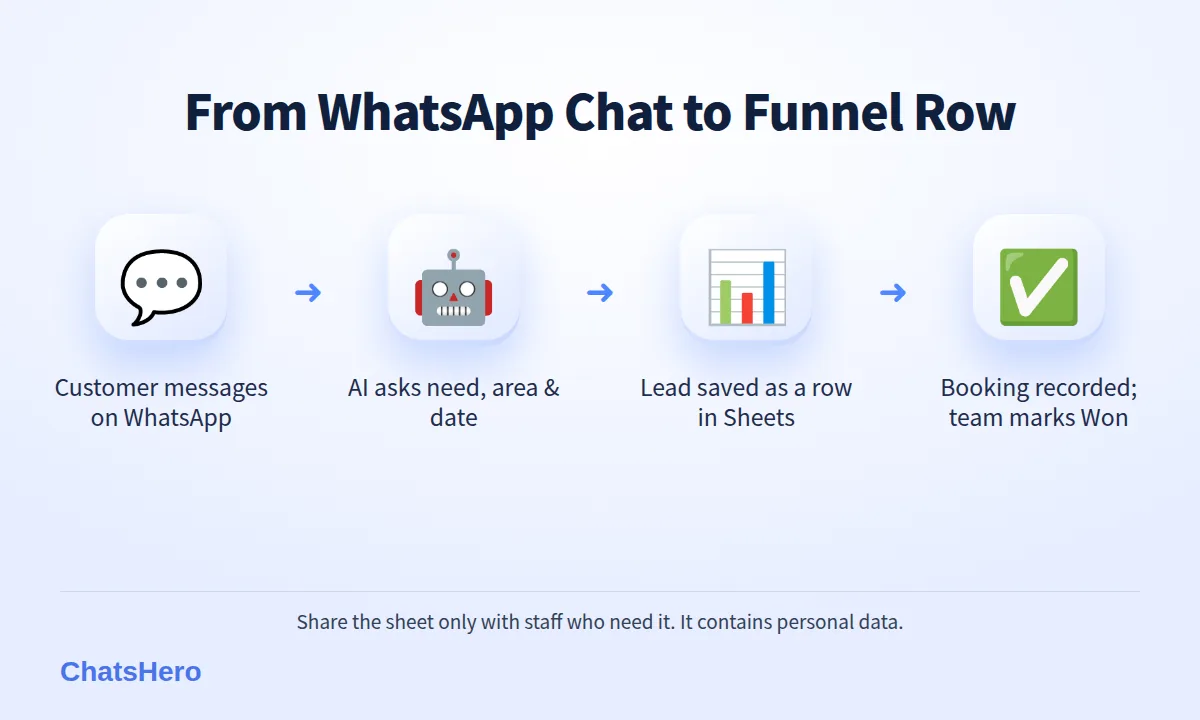
A manual sheet only works if staff update it — and after a busy Saturday, they won’t. This is where ChatsHero’s Record feature helps. When a customer messages your WhatsApp, the AI replies instantly, asks the qualifying questions you set (area, unit type, preferred date), and writes the answers into your Google Sheet as a new row. When the customer books a slot, the booking is recorded in the sheet. Payment is different: your team marks the lead Won after verifying the payment.
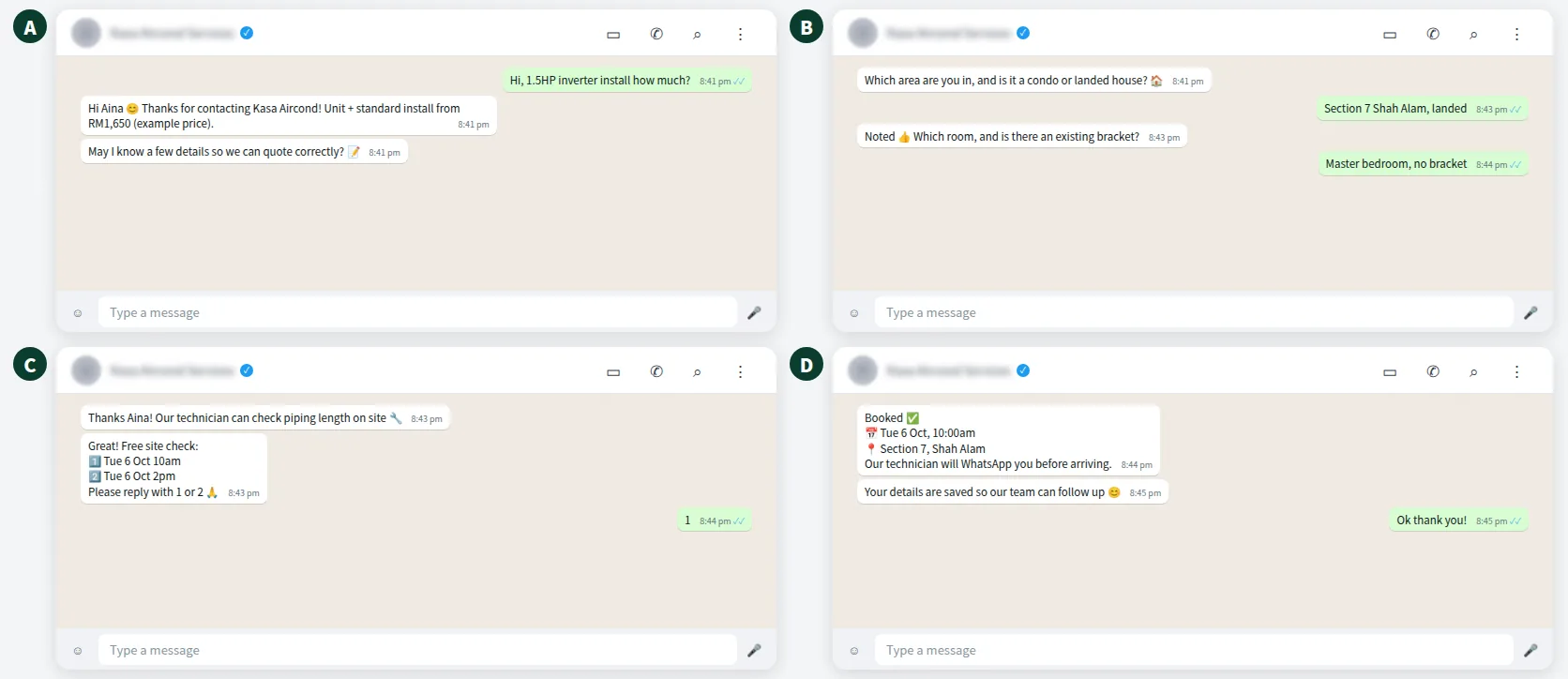
The result is a funnel that updates itself from real conversations:
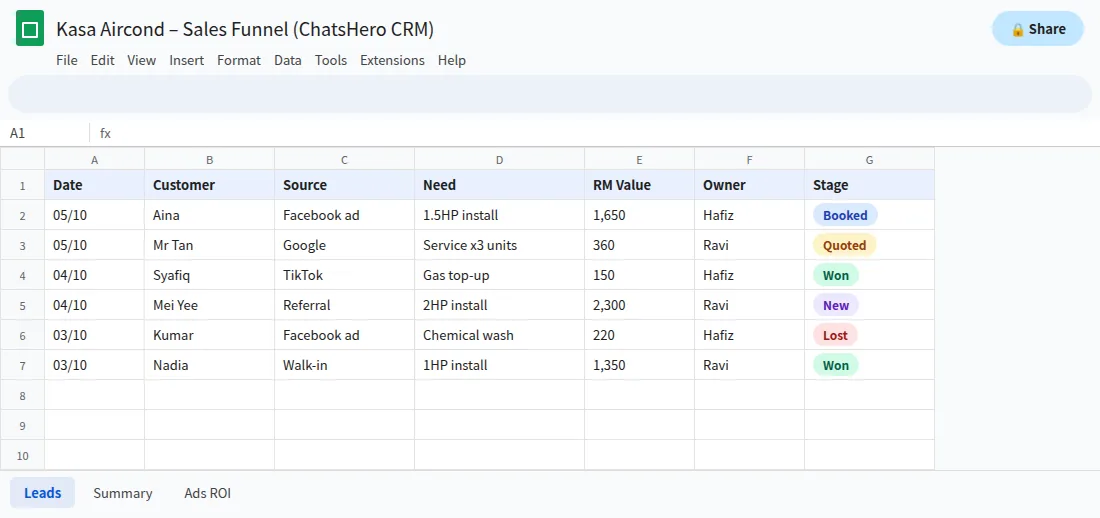
- RecordEach new WhatsApp lead becomes a row with source and need.
- AssignLeads can be auto-assigned to a salesperson or technician.
- ReportA daily summary of new, booked and won leads goes to your WhatsApp group.
Because the questions are asked in the customer’s own language (English, Bahasa Melayu or Chinese), fewer rows end up with a blank area or unit type — a point we cover in our note on mixed-language chats.
Want to see how this looks with your own business? WhatsApp us and chat with the ChatsHero AI.
How can you see which ads bring real sales?
It is tempting to judge ads by clicks or messages. The Source column lets you measure them by paid jobs. At the end of the month, compare what you spent on each channel with the revenue won from it.
For example (illustrative numbers): if Kasa Aircond spent RM1,500 on Facebook ads that produced 30 WhatsApp leads and 8 won jobs worth RM9,600 in total, the cost per won job is RM187.50. If TikTok produced more leads but fewer won jobs, the “cheaper” channel may actually be more expensive. Without a funnel sheet, you only see the lead count — and you optimise the wrong thing.
To fill the Source column, the chatbot can ask “How did you hear about us?” and record the answer, or your team can pick the source from the dropdown. Once the column is reliable, the Ads ROI tab shows which channel really pays for itself. You can compare plans on our pricing page.
How do you keep customer data in the sheet safe?
Your funnel sheet holds names and phone numbers, which is personal data under Malaysia’s Personal Data Protection Act 2010 (amended in 2024). A few habits keep it under control:
- Share the sheet with named staff accounts only — never with “anyone with the link”.
- Use protected ranges so only managers can change values and owners. Google notes that protection prevents accidental edits but is not a security feature on its own.
- Remove access when a staff member leaves.
- Collect only what you need to serve the customer — no IC numbers in a sales sheet.
- Honour requests to stop marketing and mark them clearly in the sheet.
When should you move from Google Sheets to a full CRM?
Google Sheets is enough for many SMEs for a long time, especially when a chatbot keeps it updated. Consider a dedicated CRM when you have several sales teams with different approval flows, need detailed permissions per record, or your sheet grows to tens of thousands of rows and becomes slow. Until then, a clean WhatsApp sales funnel Google Sheets setup gives you most of the benefit at a fraction of the cost — and your team already knows how to use it.
A good test: if your weekly sales meeting can be run from the Summary tab alone, the sheet is doing its job. When it can’t, that is the signal to look at a CRM. ChatsHero itself started from the same Sheets-first idea, and more setups like this one are collected on our blog.
Frequently Asked Questions
How do I set up a WhatsApp sales funnel in Google Sheets?
Create one row per lead with columns for date, customer, source, need, stage, RM value, next follow-up and owner. Add a Stage dropdown (New, Quoted, Booked, Won, Lost) and a Summary tab with COUNTIF formulas to count leads in each stage.
Which funnel stages should a small business use?
Five stages suit most SMEs: New, Quoted, Booked, Won and Lost. Fewer stages mean less confusion and more consistent updates from your team.
How do I calculate conversion rate in Google Sheets?
Count Won leads with COUNTIF, count all leads with COUNTA, then divide Won by total and format the cell as a percentage.
Can WhatsApp leads go into Google Sheets automatically?
Yes. ChatsHero replies to WhatsApp enquiries, asks your qualifying questions and writes each lead into your Google Sheet, updating the stage when the customer books; your team marks it Won after verifying payment.
Is it safe to keep customer phone numbers in Google Sheets?
It can be, if you share the sheet only with named staff, protect key ranges, remove access when people leave and collect only the data you need, in line with Malaysia’s PDPA.
Is Google Sheets good enough as a CRM?
For many SMEs, yes — especially when a chatbot keeps it updated. A dedicated CRM becomes useful when you need complex permissions, several sales teams or very large data volumes.