A WhatsApp restock alert works when it is requested, specific and sent once: the customer asks to be told when a product and size is back, you save that request, and when stock arrives you message only those customers with a clear way to order. On the official API, expect each alert to be charged as a marketing message, illustratively RM0.35 in Malaysia.
RM0.35 and RM0.06 in this article and its supplied illustrations are planning assumptions, not verified current Meta quotations. Gupshup's October announcement describes 1,000 free service replies per business phone number per month, then eligible service charges from 1 October 2026. Utility templates do not use that allowance. Inbound messages and qualifying 72-hour free entry point messages remain exempt. Confirm the recipient market, applicable rate card, free allowance and provider fees before budgeting. Figures below exclude tax and any unlisted costs.
- Only send restock alerts to customers who asked for that product, and ideally that size or colour.
- Capture the request when the customer hits “out of stock”, with a clear yes to being notified.
- Send one alert per request, then remove the customer from that waitlist. Expire old requests after a set time.
- Be honest about quantity and give a fair way to reserve, such as first to reply or a short hold window.
- Budget each alert as a marketing message, an assumed RM0.35 in Meta fees, and keep waitlists targeted.
- Record every request in Google Sheets so the team knows exactly who to message when stock lands.
Why does a WhatsApp restock alert work so well?
A restock alert is the rare marketing message that the customer asked you to send.
When someone messages “size 42 still have?” and you reply “sold out”, the conversation usually ends there. The customer goes elsewhere, and you have no way to reach them when your next shipment arrives. A WhatsApp restock alert changes that. You keep the request, and when stock lands you go back to a person who already wanted to buy.
Compare that with a general promotion broadcast. The broadcast goes to everyone and is relevant to a few. The restock alert goes to a few, and it is relevant to all of them. That makes it far more likely to earn a reply than a block.
It also suits customers who would rather ask on WhatsApp than refresh a website every morning, especially for sizes, colours and limited batches.
What makes a back in stock notification customers actually want?
The difference between a welcome alert and spam comes down to a few details:
- Requested. The customer said yes to being notified. No request, no alert.
- Specific. “Runner Pro, size 42, black” beats “New stock is in!”.
- Sent once. One alert per request. After that, the customer is off that waitlist unless they ask again.
- Timely. Send it when stock is truly available to order, not when the container is still at port.
- Honest about quantity. If there are only 6 pairs, say 6 pairs. Never invent scarcity.
- Easy to act on. A numbered reply to reserve or order, not a long link hunt.
Would the customer be glad to get this message? If they asked for this exact product and it is really available, yes. If not, it belongs in a normal broadcast to people who opted in to promotions, or not at all.
How do you set up a WhatsApp waitlist for restock alerts?
Here is the setup we use for retail sellers. Our fictional example is Kicks Borneo, a sneaker shop in Kuching that sells in store and on WhatsApp, where popular sizes sell out within days.
- Train the AI on your stock rules. Tell it which items are sold out, which sizes are coming back and roughly when, using Build mode. Update it when stock changes.
- Offer the waitlist at the “sold out” moment. “Size 42 is sold out now. Want a WhatsApp message when it’s back? 1️⃣ Yes please 2️⃣ No thanks.”
- Record the request. The AI saves the customer’s name, number, product, size, colour and request date in Google Sheets.
- Filter when stock arrives. Your team filters the waitlist tab by product and size to get exactly the right customers.
- Your team messages the waitlist once. From ChatsHero, your team sends the restock alert to those customers only, with the quantity and a way to reserve.
- Handle replies and close the loop. The AI takes reservations and passes payment and special requests to your team. Your team marks everyone as “Notified” so nobody gets a second alert.
- Expire old requests. Remove requests older than, for example, 60 days, or ask once whether they still want it.
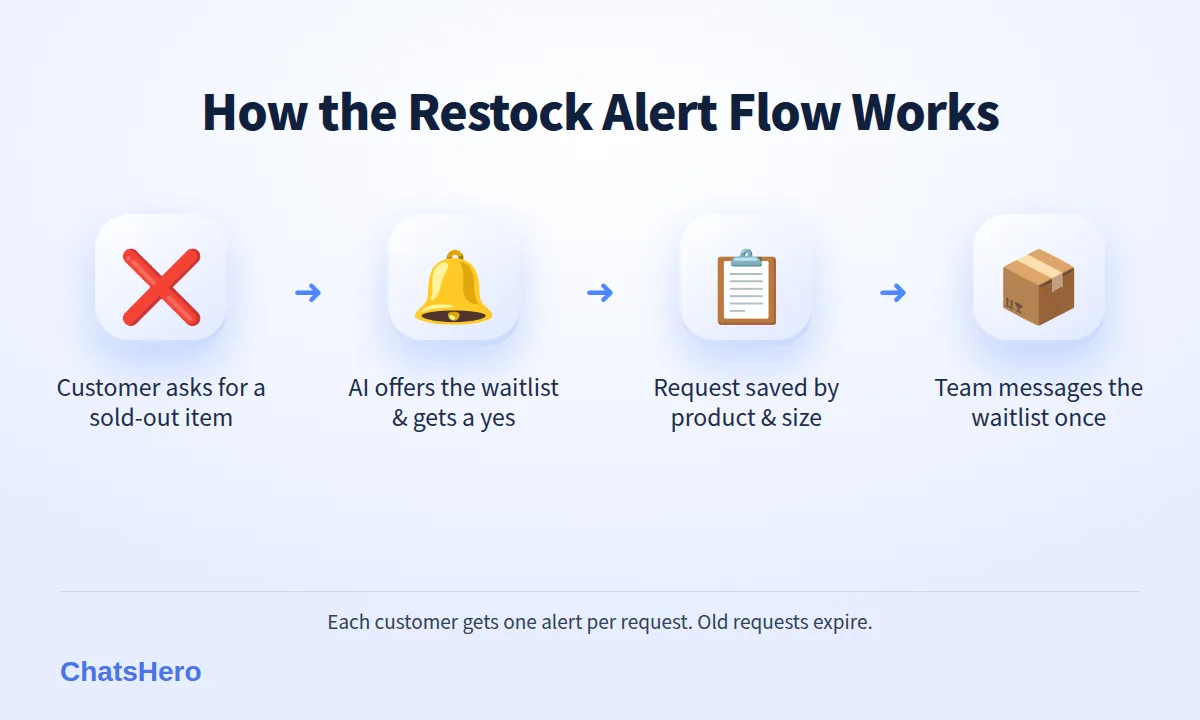
This keeps the list tidy and the messages relevant. It also means your team never has to remember who asked for what three weeks ago.
What does a WhatsApp restock alert conversation look like?
Here is an illustrative conversation for Kicks Borneo, from the sold-out enquiry to the reservation. Adrian asks “size 42 ada lagi?”, and the AI answers the stock question and offers the waitlist in one go (why Malay-English questions are no problem).
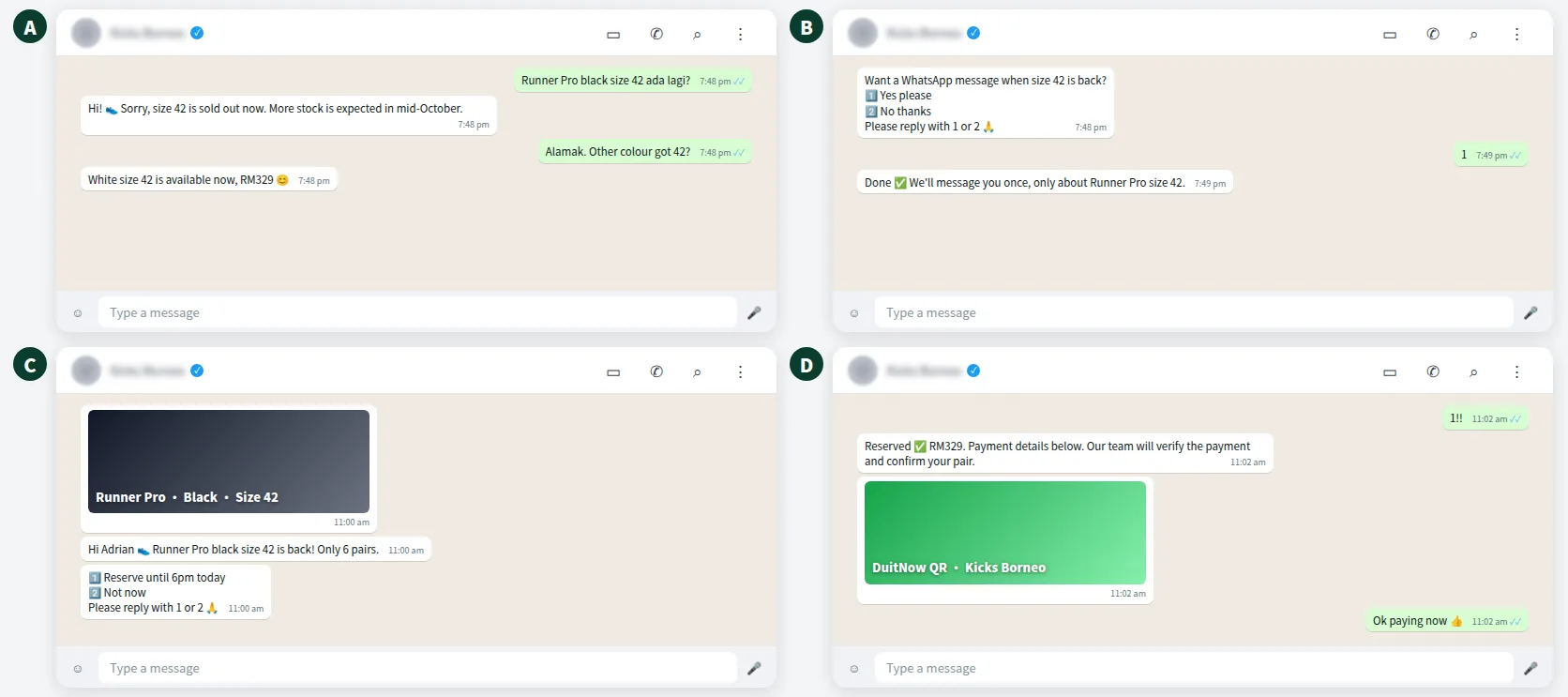
Two details make it fair. The alert states the real quantity and a clear hold time, so nobody feels tricked. And the AI hands payment to the team: it sends the payment details, and our team will verify the payment before the pair is marked as sold.
Want to see how this looks with your own business? WhatsApp us and chat with the ChatsHero AI.
Is a restock alert a marketing or utility message on WhatsApp?
On the official WhatsApp Business API, Meta puts each message template into a category, and the category sets the price. Meta’s template guidelines say utility templates must be non-promotional and tied to something the user requested or that is essential to them, such as an order update. Templates that mix utility content with promotion are categorised as marketing.
A restock alert invites the customer to buy a product, even though they asked for it. So the safe assumption is that Meta will treat it as marketing. Meta makes the final call when it reviews your template, and it can recategorise templates later, so plan your budget on marketing rates.
Budget rule: treat every restock alert as a marketing message.
How much does a WhatsApp restock alert cost?
In Malaysia, a marketing message on the official API is illustrated here at RM0.35 in Meta fees, billed to your own WhatsApp account and separate from your ChatsHero plan (see Meta’s pricing page). From 1 October 2026, eligible service replies above the monthly 1,000-message allowance per phone number inside the customer-service window are also charged, using an illustrative utility-rate assumption (≈ RM0.06), according to this summary of the change.
| Approach | Messages | Approx. Meta fees (at ≈ RM0.35) | Relevance |
|---|---|---|---|
| Waitlist alert: size 42 only | 40 | 40 × RM0.35 = RM14 | Very high: all asked for it |
| Waitlist alert: all sizes of one model | 150 | 150 × RM0.35 = RM52.50 | High |
| “New stock!” broadcast to whole list | 3,000 | 3,000 × RM0.35 = RM1,050 | Low for most people |
| Instagram post only | 0 | RM0 | Easy to miss |
These are examples, not quotes, and Meta can change its rates. The pattern is clear, though: targeted waitlists cost little and reach the people most likely to buy.
How do you track every out of stock enquiry?
Every out of stock enquiry is a lead. With ChatsHero, each waitlist request is recorded in Google Sheets automatically, with the product, size, colour and date. When stock lands, the team filters the sheet and knows exactly who to message.
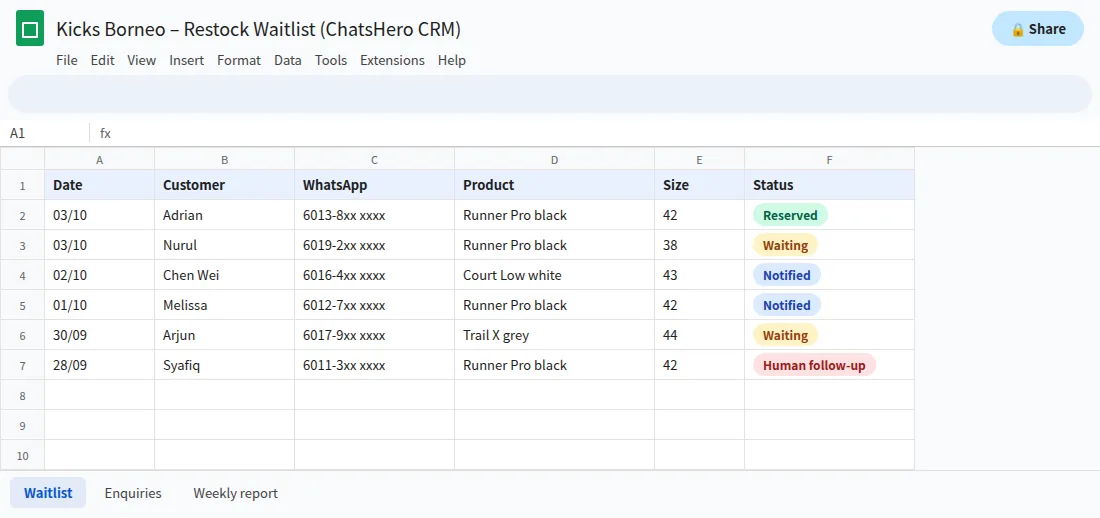
- WaitingAsked to be told; filter these rows when stock lands.
- NotifiedYour team marks rows after sending, so nobody gets a second alert.
- ReservedHeld until the stated time; released to the next person if unpaid.
The sheet is useful beyond alerts. If 40 people asked for size 42 and only 5 for size 38, it tells you what to reorder.
How do you keep restock alerts fair and compliant?
Limited stock can create frustration if the rules are unclear. Keep it fair:
- State the real quantity. Invented scarcity like “last 2 pairs!” when you have 30 is misleading and damages trust.
- Use a clear, equal rule. First to reply, or a short hold window such as until 6pm the same day.
- Release unpaid holds. Tell customers when a hold expires, then offer the pair to the next person.
- Respect consent. Under Malaysia’s PDPA, only use the number for what the customer agreed to, and stop when they ask.
- Protect your number. Use the official WhatsApp Business API and message only people who opted in. That keeps the risk of restrictions low and your quality rating healthy.
Write your hold rule down once — for Kicks Borneo it is “first to reply, held until 6pm” — and use the same wording in every alert. A rule that never changes is much easier to explain when the six pairs run out. Sending to the waitlist is included in every ChatsHero plan, with Meta’s fees billed separately.
Frequently Asked Questions
How do I send a WhatsApp restock alert without spamming customers?
Only message customers who asked to be notified about that product, send one alert per request, state the real quantity and give a clear way to reserve. Then remove them from that waitlist.
Is a back in stock notification a marketing message on WhatsApp?
Usually, yes. It invites the customer to buy, so plan for Meta to categorise it as marketing, illustratively RM0.35 per message in Malaysia. Meta decides the category when it reviews your template.
How do customers join a WhatsApp waitlist?
When they ask about a sold-out item, the AI offers to notify them and asks for a clear yes, for example by replying 1. The request is saved with the product, size and date.
How long should I keep restock requests?
Set a limit, for example 60 days. After that, remove the request or ask once whether the customer still wants to be notified.
Can the AI take reservations when stock comes back?
Yes. The AI can take reservations by numbered reply and send your payment details. Payment is not detected automatically; your team verifies it before the item is marked as sold.
Will restock broadcasts get my WhatsApp number banned?
No tool can promise that, but the official API, opted-in waitlists and relevant, one-time alerts keep the risk low and protect your quality rating.