WhatsApp recruitment screening lets an AI assistant handle the first round of hiring: it explains the role, asks a few job-related questions, collects the resume and books an interview slot, then records everything in Google Sheets. Your HR team reviews the shortlist and makes every decision. For outlets hiring many frontline staff, it can turn hundreds of "Still hiring?" messages into an organised interview list.
RM0.35 and RM0.06 in this article and its supplied illustrations are planning assumptions, not verified current Meta quotations. Gupshup's October announcement describes 1,000 free service replies per business phone number per month, then eligible service charges from 1 October 2026. Utility templates do not use that allowance. Inbound messages and qualifying 72-hour free entry point messages remain exempt. Confirm the recipient market, applicable rate card, free allowance and provider fees before budgeting. Figures below exclude tax and any unlisted costs.
Examples show a proposed workflow, not a guarantee that every account or plan supports it. Ask our team to confirm the channel, integration, permissions and delivery method for your setup. Staff-group notifications and group assistants require separate eligibility and integration checks; a standard one-to-one WhatsApp API account should not be assumed to access every existing staff group. Use approved individual notifications or a staff dashboard if group delivery is unavailable. Test the workflow and human handover before use.
- Use WhatsApp screening for the repetitive first round; keep hiring decisions with your HR team.
- Ask only job-related questions: availability, shifts, location, relevant experience and must-have licences.
- Never screen on race, religion, gender, marital status, pregnancy or similar personal traits.
- Tell applicants at the start what data you collect, why, who sees it and how long you keep it (PDPA).
- Answers, resumes and interview slots are recorded in Google Sheets so HR works from one list.
- Send every applicant a clear, polite outcome, including those who are not shortlisted.
Why use WhatsApp recruitment screening for frontline hiring?
For frontline roles, the application often starts as a WhatsApp message.
Retail outlets, cafés, clinics, logistics hubs and factories in Malaysia often hire many staff at once — cashiers, kitchen crew, packers, drivers. The job ad goes up on Facebook or a hiring poster, and the WhatsApp number fills with "Still hiring?", "Salary how much?" and "Can apply part-time?". Replying to each one by hand takes hours, and good applicants move on to the next employer while they wait.
WhatsApp recruitment screening handles that first round. An AI assistant explains the role and outlets, asks a short set of job-related questions, collects the resume and offers interview slots. Your HR team opens a Google Sheet the next morning and sees a list of applicants with answers, resumes and booked interviews, instead of 200 unread chats.
The AI organises; people decide. Screening questions sort information, but hiring decisions stay with your HR team and hiring managers.
How does WhatsApp recruitment screening work step by step?
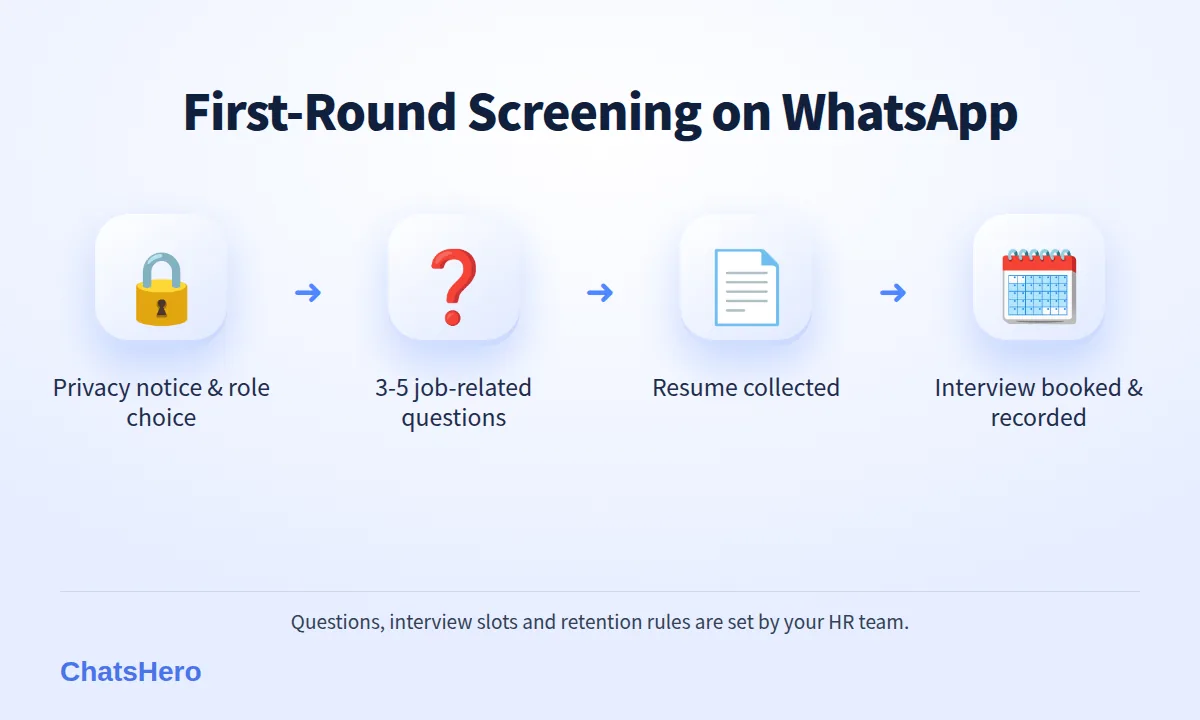
With ChatsHero, you train the assistant by pasting the job description, outlets, shift patterns, salary range you choose to publish and your interview slots. The AI builds the flow; no prompt writing. A typical flow to screen job applicants:
- Greet and give a short privacy notice: what you collect, why, who sees it and how long you keep it.
- Confirm the role and outlet with numbered options.
- Ask 3–5 job-related questions: shifts, start date, commute to the outlet, relevant experience, any licence the job requires.
- Collect the resume as a PDF or photo, or a short summary for applicants without one.
- Offer interview slots your team has set, and confirm date, time, address and what to bring.
- Record everything in Google Sheets and alert HR in its WhatsApp group when a candidate needs attention.
Applicants can answer in English, Bahasa Melayu or Chinese, and switch mid-chat. That matters for frontline roles, where applicants often write the way they speak — see how the AI handles Bahasa Rojak.
Which screening questions are fair to ask job applicants?
Fair screening asks about the job, not the person's background. A simple test: would the answer change whether this person can do this job? If not, do not ask it.
| Ask (job-related) | Avoid (personal traits) |
|---|---|
| Which shifts can you work, including weekends? | Race, ethnicity or religion |
| How will you travel to the outlet? | Marital status or plans to have children |
| Do you have retail or F&B experience? | Pregnancy or health conditions |
| When can you start? | Gender, unless the role legally requires it |
| Do you hold the licence the role needs (e.g. a driving licence for a driver)? | Photos of the applicant's face for screening |
Two more rules keep an automated flow fair:
- No automatic rejection on soft answers. If someone has no experience, the AI records it; HR decides whether it matters.
- A way to reach a person. Applicants who need adjustments or have questions the AI cannot answer should be handed to HR.
Malaysian law is moving in this direction too. Since the Employment (Amendment) Act 2022 came into force on 1 January 2023, section 69F lets the Director General of Labour inquire into and decide disputes between an employee and employer relating to discrimination in employment. It speaks of employees rather than applicants, but a fair, job-related screening process is simply good hiring.
What does a WhatsApp screening conversation look like?
Here is an illustrative conversation for a fictional minimart chain, Mesra Mart in Kuantan, hiring cashiers for two outlets. The applicant messages at night after seeing a Facebook post; by the end, an interview is booked.
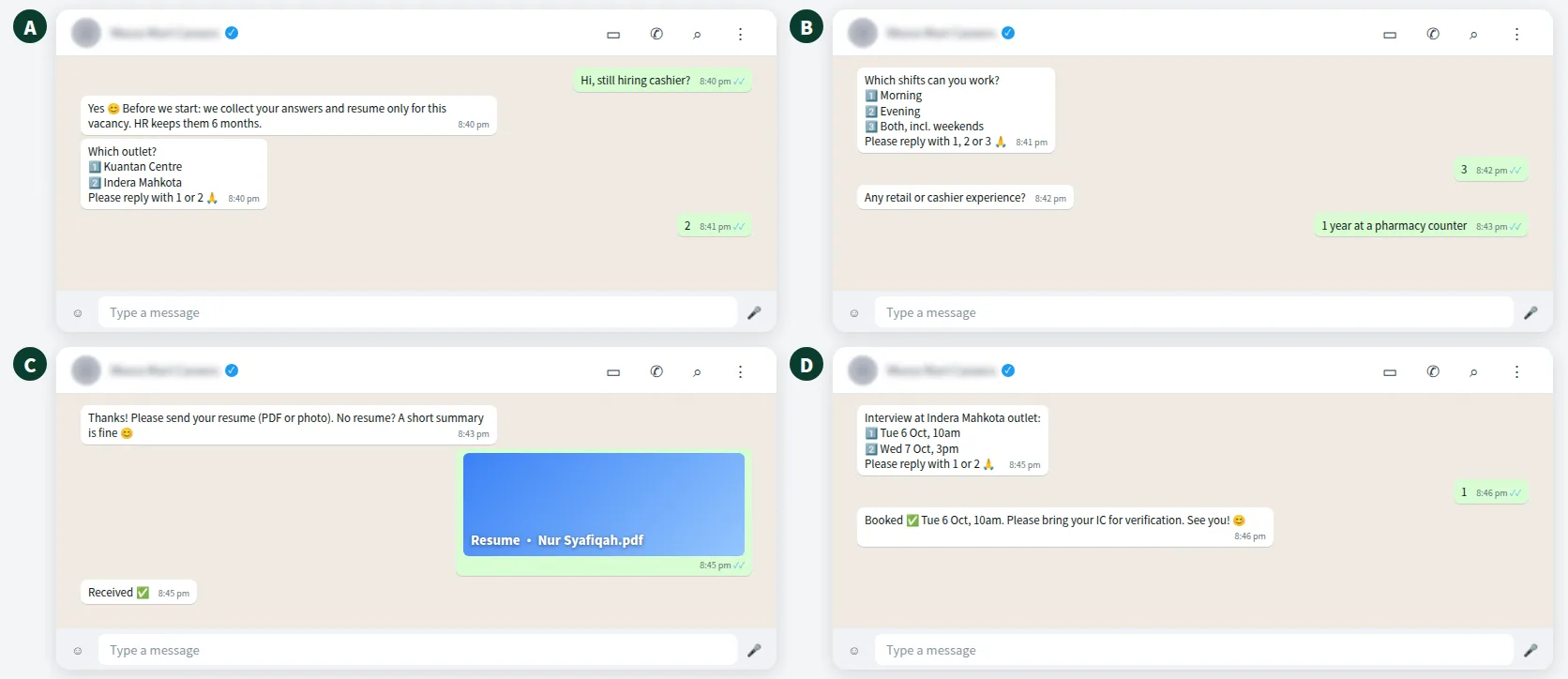
Note the order: the privacy notice comes first, before any personal data is collected. The questions are short and job-related, and the interview confirmation tells the applicant exactly where to go and what to bring.
A good screening chat takes about three minutes for the applicant and saves your HR team a phone call.
How do resumes and interview bookings get recorded in Google Sheets?
Every applicant's answers, resume and interview slot are recorded in Google Sheets. Interview bookings are added to Google Calendar, and your team keeps the calendar up to date — for example, blocking slots when the outlet manager is on leave.
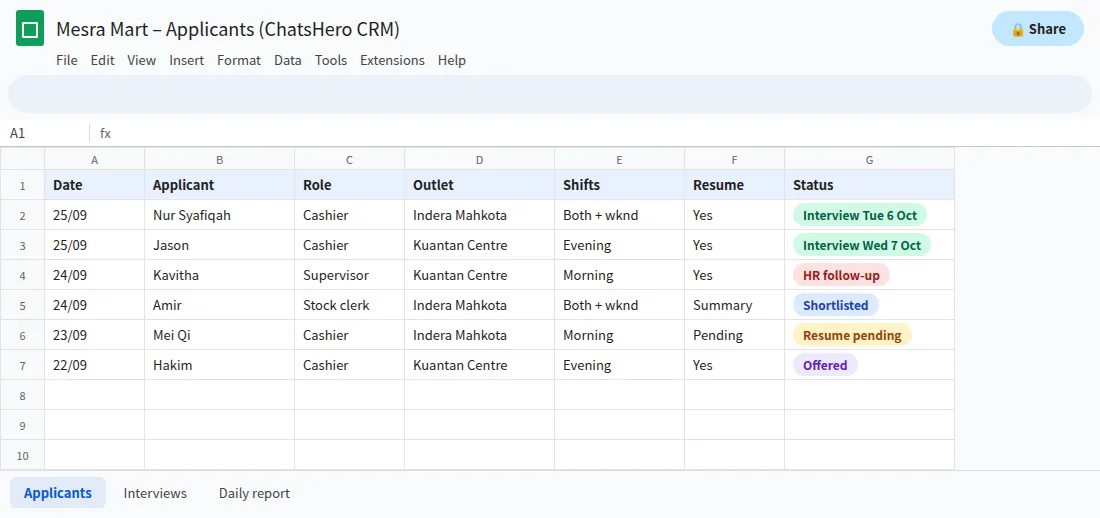
- One shortlistHR filters by outlet, shift availability or start date instead of scrolling chats.
- Interview day viewThe outlet manager sees who is coming, when, and for which role.
- Clear statusHR updates each row: shortlisted, interviewed, offered or not selected.
Interview reminders sent as WhatsApp templates are usually utility messages, at an assumed RM0.06 each in Malaysia. As an example, 40 reminders × RM0.06 = RM2.40 in Meta fees, billed to your own WhatsApp account and separate from your ChatsHero plan; rates are set by Meta and can change (see Meta's pricing page).
How do you protect applicant data under the PDPA?
Resumes contain names, phone numbers, addresses, education and work history — all personal data under Malaysia's Personal Data Protection Act 2010. Treat recruitment data with the same care as customer data:
- Give notice first. A short message before the questions: what you collect, the purpose (this vacancy), who sees it and how long you keep it.
- Collect only what the screening needs. Leave IC copies, bank details and health information for the offer stage, handled by HR in person or through your HR system.
- Limit access. Share the applicant sheet only with HR and the relevant hiring managers.
- Set a retention rule. For example, delete unsuccessful applicants' records after six months unless they agree to be kept for future openings. The period is your policy decision.
- Plan for mistakes. Under the amended PDPA, guidelines in force since 1 June 2025 require notifying the Commissioner within 72 hours of a qualifying personal data breach, as summarised by DLA Piper.
Also avoid adding applicants to marketing broadcasts. They contacted you about a job, not your promotions.
What should the AI hand over to your HR team?
Set clear handover rules so the assistant never makes promises it should not:
- Salary negotiation beyond the range you published.
- Offers and rejections. The AI can send the outcome message HR approves, but it does not decide it.
- Special requests such as disability-related adjustments, unusual shift needs or questions about benefits.
- Senior or specialist roles, where a conversation with a hiring manager is better than a form.
When any of these come up, your team gets a "Human Agent Needed" alert in its WhatsApp group, and the row in Google Sheets is marked for HR follow-up. A daily report to the same group can summarise new applicants and tomorrow's interviews.
Want to see how this looks with your own business? WhatsApp us and chat with the ChatsHero AI.
Is WhatsApp recruitment screening worth it for an SME?
If you hire a handful of people a year, a well-organised manual process is enough. If you run several outlets, have high turnover in frontline roles, or post job ads that bring in dozens of messages a day, WhatsApp recruitment screening saves real HR time and gives applicants a faster, clearer experience.
It also fits alongside other company-wide uses on the same platform, such as the receipt scanner and AI in staff WhatsApp groups. You can compare plans on the ChatsHero pricing page, or learn about the team behind ChatsHero.
Frequently Asked Questions
What is WhatsApp recruitment screening?
It is an AI assistant on your WhatsApp Business number that handles the first round of hiring: it explains the role, asks job-related questions, collects resumes and books interviews, then records everything in Google Sheets for HR to review.
Does the AI decide who gets hired?
No. The AI collects and organises information. Your HR team and hiring managers review the shortlist, interview candidates and make every decision.
What questions should I avoid when I screen job applicants?
Avoid questions about race, religion, gender, marital status, pregnancy, health or other personal traits unrelated to the job. Ask about availability, shifts, location, experience and any licence the role genuinely requires.
Is it PDPA-compliant to collect resumes on WhatsApp?
It can be, if you give applicants a notice before collecting data, collect only what the screening needs, limit access to HR, set a retention period and protect the data. Leave IC copies, bank and health details for the offer stage.
Can applicants book their own interview slot?
Yes. The AI offers the interview slots your team has set, confirms the date, time and address, and the booking is added to Google Calendar. Your team keeps the calendar up to date.
How much do interview reminders cost on WhatsApp?
Reminder templates are usually utility messages at an assumed RM0.06 each in Malaysia, set by Meta and billed to your own WhatsApp account, separate from your ChatsHero plan. Rates can change.