A WhatsApp quotation gets accepted when it arrives fast, is easy to read on a phone and makes the next step obvious. Reply within the hour, show two or three clear options with the total in RM, state what is included and how long the price is valid, then follow up once or twice. Speed matters: HBR found leads contacted within an hour were nearly seven times likelier to qualify.
RM0.35 and RM0.06 in this article and its supplied illustrations are planning assumptions, not verified current Meta quotations. Gupshup's October announcement describes 1,000 free service replies per business phone number per month, then eligible service charges from 1 October 2026. Utility templates do not use that allowance. Inbound messages and qualifying 72-hour free entry point messages remain exempt. Confirm the recipient market, applicable rate card, free allowance and provider fees before budgeting. Figures below exclude tax and any unlisted costs.
Examples show a proposed workflow, not a guarantee that every account or plan supports it. Ask our team to confirm the channel, integration, permissions and delivery method for your setup. Staff-group notifications and group assistants require separate eligibility and integration checks; a standard one-to-one WhatsApp API account should not be assumed to access every existing staff group. Use approved individual notifications or a staff dashboard if group delivery is unavailable. Test the workflow and human handover before use.
- Speed wins: a quote sent within minutes competes with fewer rivals than one sent the next day.
- Write the quotation for a phone screen — short lines, total in RM, what is included and what is not.
- Offer two or three options (for example Basic, Standard, Premium) so the customer chooses which, not whether.
- Always add a validity date and one clear next step: “Reply 1 to confirm”.
- Follow up on Day 2 and Day 5, then stop; record every quote and its status in Google Sheets.
- A neutral quote reminder and a discount push are charged differently by Meta — keep them separate.
Why do customers ignore a WhatsApp quotation?
A quote is often lost not on price, but on speed, clarity and silence.
In Malaysia, customers ask for prices on WhatsApp because it is quick. A customer may message several businesses at once — three aircon installers, two printing shops, a few caterers. The first clear answer can easily become the benchmark the others are compared against.
From what business owners tell us, quotes go unanswered for a few simple reasons:
- It arrived too late. The customer asked at 9pm, the reply came the next afternoon, and they had already booked someone else.
- It was hard to read. A blurry photo of a handwritten quote, or a long PDF that needs zooming, is easy to put off.
- The total was unclear. “RM240 per unit, piping extra, transport depends” leaves the customer guessing what they will actually pay.
- There was no next step. Without “Reply 1 to confirm”, the customer has to think of what to say — so they say nothing.
- Nobody followed up. The customer meant to reply, got busy, and the chat sank under 40 new messages.
Every one of these can be fixed inside WhatsApp itself, without asking the customer to download an app or log into a portal.
How fast should you reply to a quote request on WhatsApp?
As fast as you possibly can — ideally within minutes, and certainly within the hour. A study of US companies published in Harvard Business Review found that firms which contacted an online lead within an hour were nearly seven times as likely to qualify it as those which waited even one hour longer. Only 37% of the companies studied responded within an hour.
For many SMEs the problem is timing. Quote requests arrive at night, on Sundays and while the boss is on site. That is where an AI auto-reply helps: it can answer 24/7 in English, Bahasa Melayu and Chinese, ask the questions needed to price the job, and send a standard WhatsApp quotation for common items straight away.
The first clear price often becomes the benchmark. Being first does not mean being cheapest — it means your number is the one the others are compared against.
For custom jobs that need a site visit, the AI does not have to invent a price. It can collect the details (location, photos, sizes, preferred date), give an indicative range if you allow it, and alert your team in a WhatsApp group that a quote is waiting.
What should a WhatsApp quotation include?
A good WhatsApp quotation is short enough to read without zooming, but complete enough that the customer does not need to ask a follow-up question. Use this checklist:
- Clear total in RMShow the final price, not just unit prices. Say whether SST or transport is included.
- What is (and is not) includedMaterials, labour, delivery, warranty — and any common extras.
- Validity and next step“Valid until Mon 12 Oct. Reply 1 to confirm.”
Also include the customer’s name, a quote reference number, the date you can start or deliver, and your payment terms (for example, 30% deposit, balance on completion). If a formal document is needed — for a company purchase order, for instance — send a short summary in the chat and attach the PDF. The summary is what gets read; the PDF is what gets filed.
Keep the language simple and match the customer’s: if they asked “berapa for 2 unit?”, a quote that answers in the same mix reads more naturally than a formal letter (see how AI handles mixed-language chats).
How do you send a quotation on WhatsApp step by step?
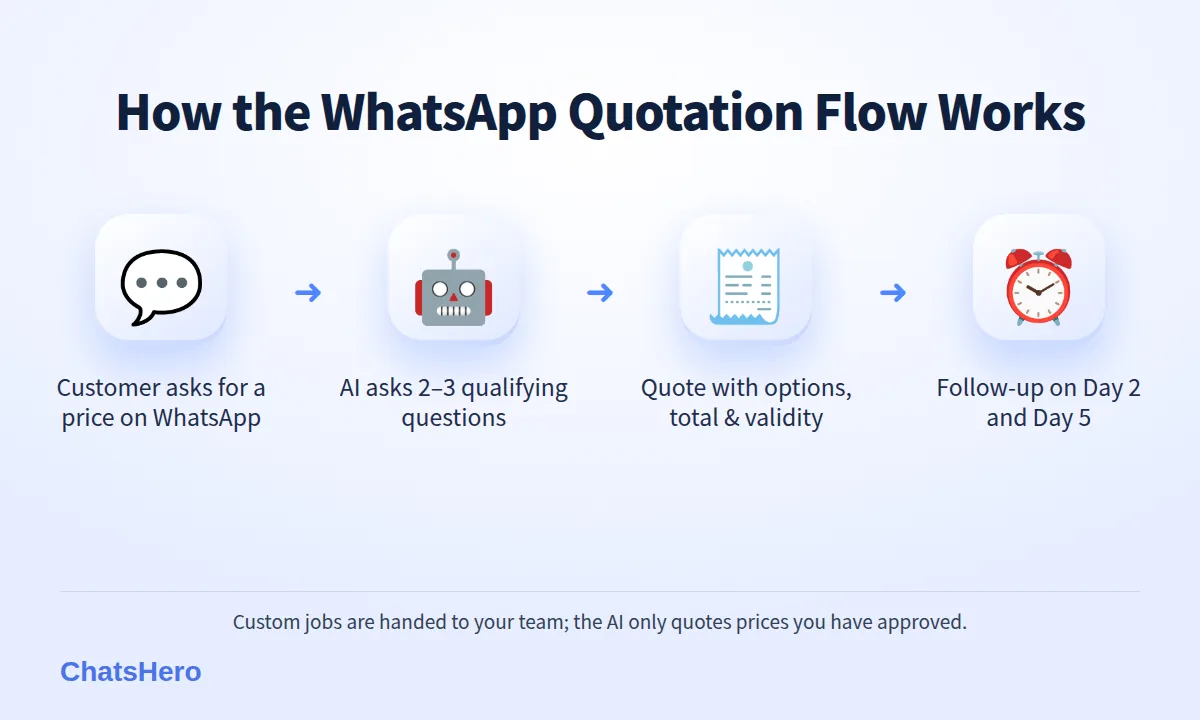
Qualify → Quote → Confirm → Follow up
This is the routine we set up for service businesses, suppliers and contractors. The example below uses a fictional aircon installer in Shah Alam, but it works the same for printing, catering, renovation or event rentals.
- Qualify in two or three questions. Ask only what changes the price: “How many units? What horsepower? Which area?” Numbered choices make it quick to answer.
- Send the quote in the chat. Two or three options, each with a total in RM, what is included and a validity date.
- Make saying yes effortless. End with “Reply 1 or 2 to confirm 🙏” and offer the earliest available date.
- Confirm and record. Once the customer picks an option, confirm the details, share your payment method and let them know your team will verify the deposit. The quote is saved to Google Sheets with its status.
- Follow up if there is no reply. A friendly nudge on Day 2 and a final check on Day 5, then mark the quote as closed.
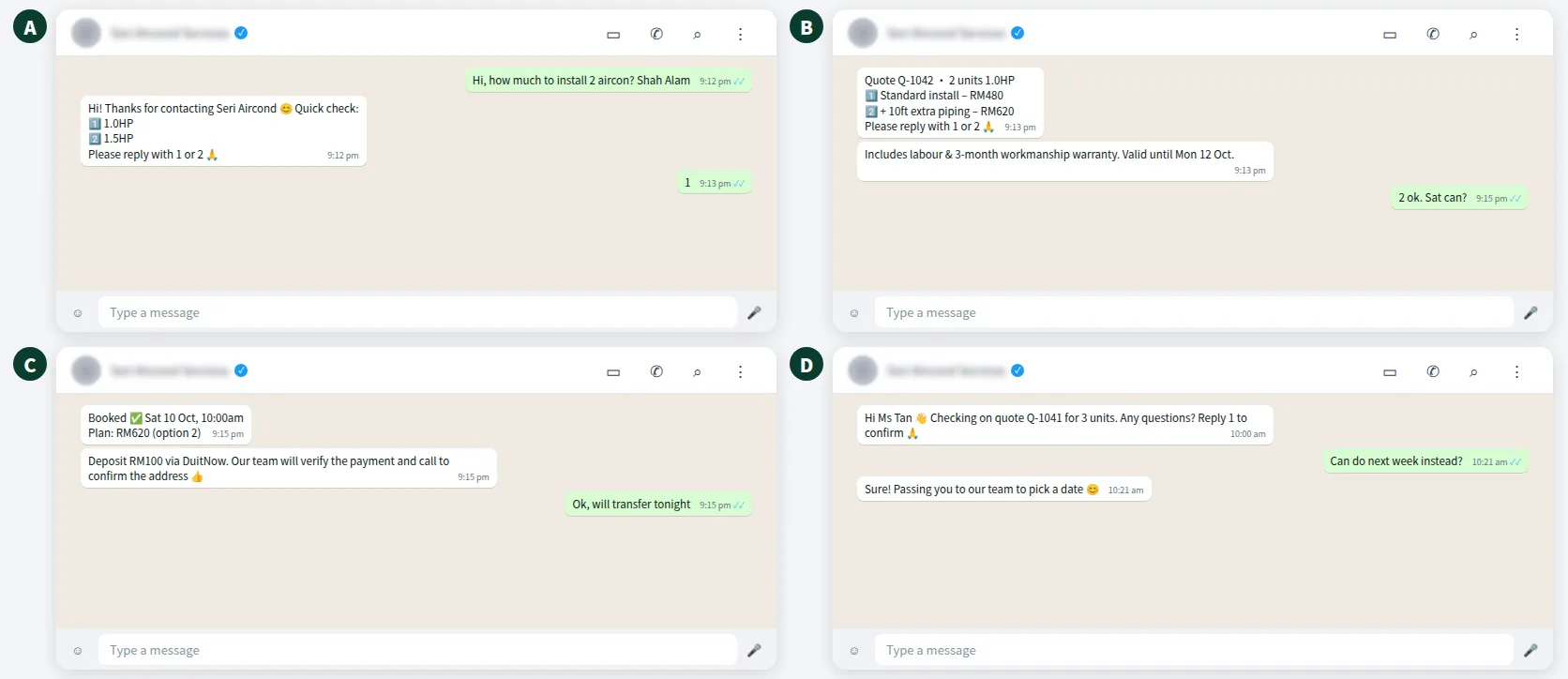
What the full conversation looks like
Here is an illustrative chat from a late-night enquiry to a confirmed job. The customer never waits for “the boss to come back”, and nobody on the team has to remember to chase.
Should a sales quotation template offer one price or three options?
For most jobs, two or three options work better than a single number. With one price, the customer’s question is “yes or no?”. With options, it becomes “which one?” — and each option shows exactly what the extra money buys.
| Quote style | Customer’s question | Best for | Watch out for |
|---|---|---|---|
| Single price | Yes or no? | Fixed-price items, repeat orders | Easy to compare purely on price |
| Two options | Basic or upgraded? | Most services and installations | Keep the gap clear and meaningful |
| Three options (good / better / best) | Which level fits me? | Packages, events, renovation | More than three becomes confusing |
| Price range only | How much really? | Jobs needing a site visit | Follow with an exact quote quickly |
As an example, an installer might quote: Standard installation RM480 for two units, or RM620 including 10 feet of extra piping and a bracket upgrade. The second option answers the “what if the piping is not enough?” worry before the customer asks it.
How do you do a quotation follow up without being pushy?
Following up is not being annoying — it is being helpful to a customer who is busy. Keep each follow-up short, useful and easy to answer. Two templates you can adapt:
Day 2: “Hi Encik Faizal 👋 Just checking if you had a chance to look at the quote for 2 aircon units (ref Q-1042). Any questions on the options? Reply 1 to confirm Standard or 2 for the piping package 🙏”
Day 5: “Hi Encik Faizal, the quote is valid until Mon 12 Oct. Would you like us to hold a Saturday slot, or shall we close this quote for now? Either is fine 😊”
The second message gives the customer an easy way to say no — and a clear “not now” keeps your pipeline honest.
Meta’s rules and costs for follow-ups
- Inside 24 hours of the customer’s last message, you can reply freely. From 1 October 2026, Meta charges these replies per message too, using an illustrative utility-rate assumption (see this summary of the change).
- After 24 hours, you need an approved template. Meta classifies templates by content: a plain update about a specific transaction can qualify as utility (illustratively RM0.06 in Malaysia), but anything with an offer or discount is marketing (illustratively RM0.35). See Meta’s template categorization guide.
- These fees are paid on your own WhatsApp Business account and are separate from your ChatsHero plan.
With ChatsHero, these reminders are sent at the times you set as part of the Remind step; when the customer answers, the AI carries on the conversation from there.
Want to see how this looks with your own business? WhatsApp us and chat with the ChatsHero AI.
How do you track every WhatsApp quotation in Google Sheets?
A quote you cannot find is a quote you cannot follow up. With ChatsHero, each WhatsApp quotation the AI sends is recorded in Google Sheets: customer name, number, items, amount, date sent, validity and status. Your sales team sees the same list the AI is working from.
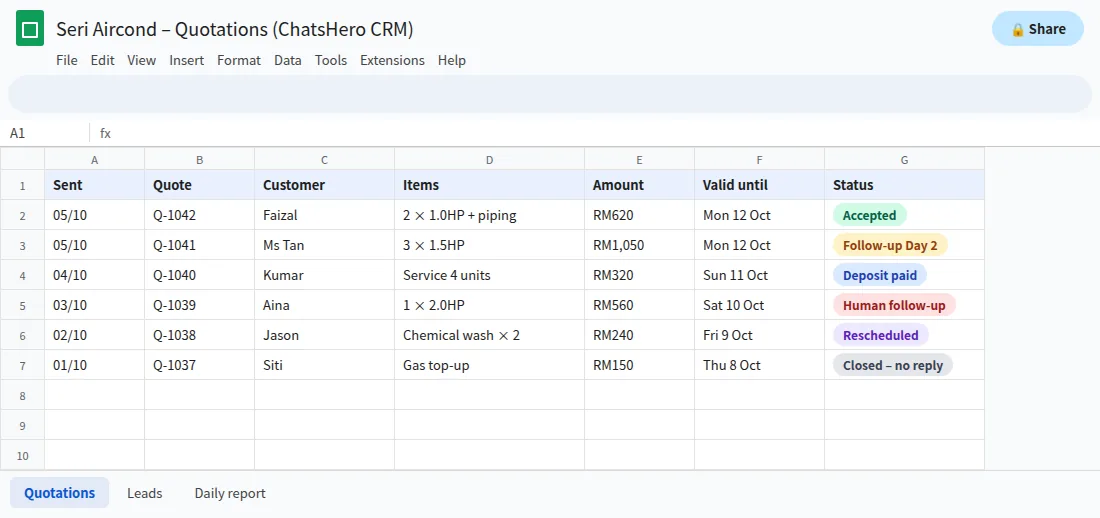
This makes a few useful things possible:
- A daily report to your team’s WhatsApp group: quotes sent, accepted, waiting and expired.
- Human handover when a customer asks for a special discount or a custom job — a “Human Agent Needed” alert goes to the group.
- From quote to invoice. Once a quote is accepted, ChatsHero can create the sales invoice from a single WhatsApp line into AutoCount, SQL Account or Bukku, so nobody re-types the order.
Note that a quotation is not an invoice. Under LHDN’s e-Invoice rollout, invoicing rules apply to the actual sale, so keep your accounting system as the place where invoices are issued. See our plans and pricing for which features come with each plan.
What mistakes make customers reject a quote?
Even a fair price can lose if the quote is presented badly. Avoid these:
- Hidden extras. If transport or disposal will be added later, say so upfront. Surprises destroy trust faster than a high price.
- No validity date. Without one, the customer has no reason to decide this week — and you are stuck honouring an old price when costs rise.
- Too many options. Five packages with small differences make people postpone. Stick to two or three.
- Pressure tactics. “Only today!” for a service you offer every day feels fake. A genuine validity date is enough.
- Messaging people who never asked. Only send quotes and follow-ups to people who contacted you. Respect Malaysia’s Personal Data Protection Act, and stop messaging anyone who asks.
Do I need quotation software or a WhatsApp chatbot?
They do different jobs. Quotation or accounting software produces formal documents and keeps your books. A WhatsApp AI chatbot handles the conversation — the place where your customers ask for prices, compare and decide. If quote requests already arrive on WhatsApp, automating the reply, the follow-up and the record-keeping there is often the quickest win.
ChatsHero runs on the official WhatsApp Business API and also covers Facebook, Instagram, TikTok and Telegram, so quote requests from every channel land in one place. Training is as easy as chatting with ChatGPT: paste your price list, a screenshot or a voice note and the AI builds the bot. Start with your five most-quoted jobs; once those answer themselves, add the rest. If you’d like the background first, here is who we are.
Frequently Asked Questions
How do I send a WhatsApp quotation professionally?
Reply quickly, write a short summary in the chat with the total in RM, what is included, a validity date and a quote reference, and attach a PDF if the customer needs a formal document. End with one clear next step such as “Reply 1 to confirm”.
Is a chat message enough, or should I send a PDF quote?
For most consumers, a clear chat message is what gets read and accepted. For companies that need a document for their purchase order, send both: the chat summary for quick reading and the PDF for filing.
How many times should I follow up a quotation?
Usually two times: a friendly check on Day 2 and a final message before the quote expires, offering an easy way to say no. After that, mark it closed and stop messaging.
How much does a WhatsApp follow-up message cost?
Through the official API, a non-promotional template is illustrated here at RM0.06 and a marketing template illustratively RM0.35 in Malaysia. From 1 October 2026 eligible service replies above the monthly 1,000-message allowance per phone number inside the customer-service window are also charged per message, using an illustrative utility-rate assumption. Meta sets and bills these fees on your own WhatsApp account, separate from your ChatsHero plan.
Can a chatbot give prices without me checking?
Only for prices you have approved, such as a standard price list. For custom jobs, the AI collects the details and hands the chat to your team with a “Human Agent Needed” alert in your WhatsApp group.
Can an accepted quote become an invoice automatically?
ChatsHero can create a sales invoice from one WhatsApp line into AutoCount, SQL Account or Bukku. Invoices themselves should still be issued from your accounting system in line with LHDN e-Invoice rules.