Your WhatsApp quality rating shows how customers react to your messages; your messaging limit caps how many different people you can start conversations with in 24 hours. On the official API, new business portfolios start at 250 and can grow to 2,000, 10,000, 100,000 and unlimited. Since October 2025, a lower rating no longer cuts your messaging limit automatically — but it can still get templates paused.
RM0.35 and RM0.06 in this article and its supplied illustrations are planning assumptions, not verified current Meta quotations. Gupshup's October announcement describes 1,000 free service replies per business phone number per month, then eligible service charges from 1 October 2026. Utility templates do not use that allowance. Inbound messages and qualifying 72-hour free entry point messages remain exempt. Confirm the recipient market, applicable rate card, free allowance and provider fees before budgeting. Figures below exclude tax and any unlisted costs.
- Messaging limits count unique customers you start conversations with outside the 24-hour window, in a rolling 24 hours — replies to customers who messaged you do not count.
- Since October 2025, limits are set per business portfolio and shared by all its phone numbers.
- New portfolios start at 250; business verification or high-quality sending raises the limit to 2,000, then automatic scaling can take you higher.
- Quality rating comes from customer feedback such as blocks, reports and low read rates.
- A low rating no longer lowers your limit, but low-quality templates can be paused or disabled.
- Tiers can change, so check WhatsApp Manager for your portfolio’s actual limit.
What are WhatsApp quality rating and messaging limits?
Quality rating = how customers feel. Messaging limit = how many you can reach.
If you have been searching for “WhatsApp quality rating messaging limit” answers because a broadcast got stuck halfway, here is the plain version. Both apply to the official WhatsApp Business API (also called the WhatsApp Business Platform), not to the normal WhatsApp Business app.
- Quality rating is Meta’s score of how people respond to your messages. Many blocks, reports or ignored messages pull it down.
- Messaging limit is the maximum number of different customers you can start conversations with, using templates, in any rolling 24 hours.
They used to be tightly linked: a bad rating could shrink your limit. Meta loosened that link in October 2025, but quality still decides whether your templates keep sending and whether you can grow. Meta’s messaging limits documentation is the official reference, and it changes often.
How does the WhatsApp quality rating work?
There are two ratings you should know about. You can see both in WhatsApp Manager, and your provider can show them too.
- Phone number qualityHigh, Medium or Low (green, yellow, red), based on recent customer feedback on your number.
- Template qualityEach template is rated green, yellow, red or “unknown” while Meta collects data.
- SignalsBlocks, reports, the reasons people give and low read rates.
Meta’s template quality documentation explains that a green template has received “little to no negative feedback”, while yellow and red templates have received negative feedback from multiple users or low read rates. A red template “is in danger of being paused or disabled soon”.
The phone number rating looks at recent feedback — roughly the last seven days — and weights the most recent days more. That is good news: one bad campaign does not follow you forever if you fix what caused it.
Quality is decided by your customers, not by Meta’s mood. Relevant messages to people who expect them keep ratings green. Surprise promotions to old or cold lists turn them red.
What are the WhatsApp messaging limit tiers in 2026?
A messaging limit counts unique customers you deliver template messages to outside an open customer service window, within a moving 24-hour period. Sending three templates to the same parent counts as one. Replies to a customer who messaged you in the last 24 hours do not count at all.
At the time of writing, Meta’s documentation lists these WhatsApp messaging limit tiers:
| Tier | Unique customers per 24 hours | How you get there |
|---|---|---|
| Starting limit | 250 | New business portfolio |
| Tier 1 | 2,000 | Complete a scaling path, such as business verification |
| Tier 2 | 10,000 | Automatic scaling |
| Tier 3 | 100,000 | Automatic scaling |
| Unlimited | No cap | Automatic scaling |
Since 7 October 2025, the limit is set at the business portfolio level and shared by every number in that portfolio. If you run three outlet numbers under one portfolio, they draw from the same pool.
For WhatsApp Business API limits, remember what is not limited: customers can always message you first, and you can always reply inside the 24-hour window.
What changed in October 2025, and what may change next?
Meta rewrote the messaging limit rules in October 2025. The changes that matter for SMEs:
- Portfolio-level limits. One shared limit for all numbers in a business portfolio, instead of one per number.
- No more automatic downgrades. The old “flagged” status, where a number with falling quality could drop a tier after seven days, was removed. A lower quality rating no longer lowers your limit.
- Faster upgrades. Once you qualify, the increase happens within about six hours.
At the time of writing, Meta’s documentation shows the tiers in the table above. Treat any tier number as something that may change, and check the limit shown in WhatsApp Manager for your own portfolio before planning a big campaign.
How do I increase my WhatsApp messaging limit?
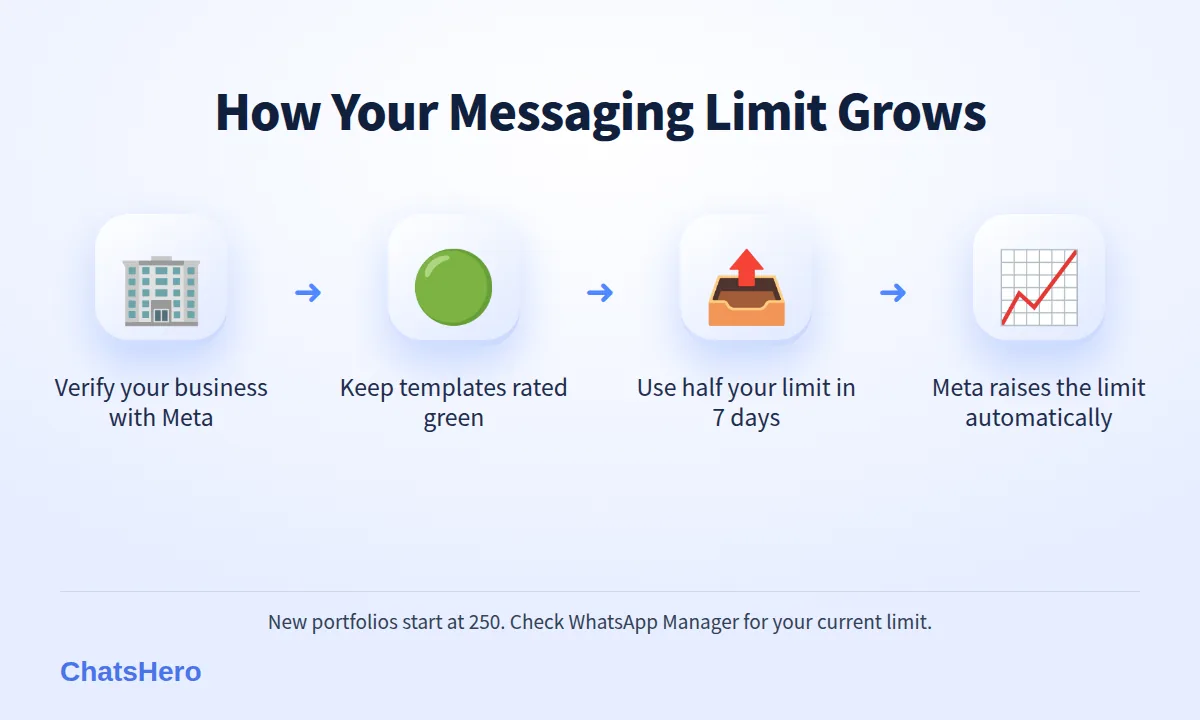
To increase your WhatsApp messaging limit from 250 to 2,000, Meta offers three scaling paths: verify your business, complete partner-led verification through your provider, or deliver 2,000 template messages to unique customers outside the service window within 30 days using high-quality templates. After that, automatic scaling takes over. The practical steps:
- Verify your business with Meta. Submit your company details, such as SSM registration documents, in your Meta Business portfolio. It is often the simplest path.
- Keep templates high quality. Send useful, expected messages. Check that your templates stay green.
- Use at least half of your limit. Meta raises the limit automatically when, over the last seven days, you have used at least half of your current limit with high-quality messages.
- Grow step by step. Start with your most engaged customers, then widen the audience as the limit grows.
There is no paid shortcut. A promise of “instant unlimited” sending is a warning sign of an unofficial tool, which carries a much higher ban risk.
What happens if my quality rating drops?
Your limit stays the same under the current rules, but a falling WhatsApp quality rating still costs you:
- Templates get paused or disabled. A template with enough negative feedback can be paused for a few hours; if it keeps happening, Meta can disable it, and you must create a new one.
- Growth stops. Automatic scaling needs high-quality messages, so you stay stuck at your current tier.
- Policy enforcement is separate. Breaking the WhatsApp Business Messaging Policy — for example messaging people without opt-in — can still lead to restrictions on your account.
Rules like these change regularly. Treat quality as the thing you protect, and the limit as the thing that follows.
How can I keep a high WhatsApp quality rating?
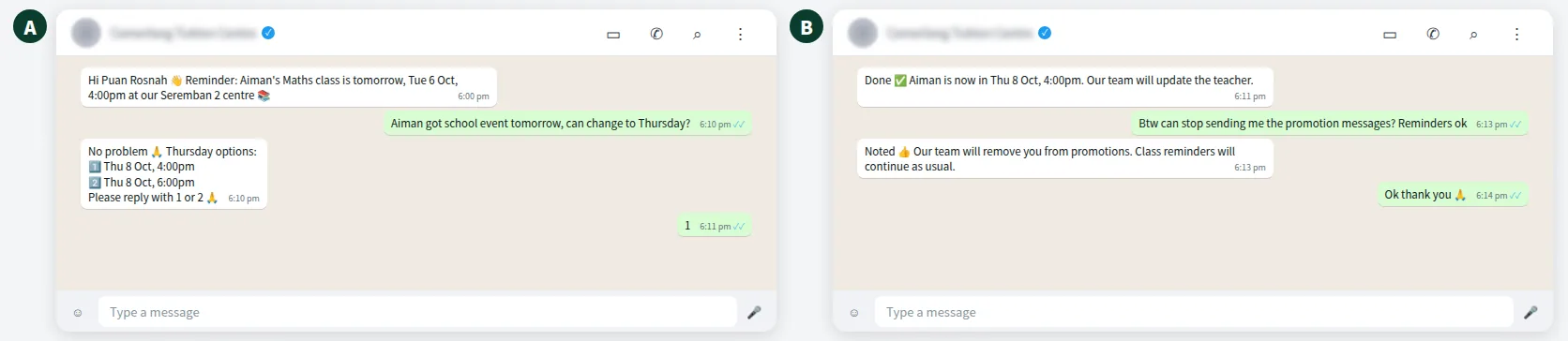
Three habits put quality at risk: sending promotions to people who never asked, sending too often, and sending messages that feel generic. For a fictional tuition centre in Seremban, a healthy routine looks like this:
- Class reminders and schedule changes as utility templates, only to enrolled families.
- New-term promotions as marketing templates, only to parents who agreed to receive them, and not more than a few times a term.
- A clear way to opt out in every promotion, which your team honours before the next send.
- Messages in the parent’s preferred language: English, Bahasa Melayu or Chinese.
Keep a simple log of who opted in and who opted out, so every broadcast goes to the right list:
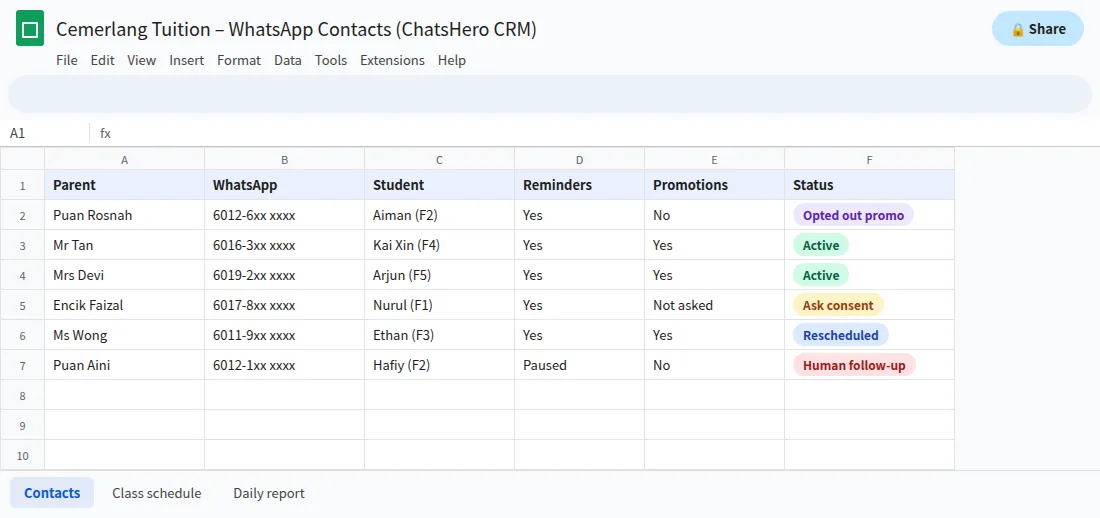
ChatsHero can record each reply in Google Sheets, so your team can mark who agreed to what.
Want to see how this looks with your own business? WhatsApp us and chat with the ChatsHero AI.
Do messaging limits affect replies and my AI chatbot?
No. When a customer messages you first, the 24-hour window opens and your AI chatbot and staff can reply as much as needed. Those replies do not count towards your messaging limit. Limits only apply when you start the conversation with a template.
Cost is a separate question: unlimited does not mean free. From 1 October 2026 Meta also charges eligible service replies above the monthly 1,000-message allowance per phone number inside the customer-service window (see Meta’s pricing page), billed to your own WhatsApp account and separate from your platform plan (see our pricing).
Your WhatsApp quality rating messaging limit cheat sheet
- Quality rating: set by customer feedback, protect it first.
- Messaging limit: unique customers you message first, per rolling 24 hours, shared across your portfolio.
- eligible service replies above the monthly 1,000-message allowance per phone number inside the customer-service window: not limited, but charged from 1 October 2026.
ChatsHero runs on the official WhatsApp Business API and replies 24/7 in three languages. If your rating has already slipped, talk to our team about cleaning up your templates and lists; more plain-language API guides are on our blog.
Frequently Asked Questions
How are WhatsApp quality rating and messaging limit connected now?
Under the rules Meta introduced in October 2025, a lower quality rating no longer lowers your messaging limit automatically. But you need high-quality messages to move up to a higher limit, and low-quality templates can be paused or disabled.
What is the starting WhatsApp messaging limit?
New business portfolios start at 250 unique customers per rolling 24 hours for messages you start with a template. Completing a scaling path, such as business verification, raises it to 2,000.
Do replies to customers count towards my messaging limit?
No. If a customer messaged you in the last 24 hours, your replies are inside the customer service window and do not count. Only template messages you send first count.
How long does it take to increase my messaging limit?
Once you qualify — by using at least half your current limit over seven days with high-quality messages — Meta says the increase happens within about six hours. Business verification time depends on Meta’s review.
Does my messaging limit apply to each phone number?
Not any more. Since October 2025, the limit is set per business portfolio and shared by all the phone numbers in it.
Where can I see my quality rating and limit?
In WhatsApp Manager inside your Meta Business portfolio, under your phone numbers and message templates. Your WhatsApp API provider can usually show them as well.