The clean way to handle WhatsApp payment proof and COD is to separate collecting from checking. Let an AI assistant ask for the DuitNow or bank transfer screenshot, match it to the order and log it in one sheet. Your team then confirms the money in the bank account before shipping. For COD, confirm the order and the amount (e.g. RM89) on WhatsApp before dispatch.
RM0.35 and RM0.06 in this article and its supplied illustrations are planning assumptions, not verified current Meta quotations. Gupshup's October announcement describes 1,000 free service replies per business phone number per month, then eligible service charges from 1 October 2026. Utility templates do not use that allowance. Inbound messages and qualifying 72-hour free entry point messages remain exempt. Confirm the recipient market, applicable rate card, free allowance and provider fees before budgeting. Figures below exclude tax and any unlisted costs.
Examples show a proposed workflow, not a guarantee that every account or plan supports it. Ask our team to confirm the channel, integration, permissions and delivery method for your setup. Staff-group notifications and group assistants require separate eligibility and integration checks; a standard one-to-one WhatsApp API account should not be assumed to access every existing staff group. Use approved individual notifications or a staff dashboard if group delivery is unavailable. Test the workflow and human handover before use.
- Collecting receipts and verifying payment are two different jobs. Automate the first, keep a person on the second.
- Never ship on a screenshot alone. Check that the money is actually in your bank or merchant account.
- Ask customers to put the order number in the DuitNow or transfer reference so matching takes seconds.
- Confirm every COD order on WhatsApp before dispatch, with the exact amount to pay, to reduce refused parcels.
- Keep one Google Sheet with each order’s payment method, proof status and verification status.
- Payment screenshots contain personal data, so limit who can see them under PDPA.
Why are WhatsApp payment screenshots so messy?
The problem is not the customer. It is that receipts arrive everywhere, in any format.
Ask any seller who takes orders on WhatsApp. Receipts come in as screenshots, forwarded bank SMS, blurry photos of a phone screen, or just “dah bayar ya”. Some customers pay before confirming the order, some pay the wrong amount, and some pay for two orders in one transfer. Then someone on the team has to scroll back through hundreds of chats to match it all.
Common problems we hear from online sellers:
- Lost screenshots. The receipt was sent at 11pm and is now buried under new chats.
- No order number. A RM89 transfer with the reference “payment” could belong to any order.
- Edited or fake receipts. A screenshot proves nothing until the money shows up in your account.
- COD surprises. The customer forgot they ordered, or did not expect to pay RM89 in cash, and refuses the parcel.
All of these are organisation problems. That is good news, because organisation is exactly what automation does well.
Can a WhatsApp chatbot verify payments automatically?
Not in ChatsHero, and we think that is the right design. The AI collects the receipt: it asks for the receipt, links it to the right order, notes the amount and records everything in Google Sheets. Your team verifies the payment by checking that the money has actually arrived in your bank or merchant account, and then updates the order status.
A screenshot is a picture, not a payment. Only your bank or payment provider can confirm that the money arrived. A person checking the account before shipping is your best protection against edited receipts.
What the AI tells the customer is honest: “Receipt received. Our team will verify the payment and update you soon.” It never says “payment confirmed” on its own. That keeps customer expectations clear and protects you from shipping unpaid orders.
How do you collect DuitNow payment proof step by step?
Here is the routine we set up for online sellers. Our fictional example is GadgetKaki Accessories, a phone accessories shop in Seremban that sells on WhatsApp and Instagram.
- Confirm the order first. The AI repeats items, total and delivery details, and the customer replies 1 to confirm. No payment request before that.
- Send payment details with the order number. Share your DuitNow QR or account details and ask the customer to put the order number, e.g. GK2217, in the payment reference.
- Ask for the receipt in the same chat. “Please send the receipt screenshot here after paying 🙏”.
- Log the receipt. The AI logs the order number, amount and time in Google Sheets with the status “Proof received – to verify”.
- Verify in your bank or merchant app. A team member checks that the amount and reference match an incoming payment.
- Update the status and ship. Only “Verified” orders go to packing. The customer gets a short confirmation.
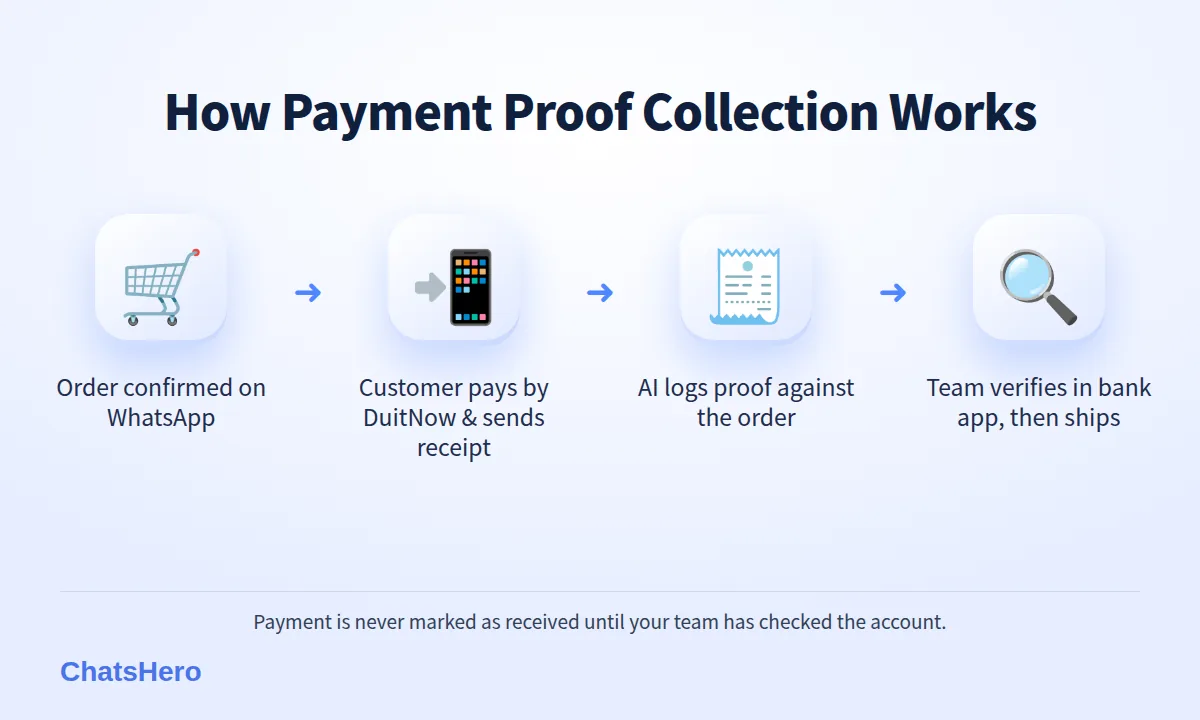
DuitNow makes step 5 easier. According to PayNet, the operator of DuitNow, payments via DuitNow QR are credited instantly to the merchant’s bank account. So your team can check straight away instead of waiting days.
Which payment method is easiest to verify?
Each method has trade-offs, and offering two or three lets customers choose.
| Method | Speed for customer | Verification effort | Main risk | Best for |
|---|---|---|---|---|
| DuitNow QR | Very fast | Low: check merchant or bank app | Missing reference | Most direct orders |
| Bank transfer / DuitNow to account | Fast | Medium: match amount and name | Fake or edited screenshots | Customers without QR apps |
| Payment link (gateway) | Fast | Low: gateway shows status | Gateway fees | Higher-value orders |
| Cash on delivery (COD) | No upfront payment | Low at order, high at delivery | Refused parcels, return postage | First-time or cautious buyers |
If you use several methods, record the method in your sheet for each order. Verification then follows a simple rule per method, and anyone on the team can do it.
How does COD order confirmation on WhatsApp reduce refusals?
A pattern sellers often describe: refused COD parcels tend to come from orders that were never properly confirmed — impulse clicks, fake names or customers who forgot the price. A short WhatsApp check before dispatch gives those orders a chance to drop out before you pay the courier.
- Confirm before shipping. “Your COD order GK2219: 1x MagSafe case. Please prepare RM89 cash on delivery. Reply 1 to confirm or 2 to cancel.”
- Ship only confirmed COD orders. No reply after a reminder? Hold the parcel and let a person follow up.
- Remind the day before delivery. “Your parcel arrives tomorrow, Fri 9 Oct. Please prepare RM89.”
- Offer a prepaid switch. Some customers may prefer to pay by DuitNow once they see the QR code, which removes the COD risk for that order.
For example, if a shop sends 300 COD parcels a month and each refusal costs RM12 in return postage, cutting refusals from 30 to 15 saves about RM180 a month, plus stock that stays sellable. These are illustrative numbers; use your own courier’s rates.
Want to see how this looks with your own business? WhatsApp us and chat with the ChatsHero AI.
What does the WhatsApp payment proof conversation look like?
Here is an illustrative chat for GadgetKaki Accessories: one customer paying by DuitNow QR, and one choosing COD. “Dah bayar, ni resit” is all the customer needs to type; the AI understands it and answers with the order number and amount (see how it reads mixed Malay-English).
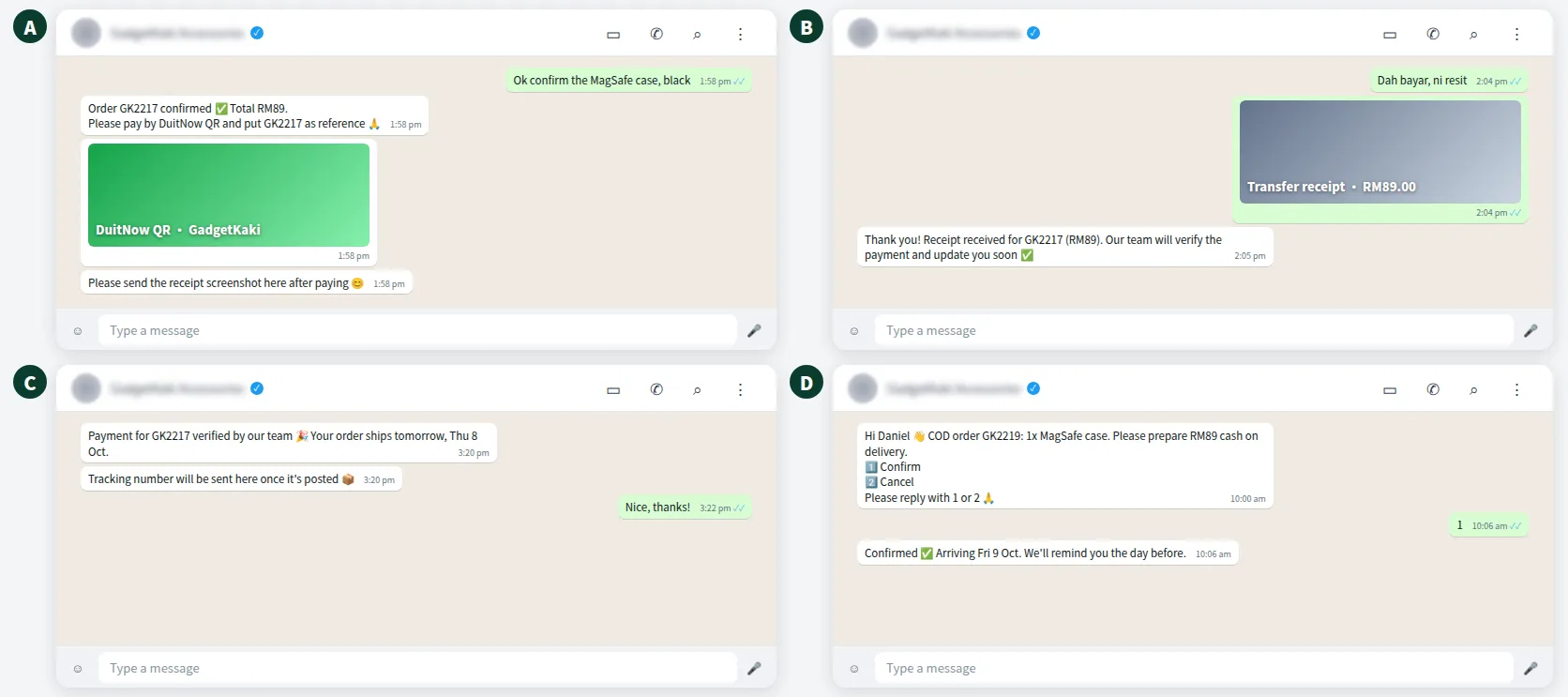
Notice two things. The AI links the receipt to an order number immediately, so nothing gets lost. And it never claims the payment is confirmed. The final confirmation comes after the team has checked the account.
How do you track receipts and COD status in one sheet?
With ChatsHero, every order and every receipt is recorded in Google Sheets automatically. Receipt images can also be saved to Google Drive with a link in the sheet, so the team never has to search chats again.
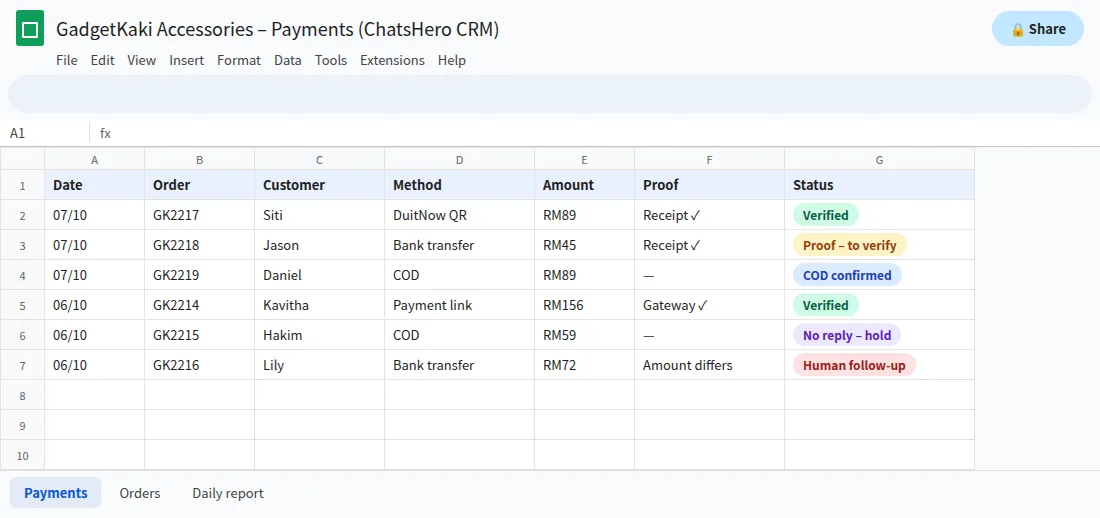
- CollectThe AI asks for and logs every receipt against its order number.
- VerifyYour team checks the account and marks the order as verified.
- ReportA daily summary of unpaid, verified and COD orders goes to your team’s WhatsApp group.
Payment screenshots often show names and partial account numbers, which count as personal data under Malaysia’s PDPA. Give sheet and folder access only to staff who need it.
How much do payment and COD messages cost on WhatsApp?
On the official WhatsApp Business API, Meta charges per message, billed to your own WhatsApp account and separate from your ChatsHero plan. Payment reminders, COD confirmations and delivery reminders are utility messages, roughly RM0.06 each in Malaysia (see Meta’s pricing page). Add a promotion to the same message and it becomes marketing, at an assumed RM0.35.
From 1 October 2026, Meta also charges eligible service replies above the monthly 1,000-message allowance per phone number inside the customer-service window, using an illustrative utility-rate assumption, as explained in this summary of the change. For most shops, that is still small compared with one refused COD parcel or one order shipped against a fake receipt.
What are the golden rules for WhatsApp payments?
- Confirm the order before asking for money.
- Always include the order number in the payment reference.
- Collect receipts in the same chat, logged against the order.
- Verify in the bank or merchant account, never on the screenshot alone.
- Confirm COD orders and the cash amount before dispatch.
- Keep payment data visible only to the people who need it.
Print these six rules and stick them next to whoever does the daily bank check. The AI can take care of rules 1 to 3 around the clock; rules 4 to 6 stay with your team. When you’re ready to split the work that way, the plans page shows what each option includes.
Frequently Asked Questions
How do I manage WhatsApp payment proof and COD orders without losing track?
Confirm each order first, ask customers to put the order number in the payment reference, collect the receipt in the same chat and log it in one Google Sheet. For COD, confirm the order and cash amount on WhatsApp before dispatch.
Does ChatsHero detect payments automatically?
No. The AI collects the receipt, links it to the order and records it. Your team checks that the money arrived in your bank or merchant account and then marks the order as verified.
How can I tell if a payment receipt is fake?
Don’t rely on the screenshot. Check your bank or merchant app for an incoming payment with the right amount, time and reference before shipping. If it is not there, it has not been paid.
Is DuitNow QR good for WhatsApp orders?
Yes. According to PayNet, DuitNow QR payments are credited instantly to the merchant’s account, so your team can verify quickly. Ask customers to add the order number as the reference.
How do I reduce refused COD parcels?
Confirm every COD order on WhatsApp before shipping, state the exact cash amount, send a reminder the day before delivery and hold parcels for orders that never confirm.
How much does a WhatsApp payment reminder cost?
On the official WhatsApp Business API, payment and COD reminders are utility messages at illustratively RM0.06 each in Meta fees, billed to your own WhatsApp account. Meta sets and can change these rates.