
A good WhatsApp order confirmation goes out within minutes of the order, lists the items, total, delivery address and payment status, and tells the customer what happens next. Add a shipped notice with the tracking number and a short delivery check-in, and you answer “where is my parcel?” before the customer has to ask. On the official API, each of these utility messages is illustrated here at RM0.06 in Meta fees.
RM0.35 and RM0.06 in this article and its supplied illustrations are planning assumptions, not verified current Meta quotations. Gupshup's October announcement describes 1,000 free service replies per business phone number per month, then eligible service charges from 1 October 2026. Utility templates do not use that allowance. Inbound messages and qualifying 72-hour free entry point messages remain exempt. Confirm the recipient market, applicable rate card, free allowance and provider fees before budgeting. Figures below exclude tax and any unlisted costs.
Examples show a proposed workflow, not a guarantee that every account or plan supports it. Ask our team to confirm the channel, integration, permissions and delivery method for your setup. Staff-group notifications and group assistants require separate eligibility and integration checks; a standard one-to-one WhatsApp API account should not be assumed to access every existing staff group. Use approved individual notifications or a staff dashboard if group delivery is unavailable. Test the workflow and human handover before use.
- Confirm every order within minutes with items, total, address and payment status. Malaysian e-commerce rules already expect prompt acknowledgement.
- Send three messages per order: confirmation, shipped notice with tracking number, and a delivery check-in.
- Keep order updates free of promotions. Meta charges an update with a promo as marketing (≈RM0.35) instead of utility (≈RM0.06).
- Let the AI answer common delivery questions 24/7 and hand real problems, like a damaged parcel, to a person.
- Record every order and status in one Google Sheet so the AI and your team see the same information.
- For Shopee and TikTok Shop orders, let the marketplace send the updates; use WhatsApp for orders placed with you directly.
What should a WhatsApp order confirmation include?
A confirmation is not a “thank you”. It is proof the order is right.
A quick “ok noted 👍” is a common way to confirm an order. It feels friendly, but it leaves the customer unsure what exactly was noted, and it leaves your team with nothing to check later. A proper WhatsApp order confirmation contains:
- Order number so both sides can refer to it.
- Items, sizes and quantities, exactly as they will be packed.
- Total, with postage shown separately.
- Delivery name, address and phone number, so mistakes are caught before dispatch.
- Payment status, such as “waiting for payment” or “payment received, our team is verifying”.
- What happens next: when you ship and when to expect the tracking number.
This is also good compliance. Malaysia’s Consumer Protection (Electronic Trade Transactions) Regulations 2012 expect online sellers to acknowledge receipt of the order without undue delay and to give buyers a way to fix errors before the order is confirmed.
Which WhatsApp delivery update messages should you send?
You don’t need a message at every scan point. Three well-timed messages cover the questions customers usually ask:
| Stage | When | What it says | Meta category |
|---|---|---|---|
| 1. Order confirmation | Within minutes of ordering | Items, total, address, payment status, next step | Utility |
| 2. Shipped notice | Same day the parcel leaves | Courier, tracking number, estimated arrival | Utility |
| 3. Delivery check-in | 1–2 days after expected arrival | “Did it arrive safely? Reply if anything is wrong.” | Utility |
| Optional: delay notice | When something slips | Honest reason and new estimate | Utility |
The delay notice is the easiest one to skip, and it can save the most frustrated chats. A customer told early about a courier backlog during the year-end sales has a reason to wait; a customer who has to ask three times has only a reason to complain.
Tell them before they ask. Every update you send proactively is one less “dah pos ke?” message your team has to answer.
How do you automate WhatsApp order confirmation step by step?
Here is how we set it up for online sellers who take orders directly on WhatsApp, Instagram or their own website. Our example is Laman Batik Terengganu, a fictional batik seller in Kuala Terengganu that ships across Malaysia.
- Train the AI on your catalogue. Paste your product list, prices, postage rates and courier cut-off time into ChatsHero’s Build mode. No prompt writing needed.
- Let the AI take the order. It asks for items, sizes, name, address and phone number, then repeats everything back as a numbered summary.
- Ask for a clear yes. “Reply 1 to confirm or 2 to change something.” The order is only recorded once the customer confirms.
- Record it in Google Sheets. The confirmed order lands in your order sheet with a status of “Waiting payment” or “To pack”.
- Verify payment. Your team checks the bank or payment gateway and updates the status. The AI never marks a payment as received on its own.
- Send the shipped notice. After packing, your team sends the day’s shipped notices with tracking numbers from ChatsHero in one go.
- Follow up. An automatic check-in goes out a couple of days later, and any problem is flagged to a person.
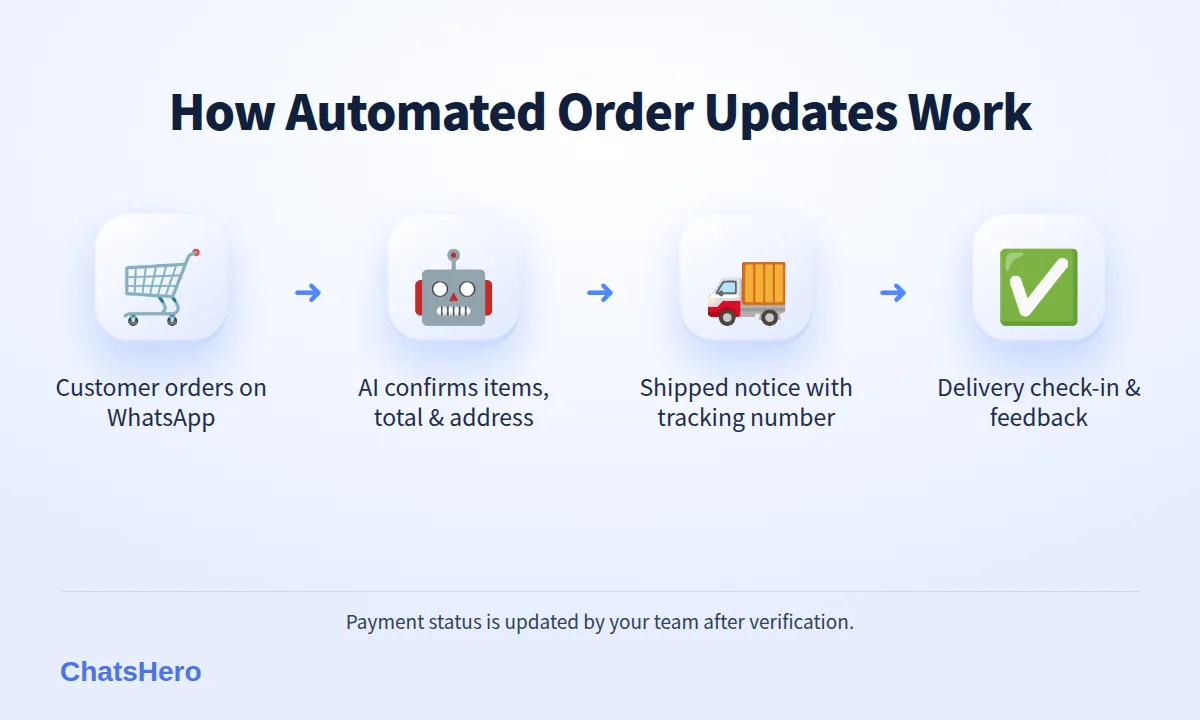
Which steps run fully automatically depends on how your shop works, for example whether tracking numbers come from a courier portal or are written by hand. We set up the flow with you during onboarding.
What does an automated order conversation look like?
Here is an illustrative conversation for Laman Batik Terengganu, from a late-night order to the delivery check-in. Farah writes “Nak order… pos ke Cheras” and the AI answers in the same easy mix, keeping the order summary itself in clear, fixed lines (more on mixed-language chats).
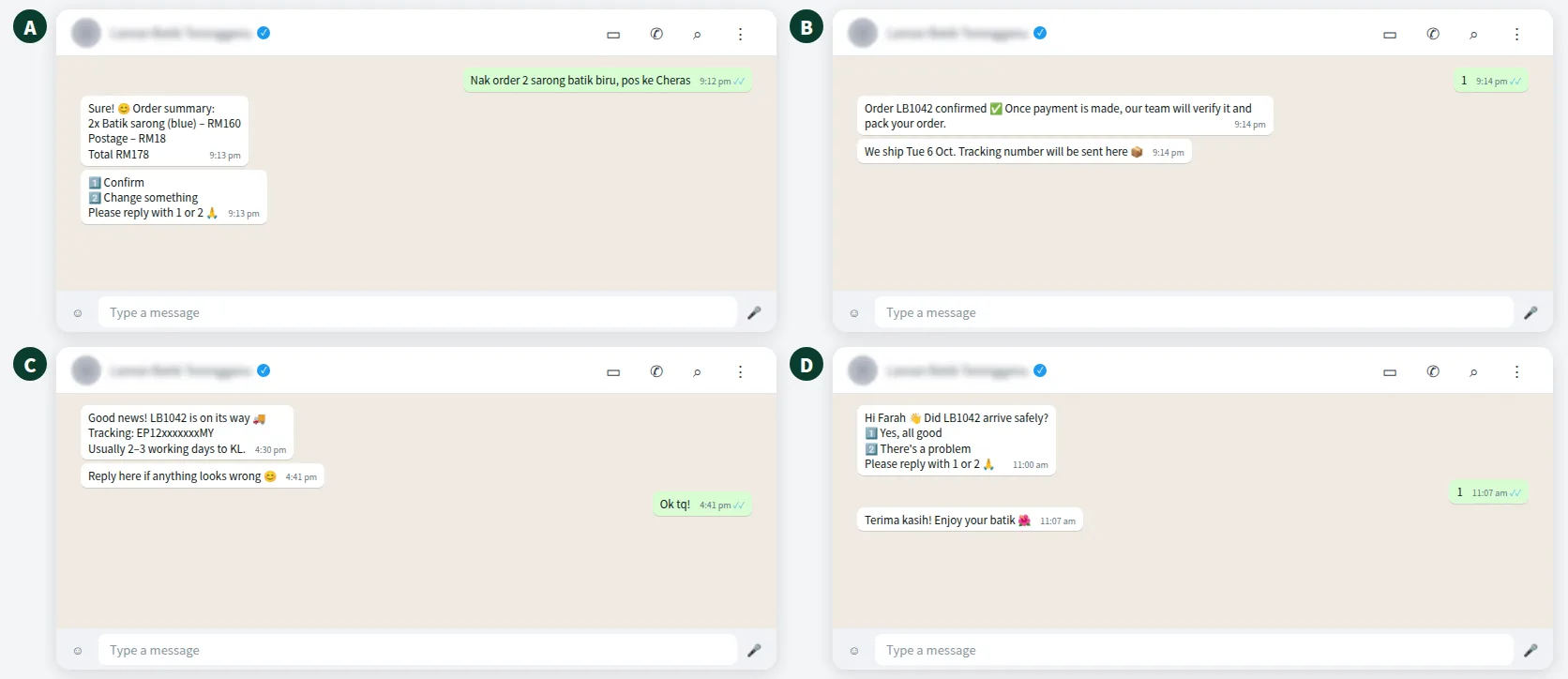
Notice what the AI does not do. It does not promise an exact delivery date, because couriers decide that. It gives the usual range and the tracking number, and it passes damaged or missing parcels to a human with a “Human Agent Needed” alert in your team’s WhatsApp group.
Want to see how this looks with your own business? WhatsApp us and chat with the ChatsHero AI.
How much does a WhatsApp order confirmation cost to send?
On the official WhatsApp Business API, Meta charges per message, billed to your own WhatsApp account and separate from your ChatsHero plan. Order confirmations, shipping and delivery updates fall under Meta’s utility category, which is illustrated here at RM0.06 per message in Malaysia (see Meta’s pricing page).
| Example shop | Orders / month | Update messages | Approx. Meta fees (≈ RM0.06 utility / ≈ RM0.35 marketing) |
|---|---|---|---|
| Home-based seller | 200 | 3 per order = 600 | 600 × RM0.06 ≈ RM36 |
| Growing online shop | 800 | 3 per order = 2,400 | 2,400 × RM0.06 ≈ RM144 |
| Same shop, promo added to updates | 800 | 2,400 charged as marketing | 2,400 × RM0.35 ≈ RM840 |
These are examples, not quotes. The last row is the expensive mistake: Meta’s template guidelines say a template that mixes an order update with a promotion is categorised as marketing. Also note that from 1 October 2026, Meta charges free-form replies and utility templates inside the 24-hour customer-service window too, using an illustrative utility-rate assumption, according to this summary of the change.
Should you send WhatsApp delivery updates for Shopee or TikTok Shop orders?
No. Marketplace orders already get updates inside the Shopee or TikTok Shop app, and marketplaces generally restrict contacting buyers off the platform. Messaging those buyers on WhatsApp can break those rules — check the current policy in your Malaysian Seller Centre.
Use WhatsApp order confirmation and delivery updates for orders customers place with you directly: through WhatsApp, Instagram, Facebook, TikTok DMs or your own website. Those customers gave you their number to get their order, so updates are exactly what they expect.
Marketplace orders: marketplace updates. Direct orders: WhatsApp updates.
How do you track every order status in one place?
When orders live in scattered chats, somebody always asks “who packed LB1038?”. With ChatsHero, each confirmed order is recorded in Google Sheets automatically. Your team updates payment and shipping status in the same sheet, so everyone works from one list.
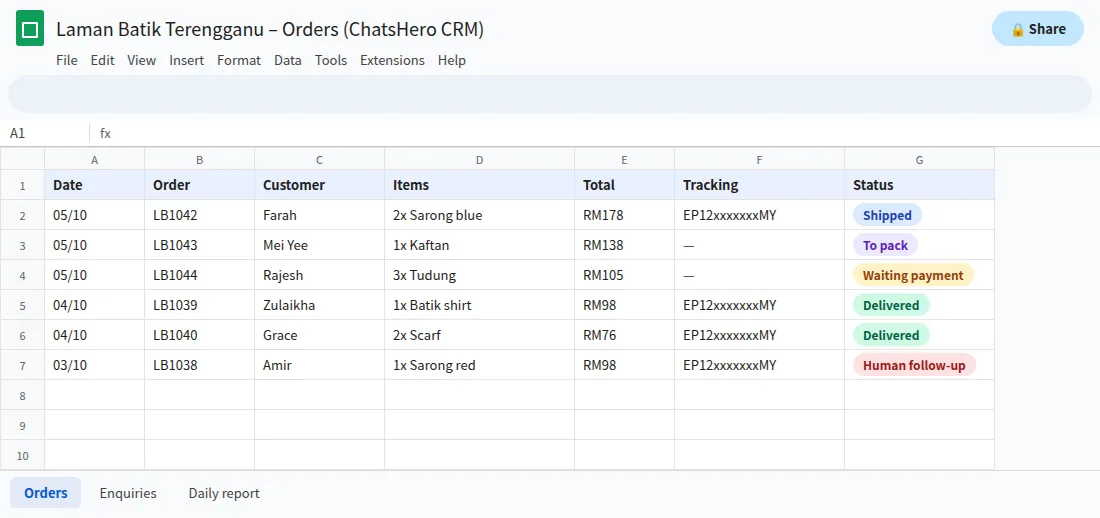
- Waiting paymentYour team checks the bank and moves the row to “To pack”.
- To packThe packer works from this filter, not from scrolling chats.
- ShippedTracking number pasted once; the AI can answer “dah pos ke?” from it.
The daily report is handy for the owner: how many orders came in, how many are waiting for payment and how many still need packing, without opening the sheet.
What mistakes make order update messages annoying?
A WhatsApp delivery update should reduce questions, not create them. Avoid these common mistakes:
- Too many messages. Five updates for one parcel feels like spam and increases blocks, which hurts your number’s quality rating.
- Promotions in updates. Besides the higher cost, customers stop reading your updates when they look like ads.
- Promising exact dates. Give a range and let the tracking link do the rest.
- No way to reply. Always say “Reply here if anything is wrong”, and make sure someone reads those replies.
- Using an unofficial sender. Bulk-sending from a personal WhatsApp number carries a much higher risk of restriction. The official API with real, expected messages keeps the risk low.
Handle personal data carefully too. Names, addresses and phone numbers are personal data under Malaysia’s PDPA, so keep the order sheet access limited to staff who need it.
Is automated order confirmation worth it for a small shop?
If you handle more than a handful of direct orders a day, usually yes. The messages themselves cost cents, and the time saved is real: no more retyping order summaries at midnight, no more scrolling back to find an address, and far fewer “dah pos ke?” chats. A clear confirmation also reassures anyone buying from a small shop for the first time.
If you ship fewer than five direct orders a week, a saved template in the WhatsApp Business app may be enough for now. Once the “dah pos ke?” chats start eating your evenings, compare the ChatsHero plans — every one includes unlimited messages within the platform, with Meta’s fees billed separately.
Frequently Asked Questions
What should a WhatsApp order confirmation include?
The order number, items and quantities, total with postage, delivery name, address and phone, payment status and what happens next, such as the shipping date and when the tracking number will arrive.
How much does a WhatsApp delivery update cost in Malaysia?
Order and delivery updates are utility messages, illustratively RM0.06 each in Meta fees on the official WhatsApp Business API, billed to your own WhatsApp account. Adding a promotion makes it a marketing message at an assumed RM0.35. Meta sets and can change these rates.
How many update messages should I send per order?
Usually three: an order confirmation, a shipped notice with tracking number, and a delivery check-in. Add a delay notice only when something goes wrong.
Does ChatsHero confirm payments automatically?
No. The AI records the order and collects the customer’s payment details or proof, and your team verifies the payment and updates the status.
Can I send WhatsApp updates for Shopee or TikTok Shop orders?
It is best not to. Marketplaces send their own updates and restrict off-platform contact with buyers. Use WhatsApp updates for orders placed with you directly.
Is a WhatsApp order confirmation legally required in Malaysia?
The Consumer Protection (Electronic Trade Transactions) Regulations 2012 expect online sellers to acknowledge orders without undue delay. A clear WhatsApp confirmation is a practical way to do that for WhatsApp orders; check with an adviser for your exact situation.