A WhatsApp opt in list is a list of customers who gave you their number and clearly agreed to receive messages from your business by name. Build it from real touchpoints — counter QR codes, checkout forms, booking chats — record when and how each person agreed, and remove anyone who says stop. With marketing messages costing an assumed RM0.35 each, a clean list also saves money.
RM0.35 and RM0.06 in this article and its supplied illustrations are planning assumptions, not verified current Meta quotations. Gupshup's October announcement describes 1,000 free service replies per business phone number per month, then eligible service charges from 1 October 2026. Utility templates do not use that allowance. Inbound messages and qualifying 72-hour free entry point messages remain exempt. Confirm the recipient market, applicable rate card, free allowance and provider fees before budgeting. Figures below exclude tax and any unlisted costs.
- Meta’s policy requires two things before you message someone: they gave you their number, and they opted in to hear from your business.
- The opt-in must name your business and say what they will receive; it can be collected on WhatsApp, a website, a form, by phone or in person.
- Record every opt-in: date, source, wording shown and message categories agreed to.
- Never buy lists, scrape group members or blast every contact in your phone — that is where blocks, reports and restrictions come from.
- Make “STOP” easy and honour it quickly; Malaysia’s PDPA gives people the right to stop direct marketing.
- A smaller, willing list costs less (marketing messages are illustratively RM0.35 each in Malaysia) and protects your quality rating.
What counts as a valid WhatsApp opt-in?
Having someone’s number is not the same as having their permission.
Meta’s WhatsApp Business Messaging Policy says you may only contact people if they have given you their phone number and you have received opt-in permission from them. Meta’s opt-in guide for developers adds three requirements. Your opt-in must:
- clearly state that the person is opting in to receive messages;
- clearly state the name of your business;
- comply with applicable law — in Malaysia, that includes the Personal Data Protection Act 2010.
Since a November 2024 update, Meta says the permission can be general and does not have to mention WhatsApp specifically, as long as local law is followed. Naming WhatsApp is still clearer for customers and less likely to surprise them.
So a WhatsApp opt in list is not “everyone who ever messaged us”. It is the people who said yes to a clear question.
Why does a clean opt-in list matter for your business?
Opt-in is not just paperwork. It decides whether your broadcasts work at all.
- Quality rating. When people block or report your messages, your quality rating drops, templates can be paused and your messaging limit stops growing. The official API lowers the risk compared with unofficial blasting tools, but only if you message people who want to hear from you.
- Cost. On the official API, each marketing message is illustrated here at RM0.35 in Malaysia (see Meta’s pricing page). Sending to people who ignore you is money spent for nothing.
- The law. Malaysia’s PDPA requires notice and consent for processing personal data, and lets people stop direct marketing.
| List source | Opt-in? | Risk | Verdict |
|---|---|---|---|
| Customers who ticked a clear WhatsApp box at checkout | Yes | Low | Use it |
| Customers who replied “1 – Yes” to a promo question | Yes | Low | Use it |
| Everyone who once asked a price on WhatsApp | Not for marketing | Medium | Ask first |
| All contacts saved in the boss’s phone | No | High | Don’t blast |
| Bought lists or scraped group members | No | Very high | Never |
Where can you collect WhatsApp opt-ins in Malaysia?
Meta allows opt-in through many channels — WhatsApp itself, websites, forms, phone calls or in person. Here are six touchpoints to consider:
- Counter QR code. A stand at the cashier: “Scan to get restock alerts and member promos on WhatsApp from Paws & Co.” The QR opens a chat with a pre-filled word like JOIN.
- Website or online store checkout. An unticked checkbox: “Send me order updates and promos from Paws & Co on WhatsApp.”
- Booking or enquiry chats. After you answer a question, ask once: “Would you like our monthly promos here? Reply 1 for yes.”
- Membership or warranty forms. Paper or Google Form, with a separate line for WhatsApp marketing.
- Click-to-WhatsApp ads. When someone taps your ad and messages you, answer first, then ask if they want future offers.
- Events and roadshows. A lucky-draw form at a mall booth, with the opt-in wording printed above the signature.
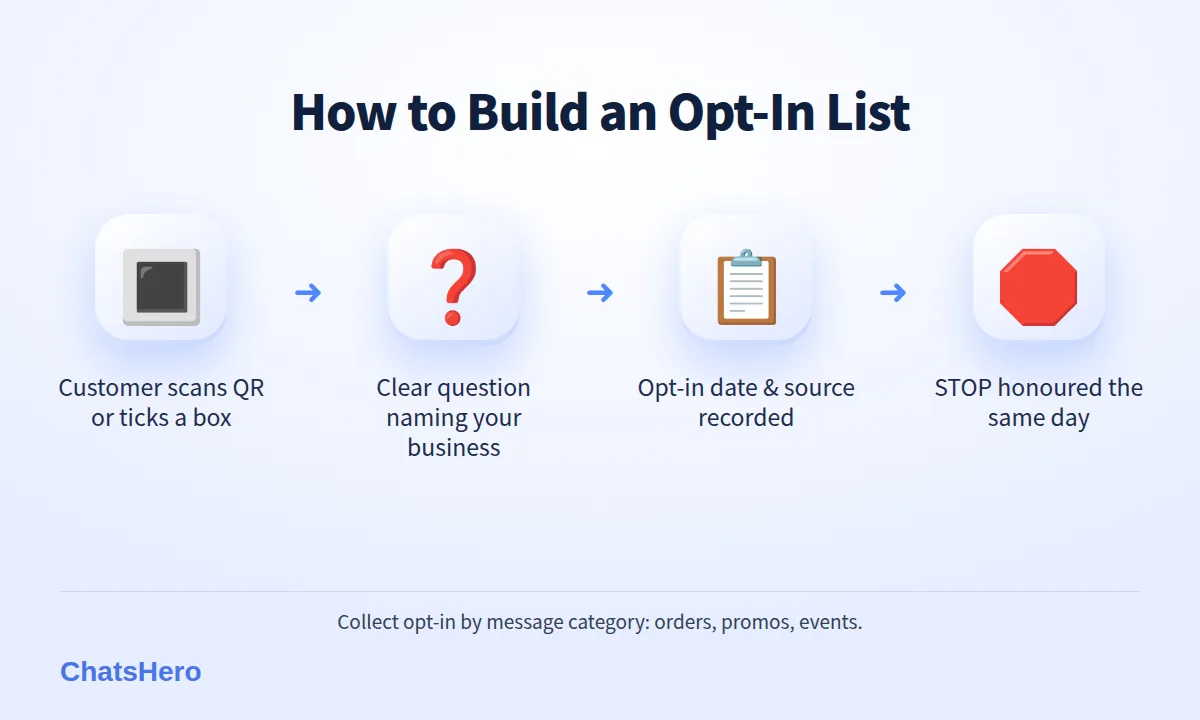
Whatever the source, the person should take an action — scan, tick, reply — not be added silently.
What should your WhatsApp opt-in wording say?
Keep it short, name your business and say what they will get. Here are templates you can adapt:
Checkout checkbox: “☐ Yes, send me order updates, restock alerts and promotions from Paws & Co Pet Supplies on WhatsApp. I can reply STOP anytime.”
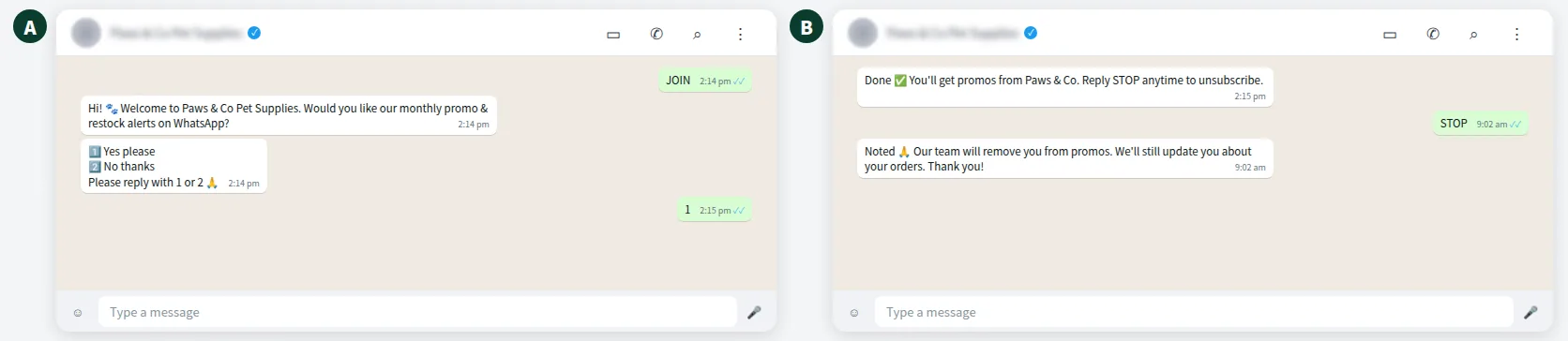
Inside a chat: “Would you like Paws & Co to send you our monthly promo and restock alerts here on WhatsApp? 1️⃣ Yes please 2️⃣ No thanks. Please reply with 1 or 2 🙏”
Printed form: “By ticking this box, I agree to receive promotional messages from Paws & Co Pet Supplies via WhatsApp. I can unsubscribe anytime.”
Separate the categories. Meta recommends collecting opt-in by message type. A customer who wants order updates may not want weekly promos — let them choose.
For customers who prefer Bahasa Melayu or Chinese, show the same wording in their language. An AI assistant that replies in English, Bahasa Melayu and Chinese can ask the question in whichever language the customer is already using.
How do you record and manage your WhatsApp opt in list?
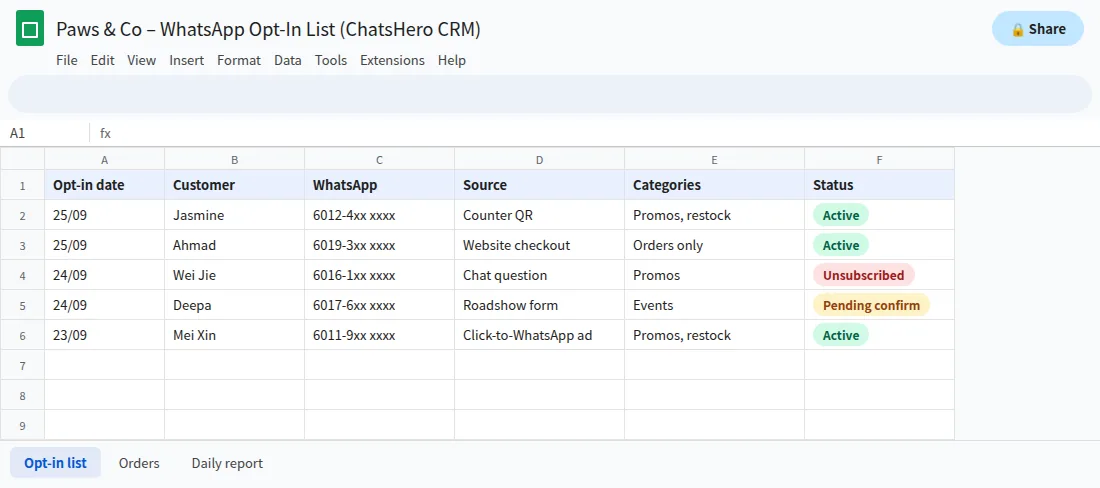
If a customer or regulator ever asks “when did I agree to this?”, you want an answer in seconds. Each entry in your WhatsApp opt in list should store:
- name and WhatsApp number;
- date and time of opt-in;
- source (counter QR, website, chat, form, ad);
- the wording shown, or a link to it;
- categories agreed to (orders, promos, events);
- status: active or unsubscribed, with the unsubscribe date.
With ChatsHero, the AI can ask the opt-in question inside the chat and record each reply in Google Sheets. Your team then marks the status and categories, and checks the list before each broadcast.
- AskThe AI asks one clear opt-in question at the right moment.
- RecordEach reply is recorded in Google Sheets with its date; your team marks the source and choice.
- RespectOpt-outs are logged in Google Sheets so your team can remove them before the next broadcast.
How should you handle opt-outs and STOP replies?
Opt-out is the other half of opt-in. Meta’s policy says you must respect requests, on or off WhatsApp, to stop messaging, and give clear instructions for opting out. Under Section 43 of the PDPA, a person can require you to stop processing their personal data for direct marketing (see the Personal Data Protection Department).
- Add “Reply STOP to unsubscribe” to every marketing message.
- Treat similar replies — “unsubscribe”, “berhenti”, “不要再发” — the same way.
- Confirm once: “You’re unsubscribed from promos ✅ We’ll still send updates about your orders.”
- Update the list the same day, and check it before every broadcast.
An easy opt-out actually protects your number: a person who can unsubscribe politely is less likely to press “Block” or “Report”.
Want to see how this looks with your own business? WhatsApp us and chat with the ChatsHero AI.
What mistakes break WhatsApp opt-in rules?
Habits that break the rules, or set you up for blocks:
- Blasting every phone contact. Saving someone’s number for a delivery is not permission to send festive promos.
- Adding people to groups or broadcast lists without asking.
- Pre-ticked boxes. Consent should be an action the customer takes.
- Hiding the opt-in in terms and conditions. Make it visible and specific.
- Mixing promos into order updates. Meta classifies messages by content; a “your order is ready” message with a discount is treated as marketing (an assumed RM0.35 instead of an assumed RM0.06).
- Buying or sharing lists. A list from another company has no consent for your business.
This guide is general information, not legal advice. If your business handles sensitive data or large volumes, speak to a lawyer about your PDPA obligations.
How often should you message your WhatsApp broadcast list?
There is no fixed number, but a useful rule is: message only when you have something your customers would be glad to receive. For a pet shop, that might be one monthly promo, restock alerts for the food brand a customer buys, and a birthday treat for their cat.
Watch two signals after each broadcast: the unsubscribe rate and whether Meta changes your quality rating. If either moves the wrong way, send less often or segment better. Blasting within ChatsHero is unlimited on every plan (pricing), which is exactly why the list, not the tool, should set your limits. If you want a second pair of eyes on your opt-in wording, our team is happy to look, and the blog has more on WhatsApp rules for Malaysian businesses.
Frequently Asked Questions
What is a WhatsApp opt in list?
It is a list of customers who gave you their number and clearly agreed to receive WhatsApp messages from your business by name, ideally with the message types they chose and a record of when and how they agreed.
Does the opt-in have to mention WhatsApp?
Since a November 2024 update, Meta says permission can be general and need not mention WhatsApp, as long as it names your business, makes clear the person is opting in, and complies with local law. Mentioning WhatsApp is still clearer for customers.
Can I message customers who contacted me first?
You can reply to their questions. To send them marketing later, ask for permission first — for example, “Would you like our monthly promos here? Reply 1 for yes.”
Can I import all the contacts in my phone and send a broadcast?
No. Having a number is not opt-in. Blasting contacts who never agreed leads to blocks and reports, can lower your quality rating, and may breach Meta’s policy and Malaysia’s PDPA.
How should I handle STOP replies?
Confirm the unsubscribe, update your list the same day, and check the list before every broadcast. You can keep sending service messages about an existing order.
Is this legal advice?
No. This is general information for Malaysian SMEs. For specific PDPA questions, consult a lawyer or the Personal Data Protection Department.