If your WhatsApp number is banned, first check whether it is temporary or permanent, then request a review from inside WhatsApp (or from Business Support Home if you use the API) with an honest explanation. Typical causes are messaging people without opt-in, many blocks and reports, or unofficial blasting tools. Appeals can succeed, but none are guaranteed, so prevention matters most.
- Common causes: unofficial apps or blasting tools, messaging people without opt-in, and too many blocks or reports.
- A temporary ban shows a countdown; a permanent ban says the account is not allowed to use WhatsApp.
- On the app, use the available review option; on the API, check Business Support Home for an eligible appeal. Timing varies and reinstatement is not guaranteed.
- Do not keep reinstalling, switching phones or creating new numbers during an appeal.
- The official WhatsApp Business API lowers risk but cannot guarantee you will never be restricted.
- Record consent, honour opt-outs and watch your quality rating to keep your number healthy.
Why was my WhatsApp number banned?
Before you blame one message, look for patterns that look like spam.
WhatsApp does not always say exactly why a number was banned, but business cases usually trace back to a few causes:
- Unofficial apps and tools. Modified apps such as “GB WhatsApp”, and tools that automate WhatsApp Web to blast messages, break WhatsApp’s terms.
- No opt-in. Messaging people who never gave you their number or agreed to hear from you, for example bought lists or contacts scraped from Facebook groups.
- Many blocks and reports. WhatsApp’s Business Messaging Policy says users can block or report businesses, and its systems may limit how many messages a business can send based on that feedback.
- Sudden spikes from a new number. A fresh SIM that messages hundreds of strangers on day one looks like a spammer.
- Restricted products or content. Some categories, such as illegal products, certain regulated goods and misleading offers, are not allowed at all.
- Adding people to groups without asking. Bulk-adding customers to promo groups can trigger reports.
Is my WhatsApp number banned temporarily or permanently?
The message you see tells you a lot about the kind of ban and what to do next.
| What you see | What it usually means | What to do |
|---|---|---|
| “Temporarily banned” with a countdown timer | Short ban, often linked to unofficial apps or unusual activity | Wait it out, switch to the official app, then change your habits |
| “This account is not allowed to use WhatsApp” | Access blocked; review may determine whether restoration is possible | Tap “Request a review” and explain honestly |
| API: template or messaging block for a set number of days | Business Platform restriction after policy or quality issues | Fix the cause; appeal in Business Support Home if eligible |
| API: account locked or disabled | Serious or repeated violations | Appeal; prepare a backup plan for customer communication |
Restrictions may affect templates, messaging or the account. Repeated or serious violations can disable access. Check the notice in WhatsApp Manager or Business Support Home and current policy enforcement guidance; do not assume a fixed restriction timetable.
How do I recover a banned WhatsApp number step by step?
Here is the recovery process we recommend when a Malaysian business finds its WhatsApp number banned. Follow it calmly and in order:
- Stop all sending. Pause every broadcast, auto-reply script or tool connected to the number.
- Read the exact message. Take a screenshot. Temporary and permanent bans need different actions.
- Remove unofficial apps. Back up what you can, uninstall modified WhatsApp versions and install the official WhatsApp or WhatsApp Business app from the App Store or Google Play.
- Request a review. On the app, tap “Request a review” on the ban screen. On the API, go to Business Support Home in Meta Business Suite, select the violation and choose “Request Review”.
- Write a short, honest explanation. Say what your business does, how customers contacted you, and what you have changed. Do not blame WhatsApp or make up excuses.
- Wait for the review status. Follow the app or Business Support Home instructions. Timing varies, and repeated requests do not guarantee a faster decision.
- Keep customers informed elsewhere. Post on Facebook, Instagram or TikTok that your WhatsApp is temporarily unavailable and share an alternative contact.
An appeal is a request, not a guarantee. Meta notes that not every spam violation can be appealed; some restrictions simply have to expire. If a permanent ban is upheld, WhatsApp may also refuse future use by the same business.
What should I do while my WhatsApp business account is banned?
A WhatsApp number banned in the middle of a busy sales week is a sales problem as much as a technical one. Take Ria Modest Wear, a fictional online fashion shop in Shah Alam that sells mostly through WhatsApp. While waiting for a review, it could:
- Pin a notice on Instagram and Facebook with a temporary contact method.
- Reply to Instagram and Facebook messages quickly, since customers may look for you there.
- Update the phone number on marketplace listings and Google Business Profile if the ban lasts more than a day.
- Keep a list of pending orders from the last week so no customer is forgotten.
This is where it helps to have your leads recorded outside WhatsApp. If every order and enquiry lives only in chat history, a ban can leave you with no list of who to follow up. Platforms like ChatsHero record each lead in Google Sheets, so your customer list does not disappear with the chat.
How can I lower the risk of a WhatsApp business account ban?
No provider can honestly promise your WhatsApp number will never be banned. What you can do is make your number look like what it is: a real business talking to real customers who want to hear from it.
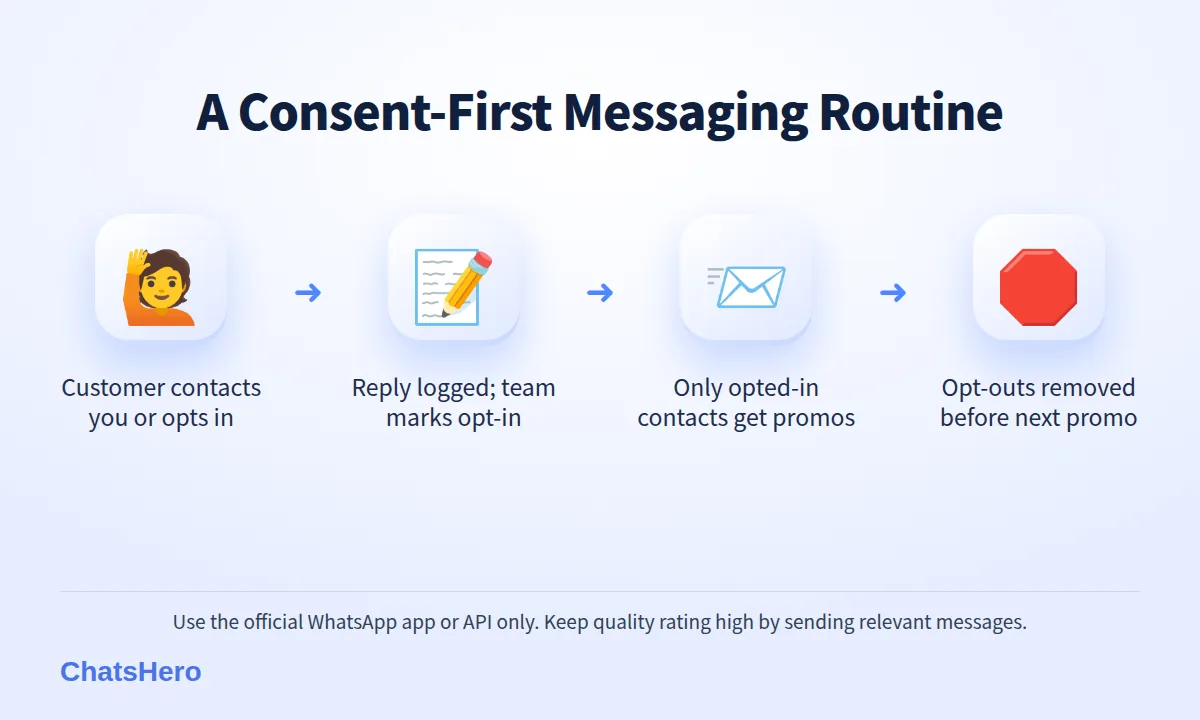
- Opt-in firstOnly message people who gave you their number and agreed to receive messages.
- Easy opt-outHonour “STOP” immediately and remove the contact from promotions.
- Official toolsUse the official app or the official API — never modified apps or blasters.
Consent is also a legal matter in Malaysia. The Personal Data Protection Act 2010 expects you to collect personal data for a clear purpose and to stop direct marketing when a customer asks. Getting opt-in right helps you with both WhatsApp and the law.
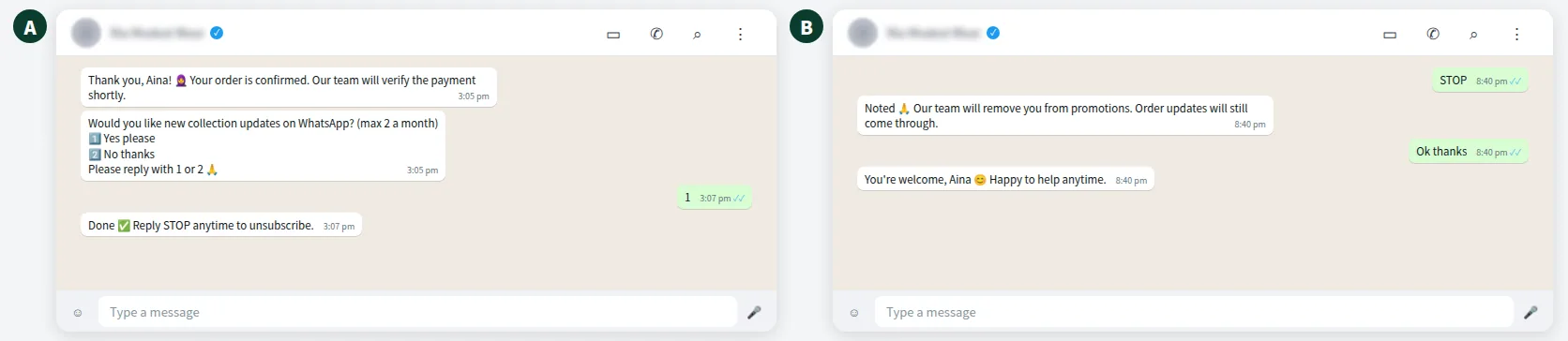
Here is what a clean opt-in and opt-out can look like in practice:
What is the WhatsApp quality rating and why does it matter?
On the WhatsApp Business Platform, Meta gives your phone number and templates a quality rating based on how customers react to your messages, especially blocks and reports. Low quality can pause templates, stop your messaging limit from growing and, if it continues, lead to restrictions.
Practical ways to keep quality high:
- Send fewer, more relevant promotions, for example to customers who bought in the last 90 days.
- Keep reminders and order updates purely informational.
- Use a recognisable business name and profile picture so customers know who is messaging them.
- Check quality in WhatsApp Manager every week, and pause campaigns when it drops.
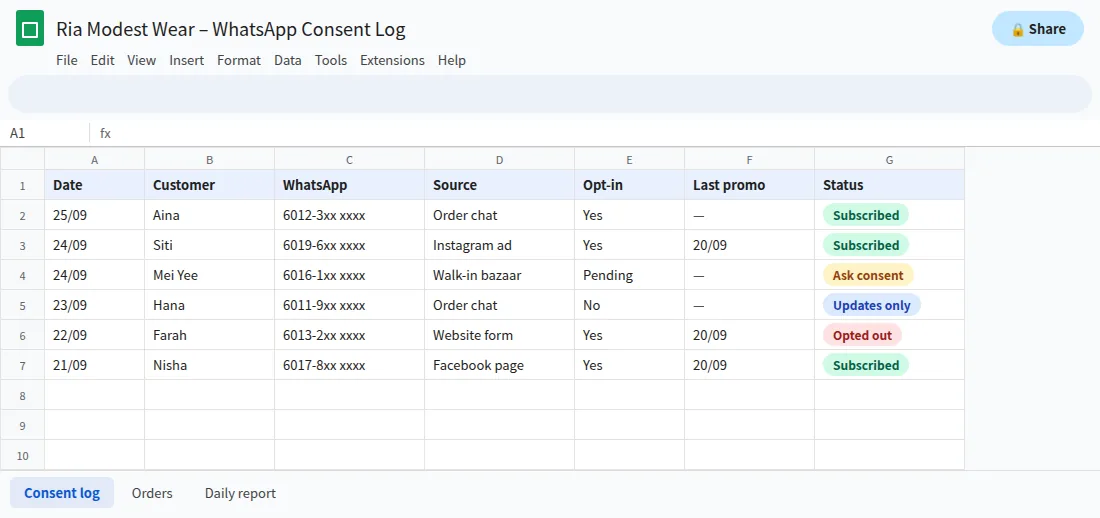
A simple log helps. ChatsHero can record each reply in Google Sheets, and your team marks the source, opt-in and opt-out for each contact before the next promotion goes out:
Does using the official WhatsApp API stop my number from being banned?
It lowers the risk but does not remove it. The official API follows WhatsApp’s rules by design: approved templates, messaging limits that grow with good behaviour, and clear quality signals. Unofficial blasting tools do none of that, which puts numbers that use them at much higher risk.
But the API still enforces the same policies. Spam to people who never opted in will get restricted on the API too. Since Meta also charges for messages you send on the API, sending only messages customers actually want protects your budget as well as your number.
ChatsHero runs on the official WhatsApp Business API, replies to customers 24/7 in English, Bahasa Melayu and Chinese, and hands over to your team when a person is needed. See our plans and pricing or learn more about ChatsHero.
Want to see how this looks with your own business? WhatsApp us and chat with the ChatsHero AI.
Should I just get a new number if my WhatsApp number is banned?
Do not create a new number to bypass a restriction. If a ban is upheld, ask WhatsApp or Meta support what future use is permitted. Changing numbers also loses your customers’ saved contact route, and does not fix the underlying cause.
If support confirms you may restart, first remove unauthorised tools, document consent, honour opt-outs and fix the restriction cause. Only resume sending within the applicable rules.
Frequently Asked Questions
Why was my WhatsApp number banned without warning?
WhatsApp usually acts on patterns rather than single messages: unofficial apps or blasting tools, messaging people without opt-in, or many blocks and reports. It does not always explain the exact reason.
How long does a WhatsApp ban review take?
Review times vary by account, restriction and queue. Follow the status in WhatsApp or Business Support Home instead of treating a 24-48 hour estimate as guaranteed.
Can a permanently banned WhatsApp number be recovered?
Sometimes, if the review finds the ban was a mistake. If it is upheld, the number usually cannot be used on WhatsApp again, and WhatsApp may bar the business from future use.
Does the WhatsApp Business API prevent bans?
It lowers the risk compared with unofficial tools, but it cannot prevent bans. The same opt-in and anti-spam rules apply, and poor quality ratings still lead to restrictions.
Is it safe to use GB WhatsApp or other modified apps for business?
No. Modified apps break WhatsApp’s terms and are a common cause of temporary and permanent bans. Use the official app or the official API.
Do I need customer consent to send WhatsApp promotions in Malaysia?
Yes. WhatsApp’s policy requires opt-in, and Malaysia’s Personal Data Protection Act 2010 expects a clear purpose and lets customers stop direct marketing.