To run WhatsApp with multiple agents on one number, move from a shared phone to the official WhatsApp Business API, let an AI reply first, then auto-assign each lead to one salesperson by a clear rule — area, product or turn. The owner gets a WhatsApp alert, the lead is recorded in Google Sheets, and nobody double-replies.
Examples show a proposed workflow, not a guarantee that every account or plan supports it. Ask our team to confirm the channel, integration, permissions and delivery method for your setup. Staff-group notifications and group assistants require separate eligibility and integration checks; a standard one-to-one WhatsApp API account should not be assumed to access every existing staff group. Use approved individual notifications or a staff dashboard if group delivery is unavailable. Test the workflow and human handover before use.
- One shared phone or a few linked devices works for tiny teams, but ownership quickly becomes unclear.
- The official WhatsApp Business API lets a platform serve many agents from one business number.
- Every lead should have exactly one owner — set by a rule, not by whoever grabs it first.
- Common rules: by area, by product, by language, or in turn (round-robin).
- An AI can reply and qualify first, so salespeople receive warm leads with the details already collected.
- Record the owner of every lead in Google Sheets and review a daily report in your team’s WhatsApp group.
Why does one WhatsApp number with many salespeople get messy?
When everyone can reply, nobody is sure who should.
A growing business usually starts with one WhatsApp number printed on the banner, the Facebook page and the company van. That is good for customers — one number to remember. But once three or four salespeople share it, familiar problems appear:
- Double replies. Two salespeople answer the same customer with different prices.
- No replies. Everyone assumes someone else has handled the chat.
- Fights over ownership. Who gets the commission when a customer first talked to Daniel but paid through Siti?
- Lost history. When a salesperson is on leave, nobody knows what was promised.
- Personal numbers. Staff move customers to their own WhatsApp, and when they resign, the customers leave with them.
The fix is not more phones. It is a clear rule for who owns each lead, and a system that applies the rule automatically.
Can multiple agents use one WhatsApp number?
Yes, in two main ways, and they suit different team sizes.
| Option | How many people | Lead ownership | Best for |
|---|---|---|---|
| WhatsApp Business app + linked devices | A handful (one main phone plus a few linked devices) | Not built in — everyone sees every chat | Owner plus 1–2 staff |
| Official WhatsApp Business API via a platform | Many agents on one number | Assignment, alerts and records handled by the platform | Sales teams, several branches |
| Separate numbers per salesperson | Unlimited | Clear, but customers must know which number | Rarely ideal — breaks the one-number brand |
WhatsApp’s help centre explains that the Business app can be used on a limited number of linked devices. That is fine for a small shop, but every device sees every chat, so the double-reply and no-reply problems remain.
The WhatsApp Business Platform (the official API) is designed for businesses that message customers at scale and connect WhatsApp to systems such as CRMs. A platform like ChatsHero sits on top of it, so your whole team can work from one business number with clear ownership.
How does auto-assigning WhatsApp leads work?
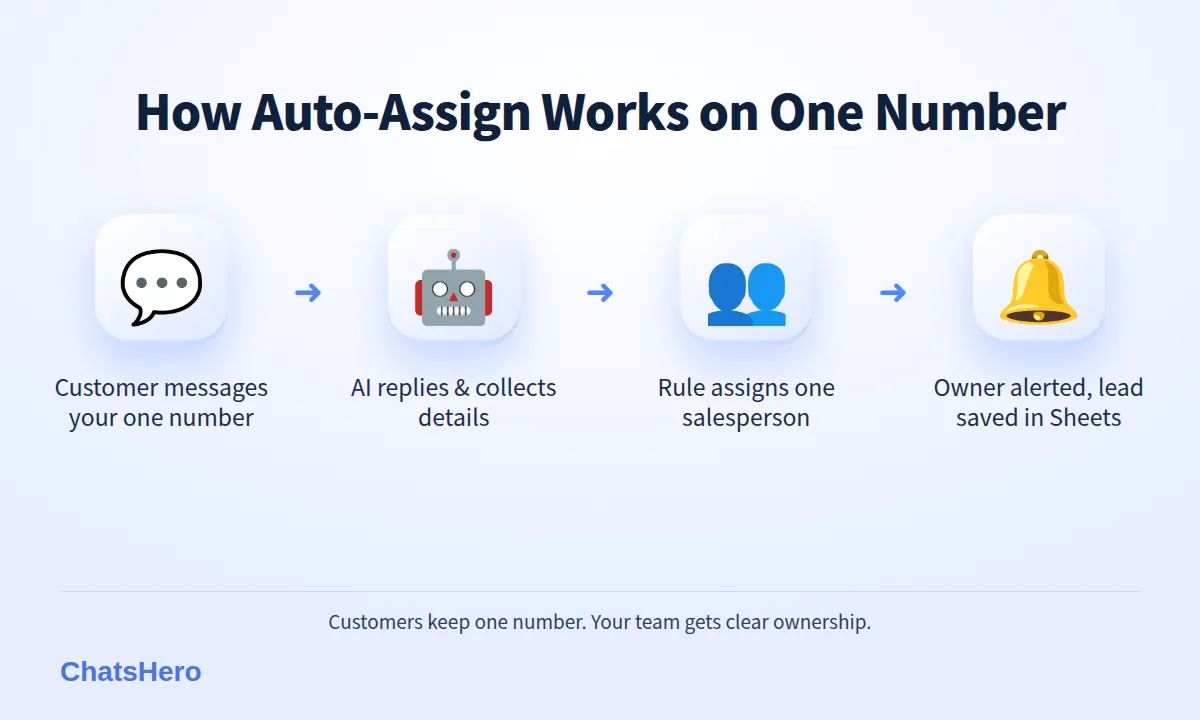
AI replies → AI qualifies → Rule picks an owner → Owner is alerted
Here is the flow we set up for sales teams that share one number:
- The AI replies first, 24/7. The customer gets an instant answer in English, Bahasa Melayu or Chinese, even at night.
- The AI collects the key details. For a solar installer: area, house type and average monthly electricity bill. For a car accessories shop: car model and the product wanted.
- A rule assigns the lead to one salesperson. For example, customers in Nilai go to Daniel and customers in Seremban go to Siti.
- The owner is alerted on WhatsApp with the customer’s details, so they can continue the conversation with full context.
- The lead and its owner are recorded in Google Sheets, so the manager can see who is handling what.
Because the AI qualifies first, salespeople no longer spend their evenings answering “how much?” from people who are just browsing. They receive leads that already have the information needed for a quotation.
Which rule should you use to assign leads to salespeople?
Pick the rule that matches how your team actually sells. Mixing too many rules creates confusion.
- By areaBest when salespeople do site visits — e.g. Seremban, Nilai, Port Dickson.
- By productBest when products need specialists — e.g. residential vs commercial.
- In turnRound-robin shares leads fairly when everyone sells the same thing.
Some teams also assign by language, so a Chinese-speaking customer goes to a salesperson who is comfortable in Mandarin. Whatever you choose, write the rule down and share it with the team before you switch it on. When people agree on the rule in advance, arguments about who owns a customer mostly disappear.
One lead, one owner, one rule. Clear ownership is what turns a busy shared number into a working sales team.
What does an auto-assigned WhatsApp conversation look like?
Below is an example from a fictional solar installer in Seremban, SunPeak Solar, which has three consultants covering different parts of Negeri Sembilan. The customer messages the company’s single number in the evening; the AI qualifies the lead and hands it to the right consultant.
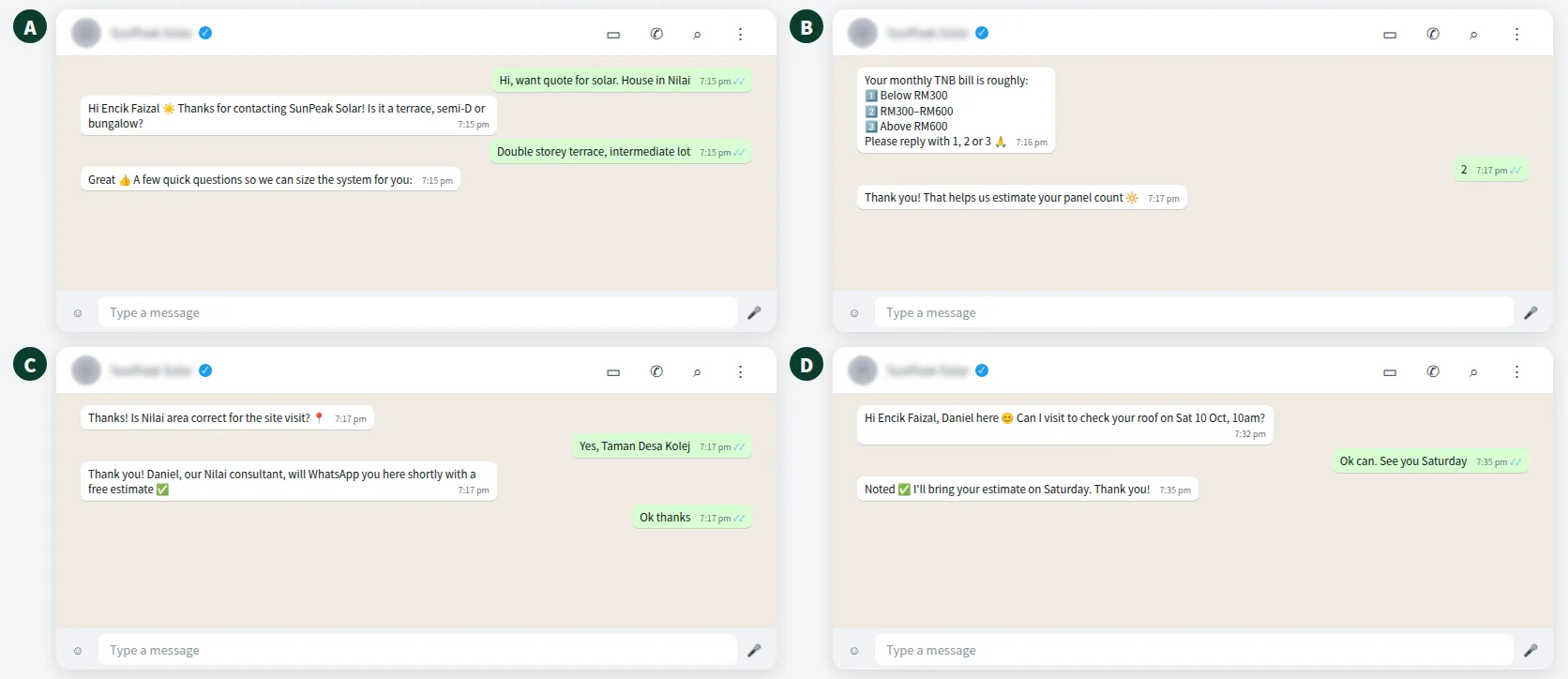
From the customer’s side, it feels like one smooth conversation with one company. Behind the scenes, the lead has been assigned, recorded and announced to the right person. The customer never has to repeat their details.
Want to see how this looks with your own business? WhatsApp us and chat with the ChatsHero AI.
How do you make sure assigned leads are actually followed up?
Assigning a lead is only half the job. Speed still decides who wins: in an audit of 2,241 US companies published in Harvard Business Review, firms that responded within an hour were nearly seven times as likely to qualify the lead as firms that responded later. Three habits keep your team fast:
- A “Human Agent Needed” alert in a WhatsApp group. When the AI needs a person — a custom quote, a discount request, a complaint — ChatsHero posts an alert in your team group, so the owner and the manager both see it.
- An Owner and Status column in Google Sheets. Every lead shows who owns it and where it stands.
- A daily report to the team’s WhatsApp group. It shows new leads, assigned leads and leads still waiting, so nothing is quietly forgotten.
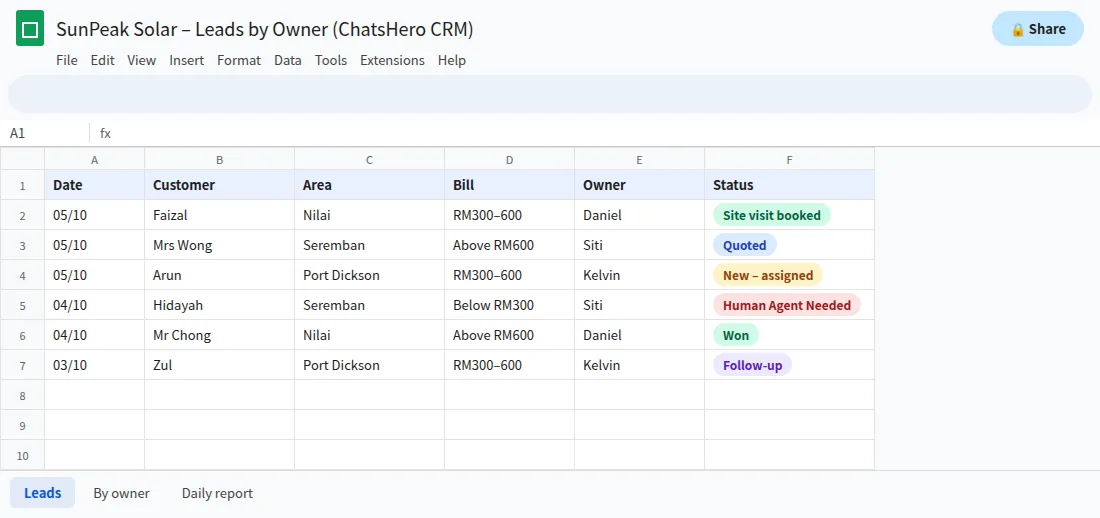
Managers can then coach with facts: which consultant has the most leads waiting, and which area produces the most won jobs.
What happens when a salesperson is on leave or resigns?
This is where one company number really pays off. Because customers message the business number, not a personal one, the conversation history stays with the company. If Daniel is on leave, you change the rule so Nilai leads go to Siti for the week. If Daniel resigns, his open leads in the sheet are reassigned, and the next salesperson can read the whole chat before replying.
Compare that with staff using personal WhatsApp numbers: when they leave, the customer list, the promises and often the relationships leave too. It also makes it harder to protect customers’ personal data properly under Malaysia’s Personal Data Protection Act.
Which ChatsHero plan suits a sales team?
For a sales team, the deciding factor is usually how many separate bots and flows you need. One bot that qualifies and assigns leads for a single product line fits the Starter plan (from RM350/month on annual billing). If each branch or product line needs its own bot and its own assign rule, the Growth plan (the one we recommend for teams) includes unlimited bots at RM650/month on annual billing; full details are on our pricing page. Either way, the setup is the same: one business number, one owner per lead, one sheet the manager can trust.
Before switching on auto-assign, sit down with your salespeople for fifteen minutes, agree the rule, and decide who covers whom during leave. That conversation prevents more disputes than any software. If you’d like to know who we are before that chat, the About page explains how ChatsHero works with Malaysian teams.
Frequently Asked Questions
Can WhatsApp have multiple agents on one number?
Yes. The WhatsApp Business app allows a few linked devices, which suits very small teams. For a real sales team, the official WhatsApp Business API through a platform such as ChatsHero lets many agents work from one number with clear lead ownership.
How do I stop two salespeople replying to the same customer?
Assign every lead to exactly one owner using a clear rule, such as area, product or turn. The owner is alerted, and the assignment is recorded in Google Sheets for everyone to see.
What is round-robin lead assignment?
Round-robin gives new leads to salespeople in turn, so everyone gets a fair share. It works best when all salespeople sell the same products in the same area.
Does the customer see which agent is replying?
The customer always chats with your one business number. A salesperson can introduce themselves by name when they take over, so the conversation still feels personal.
What happens to the chats when a salesperson leaves?
Because customers message the company number, the conversation history stays with the business. You reassign the salesperson’s open leads to a colleague, who can read the full chat before replying.
Do I need the WhatsApp Business API to auto-assign leads?
In practice, yes. The free Business app shows every chat on every linked device and has no built-in lead ownership. The official API, used by platforms like ChatsHero, supports automated replies, assignment and alerts.