There are three WhatsApp message template categories: marketing (promotions and offers), utility (updates about something the customer already did, like an order or booking) and authentication (one-time passcodes). Meta checks every template, charges by category — in Malaysia illustratively RM0.35 for marketing and RM0.06 for utility or authentication — and will move a “utility” template into marketing if it contains promotional content.
RM0.35 and RM0.06 in this article and its supplied illustrations are planning assumptions, not verified current Meta quotations. Gupshup's October announcement describes 1,000 free service replies per business phone number per month, then eligible service charges from 1 October 2026. Utility templates do not use that allowance. Inbound messages and qualifying 72-hour free entry point messages remain exempt. Confirm the recipient market, applicable rate card, free allowance and provider fees before budgeting. Figures below exclude tax and any unlisted costs.
Examples show a proposed workflow, not a guarantee that every account or plan supports it. Ask our team to confirm the channel, integration, permissions and delivery method for your setup. Staff-group notifications and group assistants require separate eligibility and integration checks; a standard one-to-one WhatsApp API account should not be assumed to access every existing staff group. Use approved individual notifications or a staff dashboard if group delivery is unavailable. Test the workflow and human handover before use.
- You need an approved template to message a customer outside the 24-hour customer service window.
- Marketing templates promote; utility templates update a customer about their own order, booking or account; authentication templates only send one-time passcodes.
- Since April 2025, Meta approves a utility template that contains promotional content as marketing instead.
- In Malaysia, marketing is illustrated here at RM0.35 and utility or authentication illustratively RM0.06 per message, billed by Meta to your own WhatsApp account.
- From 1 October 2026, utility templates and eligible service replies above the monthly 1,000-message allowance per phone number inside the customer-service window are also charged.
- Keep reminders and promotions in separate templates — it keeps costs down and your quality rating healthy.
What are WhatsApp message template categories?
A template is a pre-approved message you are allowed to send first.
On the official WhatsApp Business API, you can reply freely for 24 hours after a customer messages you. This is the customer service window. To start a conversation outside that window — a reminder next week, an order update, a promotion — you must use a message template that Meta has reviewed.
Every template belongs to one of three WhatsApp message template categories:
- MarketingPromotions, offers, launches, re-engagement and anything meant to sell.
- UtilityUpdates about something the customer already did: an order, booking, payment or account.
- AuthenticationOne-time passcodes that confirm a customer’s identity when they log in or verify.
Normal replies inside the 24-hour window are not templates. Meta calls them service messages. The category matters because it sets the price, the approval rules and how strictly Meta watches the content. Meta’s own template categorisation guidelines are the final word, and they are updated from time to time.
What is a WhatsApp marketing template?
Meta describes marketing templates as messages that help businesses reach goals “from generating awareness to driving sales and retargeting customers”. In practice, if a message tries to get the customer to buy, return or try something, it is marketing.
Typical marketing templates for a Malaysian SME:
- A new product launch or seasonal menu.
- Discounts, vouchers, “last few slots” or flash sales.
- “We miss you” messages to past customers.
- Invitations to events, open days or live sales.
A WhatsApp marketing template costs the most — roughly RM0.35 per delivered message in Malaysia — and it is the type of message that draws blocks and reports when it feels like spam. Meta may also hold back marketing messages to a person who has recently received many marketing messages from businesses. Only send marketing templates to customers who agreed to receive them, as required by Malaysia’s Personal Data Protection Act and Meta’s own opt-in rules.
What counts as a WhatsApp utility template?
A WhatsApp utility template must meet two conditions in Meta’s guidelines: it has no promotional intent, and it is either specific to the customer (their order, booking, payment or account) or essential to their safety.
Good examples:
- Order confirmation, “ready for pickup” or delivery updates.
- Appointment and booking reminders.
- Payment receipts and outstanding-payment notices for an existing purchase.
- Changes to a booking the customer made, such as a new time or venue.
Utility messages are illustrated here at RM0.06 each in Malaysia. Until 30 September 2026, a utility template sent while the customer service window is open is free. From 1 October 2026, Meta charges those too, along with eligible service replies above the monthly 1,000-message allowance per phone number inside the customer-service window, as summarised in this announcement of the pricing change.
One promotional line turns utility into marketing. “Your cake is ready — and enjoy 10% off your next order!” is a marketing message, and Meta will categorise and charge it that way.
When should I use a WhatsApp authentication template?
Only for one-time passcodes. Meta calls authentication the most restrictive category: the wording comes from a fixed format provided by Meta, and your business mainly supplies the code and a few settings such as how long it stays valid. You cannot add links, promotions or extra content.
A shop or service business without a login system does not need a WhatsApp authentication template. It matters if you run a member app, an online portal or a loyalty system where customers log in and verify their number. If you are using a marketing or utility template to send passcodes, Meta may reject it — use the proper category instead.
Quick comparison of the three categories
| Category | Purpose | Example | Approx. Meta fee (Malaysia) |
|---|---|---|---|
| Marketing | Promote, sell, re-engage | “New durian crepe this weekend!” | ≈ RM0.35 |
| Utility | Update on the customer’s own transaction | “Order #SP1043 is ready for pickup” | ≈ RM0.06 |
| Authentication | One-time passcode | “Your code is 482915” | ≈ RM0.06 |
| Service (not a template) | Replies inside the 24-hour window | “Yes, we open until 7pm” | Free until 30 Sep 2026; 1,000 service replies per phone number/month free, then eligible charges from 1 Oct 2026 |
Fees are approximate, set by Meta, and can change. Always check Meta’s current pricing.
What happens if Meta puts my template in a different category?
It can come as a surprise: you submit a template as utility, and it comes back as marketing. Here is how the rules work according to Meta’s guidelines:
- At submission: since 9 April 2025, a template submitted as utility that contains marketing content is simply approved as marketing.
- After approval: Meta regularly reviews approved templates. If a utility template is found to be marketing, you usually get 24 hours’ notice before the category changes. Repeat offenders may not get that notice.
- Passcodes in the wrong category: marketing or utility templates used for authentication can be rejected.
- Appeals: you can ask for a review through Meta Business Support within 60 days of the decision.
A category change is not a punishment, but it changes your cost — from an assumed RM0.06 to an assumed RM0.35 per message. If a reminder you send to 2,000 customers a month is recategorised, that is the difference between 2,000 × RM0.06 = RM120 and 2,000 × RM0.35 = RM700 in Meta fees a month (example figures, rounded rates). That is why WhatsApp template approval starts with honest wording, not clever wording.
How do I write templates that get approved in the right category?
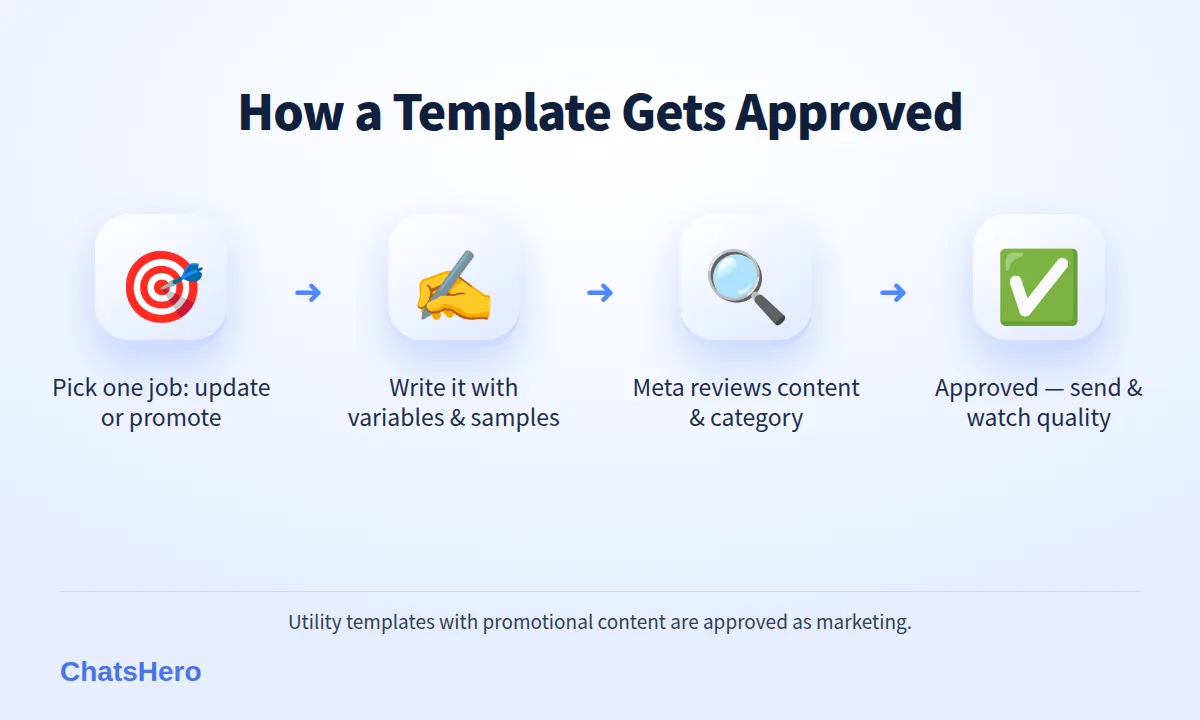
Here is a simple process that keeps each template in its lane:
- Decide the job of the message first. Is it updating the customer on something they did (utility), or trying to sell (marketing)? One template, one job.
- Write it as a plain, specific message. Use variables for personal details, for example: “Hi {{1}}, your order {{2}} is ready for pickup from {{3}}.”
- Give realistic sample values. Meta reviews the sample, so use a real-looking name, order number and time.
- Remove anything promotional from utility templates. No discounts, “check out our new…”, or links to your catalogue.
- Add an opt-out line to marketing templates. For example, “Reply STOP to stop receiving promotions.”
- Submit, then watch the category and quality. If Meta changes the category, fix the wording rather than fighting the decision.
Create each template in the languages your customers use. Having Bahasa Melayu and Chinese versions of the same reminder lets each customer read it in the language they chat in.
How do templates and AI replies work together?
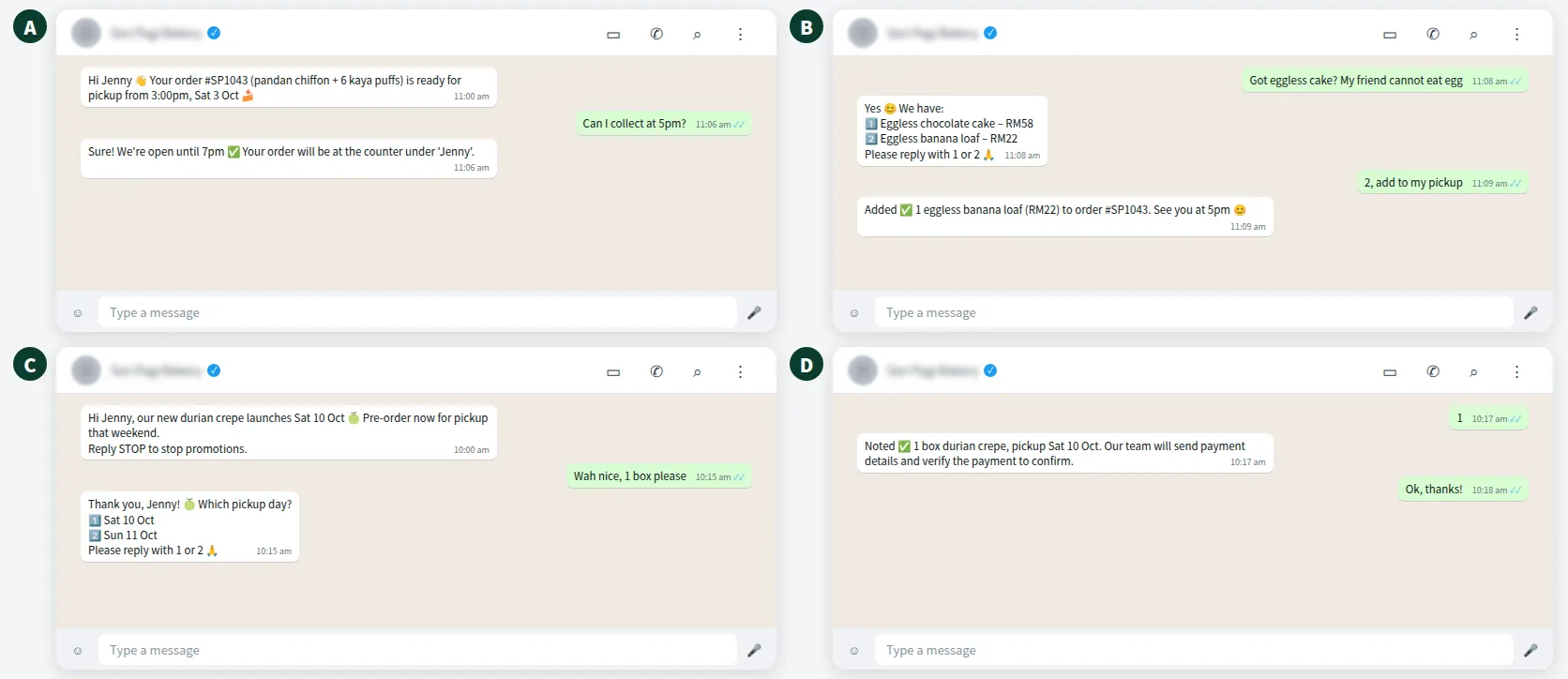
Templates open the conversation; the AI handles what comes next. When a customer replies to a template, the 24-hour window opens and the AI can answer questions, take changes and record the result. Here is an illustrative example for a fictional bakery in Kuching:
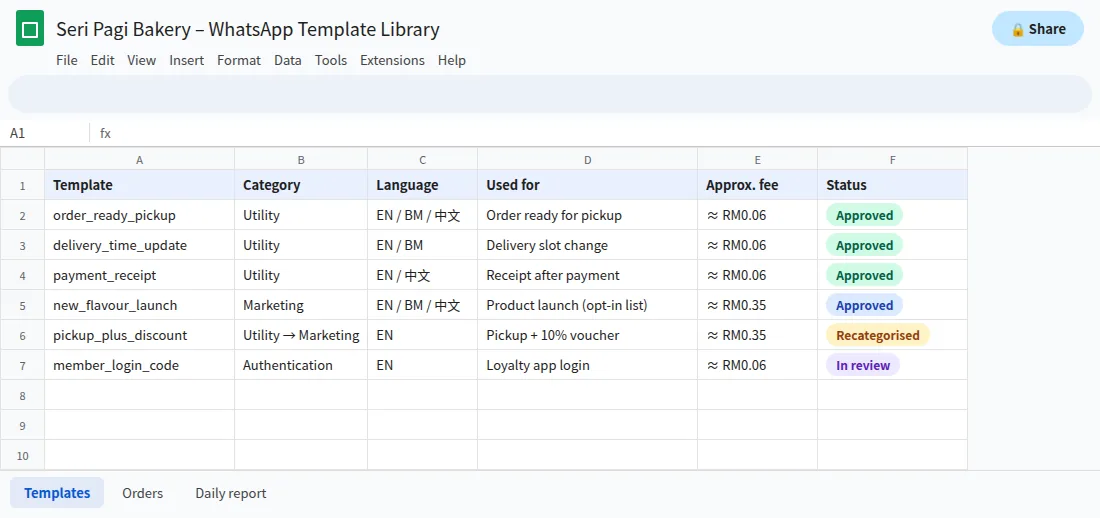
Behind the scenes, keep a simple template library so your team knows which message to use for which job — and what it costs:
ChatsHero also records every confirmed order and follow-up in Google Sheets, and sends a daily report to your team’s WhatsApp group. See our plans and pricing.
Want to see how this looks with your own business? WhatsApp us and chat with the ChatsHero AI.
Which template category should each message use?
A quick rule of thumb for Malaysian SMEs:
- Booking reminder, order update, receipt, delivery time → utility.
- Promotion, new product, festive offer, “come back” message → marketing.
- Login or verification code → authentication.
- Answer to a question the customer just asked → a normal reply inside the 24-hour window, no template needed.
Getting the WhatsApp message template categories right keeps your costs predictable and your number healthy. Customers who get useful, expected updates have little reason to block you — and a good quality rating makes it easier to grow your sending limits later.
ChatsHero runs on the official WhatsApp Business API and replies 24/7 in English, Bahasa Melayu and Chinese. If you are unsure how a draft will be categorised, send it to our team for a second look before you submit it; more WhatsApp API guides are on our blog.
Frequently Asked Questions
What are the WhatsApp message template categories?
There are three: marketing (promotions and offers), utility (updates about a customer’s own order, booking, payment or account) and authentication (one-time passcodes). Replies inside the 24-hour customer service window are not templates.
Why did Meta change my utility template to marketing?
Usually because it contains promotional content, such as a discount, a product suggestion or a link to your catalogue. Since April 2025, such templates are approved as marketing. Remove the promotional part and submit a separate utility version.
How much does each template category cost in Malaysia?
Roughly RM0.35 per marketing message and RM0.06 per utility or authentication message, billed by Meta to your own WhatsApp Business account. From 1 October 2026, utility templates and eligible service replies above the monthly 1,000-message allowance per phone number inside the customer-service window are also charged. Rates can change, so check Meta’s pricing page.
Can I appeal a template category decision?
Yes. Meta allows businesses to request a review through Meta Business Support within 60 days. If the review is approved, the change is reversed.
Do I need a template to reply to a customer?
Not if the customer messaged you in the last 24 hours. Inside that window you can reply normally. You need a template to message them after the window closes.
How long does WhatsApp template approval take?
Many templates are reviewed quickly, often within minutes, but some take longer. Plan ahead for festive campaigns and submit templates a few days before you need them.