A WhatsApp invoice flow lets a salesperson type one line (customer, items, quantity and price) and, after a quick confirm, get a sales invoice created in AutoCount, SQL Account or Bukku. Nobody retypes order slips at the office. Setup depends on your accounting software, and your accounts team still reviews, sends and collects as usual.
RM0.35 and RM0.06 in this article and its supplied illustrations are planning assumptions, not verified current Meta quotations. Gupshup's October announcement describes 1,000 free service replies per business phone number per month, then eligible service charges from 1 October 2026. Utility templates do not use that allowance. Inbound messages and qualifying 72-hour free entry point messages remain exempt. Confirm the recipient market, applicable rate card, free allowance and provider fees before budgeting. Figures below exclude tax and any unlisted costs.
Examples show a proposed workflow, not a guarantee that every account or plan supports it. Ask our team to confirm the channel, integration, permissions and delivery method for your setup. Staff-group notifications and group assistants require separate eligibility and integration checks; a standard one-to-one WhatsApp API account should not be assumed to access every existing staff group. Use approved individual notifications or a staff dashboard if group delivery is unavailable. Test the workflow and human handover before use.
- One WhatsApp line such as "inv Hup Seng 8 ctn soya @18" can become a sales invoice in AutoCount, SQL Account or Bukku.
- The AI always shows a draft with totals first; the salesperson replies 1 to create or 2 to edit.
- Customer and item names must match the records in your accounting software, so clean master data comes first.
- Setup depends on your accounting software; confirm what your version and plan allow before rolling out.
- Your accounts team keeps control of credit terms, sending the invoice and collecting payment.
- For e-Invoicing, the invoice data sits in your accounting software, which handles MyInvois submission if it supports it.
Why do sales invoices still wait until the salesperson is back at the office?
The order is taken at 10am in the shop. The invoice is keyed in at 6pm. Everything in between is risk.
In many Malaysian trading and distribution businesses, the sales team works on the road: visiting sundry shops, restaurants, hardware stores and workshops. The order is agreed on the spot, written on a slip or sent to the office as a WhatsApp message, and someone in accounts retypes it into AutoCount, SQL Account or Bukku later.
From what SME owners describe to us, that gap causes the same problems again and again:
- Retyping errors. "20 ctn" becomes "2 ctn", or the wrong customer with a similar name is picked.
- Late invoices. Slips pile up until month end, so the invoice date and the delivery date drift apart.
- Lost orders. A WhatsApp message scrolls away in a busy chat and nobody keys it in.
- One bottleneck. If the one person who does data entry is on leave, invoicing stops.
None of this is a salesperson problem or an accounts problem. It is a handover problem, and the handover already happens on WhatsApp. That is why a WhatsApp invoice flow fixes it at the source instead of adding another app.
How does a WhatsApp invoice to AutoCount actually work?
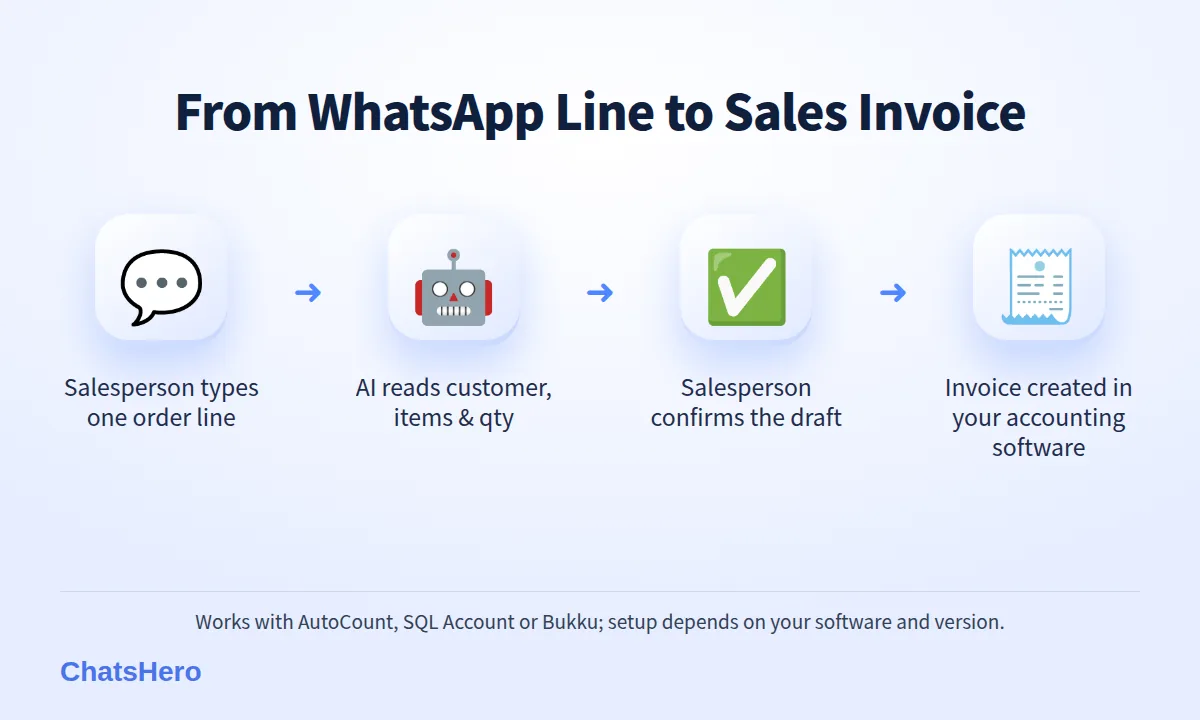
The idea is simple: the salesperson sends one message to your company's WhatsApp number, the AI turns it into a draft, and only after a confirm is the invoice created in your accounting software. Here is the flow we set up with ChatsHero:
- Salesperson types one line. For example: inv Kedai Runcit Hup Seng 20 ctn Mineral 1.5L @13, 10 ctn Teh Botol @24. Mixed English, Malay and short forms are fine.
- AI reads the order. It picks out the customer, each item, quantity and unit price, and matches them to your customer and item records.
- AI shows a draft. The reply lists each line, the total and two options: 1 to create, 2 to edit.
- Salesperson confirms. Only a confirmed draft is sent to AutoCount, SQL Account or Bukku as a sales invoice.
- AI replies when it is done. The salesperson sees that the invoice was created and moves on to the next shop.
If the AI is not sure, it asks instead of guessing. Two customers named "Hup Seng"? It lists both and asks which one. An item it cannot find? It asks the salesperson to check the name. This question-first design is the difference between a helpful WhatsApp invoice assistant and a risky one.
What the conversation looks like
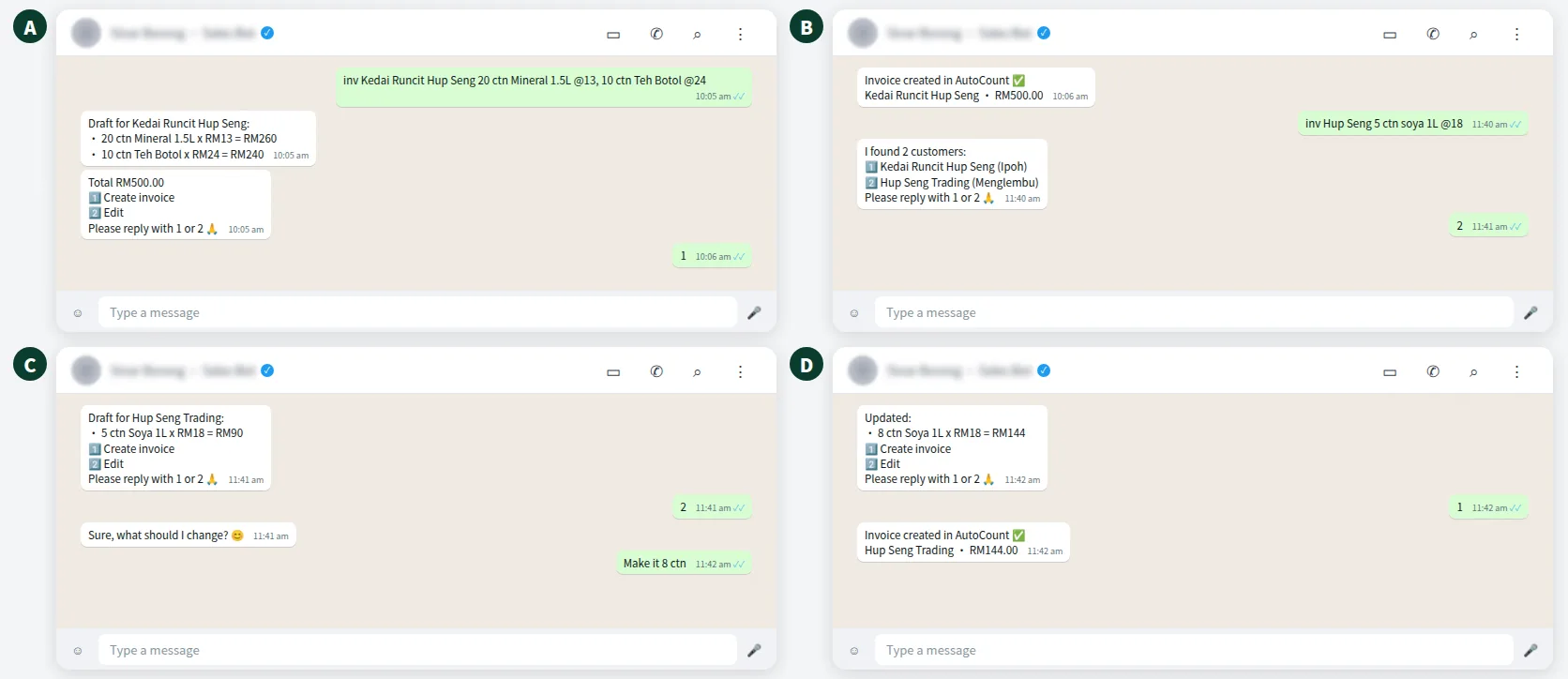
Below is an illustrative example from a fictional beverage wholesaler in Ipoh, Sinar Borong. The salesperson raises one invoice, then fixes a quantity on a second one, all without opening a laptop.
What should one WhatsApp message contain to become an invoice?
The AI is flexible with wording, but it cannot invent information that is not there. A good one-line order has four parts:
| Part of the message | Example | Becomes in the invoice |
|---|---|---|
| Trigger word | inv / invoice | Tells the AI this is an invoice request, not a question |
| Customer | Kedai Runcit Hup Seng | Debtor / customer account |
| Items and quantity | 20 ctn Mineral 1.5L | Item code, UOM and quantity |
| Unit price (if allowed) | @13 | Unit price per line |
Tips for your sales team
- Use the same short names every time ("Hup Seng Trading", not "HS" one day and "Hup Seng Menglembu" the next). You can add nicknames during training so the AI recognises them.
- Put one customer per message. Two customers means two invoices, so send two lines.
- Say the unit clearly: ctn, pkt, btl, kg. Mixing cartons and pieces is the most common cause of a wrong total.
- Check the draft total before replying 1. Five seconds of checking beats a credit note later.
Voice notes can work too when the bot is trained for them, which helps salespeople who are out between customer visits. The draft still needs a typed confirm, so nothing is created from a voice note alone.
WhatsApp invoice to AutoCount, SQL Account or Bukku: what should you check first?
The WhatsApp side is the same for all three: one line, one draft, one confirm. The accounting side is where each business is different, so setup depends on your accounting software, including which version or plan you run and how it accepts new documents. Before we connect anything, we go through a checklist like this with your accounts team:
| What to check | Why it matters | Who decides |
|---|---|---|
| Customer (debtor) list is clean | The AI matches names to existing accounts; duplicates cause wrong picks | Accounts team |
| Item codes and units | "ctn" vs "pcs" must match your item setup | Accounts + sales |
| Price rules | May salespeople type a price, or only quantities? | Owner / sales manager |
| Tax and credit terms | These stay as set in your accounting software | Accounts team |
| Who may raise invoices | Only approved staff numbers should be able to create documents | Owner |
We do not promise that every version or edition of every package works the same way, because they do not. Tell us which software and version you use and we will confirm what is possible before you commit. You can see the ChatsHero plans on our pricing page.
WhatsApp is the input, not the ledger. Your accounting software stays the single source of truth for invoices, payments and statements.
How do you stop wrong invoices, duplicates and misuse?
Speed is only useful if the invoices are right. The controls below are what we recommend for any WhatsApp invoice setup:
- Draft before createEvery request shows the lines and total first; nothing is created until the salesperson replies 1.
- Ask, don't guessUnclear customer or item? The AI lists options and asks, instead of picking one.
- Approved numbers onlyOnly staff numbers you list can raise invoices; anyone else gets a polite reply.
A few more habits help:
- Duplicates. If the same customer and total appear twice within a short time, train the bot to ask "Is this a new order or the same one?" before creating another invoice.
- Edits after create. Changes to an invoice that already exists go to the accounts team, who amend it or issue a credit note in the accounting software as usual.
- Human handover. Special pricing, a new customer or a complaint is handed to a person, and a "Human Agent Needed" alert goes to your team's WhatsApp group.
The AI prepares. Your people approve.
Does a WhatsApp invoice help with e-Invoicing (MyInvois)?
Partly, and it is worth being precise. ChatsHero does not submit anything to LHDN. It passes the invoice data to your accounting software, and your accounting software handles MyInvois submission if it supports it. What the WhatsApp step does is make sure the invoice exists in the system on the same day, with the right customer and lines, which is what any e-Invoice process needs anyway.
Whether you must issue e-Invoices at all depends on your turnover. On 30 August 2026 the Government raised the e-Invoice exemption threshold from RM1 million to RM3 million in annual turnover or revenue, effective 1 September 2026, according to LHDN's media statement. LHDN's e-Invoice FAQ sets out the conditions, and businesses below the threshold may still join voluntarily. Check your own position with your tax agent.
How do you track every WhatsApp invoice request in Google Sheets?
Your accounting software holds the invoices. Next to that, it helps to have a simple log of what was asked on WhatsApp: who sent it, for which customer, and what happened. With ChatsHero, requests and their status are recorded in a Google Sheet that the sales manager and accounts team can both open.
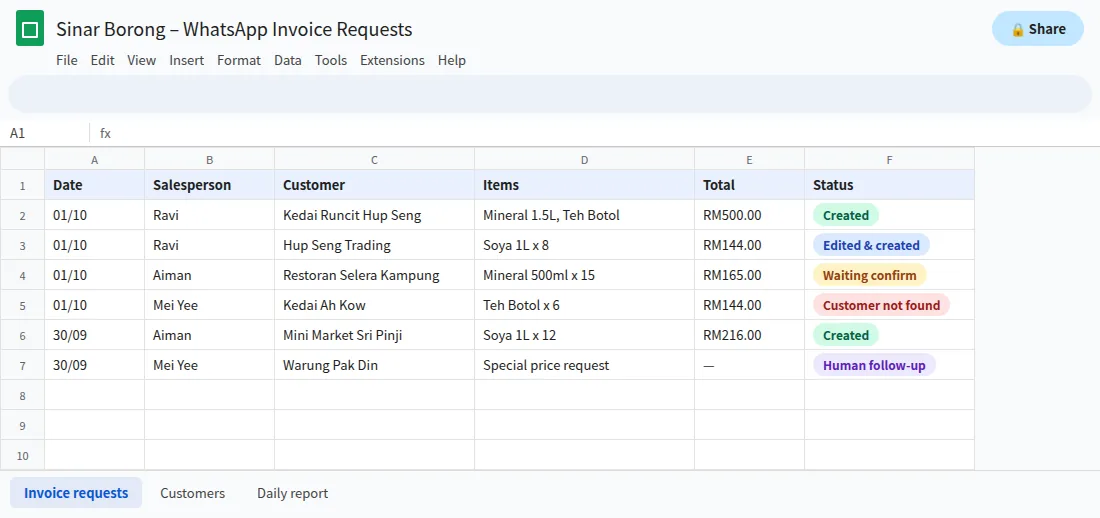
The log answers everyday questions quickly: Which invoices did Ravi raise today? Which requests are still waiting for a confirm? Which customer names keep failing to match (a sign the customer list needs cleaning)? At the end of the day, a short summary can also be sent to your team's WhatsApp group, so nobody has to open the sheet to know where things stand.
How do you set up a WhatsApp invoice flow for your sales team?
- Pick one team and one type of invoice. Start with the sales reps who raise the most standard orders, not every department at once.
- Clean the master data. Merge duplicate customers and check item names and units in AutoCount, SQL Account or Bukku.
- Agree the rules. Who can raise invoices, whether prices can be typed, and what needs a manager.
- Train the bot like you would train ChatGPT. In ChatsHero's Plan and Build modes you paste your rules, a few example messages and your nickname list; the AI builds the flow. No prompt writing.
- Test with real orders for a week. Compare WhatsApp-created invoices with what accounts would have keyed in, then widen the rollout.
One cost to plan for: ChatsHero runs on the official WhatsApp Business API, and Meta charges per message on your own WhatsApp account, separate from your ChatsHero plan. From 1 October 2026, eligible service replies above the monthly 1,000-message allowance per phone number inside the customer-service window are also charged using an illustrative utility-rate assumption, illustratively RM0.06 each in Malaysia (see Meta's pricing page and this summary of the change). As an example, 30 invoice requests a day with 2 bot replies each is 60 replies × RM0.06 = RM3.60 a day. Rates are set by Meta and may change.
Want to see how this looks with your own business? WhatsApp us and chat with the ChatsHero AI.
Want to know more about who we are and how we work with SMEs? Read about ChatsHero, or see other company-wide uses on our blog.
Frequently Asked Questions
Can I create a WhatsApp invoice in AutoCount without opening the software?
Yes. With ChatsHero, a salesperson sends one WhatsApp line with the customer, items, quantity and price, checks the draft the AI replies with, and confirms. The sales invoice is then created in AutoCount. Setup depends on your AutoCount version, so we confirm what is possible first.
Does it also work with SQL Account and Bukku?
The same WhatsApp flow is used for AutoCount, SQL Account and Bukku. How it connects depends on your accounting software, version and plan, so we check your setup before rollout.
What happens if the salesperson makes a mistake?
Nothing is created until the salesperson confirms the draft, so most mistakes are fixed by replying 2 to edit. If an invoice was already created, your accounts team amends it or issues a credit note in the accounting software as usual.
Can customers use this to create their own invoices?
We recommend limiting invoice creation to approved staff numbers. Customers can still order by WhatsApp, and your team or the bot handles the order from there.
Does ChatsHero submit e-Invoices to MyInvois?
No. ChatsHero passes the invoice data to your accounting software. If your software supports MyInvois, it handles the e-Invoice submission. Businesses with annual turnover below RM3 million are exempt from mandatory e-Invoicing from 1 September 2026, subject to LHDN's conditions.
How much does a WhatsApp invoice cost to send?
Your ChatsHero plan covers the platform. Meta's WhatsApp fees are billed separately to your own WhatsApp account; from 1 October 2026 bot eligible service replies above the monthly 1,000-message allowance per phone number inside the customer-service window are illustrated here at RM0.06 each in Malaysia. Rates are set by Meta and may change.