The WhatsApp green tick Malaysian businesses ask about is now a blue checkmark. There are two routes: an Official Business Account (OBA) on the WhatsApp Business API, which needs Meta business verification, two-step verification, an approved display name and at least 30 days on the platform; or a Meta Verified subscription in the WhatsApp Business app, where available. Neither is guaranteed, and a rejected OBA request must wait 30 days.
RM0.35 and RM0.06 in this article and its supplied illustrations are planning assumptions, not verified current Meta quotations. Gupshup's October announcement describes 1,000 free service replies per business phone number per month, then eligible service charges from 1 October 2026. Utility templates do not use that allowance. Inbound messages and qualifying 72-hour free entry point messages remain exempt. Confirm the recipient market, applicable rate card, free allowance and provider fees before budgeting. Figures below exclude tax and any unlisted costs.
- WhatsApp’s verified badge is now a blue checkmark; “green tick” is the old name people still search for.
- API users request an Official Business Account in WhatsApp Manager; Business app users subscribe to Meta Verified where it is offered.
- OBA basics: verified business portfolio, two-step verification, approved display name, 30+ days on the platform and policy compliance.
- Approval is at Meta’s discretion — well-known, often-searched brands are more likely to get it.
- If an OBA request is rejected, you must wait 30 days before trying again.
- Without a badge, you can still build trust: consistent name, complete profile, official API and clear payment steps.
Is the WhatsApp green tick still green?
Same idea, new colour: the verified badge on WhatsApp is now a blue checkmark.
For years, verified brands on WhatsApp showed a green tick next to their name. WhatsApp has since moved to a blue checkmark, in line with verified badges on Facebook and Instagram. Meta’s Official Business Account documentation now describes “a blue checkmark beside their name in the contacts view”.
So when owners ask about the WhatsApp green tick Malaysia customers look for, they really mean this blue badge. It tells customers that Meta has checked the business behind the number — useful when scam messages impersonate real brands.
What the badge does not do: it does not raise your messaging limit, lower Meta’s message fees or protect you from bans. Those depend on your quality rating and how you use WhatsApp.
What are the two ways to get a WhatsApp verified badge?
Which route applies depends on how you use WhatsApp today.
| Official Business Account (OBA) | Meta Verified for Business | |
|---|---|---|
| For | WhatsApp Business API (Business Platform) | WhatsApp Business app |
| How to get it | Request in WhatsApp Manager; Meta reviews | Subscribe in the app: Tools → Meta Verified |
| Main requirements | Business verification, two-step verification, approved display name, 30+ days on the platform | Up-to-date business profile; eligibility set by Meta |
| Cost | Normal per-message fees; no separate badge fee listed by Meta | Monthly subscription, price shown in the app |
| Availability | Where the Business Platform is available, including Malaysia | Rolling out by country — check your app |
| Guaranteed? | No — Meta decides | No — Meta decides eligibility |
WhatsApp’s help page on Meta Verified for Business says the feature “may not be available to you yet” and that Meta decides eligibility based on measures such as your business activity and volume of customer conversations. Meta Verified subscribers also get extras such as impersonation protection and priority support, according to WhatsApp Business.
Who qualifies for a WhatsApp Official Business Account?
Meta lists five basic criteria for a WhatsApp Official Business Account. The business must:
- Comply with the WhatsApp Business Messaging Policy.
- Have been registered on the WhatsApp Business Platform for at least 30 days.
- Own the number through a business portfolio that has passed Business Verification.
- Have two-step verification turned on for the number.
- Have an approved display name.
Meeting these is the entry ticket, not a promise. Meta’s Official Business Account documentation describes the badge as being for notable, well-known brands, judged on public evidence such as independent news coverage; paid or promotional content, such as advertorials or directory listings, does not count.
Business verification is not the same as the badge. Verifying your business with Meta is required, and it helps with messaging limits, but verification alone does not earn the blue checkmark — and that is normal.
How do I apply for the verified badge step by step?
For an Official Business Account on the WhatsApp Business API, the process in Malaysia looks like this:
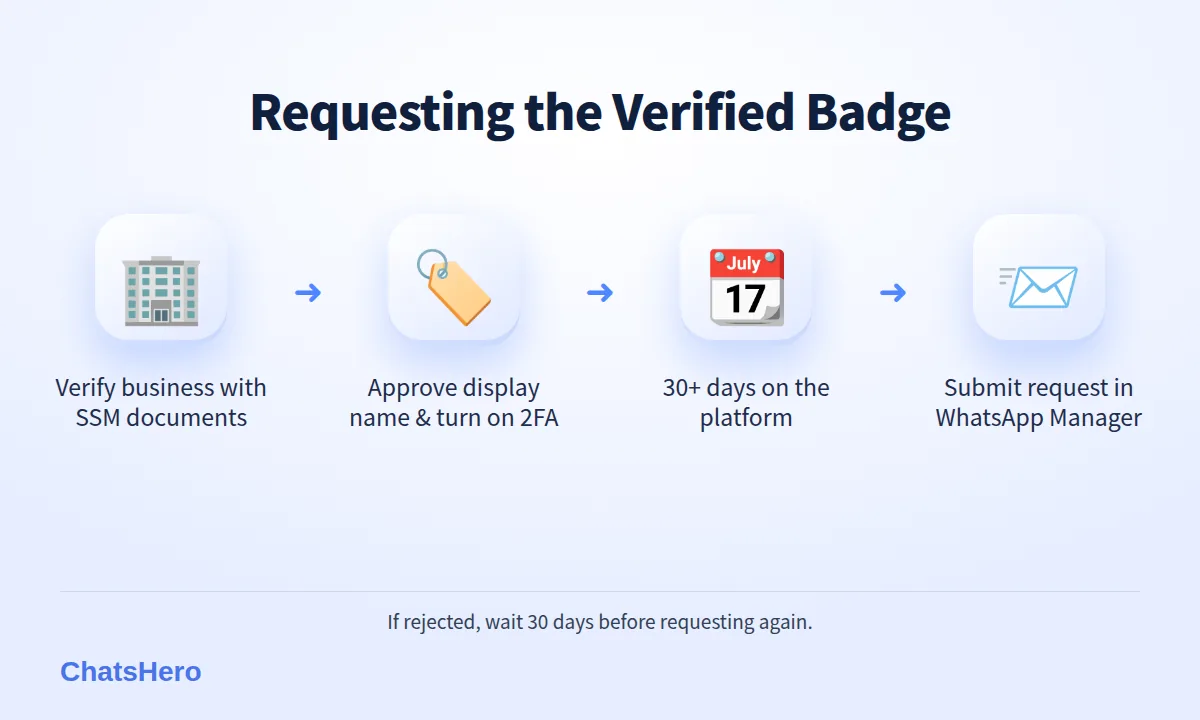
- Verify your business portfolio. In Meta Business settings, submit your legal business name, address and documents such as your SSM registration. Use exactly the name on your documents.
- Get your display name approved. It should clearly match your business or brand name — for example “Nadia Batik House”, not “Best Batik Deals 2026”.
- Turn on two-step verification for the business phone number.
- Use the platform for at least 30 days and keep your quality rating healthy.
- Submit the request in WhatsApp Manager: open the phone number, go to Profile, then Official business account, and click Submit Request.
- If rejected, wait 30 days before submitting again, and strengthen your public presence in the meantime.
Using the WhatsApp Business app instead?
Open the app, tap Tools (or Settings) and look for Meta Verified. If you see it, you can choose a plan and complete verification there. If you don’t, it is not yet offered for your account. Pick the route that matches how your number is set up today.
How much does a WhatsApp blue tick for business cost in Malaysia?
For the OBA route, Meta does not list a separate fee for the badge. You pay the normal WhatsApp Business Platform message fees, billed to your own WhatsApp account — in Malaysia roughly RM0.35 per marketing message and RM0.06 per utility message, with eligible service replies above the monthly 1,000-message allowance per phone number inside the customer-service window also charged from 1 October 2026 (see Meta’s pricing page).
For the Meta Verified route, you pay a monthly subscription. Meta shows the price inside the app, and it can differ by country and plan, so check there rather than trusting a figure from a blog.
Be careful with agents who charge a “guaranteed green tick” fee. Nobody outside Meta can guarantee approval. What a good provider can do is set up the official API correctly, verify your business and help you prepare a clean request. No ChatsHero plan includes a badge fee — see our pricing for what each plan covers.
Do I need the green tick to win customer trust?
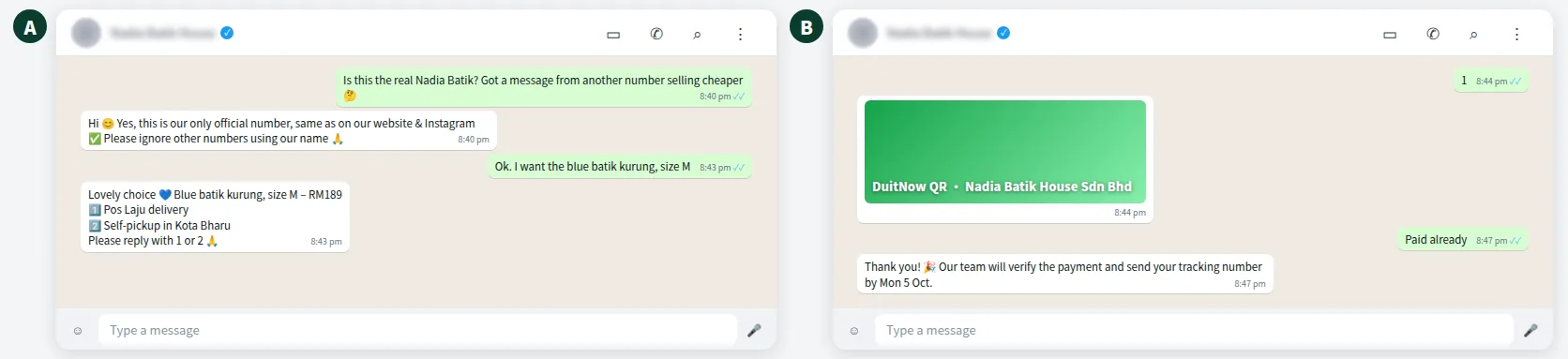
No. The badge is not a requirement to sell on WhatsApp. A nervous customer usually wants to know one thing: “Is this really the shop, or a scammer?” You can answer that without a checkmark:
- Use one official number everywhere: website, Instagram, Google Maps, packaging.
- Complete your WhatsApp business profile with address, hours, website and a clear logo.
- Keep a consistent display name that matches your brand and SSM-registered name.
- Explain your payment rules clearly, and pay only into a company account.
- Reply fast, including at night — a long silence can leave a customer wondering whether the number is real.
Here is how a fictional batik shop in Kota Bharu handles a nervous customer:
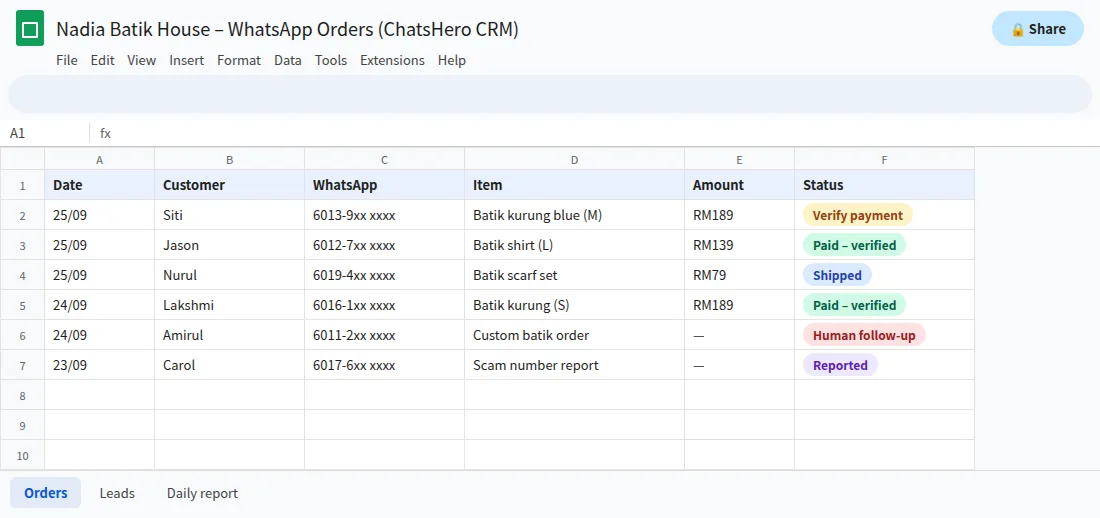
Every order and payment check is logged, so staff can confirm details quickly when a customer asks:
Want to see how this looks with your own business? WhatsApp us and chat with the ChatsHero AI.
Why do verified badge requests get rejected?
Meta does not always explain a rejection in detail. Common reasons to check:
- Business verification incomplete or documents that don’t match the business name.
- Display name mismatch — the WhatsApp name differs from the verified business or brand.
- Not enough public recognition. The brand is real but not widely searched or covered by independent media.
- Policy or quality problems, such as complaints, low quality ratings or restricted products.
- Applying too early, before 30 days on the platform.
After a rejection, fix what you can, keep your number healthy and wait the required 30 days before trying again.
What should a Malaysian SME do first?
Focus on what you control. The badge is a bonus; a trustworthy, well-run WhatsApp number is the foundation.
WhatsApp green tick Malaysia checklist
- Move automation to the official WhatsApp Business API.
- Verify your business with Meta using your SSM documents.
- Get your display name approved and turn on two-step verification.
- Keep your quality rating high: message only customers who opted in.
- Build public recognition, then request the badge when you are ready.
ChatsHero runs on the official WhatsApp Business API and answers customers 24/7 in English, Bahasa Melayu and Chinese from your one official number. If you want help preparing business verification documents, contact our team; more WhatsApp API guides are on our blog.
Frequently Asked Questions
How do I get the WhatsApp green tick in Malaysia?
The green tick is now a blue checkmark. On the WhatsApp Business API, verify your business with Meta, get your display name approved, turn on two-step verification, use the platform for at least 30 days and request an Official Business Account in WhatsApp Manager. On the WhatsApp Business app, look for Meta Verified under Tools.
Is the WhatsApp verified badge green or blue now?
Blue. WhatsApp replaced the old green tick with a blue checkmark, in line with Facebook and Instagram verified badges.
Can a small business get the WhatsApp verified badge?
It is possible but not common through the Official Business Account route, which favours well-known brands. Meta Verified in the WhatsApp Business app may be an option where Meta offers it to your account.
How long do I wait after my request is rejected?
For an Official Business Account, Meta requires you to wait 30 days before submitting another request.
Does the verified badge increase my messaging limit or stop bans?
No. Messaging limits depend on business verification and message quality, and bans depend on following WhatsApp’s policies. The badge only shows customers that Meta has verified the business.
Can anyone guarantee me a WhatsApp green tick?
No. Only Meta decides. Be careful with agents who charge for a guaranteed badge.