A WhatsApp daily sales report is a short summary, such as enquiries, orders, order value and follow-ups due, posted automatically into your team's WhatsApp group at a set time. With ChatsHero, it is built from what the chatbot records in Google Sheets, so nobody compiles figures at 11pm. Owners see the day at a glance; staff see what to chase next.
Examples show a proposed workflow, not a guarantee that every account or plan supports it. Ask our team to confirm the channel, integration, permissions and delivery method for your setup. Staff-group notifications and group assistants require separate eligibility and integration checks; a standard one-to-one WhatsApp API account should not be assumed to access every existing staff group. Use approved individual notifications or a staff dashboard if group delivery is unavailable. Test the workflow and human handover before use.
- A WhatsApp daily sales report lands in your team group at a fixed time, with no staff compiling figures.
- It summarises what is recorded in Google Sheets: enquiries, orders, order value, follow-ups due and human handovers.
- Daily reports drive action today; weekly reports show trends. Most teams need both.
- If your till sales live in a POS, those figures must reach the sheet before the report can include them.
- Keep customer details out of the group: first names and masked numbers are enough.
- A report only helps if someone owns each follow-up it shows.
Why do owners still chase staff for sales numbers every night?
"Today how many orders ah?" is a question a system should answer, not a person.
In many small Malaysian businesses, the daily sales picture lives in three places at once: the WhatsApp chats on the shop phone, a notebook or order slip at the counter, and the owner's memory. At night the owner asks in the staff group, someone scrolls back through the chats, and a rough number comes back an hour later.
That routine has real costs, even if nobody measures them:
- Staff time at the wrong hour. Counting orders after closing is the least productive work of the day.
- Numbers that don't match. Two staff count the same chats and get two different totals.
- Missed follow-ups. The report is about what was sold. The quotes that did not close yet are forgotten.
- Decisions on gut feel. Without a steady daily record, it is hard to see that Tuesdays are slow or that one product is carrying the week.
A WhatsApp daily sales report fixes the routine, not just the maths. The report arrives by itself, in the group everyone already reads.
What should a WhatsApp daily sales report include?
Short beats complete. A report people read every morning is better than a detailed one nobody opens. For a business that sells through WhatsApp, these lines usually matter most:
| Line in the report | Where it comes from | What it tells you |
|---|---|---|
| New enquiries | Chats the AI recorded in Google Sheets | Is demand up or down? |
| Orders confirmed | Orders marked confirmed in the sheet | How much of the demand you converted |
| Order value (RM) | Order amounts in the sheet | The day's sales from WhatsApp orders |
| Quotes waiting | Rows still marked "quoted" | Who needs a follow-up today |
| Human handovers | Chats flagged for a person | Complaints or special requests to check |
Pick three to five lines to start. You can always add more, but every extra line makes the report a little less likely to be read on a phone screen at 9am.
The report is only as good as the record behind it. If an order never reaches the sheet, it will never reach the report.
How does a WhatsApp daily sales report reach your group automatically?
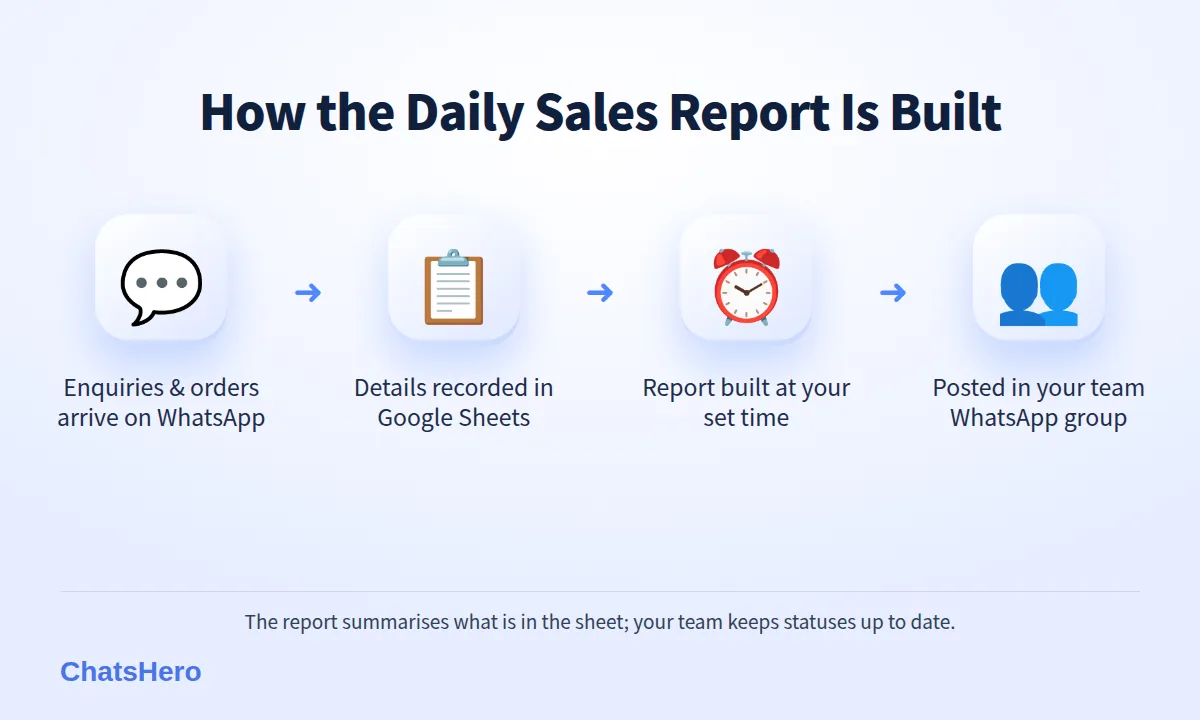
With ChatsHero, reporting is the last step of a chain that starts with the customer's first message. This is how the pieces connect:
- Customers enquire and order on WhatsApp. The AI replies 24/7 in English, Bahasa Melayu and Chinese, and answers the usual price and availability questions.
- Every enquiry and order is recorded. Name, item, amount and status go into your Google Sheet, which works as a simple CRM.
- Your team keeps statuses current. Staff mark payments verified, orders collected or quotes lost, so the sheet reflects reality.
- The report is built at a set time. Daily, weekly or both, from the sheet.
- It is posted into your WhatsApp group. Owner, managers and sales staff see the same numbers at the same time.
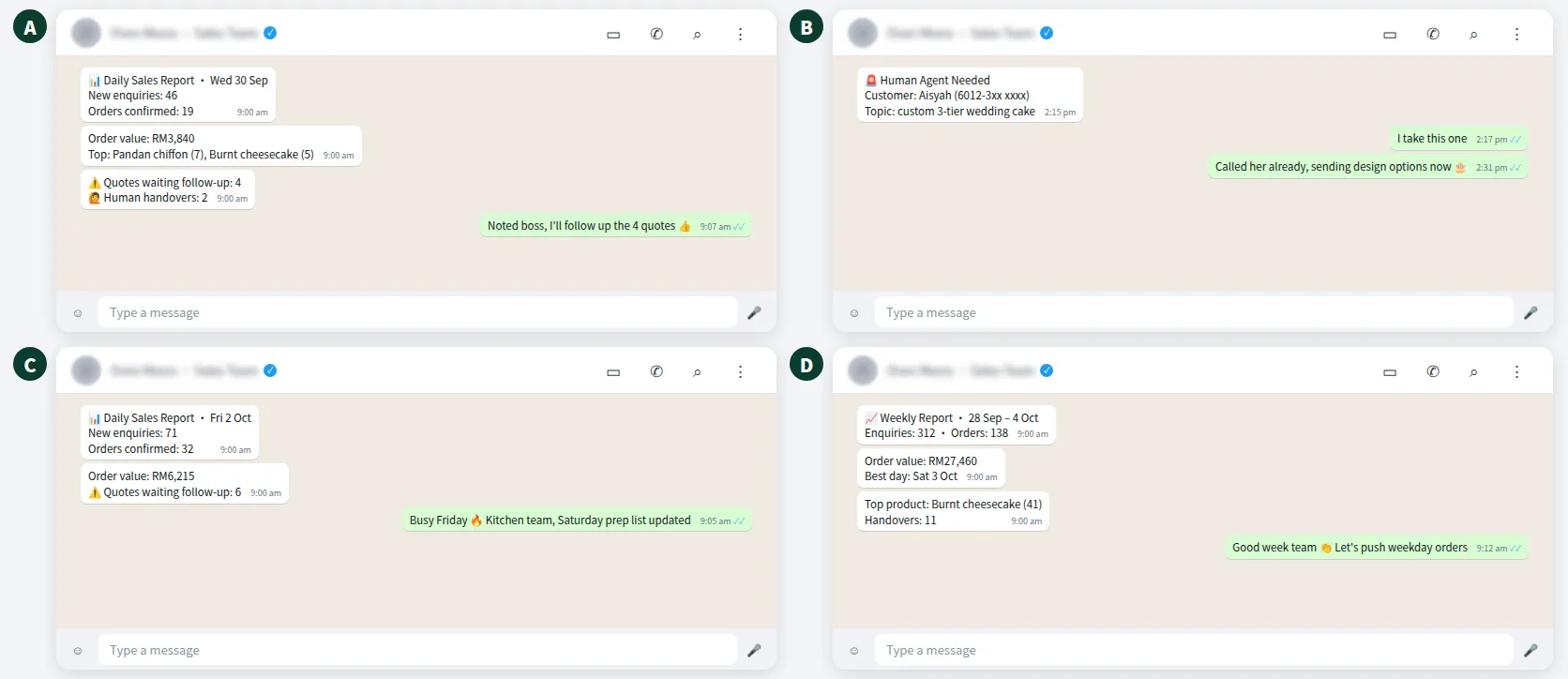
Here is an illustrative week in the team group of a fictional Johor Bahru bakery, Oven Mesra. All figures are examples.
Daily vs weekly sales report on WhatsApp: which should you send?
They answer different questions, so most teams benefit from both. The daily report is a to-do list; the weekly report is a mirror.
| Daily report | Weekly report | |
|---|---|---|
| Best time | Morning, before opening (e.g. 9am) | Monday morning |
| Main question | What must we follow up today? | Are we growing, and where? |
| Typical lines | Enquiries, orders, quotes waiting, handovers | Totals, best day, top products, week-on-week change |
| Who acts on it | Sales and front-line staff | Owner and managers |
| Risk if skipped | Quotes go cold | Slow trends go unnoticed |
If you only start with one, start with the daily report. It creates action the same day, which is when a warm enquiry is still warm.
Where do the numbers come from if you also use a POS?
This is the question to settle before you trust any automatic Google Sheets sales report. ChatsHero's report summarises what is recorded in your sheet: enquiries and orders the chatbot handled, plus the updates your team makes. It does not read your POS or bank account by itself.
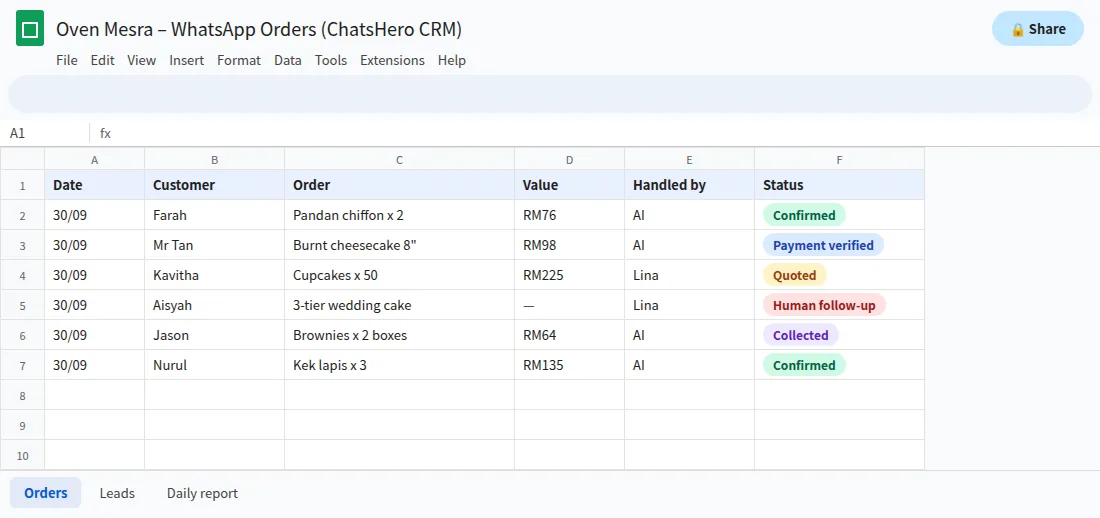
That gives you three practical options:
- WhatsApp-only sellers (home bakers, online shops, service businesses taking bookings by chat): the sheet already holds most sales, so the report is close to complete.
- Mixed shops (walk-in plus WhatsApp): treat the report as your WhatsApp channel report, and label it that way so nobody mistakes it for total sales.
- Teams that want one number: have the closing staff add the day's POS total to the sheet before the report time. Setup depends on your tools, so ask us what fits your shop.
Google Sheets also keeps a version history, so you can see who changed a figure and when if a number ever looks wrong.
Is it safe to share a sales report in a WhatsApp group?
Yes, if you design it with privacy in mind. A sales report is internal, but WhatsApp groups tend to grow: part-timers join, staff leave and forget to exit. Treat the group as a place where anything posted could be seen by the wrong person.
- Totals, not identitiesCounts and RM totals in the group; full customer details stay in the sheet.
- Mask numbersIf a line must name a customer, use a first name and a masked number like 6012-3xx xxxx.
- Tidy membershipReview group members monthly and remove anyone who has left.
Malaysia's Personal Data Protection Act applies to customer data you collect, and the 2024 amendments added duties such as data breach notification. Sharing only what the team needs is the simplest way to stay on the right side of it.
How do you turn the daily report into action, not just information?
A report nobody acts on is just another notification.
The best reports come with a small routine attached. Here is one that works for a small sales team:
- Name an owner for each line. "Quotes waiting" belongs to the sales lead; "Human handovers" belongs to the supervisor on duty.
- Reply in the group. A short "noted, following up the 4 quotes" tells the owner the loop is closed, without a meeting.
- Watch one number weekly. Choose the one that matters most, for example orders confirmed out of enquiries, and look at its direction every Monday.
- Change the bot, not just the staff. If the same question keeps ending in a human handover, add the answer to the AI's training so it is handled next time.
Human handovers also show up in real time: when a chat needs a person, a "Human Agent Needed" alert is posted to the team's WhatsApp group, so urgent cases don't wait for tomorrow's report.
How do you set up a WhatsApp daily sales report for your business?
- Decide the lines. Three to five numbers you would act on, from the table above.
- Check your Google Sheet columns. Status, amount and date must be filled in consistently, by the bot and by your team.
- Pick the group and time. For example, the sales team group at 9am daily and the management group on Monday mornings.
- Agree who updates what. Payments verified, orders collected, quotes lost: someone must mark them, or the report drifts from reality.
- Run it for two weeks, then trim. Remove any line nobody has reacted to.
Report is one of ChatsHero's 5R features, next to Reply, Resolve, Remind and Record; see the pricing page for what each plan includes.
Want to see how this looks with your own business? WhatsApp us and chat with the ChatsHero AI.
Curious how we work with SMEs across Malaysia? Read about ChatsHero or explore more company-wide ideas on the ChatsHero blog.
Frequently Asked Questions
What is a WhatsApp daily sales report?
It is a short summary of the day's enquiries, orders, order value and follow-ups, posted automatically into your team's WhatsApp group at a set time. With ChatsHero it is built from what is recorded in your Google Sheet.
Can I get a weekly report as well?
Yes. You can receive a daily report, a weekly report or both, for example daily at 9am to the sales team and weekly on Monday to management.
Does the report include sales from my POS?
Only if those figures are in the Google Sheet. The report summarises what is recorded there. Many shops have closing staff add the day's POS total to the sheet, or label the report as the WhatsApp channel report.
Can I choose which group receives the report?
Yes. You choose the WhatsApp group and the time during setup, and you can use different groups for daily and weekly reports.
Is it safe to post sales figures in a WhatsApp group?
Keep the report to totals and counts, mask any customer numbers, and review group members regularly. Full customer details should stay in the Google Sheet, in line with Malaysia's Personal Data Protection Act.
Do I need to know Google Sheets formulas?
No. The chatbot records details into the sheet and the report is set up for you. Your team only needs to keep statuses such as payment verified or collected up to date.