WhatsApp coexistence is Meta’s option for connecting a number that already runs on the WhatsApp Business app to the official Cloud API, without deleting the app. You keep your number, contacts and up to six months of chat history, staff can still reply from the phone, and an AI or CRM works through the API on the same conversations.
RM0.35 and RM0.06 in this article and its supplied illustrations are planning assumptions, not verified current Meta quotations. Gupshup's October announcement describes 1,000 free service replies per business phone number per month, then eligible service charges from 1 October 2026. Utility templates do not use that allowance. Inbound messages and qualifying 72-hour free entry point messages remain exempt. Confirm the recipient market, applicable rate card, free allowance and provider fees before budgeting. Figures below exclude tax and any unlisted costs.
Examples show a proposed workflow, not a guarantee that every account or plan supports it. Ask our team to confirm the channel, integration, permissions and delivery method for your setup. Staff-group notifications and group assistants require separate eligibility and integration checks; a standard one-to-one WhatsApp API account should not be assumed to access every existing staff group. Use approved individual notifications or a staff dashboard if group delivery is unavailable. Test the workflow and human handover before use.
- WhatsApp coexistence connects your existing WhatsApp Business app number to the official Cloud API — no new number, no lost chats.
- Meta syncs your contacts and up to six months of 1:1 chat history, and mirrors new messages between the app and the API.
- Some app features change: broadcast lists become read-only, and disappearing messages, view once and live location are turned off in 1:1 chats.
- Messages you type in the app stay free; messages sent through the API follow Meta’s per-message pricing (illustratively RM0.35 marketing, RM0.06 utility in Malaysia).
- Onboarding is done through a Meta partner by scanning a QR code in the WhatsApp Business app (version 2.24.17 or newer).
- Coexistence gives you automation and a real API number, but opt-in and quality rating rules still apply.
What is WhatsApp coexistence?
Coexistence means one number, two doors: the phone app and the API.
Until recently, moving to the official WhatsApp Business API meant a hard choice. Either you kept your number on the free WhatsApp Business app, or you moved it to the API and lost the app — plus, in practice, your old chats. For a business whose customers, chat history and habits all lived in the app, that was a hard trade.
WhatsApp coexistence removes that choice. Meta’s developer documentation describes it as onboarding WhatsApp Business app users to the Cloud API, and notes the feature is “sometimes referred to as Coexistence”. After onboarding:
- Your number stays on the WhatsApp Business app, on the same phone.
- The same number is also connected to the Cloud API, so software such as an AI chatbot or CRM can send and receive messages.
- Messages sent and received are mirrored between the app and the API, so both sides see the same conversation.
In short, the owner can still reply from the phone at the pasar malam, while an AI handles the 11pm questions through the API.
Who should use the WhatsApp Business app and API on the same number?
Coexistence is built for businesses that already have real history on the app and do not want to start again. Typical examples in Malaysia:
- Home and small shops — a bakery, florist or kuih seller whose number is printed on boxes, banners and Google Maps.
- Service businesses — tuition centres, aircond servicing or car detailing, where regular customers have saved the number for years.
- Owner-led teams — where the boss still wants to answer VIP customers personally from the phone.
It is less useful if you are starting fresh with a brand-new number, or if you already run a large contact centre where every agent works in a shared inbox. In those cases, a normal API setup is usually simpler.
Coexistence protects what you already built. Your number, your contacts and your recent chats come with you to the API.
What syncs, and what changes, after you connect?
Here is what Meta’s documentation lists, in plain language. Always check the latest version, because Meta updates these details.
What comes across
- Contacts: all contacts with a WhatsApp number can be synchronised.
- Chat history: 1:1 chats from the most recent six months can be synchronised. The partner must start this within 24 hours of onboarding.
- New messages: mirrored both ways between the app and the API.
What changes in the app
- Broadcast lists are disabled and become read-only — broadcasts move to the API.
- Disappearing messages, view once and live location are turned off for 1:1 chats.
- Group chats are not synced to the API.
- Linked devices are unlinked once; you can re-link supported ones afterwards (Meta lists WhatsApp for Windows and WearOS as not supported).
- Throughput on a coexistence number is fixed at 20 messages per second — plenty for most SMEs.
| Setup | Keep app on phone | Old chat history | AI / automation | Broadcasts |
|---|---|---|---|---|
| Business app only | Yes | Yes | Basic away/greeting messages | Broadcast lists (contacts who saved your number) |
| API only (full migration) | No | Not carried over | Full | Template messages via API |
| WhatsApp coexistence | Yes | Last 6 months synced | Full | Template messages via API; app broadcast lists read-only |
How much does WhatsApp coexistence cost?
There are two separate things to budget for: Meta’s messaging fees and your software plan.
- Messages typed in the app stay free. According to Meta, messages the business sends from the WhatsApp Business app continue to be free.
- Messages sent through the API follow Cloud API pricing. In Malaysia, a marketing template is illustratively RM0.35 and a utility or authentication template illustratively RM0.06 (see Meta’s pricing page).
- From 1 October 2026, eligible service replies above the monthly 1,000-message allowance per phone number inside the customer-service window are charged too. Meta is adding a per-message charge for non-template replies and utility templates sent in the customer-service window (see this summary of the change). Rates vary by country and can change.
These Meta fees are billed to your own WhatsApp Business account. Your ChatsHero plan is a separate cost — compare options on our pricing page.
For example only, 40 API enquiries a day with three service replies each is 3,600 replies over a 30-day month. After the assumed 1,000 free replies on one number, 2,600 eligible replies at an illustrative RM0.06 would be RM156, before exemptions, templates, tax and provider fees. Do not charge all 120 daily replies without applying the monthly allowance. Staff app messages follow the app's separate pricing.
How do you switch to WhatsApp coexistence step by step?
The process is short, but do it on a quiet morning, not on a Saturday before Deepavali orders.
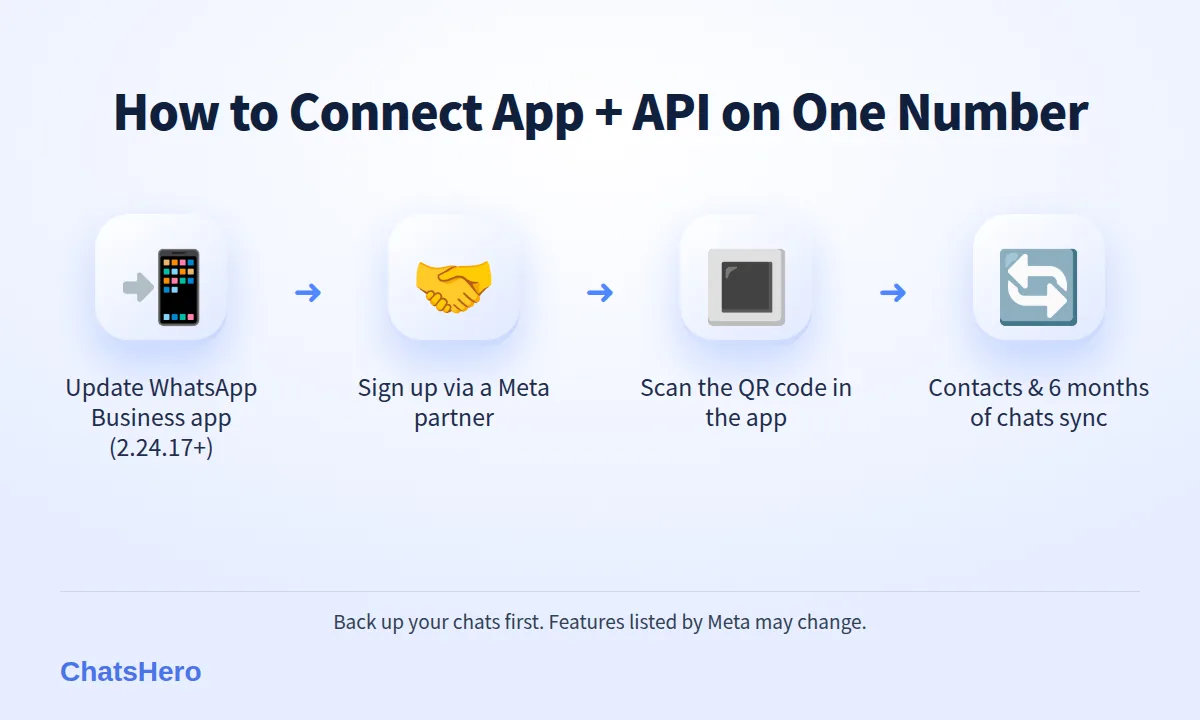
- Update the app. Make sure the WhatsApp Business app on the main phone is version 2.24.17 or newer.
- Back up your chats. Run a normal WhatsApp backup first, just in case.
- Choose a Meta partner that supports coexistence. Onboarding runs through Meta’s Embedded Signup, which only Solution Partners and Tech Providers can offer. Ask before you pay.
- Scan the QR code. During signup you choose to connect your existing WhatsApp Business app number, then scan a QR code from the app.
- Keep the phone on and the app open while contacts and chat history sync.
- Re-link your devices (for example WhatsApp Web) and tell staff about the features that changed.
- Test with your own second number before you switch on AI replies for customers.
If you ever want to stop, Meta says you can disconnect from the app itself under Settings › Account › Business Platform.
What does a day look like with AI and staff on one number?
Take a fictional example: Sri Mutiara Bakery in Ipoh. The owner, Kak Ros, has used the same WhatsApp number for six years. Orders peak at night, when she is asleep.
With coexistence, an AI connected through the API answers the late-night questions: flavours, prices, pickup slots and the deposit rule. In the morning, Kak Ros opens the WhatsApp Business app on her phone and sees exactly the same chats, so she can confirm special requests herself.
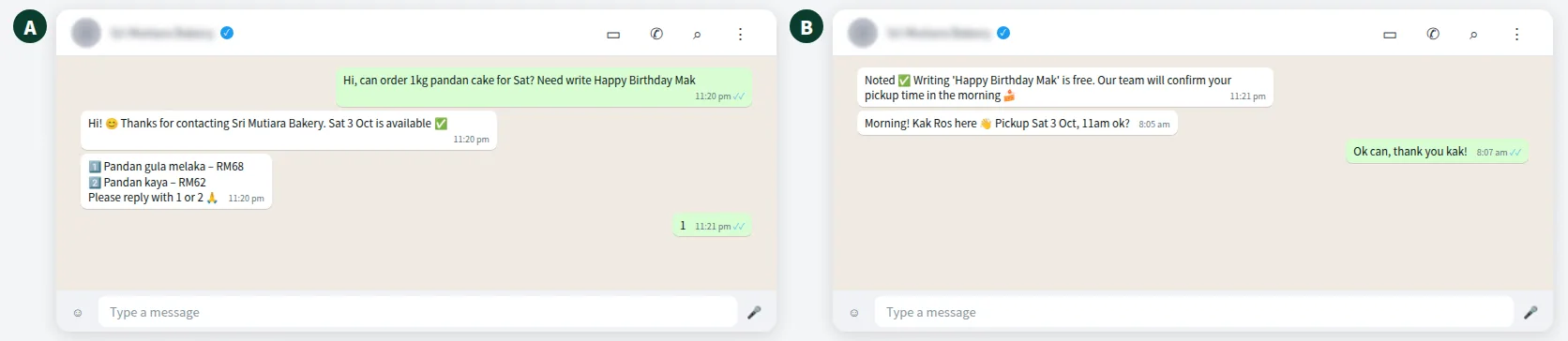
Because messages are mirrored, there is no copy-paste between systems. The AI knows what she said, and she knows what the AI said. Customers who switch between English, Malay and Chinese mid-chat get a reply in the same language — see how AI chatbots understand Bahasa Rojak.
Want to see how this looks with your own business? WhatsApp us and chat with the ChatsHero AI.
How do you keep orders organised on the WhatsApp Business API?
Coexistence solves the number problem. Organising the work is the next step. With ChatsHero on the official WhatsApp Business API, each order or lead the AI handles is saved into a Google Sheet, so the team works from one list instead of scrolling back through chats.
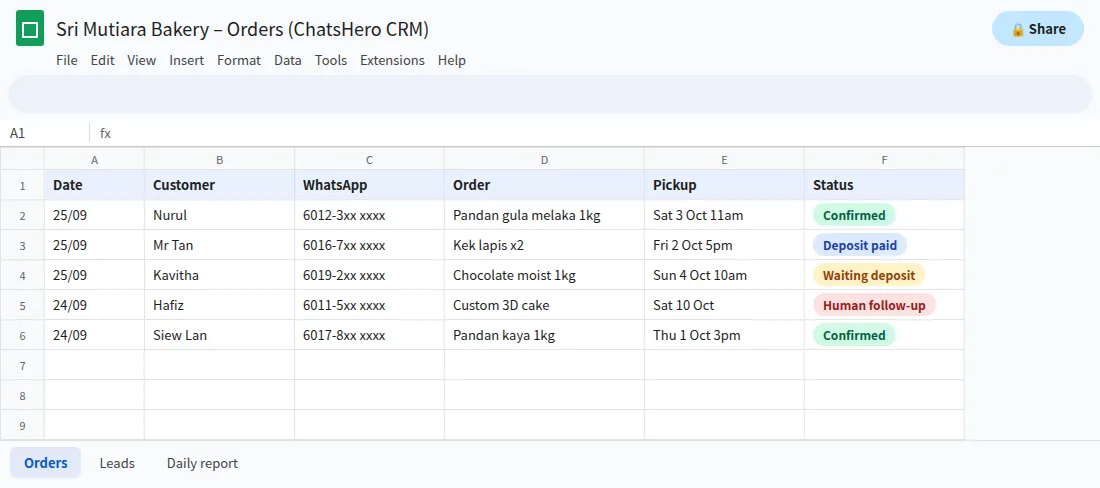
- Night ordersThe AI answers flavours, prices and slots while the owner sleeps.
- One order listEach order is recorded in Google Sheets, and staff update pickup and status.
- Owner’s callCustom designs and complaints trigger a “Human Agent Needed” alert in the team’s WhatsApp group.
When the AI hits something it should not decide — a complaint, a custom cake design, a refund — it flags a person to take over. Learn more about ChatsHero.
What should you check before connecting your number?
Coexistence gives you a real API connection, and with it come API rules. A few things to settle first:
- Opt-in still applies. Meta’s WhatsApp Business Messaging Policy says you may only contact people who gave you their number and opted in. Old contacts are not automatically a marketing list.
- Quality rating matters. If many people block or report your template messages, Meta can pause those templates and hold back increases to your messaging limit. The API lowers the risk compared with unofficial tools, but it is not a guarantee against restrictions.
- Personal data. Syncing six months of chats moves customer data into new software. Under Malaysia’s Personal Data Protection Act, you should know where it is stored and who can see it.
- Broadcast habits. If your team relies on app broadcast lists, plan the switch to approved template messages before you connect.
Features and eligibility can change, so confirm the latest details with your provider before migrating, and pick a quiet week for the switch. More WhatsApp API guides are on the ChatsHero blog.
Frequently Asked Questions
What is WhatsApp coexistence in simple terms?
It is Meta’s option to connect a number already used on the WhatsApp Business app to the official Cloud API. You keep the app on your phone, your number and recent chats, while software such as an AI chatbot uses the same number through the API.
Will I lose my chat history if I connect my WhatsApp Business app to the API?
With coexistence, Meta allows contacts and up to six months of 1:1 chat history to be synchronised. Groups are not synced. Back up your chats before you start anyway.
Can my staff still reply from the phone after connecting?
Yes. Messages are mirrored between the WhatsApp Business app and the API, so replies from the phone and from the API appear in the same conversation.
Are messages sent from the app still free?
According to Meta’s documentation, messages the business sends from the WhatsApp Business app remain free. Messages sent through the API follow Meta’s per-message pricing, billed to your own WhatsApp Business account.
What features stop working in the app?
Broadcast lists become read-only, and disappearing messages, view once and live location are turned off for 1:1 chats. Some linked devices, such as WhatsApp for Windows, are not supported.
Does coexistence stop my number from being banned?
No setup can promise that. Using the official API lowers the risk compared with unofficial tools, but you still need customer opt-in and a healthy quality rating.