In the WhatsApp Business app vs API decision, choose the app when manual replies and linked devices are enough. Consider the API for a managed team inbox, integrations or a business-focused AI assistant. Costs include your platform and eligible Meta charges; from 1 October, the announced service model retains 1,000 free service messages per phone number monthly.
The 1 October change is upcoming. Announcements from Gupshup and respond.io specify 1,000 free service messages per business phone number per month before service charges apply. Qualifying 72-hour free entry point messages remain exempt. RM0.35 and RM0.06 here are illustrative budgeting assumptions, not a verified October rate-card quotation. Confirm your market, currency and account charges before committing spend.
- The WhatsApp Business app is free and runs on your phone; it suits owners who reply personally to a manageable number of chats.
- The WhatsApp Business API has no phone app of its own; you use it through a platform that adds a shared inbox, automation and AI.
- Budget separately for your platform and chargeable Meta messages. The example RM rates here are assumptions, and the service-message free tier still applies.
- Signs you have outgrown the app: missed night enquiries, staff sharing one phone, broadcasts not reaching customers, no record of leads.
- Meta’s coexistence option can let one number use the app and the API together, with some features switched off.
- Either way, message only customers who opted in — that protects your quality rating and lowers ban risk.
What is the difference between the WhatsApp Business app and the API?
The app is a manual messaging workflow. The API is a system for a team.
The WhatsApp Business app is the free app you download from the App Store or Google Play. You get a business profile, a catalogue, quick replies, labels, and greeting and away messages. Everything happens on your phone, plus a few linked devices such as WhatsApp Web.
The WhatsApp Business API, officially the WhatsApp Business Platform, has no app of its own. Your number connects to Meta’s Cloud API through a software platform. That platform gives you a shared inbox for your team, pre-approved message templates, automation, AI chatbots and links to tools like Google Sheets. Meta charges apply to eligible delivered messages, not every outgoing message indiscriminately.
So the WhatsApp Business app vs API question is really: do you still manage WhatsApp by hand, or do you need a system?
How do the WhatsApp Business app and API compare side by side?
| Feature | WhatsApp Business app | WhatsApp Business API |
|---|---|---|
| Cost to use | Free | Meta per-message fees + platform subscription |
| Who replies | You, on your phone and a few linked devices | Many staff and an AI chatbot on one number |
| 24/7 automation | Basic greeting and away messages | Full AI replies, follow-ups and handover to staff |
| Broadcasts | Broadcast lists with a recipient cap; only reach people who saved your number | Approved templates to opted-in customers, within Meta’s messaging limits |
| Reminders outside 24 hours | Manual | Automatic utility templates (≈ RM0.06 each) |
| Lead records | Labels on your phone | Automatic records in a CRM or Google Sheets |
| Integrations | Very limited | Calendars, Sheets, accounting and ads tracking |
Check Meta pricing for actual fees. RM0.35 and RM0.06 here are budgeting assumptions, not verified October rate-card prices.
When is the free WhatsApp Business app enough?
The free app can be all a small business needs. It is usually enough when:
- The owner, or one staff member, answers every chat personally.
- You get a manageable number of enquiries, roughly under 30 a day as a rule of thumb, and mostly during working hours.
- Customers already know you, so slow night-time replies rarely lose a sale.
- You send only occasional updates to a small group of regulars.
A home baker in Seremban or a tailor in Kuching with loyal customers may never need more. The app is free, simple and familiar, and there is no shame in staying on it.
Do not pay for the API just because it sounds bigger. Move when the app is costing you sales or staff time, not before.
What are the signs you have outgrown the WhatsApp Business app?
Take CoolBreeze Aircond Services, a fictional aircon servicing company in Johor Bahru. It has three technicians, one admin and one WhatsApp number. Its typical problems are the warning signs to watch for:
- Night and weekend enquiries go unanswered. A customer with a dripping aircon at 10pm may simply book whoever replies first.
- Everyone shares one phone. The admin and the boss pass the phone around, and nobody knows who replied to whom.
- Broadcasts stop reaching people. App broadcast lists only deliver to customers who saved your number, so service reminders quietly go missing.
- Leads are not recorded. Quotes live in chat history, so follow-ups depend on someone’s memory.
- The same questions, all day. “How much for chemical wash?” “Got slot Saturday?” Staff spend hours typing the same answers.
If several apply, compare messaging and platform costs with potential staff-time savings and additional profit before deciding.
What does the WhatsApp Business API cost in Malaysia?
Budget for your platform/provider and eligible Meta messages. From 1 October, provider announcements retain 1,000 free service messages per phone number monthly before service charges. Inbound messages and qualifying 72-hour free entry points remain free. Confirm rates and billing for your own account.
Second, the platform you use to run the API. ChatsHero plans start at RM350 a month on annual billing, with unlimited messages and blasting within the platform. The Meta fees stay separate. Details are on our pricing page.
Example only: assume one phone number, no free entry point traffic, and rates of RM0.06 chargeable service/utility and RM0.35 marketing. Of 1,500 service replies, 1,000 are free and 500 cost RM30. Add 300 chargeable utility reminders (RM18) and 500 marketing messages (RM175): total RM223, excluding platform/provider charges.
What can you do on the API that the app cannot?
The biggest difference is automation. On the API, an AI chatbot can answer, qualify and book customers while your team is busy or asleep, then hand over to a person when needed.
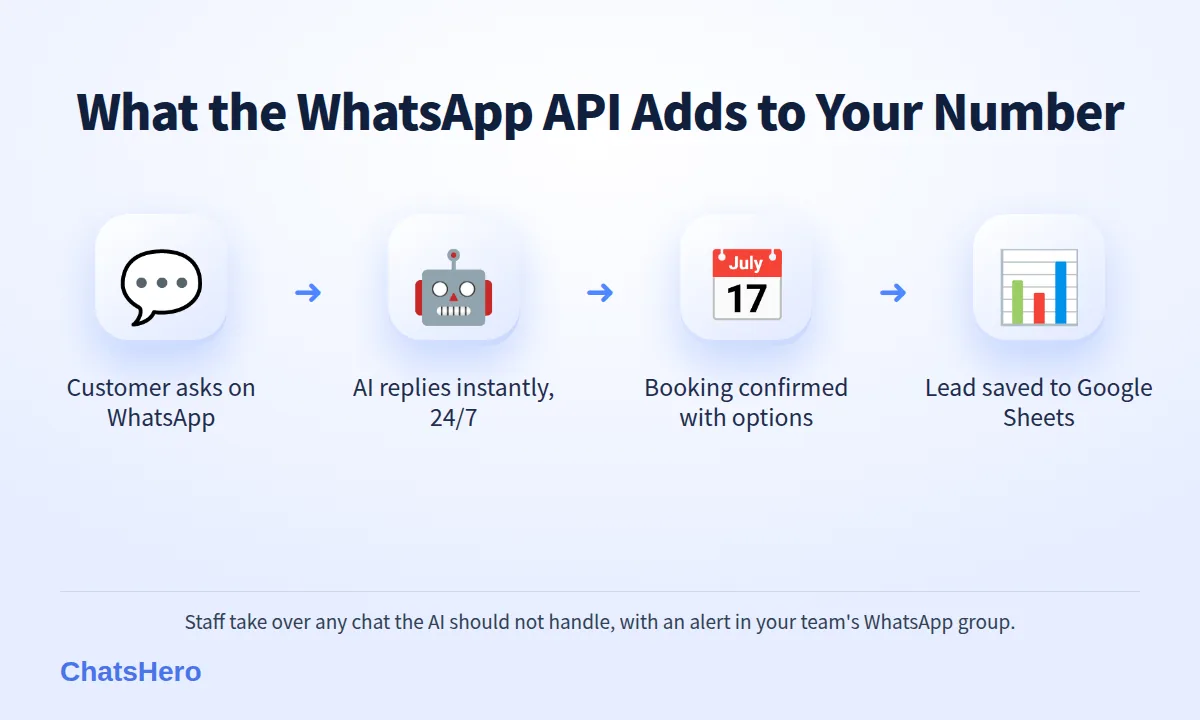
Here is how CoolBreeze’s late-night enquiry could look with an AI assistant on the API:
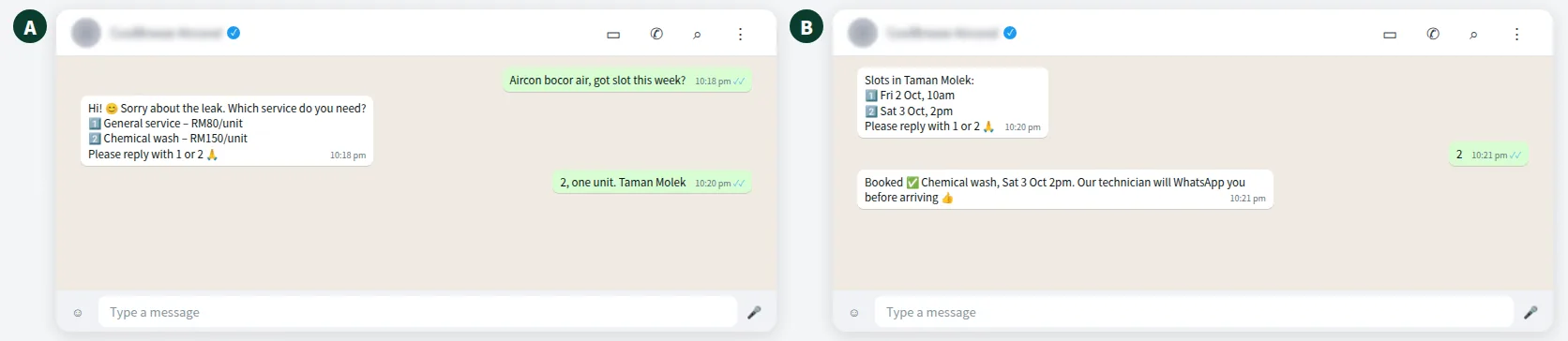
- Shared inboxAdmin, boss and technicians work the same number without passing a phone around.
- Night shiftThe AI answers pricing and slot questions in English, Bahasa Melayu and Chinese after hours.
- One job sheetEnquiries and bookings are recorded in Google Sheets for the whole team.
Every booking the AI confirms lands in one sheet that the whole team can see:
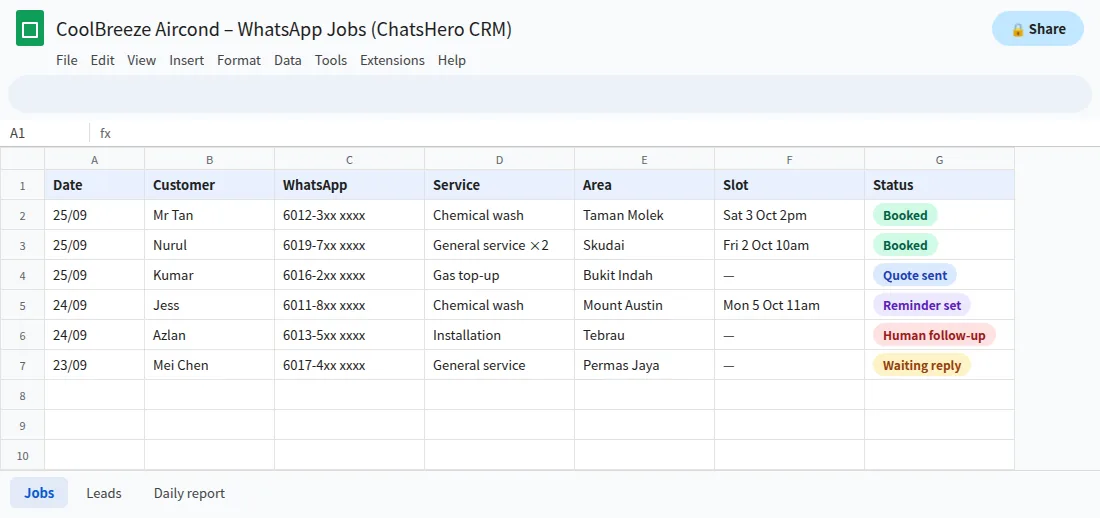
When a job needs a person, such as an installation quote, the AI flags it as a human follow-up and alerts your team’s WhatsApp group.
Can I switch to the WhatsApp API and keep my number?
Usually, yes. You can move an existing number to the API, but plan it carefully:
- Back up your chats first. Moving a number fully to the API means you generally stop using it in the Business app, and old chat history does not move across into your new platform.
- Consider coexistence. Eligible businesses may use the Business app and Cloud API on one number through a supported provider. Confirm feature and history-sync limitations in Meta onboarding documentation and with your provider before migration.
- Expect messaging limits at first. Template sends to new contacts are capped per 24 hours, and since October 2025 the limit is set per business portfolio rather than per number. Limits can rise as you verify your business and send good-quality messages; tiers change from time to time, so check your current limit in WhatsApp Manager (see Meta’s messaging limits guide).
Whichever route you take, only message people who opted in. Blocks and reports lower your quality rating on both the app and the API.
WhatsApp Business app vs API: which should your SME choose?
Use this quick checklist to settle the WhatsApp Business app vs API decision:
- One person replies, under about 30 chats a day, mostly office hours → stay on the app.
- You need managed assignments or automation beyond linked devices → consider the API.
- You lose leads at night or on weekends → API with an AI chatbot.
- You need reminders, follow-ups or broadcasts to hundreds of customers → API.
- You want every lead recorded in Google Sheets for reporting → API.
If you are unsure, start by counting last month’s chats and how many went unanswered for more than an hour. Want to see how ChatsHero works as an official API platform? Read about ChatsHero, or compare it with the other WhatsApp guides on our blog before you decide.
Want to see how this looks with your own business? WhatsApp us and chat with the ChatsHero AI.
Frequently Asked Questions
What is the main difference in WhatsApp Business app vs API?
The app supports manual messaging and linked devices. The API connects to a platform that can add team assignments, AI, templates and integrations; costs depend on the platform and eligible chargeable messages.
Is the WhatsApp Business API free?
The API is not universally free: platform/provider charges and eligible Meta fees may apply. The announced October service model retains 1,000 free service messages per phone number monthly. Inbound and qualifying free entry point messages remain free; check actual rates.
Can I use the same number on the app and the API?
Eligible businesses can use supported coexistence onboarding to keep the app and API on one number. Confirm features, history sync and eligibility with your provider. Full migration and coexistence are different routes.
Do I need the API to use an AI chatbot on WhatsApp?
For a reliable, policy-compliant AI chatbot, yes. Automation tools that control the normal app are unofficial and put your number at higher risk of restriction.
Will the API stop my number from getting banned?
No tool can promise that. The official API lowers the risk compared with unofficial tools, but you must still get opt-in and keep a good quality rating by avoiding spam.
How many staff can use one WhatsApp API number?
Through a platform with a shared inbox, several staff can handle chats on the same number, with the AI assigning or handing over conversations as needed.