A WhatsApp booking system for a salon in Malaysia connects three things: a services menu with prices and durations, a Google Calendar for each staff member, and a customer record in Google Sheets. The AI answers enquiries 24/7, offers slots from the schedule your team keeps up to date, adds the booking to the stylist’s calendar and records the customer — so bookings stop living only in your team’s phones.
RM0.35 and RM0.06 in this article and its supplied illustrations are planning assumptions, not verified current Meta quotations. Gupshup's October announcement describes 1,000 free service replies per business phone number per month, then eligible service charges from 1 October 2026. Utility templates do not use that allowance. Inbound messages and qualifying 72-hour free entry point messages remain exempt. Confirm the recipient market, applicable rate card, free allowance and provider fees before budgeting. Figures below exclude tax and any unlisted costs.
Examples show a proposed workflow, not a guarantee that every account or plan supports it. Ask our team to confirm the channel, integration, permissions and delivery method for your setup. Staff-group notifications and group assistants require separate eligibility and integration checks; a standard one-to-one WhatsApp API account should not be assumed to access every existing staff group. Use approved individual notifications or a staff dashboard if group delivery is unavailable. Test the workflow and human handover before use.
- A booking system is more than reminders: it is services menu + staff calendars + customer records working together.
- Write down every service with its duration, price and which staff can do it — the AI can only book what it knows.
- Give each stylist or therapist their own Google Calendar; bookings are added there, and your team keeps it up to date.
- Every booking should land in a Google Sheet: name, number, service, staff, visit history and status.
- Let the AI handle routine bookings; hand special requests, complaints and group bookings to a human.
- Customer records are personal data under the PDPA — collect only what you need and keep access limited.
What is a WhatsApp booking system for a salon?
If your salon already takes bookings on WhatsApp, what’s missing is a system behind the chat.
Today, a typical booking goes like this: a customer messages at 10pm, the owner replies the next morning, checks a paper book or asks the stylist, then types the booking into someone’s phone. Details are scattered across chats, and nobody sees the full picture.
A WhatsApp booking system keeps the chat — because that is where your customers already message you — but connects it to three pieces of structure:
- A services menu the AI can read: every service, price, duration and which staff can do it.
- Staff calendars in Google Calendar, one per stylist or therapist. Bookings are added to Google Calendar; your team keeps the calendar up to date.
- A customer record in Google Sheets that updates with every booking.
With ChatsHero, the AI replies 24/7 in English, Bahasa Melayu and Chinese, offers slots from the working hours and availability your team gives it, adds the booking to the calendar and records the customer. Your team keeps full control through the calendar and the sheet.
What should your salon services menu include?
The services menu is the foundation. If a service is missing, or its duration is wrong, the AI will book the wrong length of slot. Write it as a simple table first — you can paste it straight into ChatsHero when training the bot.
| Service | Duration | Price | Who can do it | Buffer after |
|---|---|---|---|---|
| Haircut (ladies) | 45 min | RM45 | Aida, Mei, Ravi | 10 min |
| Hair colour (full) | 2 hr | RM180+ | Aida, Mei | 15 min |
| Hair wash & blow | 30 min | RM30 | All staff | 5 min |
| Classic manicure | 1 hr | RM60 | Nurul | 10 min |
| Classic facial | 75 min | RM120 | Nurul | 15 min |
Prices and durations above are examples for a fictional salon. A few tips:
- Use “from” prices for services that depend on hair length, and tell the AI to say so.
- Add buffer time for cleaning and set-up, so the calendar reflects reality.
- Describe services plainly. Say what the service includes, not promised results — avoid words like “whitening” or “slimming”.
The AI books only what you have written down. A clear menu with durations is what turns chat replies into accurate bookings.
How does a WhatsApp salon booking flow work, step by step?
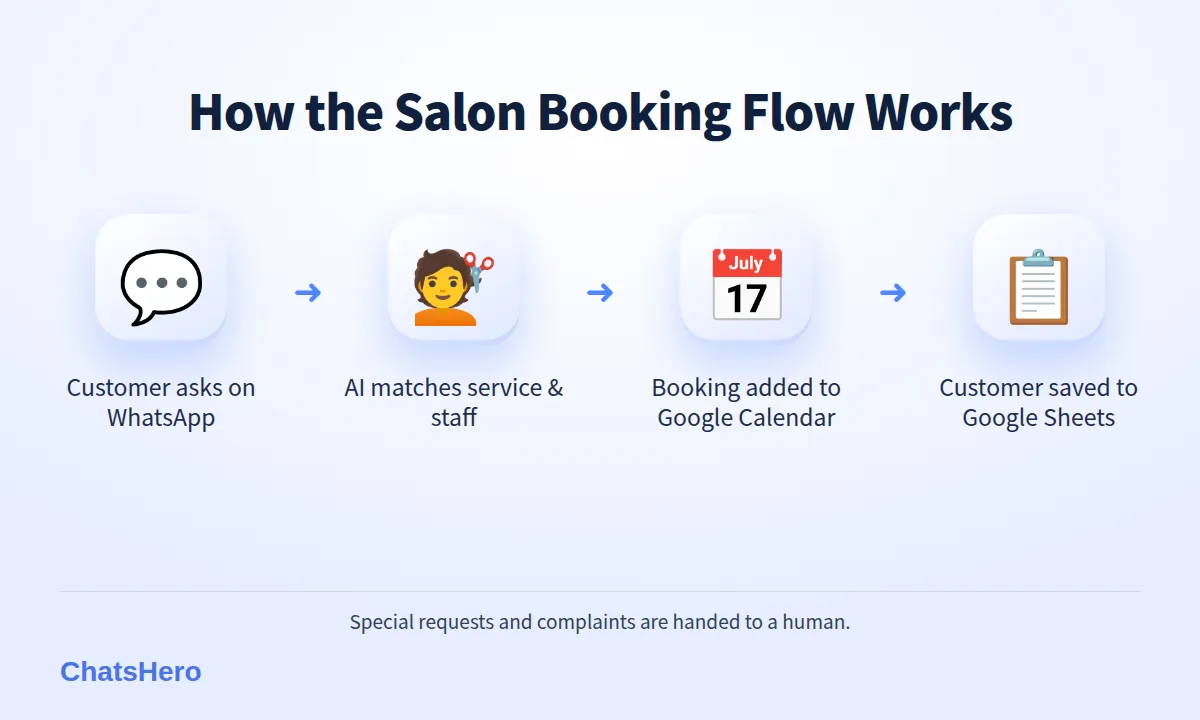
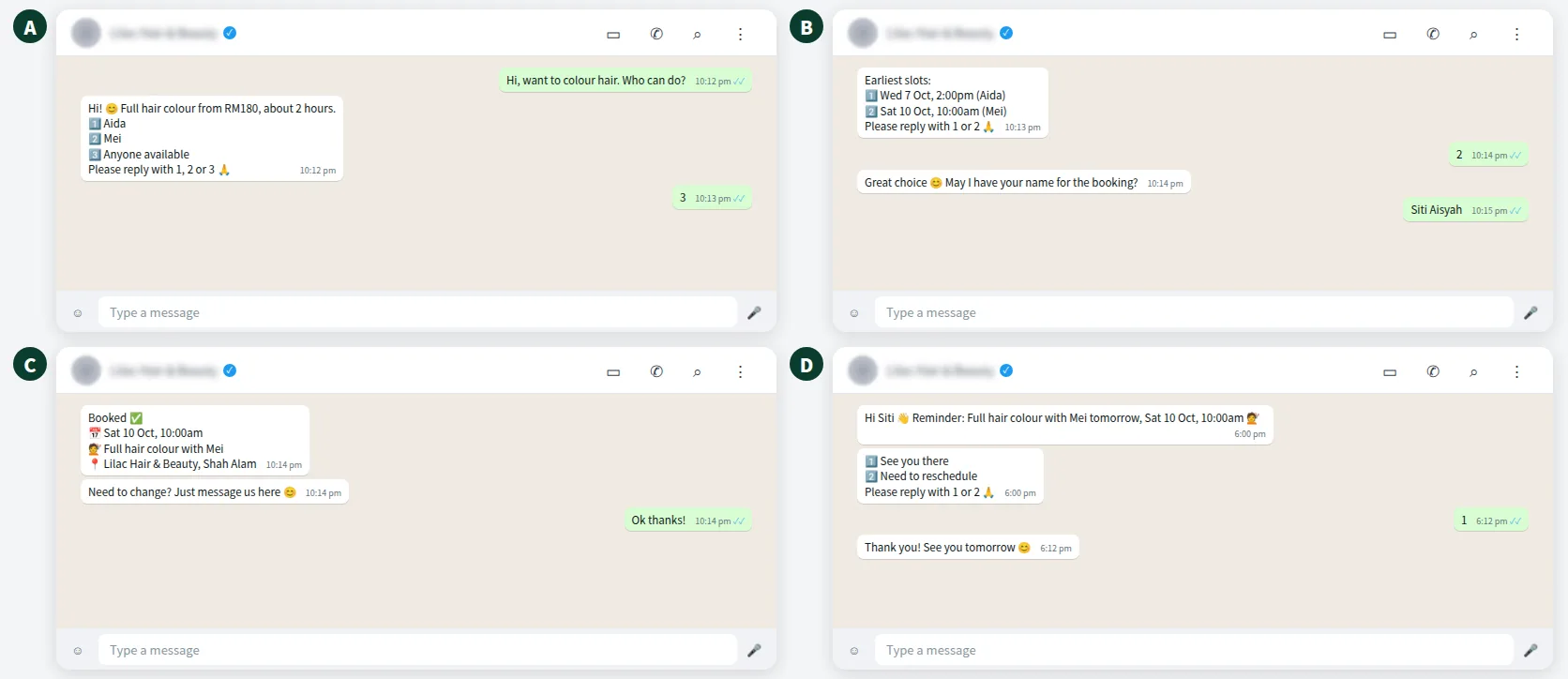
Here is the full salon appointment booking flow on WhatsApp, from first message to recorded booking:
- Customer asks. “Can book haircut this Sat?” — any time, day or night.
- AI clarifies the service. If it is unclear, it asks with numbered options: “1️⃣ Haircut 2️⃣ Haircut + wash. Please reply with 1 or 2 🙏”.
- AI offers slots. It suggests times from the schedule your team has set for staff who can do that service — working hours, off days and open slots that your team keeps current.
- Customer picks a slot. The booking is added to that stylist’s Google Calendar, where your team can see it and adjust it if needed.
- AI confirms and records. The customer gets a summary; the booking is added to the Google Sheet.
- Team is informed. A daily booking summary goes to the staff WhatsApp group.
Customers who ask for a specific stylist are offered that person’s slots from the schedule. Customers with no preference can be offered the earliest slots across the team, which helps spread bookings evenly. The one habit that makes this work: whoever runs the front desk updates the schedule when a walk-in takes a slot or a stylist goes on leave.
How do staff calendars work with Google Calendar booking?
The simplest structure is one Google Calendar per staff member, all shared with the salon owner. Leave, off days and walk-ins go into the same calendar, so the whole team sees who is busy — and your team updates the AI’s schedule to match, so it doesn’t offer a slot when someone is away.
Google Calendar also has its own appointment schedules feature: a booking page with buffer times and daily booking limits. It works well for customers who are happy to fill in a form. Some customers, though, would rather ask first on WhatsApp — about price, staff or parking — before they book.
| Method | How customers book | Staff calendars | Customer record |
|---|---|---|---|
| Paper book / notes | Call or chat; staff write it down | Not visible to others | None |
| Google Calendar booking page | Fill in a web form | Yes | Name and email in the event |
| WhatsApp AI + Google Calendar | Chat in their own language, 24/7 | Yes, per staff | Google Sheet updated per booking |
Whichever you choose, make one person responsible for keeping calendars and the schedule accurate. The AI can only be as correct as the availability your team gives it.
How does a salon CRM in Google Sheets help you know your customers?
Every booking the AI makes is saved to a Google Sheet: customer name, WhatsApp number, service, staff, date and status. Over time, this becomes a simple salon CRM — without buying separate software.
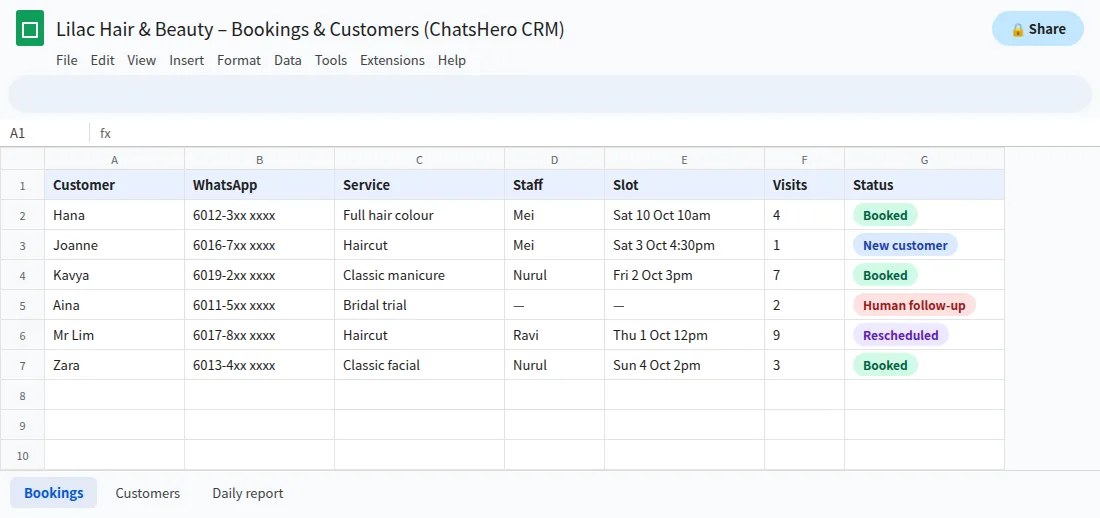
- HistorySee each customer’s past services and preferred stylist.
- Follow-upSpot regulars who have not returned in a while.
- ReportDaily and weekly booking summaries sent to your WhatsApp group.
A customer list is personal data. Under Malaysia’s Personal Data Protection Act 2010 and its 2024 amendments, you should collect only what the booking needs, limit who can open the sheet, and ask before sending promotions. Avoid storing sensitive details such as health conditions in the sheet; if a service needs them, handle that in person.
When should a human take over from the AI?
The AI should handle routine salon appointment booking; people should handle anything that needs judgement. Set clear handover rules:
- Special or bridal requests — trials, packages for a wedding party, home visits.
- Group bookings — five friends for manicures at the same time.
- Complaints or unhappy feedback — always a person, quickly.
- Questions about skin, scalp or allergies — the AI should not advise; a trained staff member should.
When a rule is triggered, ChatsHero sends a “Human Agent Needed” alert to your team’s WhatsApp group with the chat details, and the conversation is marked for follow-up in the sheet. A bride-to-be who writes half in Chinese and half in English still gets understood and passed to the right person (how mixed-language chats work).
How much does a WhatsApp booking system cost a salon?
There are two parts. Your ChatsHero plan starts from RM350 a month (Starter, annual), with the Growth plan at RM650 a month for unlimited bots; see the pricing page. Separately, Meta charges per message on the official WhatsApp Business API, billed to your own WhatsApp account.
In Malaysia, a booking confirmation or reminder counts as a utility message, illustratively RM0.06 each; a promotion is a marketing message, illustratively RM0.35. From 1 October 2026, eligible service replies above the monthly 1,000-message allowance per phone number inside the customer-service window are also charged, using an illustrative utility-rate assumption (see Meta’s pricing page). As an example, 400 bookings a month with one confirmation each would be 400 × RM0.06 ≈ RM24 in Meta utility fees, plus the replies inside each booking chat at about the same rate.
Compare that with the time an owner spends replying at night and copying bookings by hand. Learn more about ChatsHero.
Want to see how this looks with your own business? WhatsApp us and chat with the ChatsHero AI.
How can you set up a salon booking system in one week?
A realistic plan for a small salon:
- Day 1: Write the services menu with durations, prices and staff.
- Day 2: Create one Google Calendar per staff member and block leave and breaks.
- Day 3: Train the AI in Plan and Build modes — paste the menu, a screenshot of your price list or a voice note about your rules.
- Day 4: Agree handover rules and who watches the WhatsApp group alerts.
- Day 5: Test with staff pretending to be customers in English, BM and Chinese.
- Day 6–7: Go live and check the sheet each evening.
Only send reminders and promotions to customers who booked with you or opted in. Using the official API and messaging real customers keeps ban risk low and protects your number’s quality rating. After the first month, look at the sheet together with your stylists: which services get asked about most, and which slots stay empty. That is your next promotion — and a topic we cover often on the ChatsHero blog.
Frequently Asked Questions
What is a WhatsApp booking system for a salon in Malaysia?
It is a setup where customers book by chatting on WhatsApp, while an AI uses your services menu and the staff schedule your team keeps updated, adds the booking to Google Calendar and records the customer in Google Sheets. Staff step in for special requests.
Can the AI book a specific stylist?
Yes, if your services menu lists who can do each service and your team keeps each stylist’s schedule up to date. The AI then offers that stylist’s slots, or the earliest slot across the team if the customer has no preference, and the booking is added to that stylist’s Google Calendar.
Do I need separate salon booking software?
Not always. If most customers already book on WhatsApp, Google Calendar plus a Google Sheets CRM and an AI chatbot cover the core needs. Larger salons with complex payroll or inventory may still use dedicated software alongside.
Can customers reschedule on WhatsApp?
Yes. Customers message the same chat, the AI offers other slots from your schedule and records the change, and your team confirms it in the calendar. Changes that break your rules, such as last-minute changes for long services, can be handed to a staff member.
Is it safe to keep customer records in Google Sheets?
It can be, if you limit access to the people who need it, collect only booking-related details and follow the Personal Data Protection Act. Do not store sensitive information such as health conditions in the sheet.
What languages can the salon chatbot reply in?
ChatsHero replies 24/7 in English, Bahasa Melayu and Chinese, and customers can mix languages in one conversation.