A WhatsApp auto reply in Malaysia can be set up at three levels: free greeting and away messages in the WhatsApp Business app, keyword chatbots, or an AI auto-reply on the official WhatsApp Business API that actually answers questions in English, BM and Chinese. Start with the free messages today; upgrade to AI (plans from RM350 a month) when enquiries go unanswered.
RM0.35 and RM0.06 in this article and its supplied illustrations are planning assumptions, not verified current Meta quotations. Gupshup's October announcement describes 1,000 free service replies per business phone number per month, then eligible service charges from 1 October 2026. Utility templates do not use that allowance. Inbound messages and qualifying 72-hour free entry point messages remain exempt. Confirm the recipient market, applicable rate card, free allowance and provider fees before budgeting. Figures below exclude tax and any unlisted costs.
Examples show a proposed workflow, not a guarantee that every account or plan supports it. Ask our team to confirm the channel, integration, permissions and delivery method for your setup. Staff-group notifications and group assistants require separate eligibility and integration checks; a standard one-to-one WhatsApp API account should not be assumed to access every existing staff group. Use approved individual notifications or a staff dashboard if group delivery is unavailable. Test the workflow and human handover before use.
- The free WhatsApp Business app has three built-in tools: greeting message, away message and quick replies.
- Away and greeting messages set expectations but do not answer questions — customers may still ask other shops.
- An AI auto-reply on the official WhatsApp Business API answers prices, availability and bookings 24/7.
- Write replies in the customer’s language; for a Malaysian business that can mean English, BM and Chinese in the same week.
- Always keep a human handover for complaints, discounts and anything unusual.
- On the official API, Meta’s per-message fees are billed to your own WhatsApp account, separate from your chatbot plan.
What are the options for a WhatsApp auto reply in Malaysia?
An auto-reply that says “we’ll get back to you” is not the same as one that answers the question.
When business owners search for “WhatsApp auto reply Malaysia”, they usually mean one of three things. Each suits a different stage of business.
| Option | What it does | Cost | Best for |
|---|---|---|---|
| WhatsApp Business app: greeting & away messages | Sends one fixed message to new chats or outside business hours | Free | Very small shops, fewer than ~10 chats a day |
| Keyword / menu chatbot | Replies when a customer types a set word or number | Varies | Simple, predictable questions |
| AI auto-reply on the official API | Understands free-text questions and answers from your own information, 24/7 | Plan fee + Meta per-message fees | SMEs with daily enquiries, ads or night-time chats |
A sensible path is to start with the free option and upgrade when enquiries start piling up. This guide covers both.
How do you set up a WhatsApp Business away message and greeting message?
The free WhatsApp Business app has three official messaging tools, described on WhatsApp’s business features page: a greeting message for new customers, an away message for chats outside business hours, and quick replies — shortcuts for answers you send often.
- Open Business tools. In the WhatsApp Business app, go to Settings (or the three-dot menu) → Business tools. Menu names can vary slightly by app version.
- Set your greeting message. Turn it on and write a short welcome that tells customers what to send you, such as their car model or preferred date.
- Set your away message. Choose “Outside of business hours” and fill in your opening hours in your business profile, so it only goes out when you are closed.
- Create quick replies. Save your 5–10 most common answers — price list, location, how to book — under shortcuts such as /price or /location.
- Test from another phone. Send your business number a message and check what a new customer sees.
The free tools reply, but they do not answer. An away message can tell a customer you will reply at 9am; it cannot tell them the price of a ceramic coating. At night, that customer may message another shop that does answer.
What should your WhatsApp greeting message say?
Keep it short, friendly and useful. Tell customers who you are, what you can help with and what information to send. Here are templates you can adapt, using a fictional car detailing shop in Kuching:
- Greeting (EN): “Hi! 👋 Thanks for contacting Gleam Auto Detailing, Kuching. Tell us your car model and the service you need, and we’ll reply with the price.”
- Greeting (BM): “Hai! 👋 Terima kasih kerana menghubungi Gleam Auto Detailing. Sila beritahu model kereta dan servis yang anda perlukan.”
- Greeting (中文): “您好!👋 感谢联系 Gleam Auto Detailing。请告诉我们您的车型和需要的服务,我们会回复价格。”
- Away message: “Thanks for your message! 🌙 We’re closed now and open daily 9am–7pm. Our price list is here: [link]. We’ll reply first thing tomorrow.”
Adding a price list link to your away message is the single easiest improvement: it lets a night-time customer get at least part of the answer straight away.
When should you upgrade to an AI auto reply for WhatsApp?
Upgrade when the free tools start costing you customers. Common signs:
- You wake up to 10 or more unanswered chats, many asking the same price questions.
- You run Click-to-WhatsApp ads and enquiries arrive faster than staff can reply.
- Customers write in BM, English and Chinese, and not every staff member can answer all three.
- Leads go cold because nobody followed up, and nobody knows who replied to whom.
- You want every enquiry recorded without typing it into a spreadsheet.
An AI auto reply WhatsApp customers actually find useful reads a free-text question like “Myvi coating how much, Saturday can?” and answers the price and the slot. ChatsHero replies 24/7 in English, Bahasa Melayu and Chinese, and customers can mix languages in one message — see how it handles Bahasa Rojak and slang. It also understands voice notes and screenshots when trained.
Want to see how this looks with your own business? WhatsApp us and chat with the ChatsHero AI.
How do you set up an AI WhatsApp chatbot step by step?
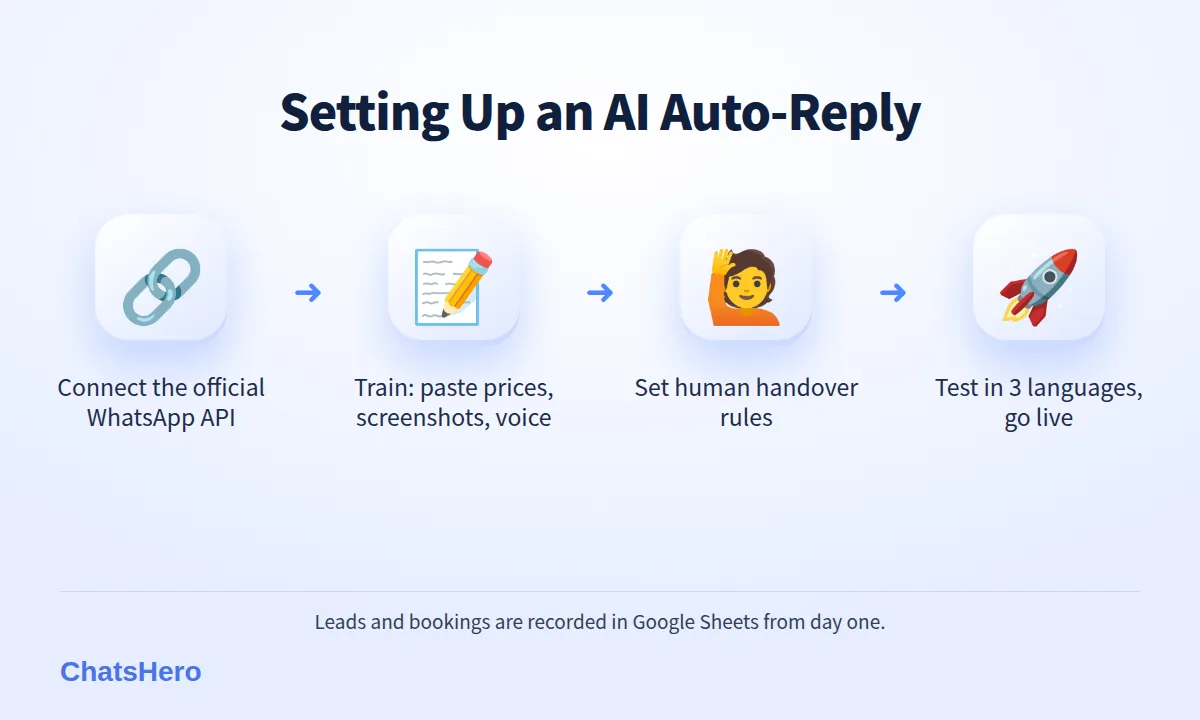
A WhatsApp chatbot setup with ChatsHero is closer to briefing a new staff member than to programming. There is no prompt writing.
- Connect your number to the official WhatsApp Business API. ChatsHero runs on Meta’s official platform, not an unofficial tool.
- Plan mode: tell the AI about your business. Paste your price list, send a screenshot of your service menu, or record a voice note explaining how you take bookings.
- Build mode: let the AI build the bot. It turns your information into replies, questions to ask and booking steps.
- Set handover rules. Decide what always goes to a person — complaints, discounts, custom jobs. Staff get a “Human Agent Needed” alert in your team’s WhatsApp group.
- Connect Google Sheets and Calendar. Every lead and booking is recorded in Google Sheets, and bookings are added to Google Calendar. Your team keeps the calendar up to date, so the slots the AI offers stay accurate.
- Test, then go live. Ask your team to chat with the bot in all three languages before switching it on for customers.
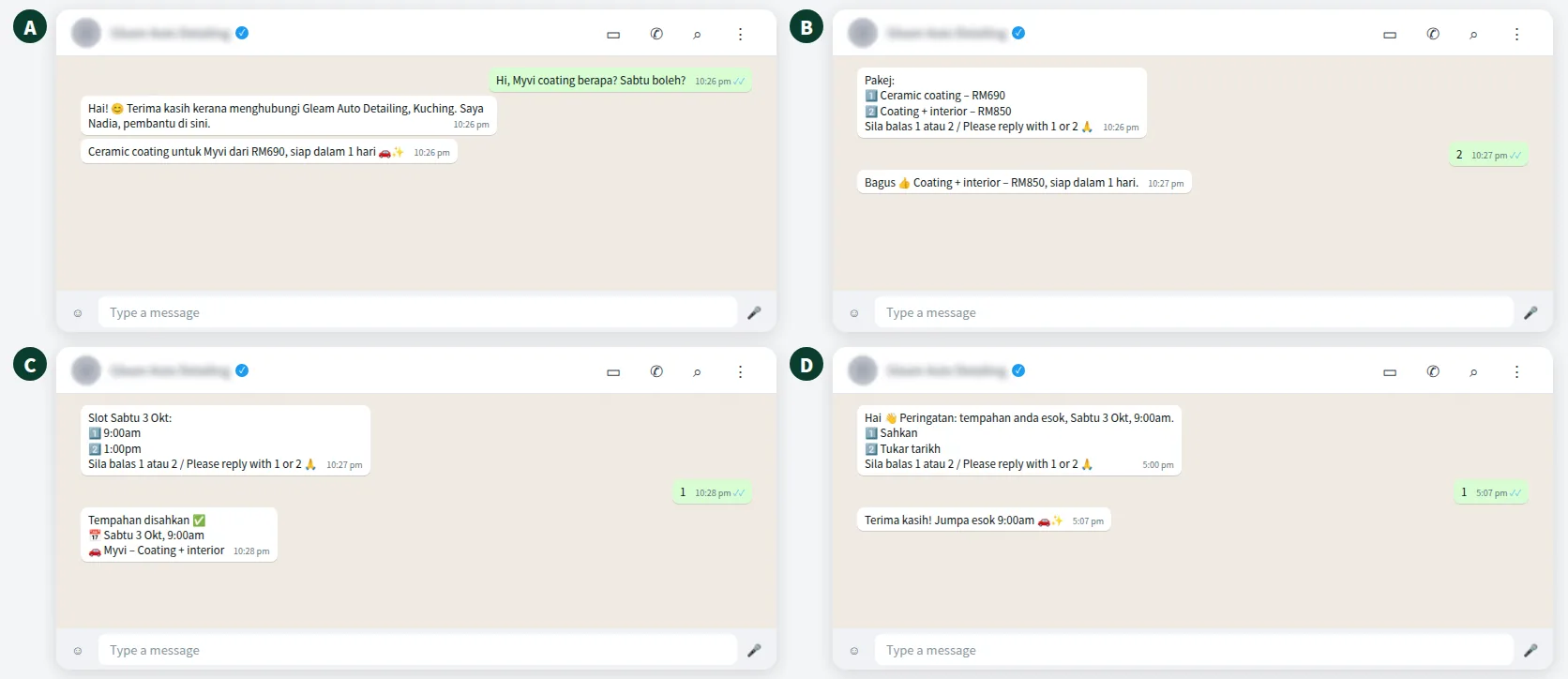
What the customer sees
Here is an example of an AI auto-reply for a car detailing shop, from a late-night price question to a confirmed Saturday booking. Prices are illustrative.
How does an AI auto-reply keep track of bookings and leads?
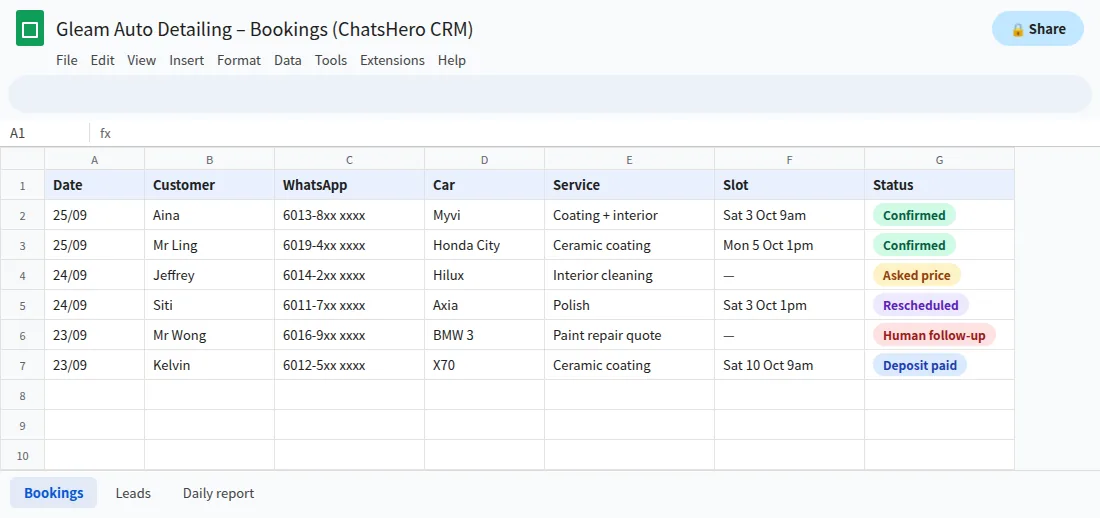
An auto-reply is only half the job; the other half is knowing what happened. ChatsHero records each conversation outcome into Google Sheets automatically: customer name, WhatsApp number, car model, service, slot and status. Your team works from the same list.
- Answers at 11pmPrices, location, opening hours and other FAQs, without waking anyone up.
- Nudge the undecidedA follow-up for customers who asked but did not book.
- Morning summaryYesterday’s enquiries and bookings, sent to your team’s WhatsApp group.
What each plan includes is listed on our pricing page; the costs are broken down in the next section.
What does a WhatsApp auto reply cost in Malaysia?
Every WhatsApp auto reply Malaysia businesses run on the official API has two separate costs, and it helps to keep them apart.
| Cost | Who charges it | Approximate amount |
|---|---|---|
| WhatsApp Business app auto-replies | — | Free |
| ChatsHero plan | ChatsHero | Starter RM350/month (annual) or RM420 (quarterly); Growth RM650/RM780 |
| Utility message (e.g. booking confirmation) | Meta, billed to your WhatsApp account | ≈ RM0.06 |
| Marketing message (e.g. promotion) | Meta, billed to your WhatsApp account | ≈ RM0.35 |
From 1 October 2026, Meta also charges per message for eligible service replies above the monthly 1,000-message allowance per phone number inside the customer-service window, which used to be free (see Meta’s pricing page and this summary of the change). Messages customers send you remain free. All ChatsHero plans include unlimited messages and blasting within the platform; Meta’s fees are separate and can change.
What mistakes should you avoid with WhatsApp auto replies?
- Replies that only say “please wait”. Give at least one useful thing: the price range, a link or a next step.
- No way to reach a person. Always offer a human for complaints and special requests.
- Promising what the bot cannot check. If payment must be verified, say “our team will verify the payment” rather than confirming it automatically.
- Messaging people who never contacted you. Meta requires opt-in; blocks and reports lower your number’s quality rating, which can pause templates and stop your messaging limit from growing. Staying on the official API and following the rules keeps the risk low, but no tool can promise a number will never be restricted.
- Ignoring personal data rules. Collect only what you need and protect it under Malaysia’s Personal Data Protection Act.
Which WhatsApp auto reply setup is right for your business?
If you get a handful of chats a day and can answer them yourself, the free greeting message, away message and quick replies are enough. Set them up today — it takes 15 minutes.
If enquiries arrive at night, from ads or in three languages, and customers are asking the same questions again and again, a WhatsApp auto reply Malaysia customers find genuinely useful needs to answer, not just acknowledge. That is where an AI auto-reply earns its keep. Try it on your own busiest question first — the price enquiry you answer ten times a day. ChatsHero is an Malaysian company built for SMEs, and the blog has more setup guides.
Frequently Asked Questions
How do I set up a WhatsApp auto reply in Malaysia for free?
Download the WhatsApp Business app, go to Business tools, and turn on the greeting message, away message and quick replies. Set your business hours so the away message only goes out when you are closed.
Can a WhatsApp auto reply answer customer questions?
The free greeting and away messages send the same fixed text to everyone. To answer questions such as prices or availability, you need a chatbot; an AI auto-reply on the official WhatsApp Business API can understand free-text questions and answer from your own information.
Can the auto-reply work in Bahasa Melayu and Chinese?
The free app messages are single fixed texts, so you would have to combine languages in one message. ChatsHero’s AI replies in English, Bahasa Melayu or Chinese depending on the customer, and handles mixed-language messages.
How much does an AI WhatsApp auto reply cost?
ChatsHero plans start from RM350 a month on an annual plan. Separately, Meta charges per-message fees on the official API — illustratively RM0.06 for utility and RM0.35 for marketing messages in Malaysia — billed to your own WhatsApp account.
Will using an auto-reply get my number banned?
No tool can promise that. Using the official WhatsApp Business API, messaging only people who contacted you or opted in, and keeping a good quality rating keeps the risk low.
Can customers still talk to a real person?
Yes. Set handover rules so complaints, discounts and special requests go to staff. ChatsHero sends a “Human Agent Needed” alert to your team’s WhatsApp group.