The biggest unofficial WhatsApp API risk is simple: you can lose the number your customers know. Tools that drive WhatsApp through a scanned QR code, a browser extension or a modified app break WhatsApp’s Terms of Service, so a ban can come without warning. The official WhatsApp Business API has Meta fees (about RM0.35 per marketing message in Malaysia), but it gives you approved templates, clear rules and a much lower risk.
The 1 October change is upcoming. Announcements from Gupshup and respond.io specify 1,000 free service messages per business phone number per month before service charges apply. Qualifying 72-hour free entry point messages remain exempt. RM0.35 and RM0.06 here are illustrative budgeting assumptions, not a verified October rate-card quotation. Confirm your market, currency and account charges before committing spend.
- Unofficial tools automate a normal WhatsApp account; WhatsApp’s Terms of Service prohibit bulk and automated messaging from those accounts.
- The main risk is a banned number — often with your chat history and the contact customers have saved for years.
- Unofficial tools also see every chat on the linked account, which is a data-protection problem under Malaysia’s PDPA.
- The official WhatsApp Business API uses approved templates, opt-in rules and a quality rating — lower risk, not zero risk.
- Meta charges per message on the official API (roughly RM0.35 marketing, RM0.06 utility in Malaysia), billed to your own WhatsApp account.
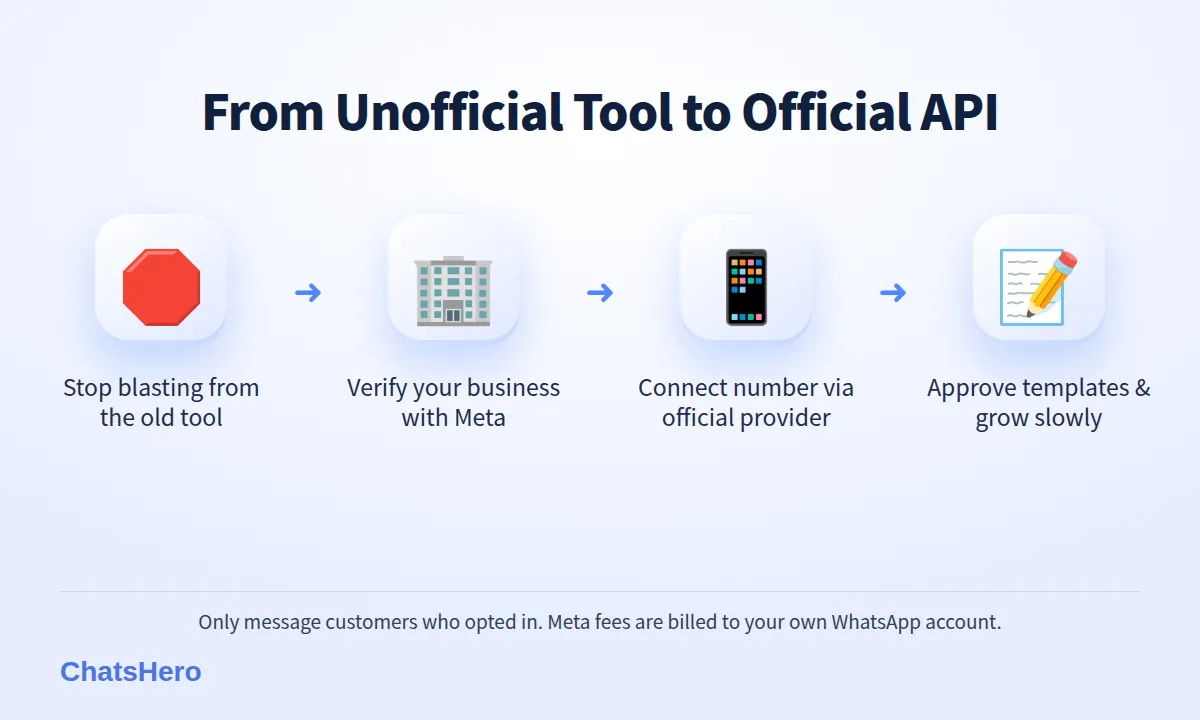
- Switching is a one-time project: verify your business, connect a number through a provider, create templates and grow slowly.
What counts as an “unofficial” WhatsApp tool?
Check the underlying integration, not just whether onboarding displays a QR code.
It is easy to end up on an unofficial tool without realising it. A typical sales pitch is “WhatsApp API, no Meta approval needed, unlimited blasting”. Under the hood, these tools fall into a few groups:
- WhatsApp Web automation. You scan a QR code, and software controls your normal WhatsApp or WhatsApp Business app account through the web session.
- Browser extensions and “blasting” software. They paste messages into chats one by one, often with random delays to look human.
- Modified apps. Versions such as “GB WhatsApp” that add scheduling or bulk features WhatsApp never approved.
- Cheap “API gateways”. A hosted service that gives you an API key, but is really a WhatsApp Web session running on someone else’s server.
The official route is different: the WhatsApp Business Platform (often called the WhatsApp Business API), which uses Meta onboarding, template review and applicable messaging limits. WhatsApp’s Terms of Service list “bulk messaging, auto-messaging, auto-dialing, and the like” among impermissible uses, and also prohibit accessing the service through unauthorised means.
A QR code alone is not proof of an unofficial tool. Supported Business app coexistence can include on-device verification. Ask for the WABA and phone-number details in your own Meta portfolio, the integration method and applicable policies. Unauthorised Web-session automation is different from Meta coexistence onboarding.
What is the real unofficial WhatsApp API risk for my business?
The unofficial WhatsApp API risk is not only “maybe we get banned”. It is a chain of business risks that land on the owner, not on the tool vendor.
- Lost numberA banned number stops sending and receiving. Customers who saved it cannot reach you.
- Exposed dataThe tool can read every chat on the linked account, including personal customer details.
- Broken automationsWhatsApp app updates can break the tool overnight, in the middle of a promotion.
1. Your number and history
Your WhatsApp number is often printed on signboards, delivery boxes and Google Maps. If it is banned, you lose that channel and, depending on your backups, the conversation history your staff rely on. Appeals are handled by WhatsApp, and a tool vendor cannot restore your account.
2. Customer data and the PDPA
Linking your account to an unknown server gives that server access to names, addresses, IC photos, payment slips — whatever customers have sent you. Under the Personal Data Protection Act 2010, your business is still responsible for protecting that data, even if a vendor leaks it.
3. Reliability and support
Unofficial tools depend on how the WhatsApp app works today. When WhatsApp changes something, messages may silently stop sending. There is no service level, no official support and no one at Meta you can escalate to.
Why do WhatsApp blasting tools get numbers banned?
WhatsApp was designed for personal conversations, so it watches for patterns that do not look like a person typing: hundreds of near-identical messages, messages to people who never saved your number, and high block or report rates. A WhatsApp blasting tool ban usually follows exactly that pattern.
WhatsApp has been open about this for years. In 2019 it said it was removing around 2 million accounts a month for bulk or automated behaviour, and that it would take legal action against companies that abuse the platform from 7 December 2019 (TechCrunch report).
“Random delays” do not make a tool official. Tricks that make automation look human may delay a ban, but the account is still breaking the Terms of Service, and the risk stays with you.
Remember that customers can block and report any number. Even a small blast to a cold list can trigger enough reports to get a normal account restricted.
How is the official WhatsApp Business API in Malaysia different?
The official WhatsApp Business API in Malaysia runs on Meta’s own infrastructure. Your account and phone number go through applicable Meta onboarding checks, and messages you start with customers must use templates that Meta reviews. In exchange, you get clear rules instead of guesswork.
| Question | Unofficial tool | Official WhatsApp Business API |
|---|---|---|
| Allowed by WhatsApp’s terms? | No — automates a normal account | Yes — Meta’s approved platform |
| Ban risk | High and unpredictable | Lower; based on quality rating and policy |
| Broadcasts | “Unlimited”, until the number is blocked | Template messages to opted-in customers, within messaging limits |
| Meta fees | None | Per message (e.g. ≈RM0.35 marketing, ≈RM0.06 utility) |
| Multiple staff and AI | Usually one phone session | Many agents plus an AI chatbot on one number |
| Customer data | Passes through an unknown server | Handled by Meta and your chosen provider |
“Lower risk” is the honest phrase. The API has rules too, and a business that spams opted-out customers can still be restricted. The difference is that you can see your quality rating and fix problems before they become a ban.
What does the official WhatsApp Business API cost?
The official API may incur eligible Meta message fees, separate from platform/provider charges. RM0.35 marketing and RM0.06 utility/service here are planning assumptions, not verified live quotations. The announced October change retains 1,000 free service messages per phone number monthly before service charges. Inbound and qualifying free entry point messages remain free; check Meta pricing.
Example only: a shop that sends 1,000 marketing messages a month to opted-in customers pays about RM350 in Meta fees. Your automation platform is a separate cost. ChatsHero plans start from RM350 a month (annual) with unlimited messages and blasting within the platform — see the pricing page.
Compare that with the cost of losing your main number in a busy month: missed orders, reprinted signage and customers who assume you closed down. For a business that sells through WhatsApp, the Meta fee is usually the cheaper risk.
How do I switch from an unofficial tool to the official API?
Moving to the official API is a one-time project, usually done in a few days to a few weeks depending on how fast business verification goes. Here is the order we recommend:
- Stop blasting from the old tool. Every extra blast from an unofficial session keeps your number at risk.
- Clean your contact list. Keep customers who bought from you, enquired or agreed to receive messages. Drop purchased or scraped lists completely.
- Verify your business with Meta. Set up a Meta Business portfolio and submit your business details, such as your SSM registration documents.
- Connect a number through an official provider. Decide whether to move your existing number or use a new one; your provider will explain what happens to the old app and chat history.
- Create message templates. Write separate templates for reminders (utility) and promotions (marketing), and wait for approval.
- Start small and grow. New accounts begin with a lower messaging limit. Send to engaged customers first, then scale as your limit rises.
If your team also answers enquiries in Bahasa Melayu and Chinese, set up the AI to reply in all three from day one — customers may switch languages mid-chat, as we explain in our guide to AI and Bahasa Rojak.
What does a compliant WhatsApp setup look like day to day?
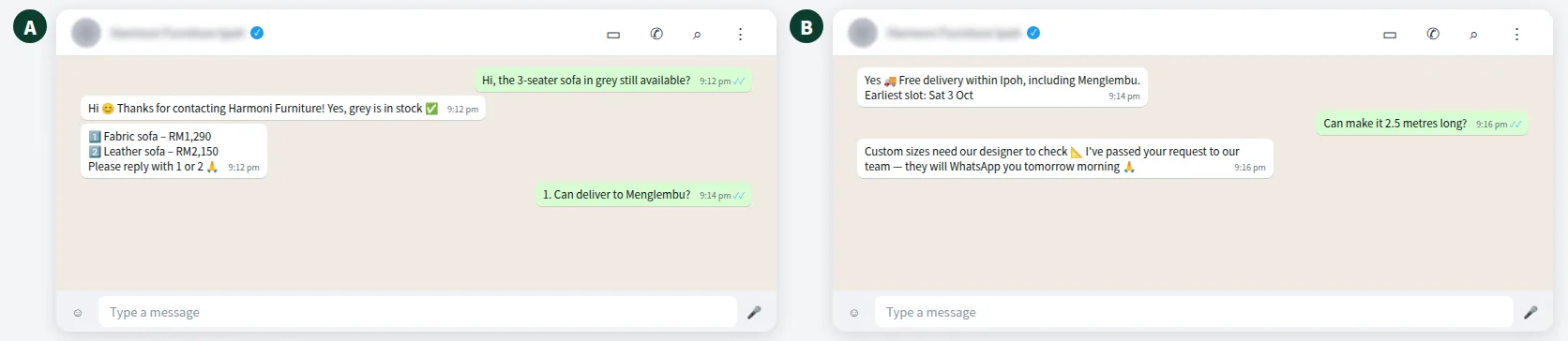
Being on the official API does not make WhatsApp feel robotic. Customers still chat normally; the difference is that the AI, your staff and your broadcasts all work on one approved number. Here is an illustrative example for a fictional furniture shop in Ipoh:
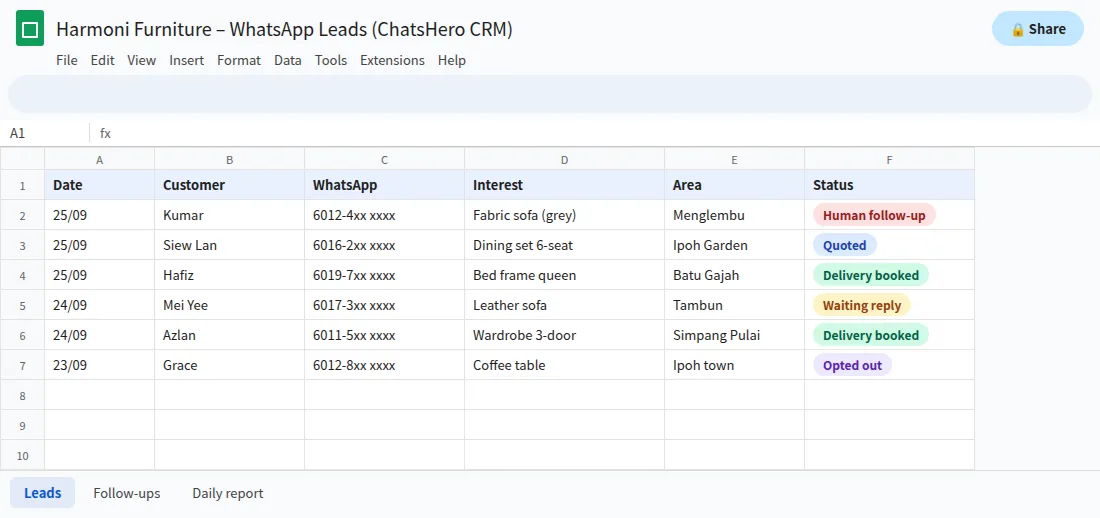
Every enquiry is recorded automatically, so the sales team follows up from one list instead of scrolling through phones:
Complaints, custom orders and anything the AI should not decide are handed to a human, with a “Human Agent Needed” alert in your team’s WhatsApp group.
Want to see how this looks with your own business? WhatsApp us and chat with the ChatsHero AI.
Is the official API completely ban-proof?
No, and anyone who promises “no ban” is overselling. On the official API, your number and templates carry a quality rating based on how customers react: blocks and reports pull it down. Meta’s WhatsApp Business Messaging Policy also requires opt-in before you message people and forbids certain products and content.
- Only message customers who contacted you or agreed to hear from you.
- Keep promotions relevant and not too frequent.
- Make it easy to opt out, and honour opt-outs immediately.
- Keep reminders and receipts separate from promotions.
Follow those basics and the risk is low and visible. That is the real upgrade from an unofficial tool: not zero risk, but risk you can see and manage.
Which option should a Malaysian SME choose?
If WhatsApp is only a personal-style chat with a few regulars, the free WhatsApp Business app used by hand is fine. The moment you want automation — AI replies, broadcasts, several staff on one number, reports — use the official API. The unofficial WhatsApp API risk is simply too large for a channel your sales depend on.
ChatsHero is built on the official WhatsApp Business API and replies 24/7 in English, Bahasa Melayu and Chinese. If you are mid-way through a switch and unsure about a step, our team can walk you through it, and the blog has more on running WhatsApp the official way.
Frequently Asked Questions
What is the biggest unofficial WhatsApp API risk?
Losing your business number. Unofficial tools automate a normal WhatsApp account, which breaks WhatsApp’s Terms of Service, so the number can be banned without warning. Customers who saved it can no longer reach you.
Are WhatsApp blasting tools illegal in Malaysia?
An unauthorised tool may breach WhatsApp terms, but that is not the same as deciding every tool is illegal under Malaysian law. Customer data and direct marketing also involve privacy obligations. Check Malaysian regulator guidance and obtain advice for your particular use. This is general information, not legal advice.
Can the official WhatsApp Business API still get banned?
Yes, if you break Meta’s policies — for example by messaging people without opt-in or getting many blocks and reports. The risk is lower and visible through your quality rating, but it is never zero.
How much does the official WhatsApp Business API cost in Malaysia?
Budget for your platform/provider and eligible Meta messages. The announced October model retains 1,000 free service messages per phone number monthly before service charges. Inbound and qualifying free entry points remain free. Use the actual market rate card for your final budget.
Can I keep my existing number when I move to the official API?
Often yes, but it depends on your current setup. Your provider will explain the options and what happens to the WhatsApp app and chat history on that number before you move it.
Is the free WhatsApp Business app an unofficial tool?
No. The WhatsApp Business app is official. It becomes risky when you connect it to third-party software that automates or blasts messages through it.