A tuition centre WhatsApp system does four things for a busy admin desk: sends polite fee reminders before the due date, keeps each parent updated on class changes, answers new enquiries and books trial classes 24/7, and records students, fees and trials in Google Sheets. For a centre with 180 students, the monthly reminders cost about RM13 in Meta fees if they are classed as utility messages.
RM0.35 and RM0.06 in this article and its supplied illustrations are planning assumptions, not verified current Meta quotations. Gupshup's October announcement describes 1,000 free service replies per business phone number per month, then eligible service charges from 1 October 2026. Utility templates do not use that allowance. Inbound messages and qualifying 72-hour free entry point messages remain exempt. Confirm the recipient market, applicable rate card, free allowance and provider fees before budgeting. Figures below exclude tax and any unlisted costs.
Examples show a proposed workflow, not a guarantee that every account or plan supports it. Ask our team to confirm the channel, integration, permissions and delivery method for your setup. Staff-group notifications and group assistants require separate eligibility and integration checks; a standard one-to-one WhatsApp API account should not be assumed to access every existing staff group. Use approved individual notifications or a staff dashboard if group delivery is unavailable. Test the workflow and human handover before use.
- Send fee reminders a few days before the due date and one follow-up only to parents who haven't sent a receipt.
- Keep fee reminders free of promotions — Meta decides the category from the content, and a promo turns it into a marketing message.
- Send class changes to each parent individually from the centre's number instead of relying on big WhatsApp groups that expose everyone's numbers.
- Let AI answer night-time enquiries about subjects, timetables and fees, and book trial classes in fixed slots.
- For students under 18, the parent or guardian is the one who consents under the PDPA — collect only what you need about the child.
- Record students, fees and trial bookings in Google Sheets; your admin verifies payments and updates the status.
Why does a tuition centre need a WhatsApp system, not just a phone?
When parents WhatsApp the front desk at all hours, one admin phone is not enough.
If your centre runs on one admin phone, that phone carries everything: new parents asking about fees, current parents asking whether class is on, fee receipts, replacement class requests and teachers' updates. It works with 40 students. With 180 students across primary and secondary levels, it starts to break:
- Fee chasing takes days. The admin scrolls through chats at month-end to see who has paid.
- Night-time enquiries wait. A parent asking about Form 4 Add Maths at 10:30pm hears back the next afternoon.
- Class changes get missed. A notice posted in a busy group is buried under 'noted with thanks' replies.
- Records live in one phone. When the admin is on leave, nobody knows who booked a trial class.
A tuition centre WhatsApp system keeps the same WhatsApp habit parents already have, but puts structure behind it: reminders on schedule, answers in seconds and every detail recorded in one place.
What does a tuition centre WhatsApp system actually do?
Here is how the admin workload changes for a fictional centre, Cerdas Learning Centre in Puchong, with 180 students.
| Task | Manual WhatsApp | With a WhatsApp AI system |
|---|---|---|
| Fee reminders | Typed parent by parent | Sent on schedule before the due date |
| Fee receipts | Scattered in chats | Receipt photo saved to Google Drive and logged in Sheets; admin verifies |
| Class changes | Posted in groups, easily missed | Sent to each parent, who replies 1 or 2 |
| New enquiries | Answered next working day | Answered 24/7 in English, Malay and Chinese |
| Trial classes | Noted on paper | Booked in fixed slots and added to Google Calendar |
| Weekly overview | Owner asks the admin | Summary sent to the owner's WhatsApp group |
The AI handles the repetitive layer. Teachers and the admin still decide anything about a child's progress, discounts or special arrangements.
How do you send a tuition fee reminder on WhatsApp that parents don't mind?
A reminder feels helpful when it is specific and polite, and pushy when it is vague. Keep it clear:
- Three or four days before the due date: child's name, subject, month, amount and due date.
- Ask for the receipt: 'Please send the receipt here after paying.' The AI thanks the parent and saves it; it tells them the admin will verify the payment.
- One follow-up after the due date, only to parents without a receipt. Your admin keeps that list up to date in the sheet.
- Anything sensitive goes to a person: instalment requests, hardship or disputes.
Fee reminders tied to a student's account are the kind of message Meta lists as a utility use case in its template guidelines ('payment reminders'). But Meta decides each template's category from its content: add 'Sign up for our holiday camp!' and it becomes marketing (≈ RM0.35 instead of ≈ RM0.06).
Example cost: 180 reminders + 40 follow-ups = 220 messages × RM0.06 = RM13.20 a month. Fees are set by Meta, billed to the centre's own WhatsApp account and separate from your ChatsHero plan. From 1 October 2026, eligible service replies above the monthly 1,000-message allowance per phone number inside the customer-service window are also charged per message using an illustrative utility-rate assumption (see Meta's pricing page).
How do you send parent updates on WhatsApp without ten class groups?
Class groups are handy, but they have downsides: every parent can see every other parent's number, important notices get buried, and it is hard to tell who has actually read them. Individual updates from the centre's number solve all three.
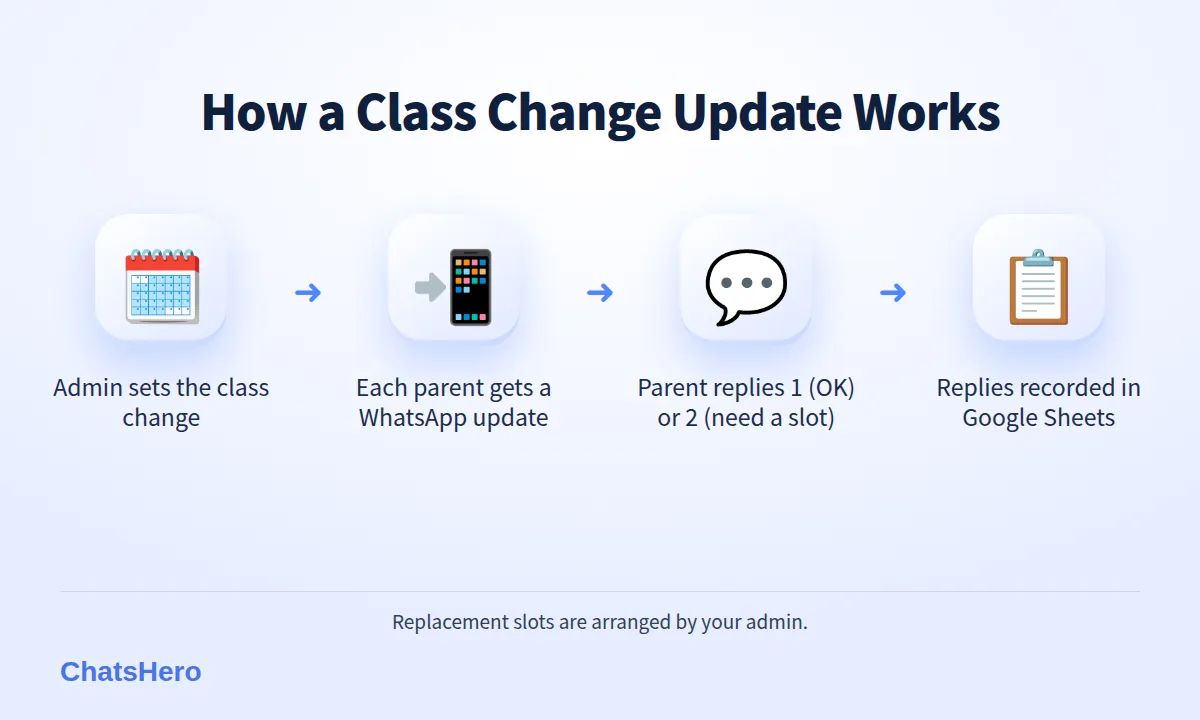
- Class changes'Thu 15 Oct class moves to Sat 17 Oct, 10am.' Parents reply 1 to confirm or 2 to ask for another slot.
- Replacement requestsParents ask for a replacement class in the chat; the request is logged for the admin to arrange.
- Term noticesHoliday breaks, exam-week timetables and fee changes, sent once and recorded.
Keep these updates about the class the child is already enrolled in. Promotions for new programmes belong in a separate message, sent only to parents who agreed to receive them.
How does the AI answer new parent enquiries and book trial classes?
New enquiries can arrive late in the evening, after work and dinner. With ChatsHero, the AI answers subject, timetable and fee questions straight away, in English, Bahasa Melayu or Chinese — including mixed-language messages (here is how AI understands Bahasa Rojak).
When a parent is interested, the AI offers the trial class slots your centre has set, confirms the booking and adds it to Google Calendar. Your admin keeps the calendar and slot list up to date. Here is an illustrative month at Cerdas Learning Centre:
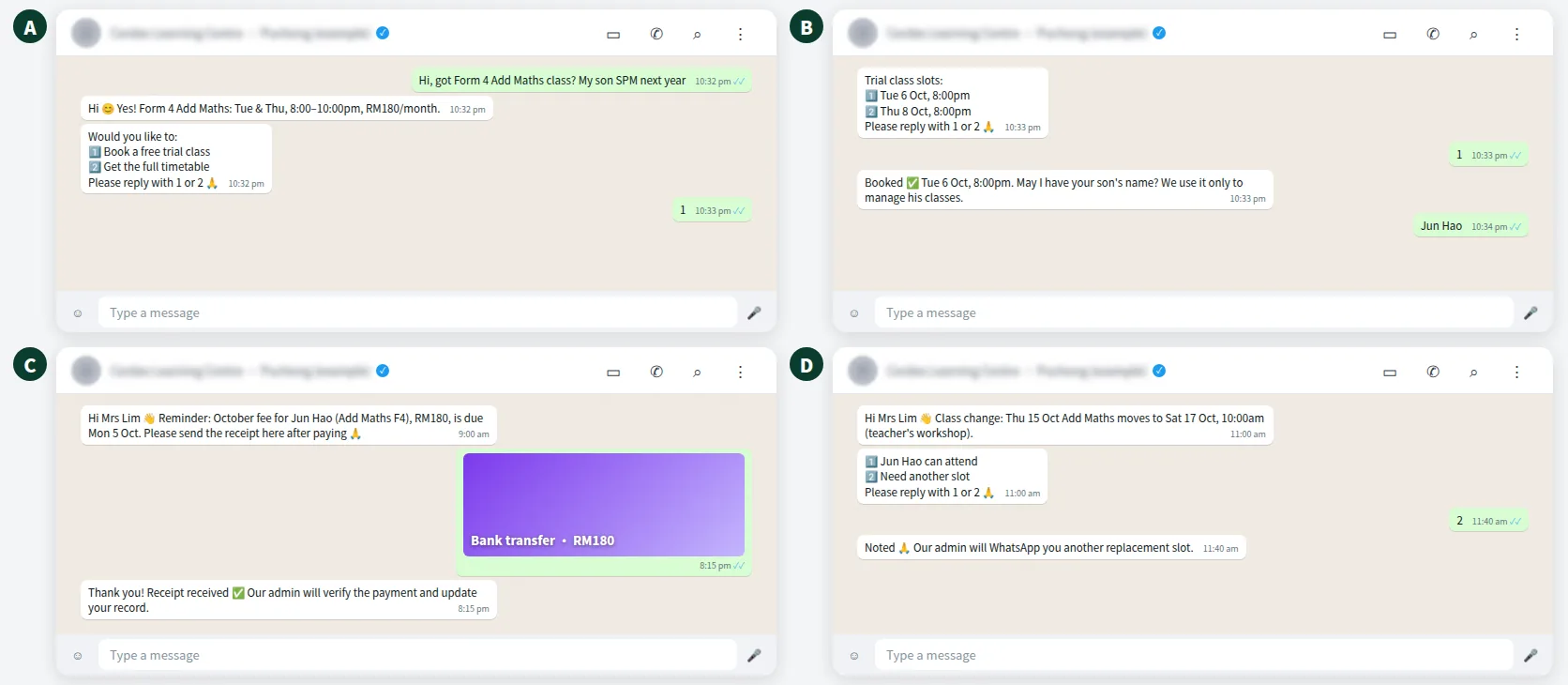
If a parent asks something the AI shouldn't answer — a special learning need, a complaint or a request for a discount — a 'Human Agent Needed' alert goes to your team's WhatsApp group so the right person can reply.
How do you protect student data under the PDPA?
A tuition centre handles children's names, schools, levels, results and sometimes photos. Under Malaysia's Personal Data Protection Act 2010, when a data subject is under 18, the 'relevant person' is the parent, guardian or person with parental responsibility — so it is the parent who gives consent and receives the notices.
- Collect only what you need: child's name, level, school (if needed for grouping) and subjects. Parents' contact details for communication.
- Tell parents how you use the data, for example in the registration form and the first WhatsApp reply.
- Ask before posting photos of children on social media or in broadcasts, and respect a 'no'.
- Share results only with that child's parent, never in a group.
- Limit access to the Google Sheet and Drive folder, and remove records you no longer need after a student leaves.
Message the parent, not the child. Keep fee reminders, class updates and results between the centre and the parent's number, unless the parent has agreed otherwise.
How do you track students, fees and trial classes in Google Sheets?
Details from each chat — trial booking, receipt received, replacement request — are recorded in Google Sheets. Your admin checks the bank statement, marks fees as paid and updates the status. The owner receives a weekly summary in a WhatsApp group: new trials booked, receipts to verify and open replacement requests.
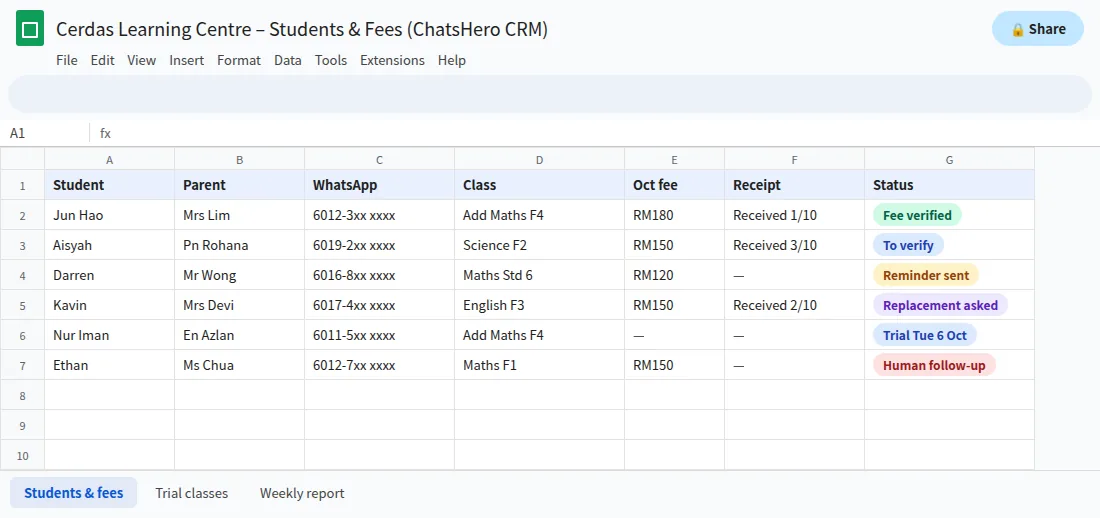
Because the sheet is shared, a relief admin or the centre owner can pick up where the regular admin left off, without scrolling through anyone's phone.
How do you set up a tuition centre WhatsApp system in one week?
Setting up is conversational. In ChatsHero's Plan and Build modes, you describe your centre by text, screenshot or voice note, and the AI builds the assistant — no prompt writing.
- Day 1: Gather your timetable, fee table, trial class slots and centre policies (replacement classes, holidays, fee due date).
- Day 2: List students and parents' WhatsApp numbers in a Google Sheet.
- Day 3: Train the AI with your FAQ and decide what always goes to a person.
- Day 4: Write the fee reminder and class-change messages, with no promotions inside.
- Day 5: Tell parents that reminders and updates will come from the centre's number.
- Days 6–7: Test with teachers' phones in English, Malay and Chinese, then go live.
Compare plans on our pricing page or learn more about ChatsHero, an Malaysian company on the official WhatsApp Business API. More guides for education businesses are on the ChatsHero blog.
Want to see how this looks with your own business? WhatsApp us and chat with the ChatsHero AI.
Frequently Asked Questions
What is a tuition centre WhatsApp system?
It is a setup on the official WhatsApp Business API where an AI assistant sends fee reminders and class updates to parents, answers enquiries 24/7, books trial classes and records details in Google Sheets, while the admin verifies payments and handles special requests.
Are tuition fee reminders charged as utility or marketing messages?
A reminder about a specific student's fee is the kind of message Meta lists as utility, at an assumed RM0.06 in Malaysia. But Meta decides each template's category from its content — add a promotion and it is charged as marketing, at an assumed RM0.35.
Can the system confirm that a parent has paid?
It receives and saves the receipt and tells the parent that the admin will verify the payment. Your admin checks the bank statement and marks the fee as paid in Google Sheets.
Do I need parents' consent to keep student data?
For students under 18, the PDPA treats the parent, guardian or person with parental responsibility as the relevant person, so consent and notices go through them. Collect only what you need and limit who can access it.
Should we still use WhatsApp groups for each class?
Groups expose every parent's number and notices get buried. Sending important updates to each parent individually from the centre's number avoids both problems and lets you record each reply.
Can the AI reply to parents in Malay and Chinese?
Yes. ChatsHero replies in English, Bahasa Melayu and Chinese, and understands parents who mix languages in one message.