To train WhatsApp AI with a voice note, you simply record yourself explaining your prices, rules and FAQs as if briefing a new staff member, add a screenshot of your price list, and let the AI plan and build the bot. With ChatsHero there is no prompt writing: you review a test chat, correct anything wrong by voice, and go live — plans start from RM350 a month (billed annually).
Examples show a proposed workflow, not a guarantee that every account or plan supports it. Ask our team to confirm the channel, integration, permissions and delivery method for your setup. Staff-group notifications and group assistants require separate eligibility and integration checks; a standard one-to-one WhatsApp API account should not be assumed to access every existing staff group. Use approved individual notifications or a staff dashboard if group delivery is unavailable. Test the workflow and human handover before use.
- You can train a WhatsApp AI the way you use ChatGPT: talk, paste or upload a screenshot — no prompt writing.
- Voice notes are best for rules and judgement calls; screenshots are best for price lists, menus and timetables.
- Record in whatever language you speak naturally — English, Bahasa Melayu, Chinese or a mix.
- Never upload screenshots that show customers' names, phone numbers or IC details; crop or blur them first (PDPA).
- Test 10–15 real customer questions before going live and fix mistakes with a short follow-up voice note.
- Decide in advance which questions must go to a human, such as custom orders, complaints and refunds.
What does it mean to train WhatsApp AI with a voice note?
Training should feel like briefing a new staff member, not writing code.
To train WhatsApp AI with a voice note means you explain your business out loud — prices, delivery areas, opening hours, what to do when a customer asks for a discount — and the AI turns that explanation into a working WhatsApp assistant. You do not write prompts, draw flowcharts or list keywords.
In ChatsHero this happens in two modes:
- Plan mode. You talk with the AI about what the bot should do. It asks follow-up questions ("What happens if the customer wants delivery on a Sunday?") until the plan is clear.
- Build mode. The AI builds the bot from that plan. You then test it and correct anything by text, screenshot or another voice note.
If you have ever typed a question into ChatGPT or Claude, you already have the skill. The difference is that the result is not a one-off answer — it is an assistant that replies to your customers on the official WhatsApp Business API, 24/7.
Voice note, screenshot or copy-paste: which input should you use?
Each input type has a job. Use the one that matches the information, and mix them freely in the same training session.
| Input | Best for | Example | Watch out for |
|---|---|---|---|
| 🎤 Voice note | Rules, exceptions, tone, judgement calls | "Deposit 50% for custom cakes, full refund if we cancel" | Background noise; very long rambles |
| 🖼️ Screenshot | Price lists, menus, timetables, postage tables | Your Canva price list or a photo of the shop board | Blurry photos; customer details in the image |
| 📋 Copy-paste | FAQ documents, terms, product descriptions | Your existing FAQ from Google Docs or your website | Outdated text you forgot to update |
A practical rule: if you would explain it to a new hire, record a voice note; if you would show it to them, take a screenshot; if it is already written down, paste it.
Owners explain better than they write. A two-minute voice note usually captures the exceptions ("but for Seremban 2 we deliver free above RM150") that people leave out when they type a formal FAQ.
How do you train WhatsApp AI with a voice note, step by step?
Here is the routine for a fictional home bakery, Rumah Kek Mak Teh in Seremban. It takes most of an afternoon, not weeks.
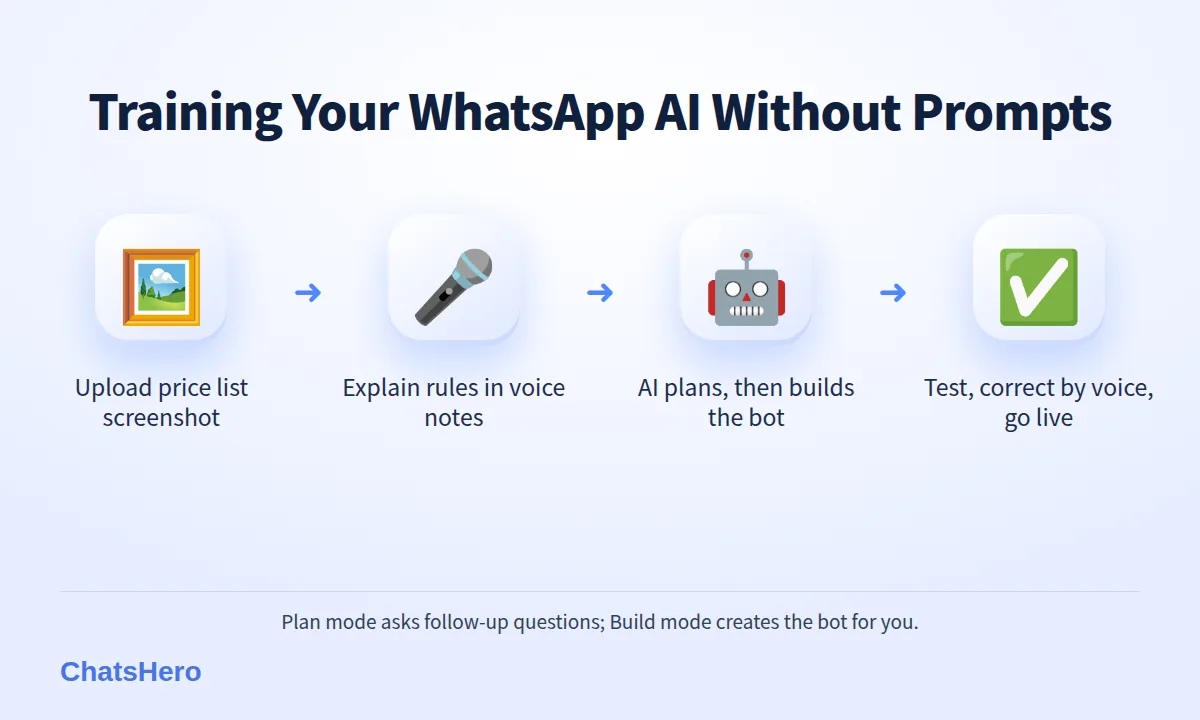
- Collect your material (15 minutes). Your price list image, delivery zones, order cut-off times, payment details and the 10 questions customers ask most often. Scroll your own WhatsApp chats to find them.
- Open Plan mode and describe the goal. For example: "I want the bot to answer cake prices, check if the area is in our delivery zone, take order details and pass custom cakes to me."
- Upload the screenshot of your price list. The AI reads the items and prices and confirms them back to you. Check every number.
- Record one voice note per topic. One for delivery rules, one for deposits and refunds, one for custom orders. Short, focused notes are easier to check than one 10-minute monologue.
- Answer the AI's follow-up questions. Plan mode will ask about gaps — public holidays, late orders, halal status of ingredients. Reply by voice or text.
- Switch to Build mode. The AI builds the WhatsApp assistant from the plan.
- Test, correct, go live. Chat with the bot as a customer, fix wrong answers with a quick voice note, then connect it to your number.
The key difference from older chatbots: you never type "IF customer says 'harga' THEN reply …". The AI works out the replies from what you explained.
What should you say in a training voice note?
Think of the voice note as a handover to a part-timer who starts tomorrow. Cover the facts, the exceptions and the tone.
A sample 60-second voice note
"OK, this one is about delivery. We deliver around Seremban, Rasah, Senawang and Seremban 2. Delivery is RM10, free if the order is above RM150. Orders must be in two days before. No delivery on Sunday — customers can self-pickup at Taman Bukit Kaya from 10am to 5pm. If someone asks for Nilai or KL, say sorry, pickup only. Always be friendly, can use a bit of Malay, like how I talk."
Tips for better voice notes
- One topic per note. Delivery, payment, custom orders, complaints — separately.
- Say numbers clearly. "RM75 for one kilo" beats "seventy-something". Then check the AI repeated it correctly.
- Include the exceptions. The unusual cases are where a bot goes wrong, and where your voice note adds the most value.
- Speak your usual language. Mixing English, Bahasa Melayu and Chinese is fine; ChatsHero replies to customers in all three. See how AI understands Bahasa Rojak.
- Record somewhere quiet. A noisy kitchen or a running mixer makes words harder to catch.
Which screenshots should you use to train a WhatsApp chatbot — and which should you never upload?
Good screenshots are clear, current and free of other people's personal data.
- UsePrice lists, menus, class timetables, postage tables, promo posters with dates, your shop's opening hours sign.
- Crop firstPast chats that show a good answer — but remove the customer's name, number and profile photo.
- Never uploadIC copies, bank statements, payslips, delivery labels with addresses or anything showing a customer's personal details.
Screenshots of old conversations are tempting because they show real questions. They also contain personal data. Under Malaysia's Personal Data Protection (Amendment) Act 2024, penalties for breaching the data protection principles now go up to RM1 million, and data breach notification became mandatory in 2025. The simple habit: retype the question ("Can deliver to Rasah?") instead of uploading the customer's chat.
Also check that the screenshot is the current version. An old Raya promo poster will be read as a live offer.
How do you test the bot before customers see it?
Never go live on trust. Spend 20 minutes chatting with the bot as if you were a customer — including a difficult one.
- Ask your 10 most common questions in different ways: short ("hrg?"), long, in Malay, in Chinese.
- Ask something the bot should not answer, like a custom three-tier wedding cake. It should hand over to you.
- Try an exception from your voice note, like a Sunday delivery.
- Check every price and date it quotes against your screenshot.
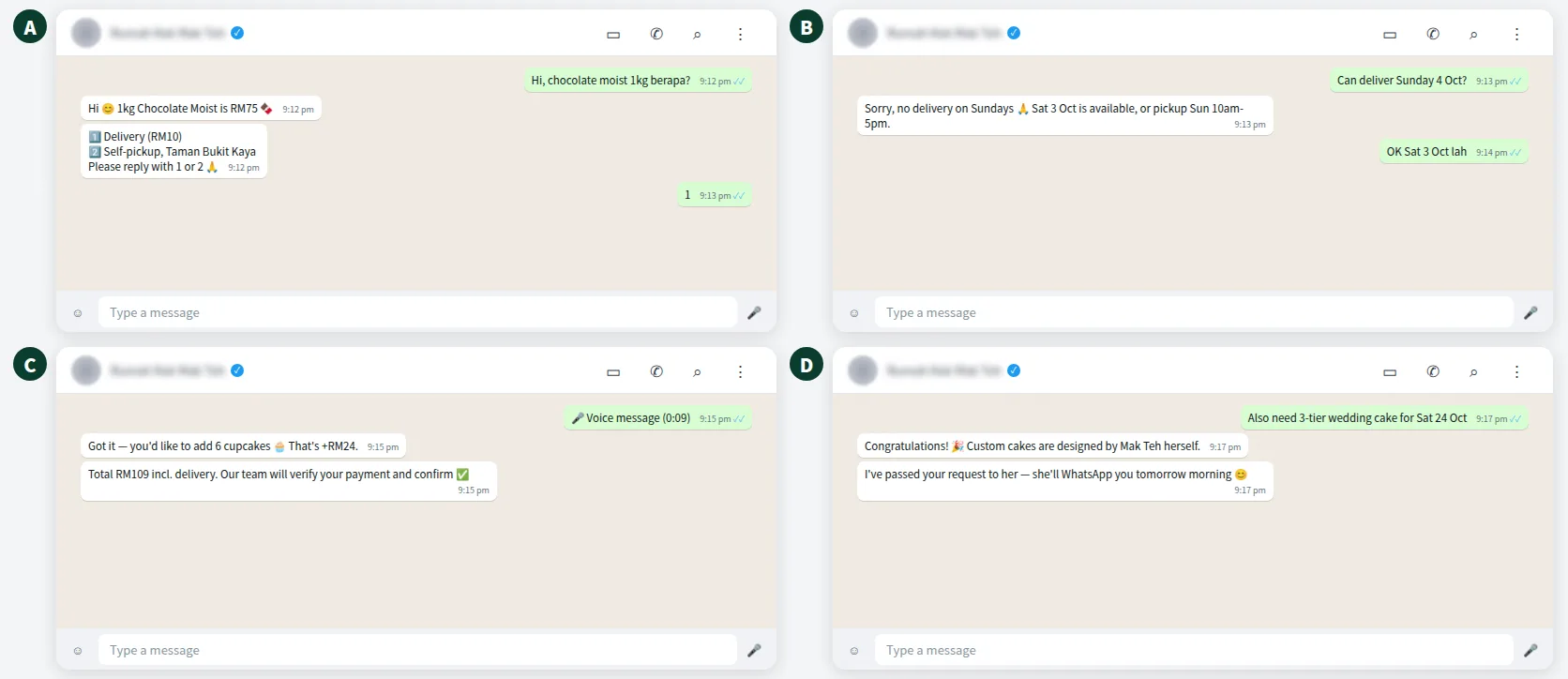
When an answer is wrong, do not rewrite a prompt — just send a correction: "No, Sunday is pickup only, no delivery." The AI updates the bot. For anything that needs a person, ChatsHero sends a "Human Agent Needed" alert to your team's WhatsApp group so someone can take over the chat.
Can the AI understand voice notes and screenshots from customers too?
Yes, when it is trained for them. Voice is a normal way to chat on WhatsApp — the WhatsApp blog reported an average of 7 billion voice messages sent every day (March 2022, global figure). Customers who send a voice note asking "Kek ni ada size kecil tak?" or a screenshot of your Instagram post expect an answer, not "please type your question".
With ChatsHero, you can train the AI to handle customers' voice notes and screenshots, for example matching a screenshot of a cake from your Instagram to the right item on your price list. When the request is unclear, the bot asks one short question or hands over to your team.
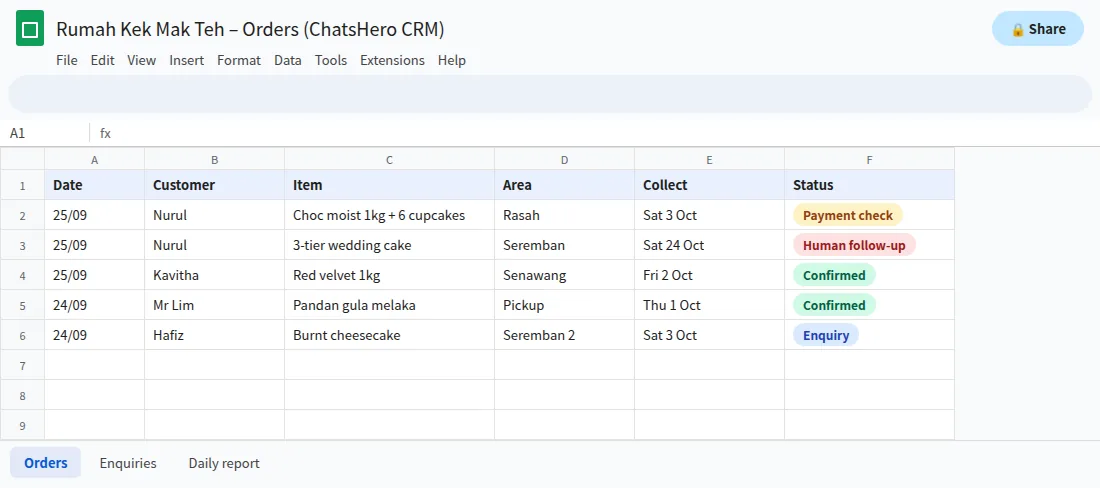
Every order detail the bot collects — name, item, date, delivery area — is recorded in Google Sheets, so your team works from one list.
How do you keep your WhatsApp AI training up to date?
Training is not a one-time job. Prices change, festive menus come and go, and delivery areas grow. The advantage of voice-note training is that updates take a minute.
| Change | Fastest update |
|---|---|
| New price list | Upload the new screenshot and say "replace the old one" |
| Festive menu (Raya, CNY, Deepavali) | Screenshot of the poster plus a voice note with the start and end dates |
| Closed for a holiday | Voice note: "Closed 1 to 3 Oct, orders resume Sunday 4 Oct" |
| A question the bot keeps missing | Type the question and the answer you want |
A good habit is a weekly five-minute review: read the chats the bot handed over to humans and ask "could it have answered this?" If yes, send one voice note to fill the gap.
ChatsHero plans include unlimited bots on Growth and a done-for-you option if you would rather we set it up — see the pricing page or learn about the team.
Want to see how this looks with your own business? WhatsApp us and chat with the ChatsHero AI.
Frequently Asked Questions
Can I really train WhatsApp AI with a voice note?
Yes. With ChatsHero you record a voice note explaining your prices, rules and FAQs, add screenshots or pasted text if useful, and the AI plans and builds the WhatsApp bot. You do not write prompts or keyword rules.
What language should I use in my training voice notes?
Use the language you speak naturally — English, Bahasa Melayu, Chinese or a mix. The bot replies to customers in English, Bahasa Melayu and Chinese, including customers who mix languages.
How long should a training voice note be?
Keep each note to one topic and roughly one to two minutes. Several short notes (delivery, payment, custom orders) are easier to check and correct than one long recording.
Is it safe to upload screenshots of old customer chats?
Only after removing personal data such as names, phone numbers and photos. Better still, retype the question. Never upload IC copies, bank statements or delivery labels, in line with Malaysia's PDPA.
What if the AI gets an answer wrong after training?
Send a correction by voice or text, for example "No, Sunday is pickup only." The AI updates the bot. Test again before going live, and set custom orders and complaints to hand over to a human.
Do I need technical skills to train a WhatsApp chatbot this way?
No. If you can use ChatGPT or send a WhatsApp voice note, you can train it. ChatsHero also offers a done-for-you plan if you prefer the team to set it up.