A receipt scanner on WhatsApp with Google Sheets works like this: a staff member snaps a petrol, toll or supplier receipt and sends it to your company WhatsApp number. The AI reads the merchant, date and amount, asks for the category if needed, saves the photo in Google Drive and adds a row to Google Sheets. At month end, your accounts team reviews one list instead of chasing crumpled paper.
RM0.35 and RM0.06 in this article and its supplied illustrations are planning assumptions, not verified current Meta quotations. Gupshup's October announcement describes 1,000 free service replies per business phone number per month, then eligible service charges from 1 October 2026. Utility templates do not use that allowance. Inbound messages and qualifying 72-hour free entry point messages remain exempt. Confirm the recipient market, applicable rate card, free allowance and provider fees before budgeting. Figures below exclude tax and any unlisted costs.
Examples show a proposed workflow, not a guarantee that every account or plan supports it. Ask our team to confirm the channel, integration, permissions and delivery method for your setup. Staff-group notifications and group assistants require separate eligibility and integration checks; a standard one-to-one WhatsApp API account should not be assumed to access every existing staff group. Use approved individual notifications or a staff dashboard if group delivery is unavailable. Test the workflow and human handover before use.
- Staff already have WhatsApp on their phones; sending a receipt photo there takes seconds and needs no new app.
- The AI reads merchant, date and total, asks for a category or project if needed, and records it in Google Sheets.
- Each receipt image is saved in Google Drive and linked from its row, so the evidence stays with the record.
- Your accounts team still checks, approves and reimburses; the scanner organises, it does not file taxes.
- Income tax records must generally be kept for seven years; ask your tax agent how to keep digital copies.
- From 1 September 2026, businesses with annual revenue below RM3 million are exempt from issuing e-invoices.
Why do receipts get lost before month-end claims?
Receipts are small, faded and easy to lose. The phone in your staff's pocket is not.
Typical month-end problems look like this: a driver's petrol receipts left in the lorry, a salesperson's parking tickets in a jacket pocket, a supplier cash bill photographed into a WhatsApp group where it is buried under 300 other messages. Thermal paper fades, and by the time the claim form is filled, nobody remembers which project the RM48 lunch was for.
The problem is not that staff are careless. It is that the process asks them to keep paper safe for weeks, then retype it. A receipt scanner on WhatsApp with Google Sheets flips that: the receipt is captured the moment it is received, in an app everyone already uses, and the details are recorded while they are still fresh.
How does a receipt scanner on WhatsApp with Google Sheets work?
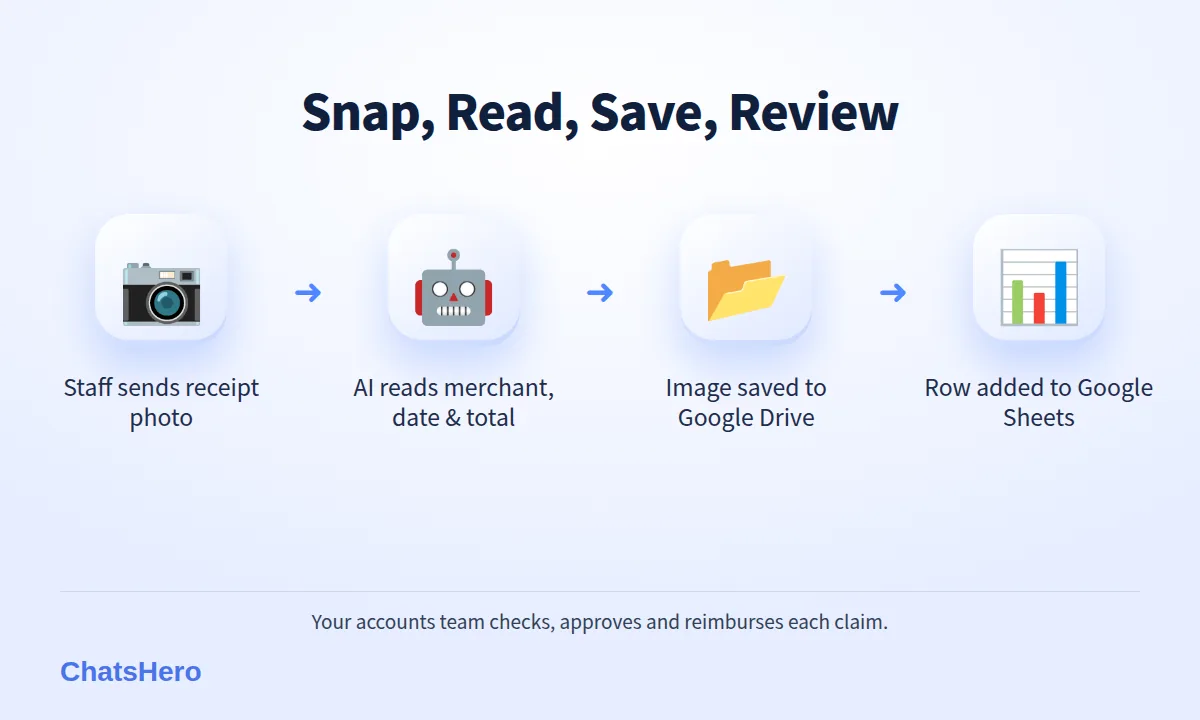
With ChatsHero, the receipt scanner runs on your company's WhatsApp Business number. The steps for a staff claim look like this:
- Snap and send. The staff member takes a clear photo of the receipt and sends it to the company WhatsApp number.
- AI reads the key details. Merchant, date and total amount, shown back to the staff member to confirm.
- Ask what is missing. If your rules need a category or project code, the AI asks with numbered options.
- Save the image. The photo is saved into a Google Drive folder.
- Record the row. A new row goes into Google Sheets with the staff name, details and a link to the image.
- Accounts reviews. Your team checks each row, marks it approved or queried, and processes reimbursement as usual.
You set it up the same way you would train any ChatsHero bot: describe your categories, projects and claim rules in plain language (text, screenshot or voice note), and the AI builds the flow. No prompt writing.
Ask for a retake immediately. If the total or date cannot be read, the AI asks the staff member to send a clearer photo while the receipt is still in hand.
What does a receipt claim look like in the chat?
Here is an illustrative set of conversations for a fictional logistics company, Sinar Logistik in Klang, where drivers and sales staff send fuel, toll, parking and supplier receipts.
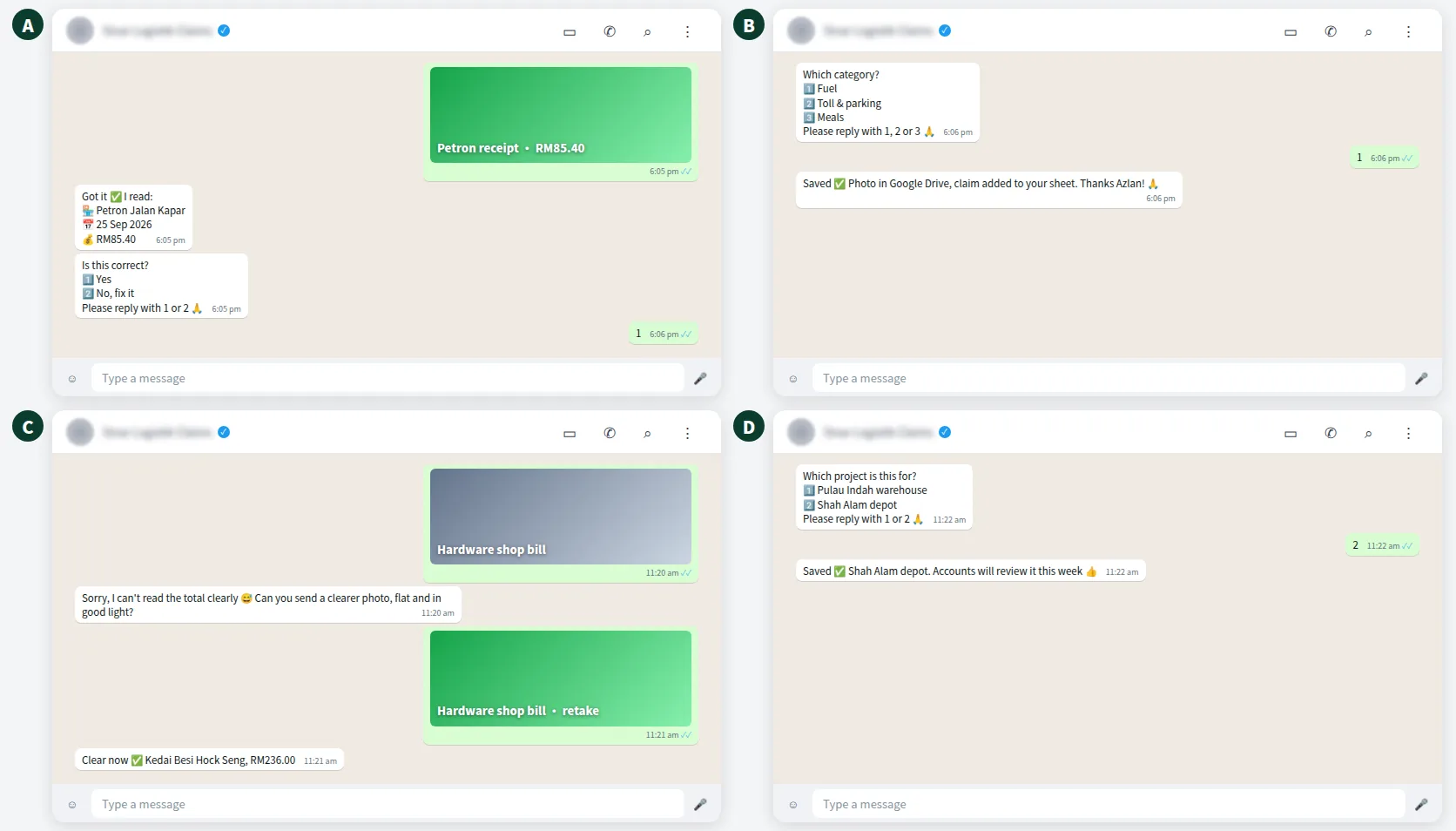
Each exchange takes under a minute. The staff member confirms what the AI read, which catches mistakes at the source rather than at month end. Anything unusual — a large amount, a missing receipt, a personal item on a company bill — is flagged for the accounts team to handle.
How are staff receipts saved to Google Drive and Google Sheets?
The receipt image is saved in Google Drive, and the details are recorded in Google Sheets with a link back to the image. Your accounts team sees one tidy list:
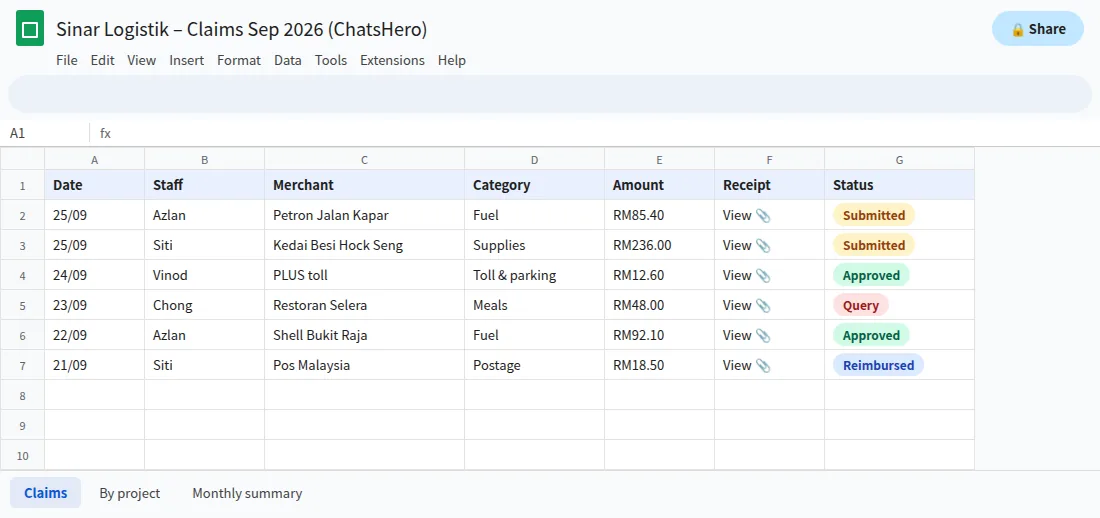
- Evidence attachedEvery row links to its receipt image in Google Drive.
- Filter by staff or projectMonth-end totals per person, vehicle or job in a few clicks.
- Clear statusAccounts marks each claim approved, queried or reimbursed.
Because it is an ordinary Google Sheet, you can add your own formulas, pivot tables or an export for your accounting software. Access is controlled with your usual Google sharing settings, so limit the sheet and Drive folder to the people who need them.
Receipt scanner on WhatsApp and Google Sheets vs a shoebox or group chat: which is better?
Most small businesses use one of three methods today. Here is how they compare:
| Method | Capture | Data entry | Finding a receipt later | Risk |
|---|---|---|---|---|
| Paper in an envelope or shoebox | At month end | Manual retyping | Slow, by hand | Lost or faded receipts |
| Photos in a WhatsApp group | Immediate | Manual retyping | Scrolling the group | Buried messages, no status |
| Receipt scanner on WhatsApp → Drive + Sheets | Immediate | AI reads, staff confirm | Search or filter the sheet | Blurry photos (retake on the spot) |
The difference is not the camera. It is that every receipt becomes a row with a status.
Does a WhatsApp receipt scanner handle tax and e-invoicing?
No — and it is important to be clear about this. The receipt scanner captures and organises receipts. It does not file taxes, submit anything to LHDN, or issue or validate e-invoices on MyInvois. Your accounts team or tax agent still decides what is claimable and how it is reported.
What it does help with is record-keeping. Under section 82 of the Income Tax Act 1967, business records must generally be kept for seven years from the end of the year to which the income relates, and they may be kept electronically if they are readable, accessible and convertible into writing. Whether a phone photo alone is enough for a particular document is a question for your tax agent; if in doubt, keep the original too.
On e-invoicing, LHDN's e-Invoice FAQ (4 September 2026) states that taxpayers with annual turnover or revenue below RM3 million are exempt from issuing e-invoices. Business Today reported that this higher threshold took effect on 1 September 2026. In practice, your staff will bring back a mix of ordinary receipts and e-invoices from larger suppliers, and the scanner simply keeps a copy of each in one place for your accounts team.
How much does a receipt scanner on WhatsApp cost to run?
There are two parts. The ChatsHero plan covers the platform — see the pricing page. Separately, Meta charges WhatsApp fees to your own WhatsApp account.
A staff member sending a receipt opens a 24-hour customer service window. From 1 October 2026, Meta charges per message for free-form replies inside that window, using an illustrative utility-rate assumption (≈RM0.06). As an example, if staff send 300 receipts a month and each gets one confirmation reply, that is 300 × RM0.06 = RM18 in Meta fees. Extra messages, such as a category question, add to that. Rates are set by Meta and can change (see Meta's pricing page).
Compare that with the hours your accounts team spends retyping receipts and chasing missing ones each month, using your own numbers.
Want to see how this looks with your own business? WhatsApp us and chat with the ChatsHero AI.
How do you roll out the receipt scanner to your staff?
A short, clear rollout avoids confusion:
- Write simple rules. Which expenses are claimable, the categories and project codes, and the monthly cut-off date.
- Save the number. Ask every staff member to save the company WhatsApp number as "Claims" or similar.
- Show one example. A 30-second demo in your staff WhatsApp group is usually enough.
- Agree on originals. Tell staff whether to keep, hand in or discard paper receipts, based on your tax agent's advice.
- Review weekly at first. Check the sheet for misread amounts and adjust categories or instructions.
The same company WhatsApp platform can also handle other internal jobs, such as recruitment screening or an AI that answers SOP questions in staff groups. Learn more about ChatsHero, a Malaysian platform, or browse other company-wide ideas on the ChatsHero blog.
Frequently Asked Questions
How does a receipt scanner on WhatsApp with Google Sheets work?
Staff send a photo of a receipt to your company WhatsApp number. The AI reads the merchant, date and amount, asks for a category or project if needed, saves the image to Google Drive and adds a row to Google Sheets with a link to the image.
Does the receipt scanner file my taxes or submit e-invoices?
No. It captures and organises receipts. It does not file taxes, submit anything to LHDN, or issue or validate e-invoices. Your accounts team or tax agent still handles those.
Are digital receipt photos enough for tax records in Malaysia?
Section 82 of the Income Tax Act 1967 allows records to be kept electronically if they are readable, accessible and convertible into writing, generally for seven years. Ask your tax agent whether a photo is enough for each type of document, and keep originals if unsure.
What happens if the receipt photo is blurry?
If the AI cannot read the total or date clearly, it asks the staff member for a clearer photo straight away, while the receipt is still in hand.
Does my small business need to issue e-invoices?
According to LHDN's e-Invoice FAQ, taxpayers with annual turnover or revenue below RM3 million are exempt from issuing e-invoices; the higher threshold took effect on 1 September 2026. Check your own position with your tax agent.
Who can see the receipts in Google Drive and Sheets?
Only the people you share the Drive folder and sheet with. Use your normal Google sharing settings and limit access to your accounts team and managers who approve claims.