Property viewing booking on WhatsApp can run almost on its own: the AI offers two or three slots from the viewing hours you set, the customer replies 1 or 2, and the booking is added to your Google Calendar with the address, guardhouse and parking details. Reminders go out 24 hours and 2 hours before, at illustratively RM0.06 each as Meta utility messages (2 × RM0.06 = RM0.12 per viewing), and a follow-up asks for feedback afterwards.
RM0.35 and RM0.06 in this article and its supplied illustrations are planning assumptions, not verified current Meta quotations. Gupshup's October announcement describes 1,000 free service replies per business phone number per month, then eligible service charges from 1 October 2026. Utility templates do not use that allowance. Inbound messages and qualifying 72-hour free entry point messages remain exempt. Confirm the recipient market, applicable rate card, free allowance and provider fees before budgeting. Figures below exclude tax and any unlisted costs.
Examples show a proposed workflow, not a guarantee that every account or plan supports it. Ask our team to confirm the channel, integration, permissions and delivery method for your setup. Staff-group notifications and group assistants require separate eligibility and integration checks; a standard one-to-one WhatsApp API account should not be assumed to access every existing staff group. Use approved individual notifications or a staff dashboard if group delivery is unavailable. Test the workflow and human handover before use.
- Offer 2–3 specific slots from the viewing hours you set instead of asking "When are you free?" — it ends the back-and-forth.
- Confirm every viewing with date, time, unit, Google Maps pin, guardhouse registration and parking tips.
- Send reminders 24 hours and 2 hours before, with an easy 1-to-confirm, 2-to-reschedule option.
- For occupied units, only give the AI the windows the owner or tenant has agreed to.
- Follow up within a day of the viewing and hand serious buyers or tenants straight to the agent.
- Keep your firm name, E number and REN details in the WhatsApp profile and confirmation messages.
Why does property viewing booking on WhatsApp take so long?
A viewing is not hard to arrange. It is just slow, one message at a time.
A typical manual booking (an illustrative example) goes like this: "When are you free?" "Weekend." "Saturday or Sunday?" "Saturday afternoon." "3pm OK?" "Can 4pm?" Then a check with the owner, a message back, and a confirmation the next morning. That is eight to ten messages for one appointment.
That delay can cost viewings: a buyer or tenant talking to several agents may simply book with whoever gives a clear time first. Meanwhile, agents lose evenings to scheduling instead of negotiating. Automated property viewing booking on WhatsApp tackles exactly this: fewer messages, faster confirmation, and a calendar you can trust.
This guide starts after the lead is qualified. It covers the logistics: slots, confirmations, reminders, reschedules and follow-up.
How does automatic property viewing booking on WhatsApp work?
With ChatsHero, you tell the AI your viewing hours and the slots you want to offer, and each confirmed booking is added to your Google Calendar. Your team keeps the calendar and the slot list up to date, so the AI never offers a time you have already given away. The steps:
- The customer asks to view a listing, from a portal, a Facebook or TikTok ad, or a direct message.
- The AI offers 2–3 slots from the viewing hours you set, as numbered replies.
- The customer replies with a number, and the booking is added to Google Calendar with the customer's name, phone and unit.
- The AI sends a confirmation with the address, Google Maps pin, guardhouse instructions and parking tips.
- Reminders go out 24 hours and 2 hours before, with confirm and reschedule options.
- After the viewing, a short follow-up asks how it went and alerts you if the customer is interested.
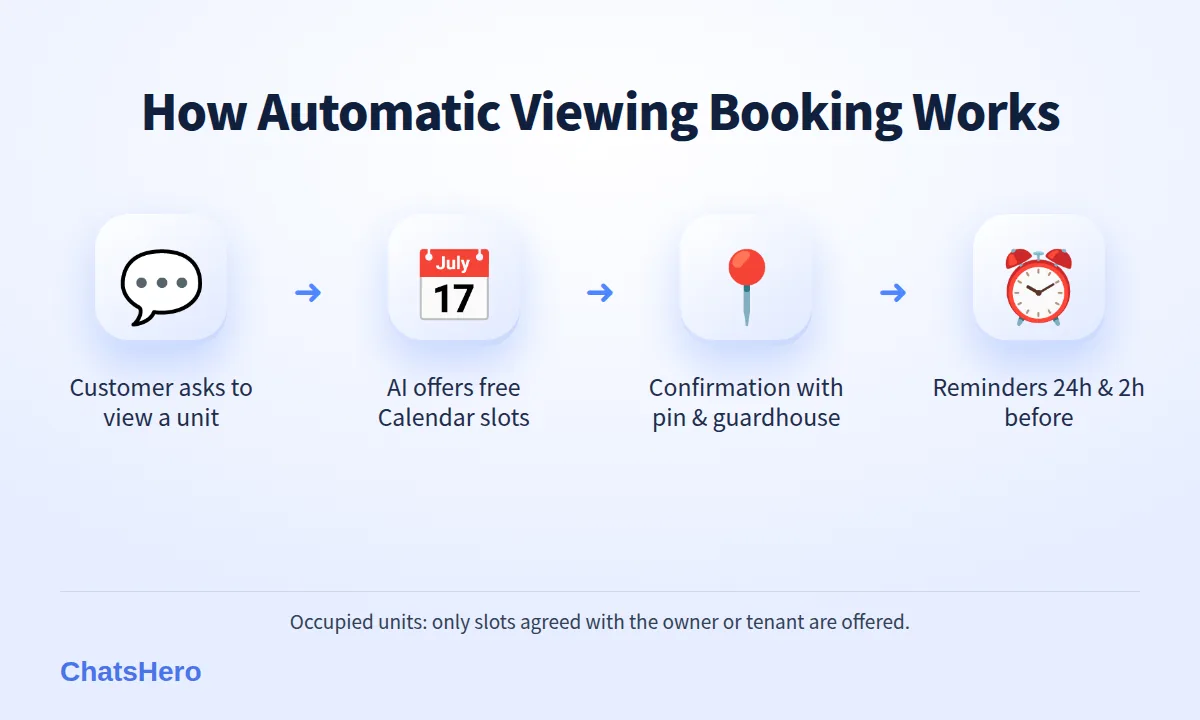
Offering specific slots matters more than it sounds. "When are you free?" invites a long discussion; "Sat 10 Oct 11am or Sun 11 Oct 4pm?" gets a one-character reply.
What should a viewing confirmation message include?
A good confirmation helps prevent no-shows and late arrivals. Include:
- Date, day and time — "Sun 11 Oct, 4:00pm", never just "Sunday".
- The unit — project name, block and floor (share the exact unit number only when appropriate).
- Google Maps pin for the guardhouse or lobby, not only the project name.
- Guardhouse instructions — many condos require visitor registration, so tell the customer to bring their IC for registration at the guardhouse if needed.
- Parking — visitor bays, street parking or where to wait.
- Your registration details — firm name, E number, your name and REN number, in line with the Board of Valuers' (LPPEH) standards for estate agency advertising.
An example conversation
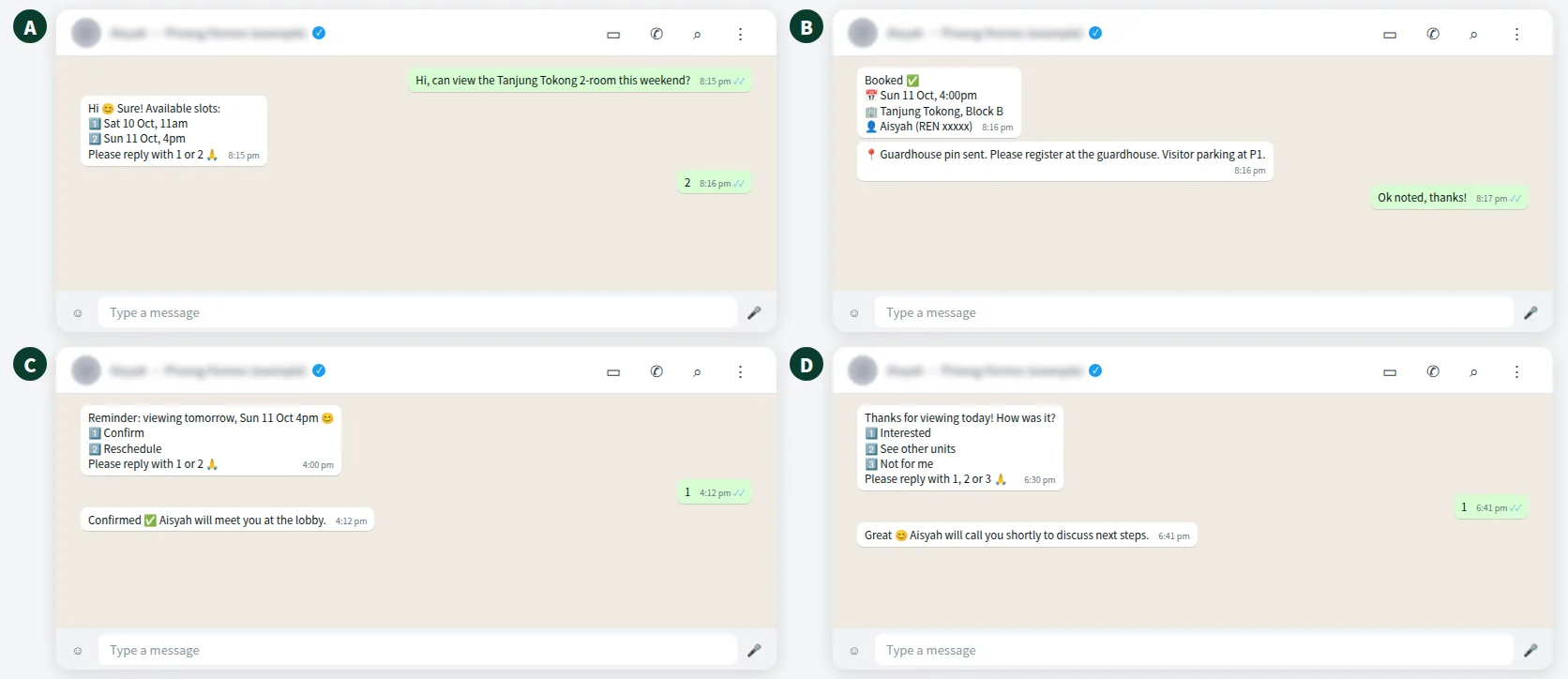
Here is an illustrative flow for a fictional Penang agent, from the booking request to the day-of reminder and follow-up.
When should you send a viewing reminder on WhatsApp?
Two reminders cover most situations:
| When | Purpose | Example message |
|---|---|---|
| 24 hours before | Confirm or reschedule early, so you can release the slot | "Reminder: viewing at Tanjung Tokong tomorrow, Sun 11 Oct 4pm. 1️⃣ Confirm 2️⃣ Reschedule. Please reply with 1 or 2 🙏" |
| 2 hours before | Practical details and running late | "See you at 4pm 😊 📍 Guardhouse pin. Reply if you're running late." |
| After the viewing | Feedback and next step | "Thanks for viewing! How was it? 1️⃣ Interested 2️⃣ Want to see others 3️⃣ Not for me. Please reply with 1, 2 or 3 🙏" |
On the official WhatsApp Business API, reminders sent outside the 24-hour service window use approved templates. A reminder is usually a utility message, an assumed RM0.06 each in Malaysia (Meta's rate, which may change), so two reminders are illustrated here at 2 × RM0.06 = RM0.12 per viewing, billed by Meta to your own WhatsApp account, separate from your ChatsHero plan. From 1 October 2026, free-form eligible service replies above the monthly 1,000-message allowance per phone number inside the customer-service window are also charged per message using an illustrative utility-rate assumption (see Meta's pricing and this summary of the change). Keep promotions out of reminders, because a reminder that includes an offer is charged as marketing.
Want to see how this looks with your own business? WhatsApp us and chat with the ChatsHero AI.
How do you handle owners, tenants and reschedules?
Viewings involve more people than the buyer and the agent. Set a few rules so the AI never offers a slot you cannot keep:
- Vacant unitsOpen slots within your viewing hours can be offered directly.
- Tenant-occupied unitsGive the AI only the windows the tenant has agreed to.
- Owner presentMark slots as "owner to confirm" and let the AI say you will reconfirm.
When a customer replies 2 to reschedule, the AI offers other slots from your list, records the new time in Google Sheets and adds the new booking to Google Calendar; your team removes the old entry. If nobody replies to the 24-hour reminder, the "no reply" shows in the sheet so you can decide whether to call or release the slot. Last-minute changes, negotiations and anything unusual trigger a "Human Agent Needed" alert in your team's WhatsApp group.
Clear windows for occupied units protect your relationship with owners and tenants.
How do you track viewings and outcomes in Google Sheets?
The calendar tells you where to be; the sheet tells you what happened. ChatsHero records every viewing in Google Sheets: date, customer, unit, slot, the customer's reply to the reminder and their follow-up answer; your team updates the final outcome. A daily report goes to your team's WhatsApp group, so a team leader sees tomorrow's viewings and today's hot prospects in one message.
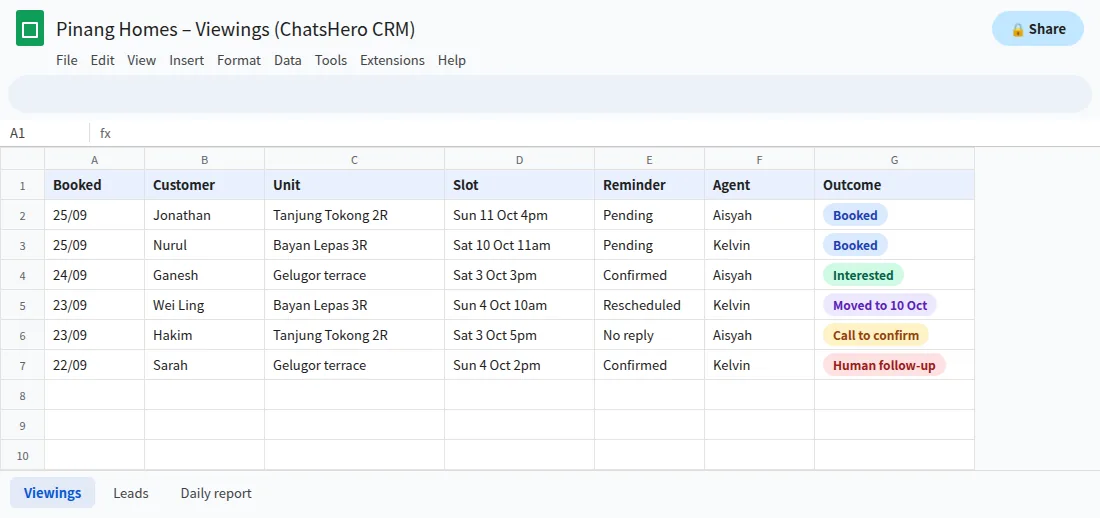
Over a few months, the sheet can answer useful questions with your own data: which listings get viewings but no offers, which time slots have the most no-shows, and which agents follow up fastest. For agencies with several RENs, auto-assign routes each viewing request to the agent handling that project.
Is property viewing booking on WhatsApp safe for customer data?
Viewing bookings hold personal data: names, phone numbers, sometimes IC details for guardhouse registration. Under Malaysia's Personal Data Protection Act, collect only what you need, keep access to the sheet and calendar within your team, and do not use viewing contacts for marketing blasts unless they agreed.
- Do not ask customers to send IC photos in chat just to book a viewing; guardhouse registration is usually done on site.
- Share exact unit numbers only with confirmed viewers.
- Message only people who contacted you or opted in, which keeps your WhatsApp quality rating healthy. The official API lowers the risk of restrictions, though no provider can promise a number will never be restricted.
How do you set up automatic viewing booking for your agency?
Set-up is conversational. In ChatsHero's Plan and Build modes, you tell the AI your viewing hours and slots, connect Google Calendar for new bookings, paste your listing details and add your confirmation template — by text, screenshot or voice note. No prompt writing.
| Step | Manual booking | Automatic booking |
|---|---|---|
| Offer times | Several messages back and forth | 2–3 slots from your set viewing hours in one message |
| Confirm | Typed by the agent, often late | Instant, with pin and guardhouse details |
| Remind | If the agent remembers | 24h and 2h before, every time |
| Record | Scattered in chats | Google Calendar + Google Sheets |
One habit makes the whole system work: update your slot list whenever your week changes, just as you would tell a human assistant. Plan details are on the pricing page; for the step before viewings, see the lead-qualification guide on the ChatsHero blog, or talk to our team.
Frequently Asked Questions
How does property viewing booking on WhatsApp work with Google Calendar?
You give the AI your viewing hours and available slots; it offers two or three options as numbered replies and adds the confirmed booking to Google Calendar with the customer's name, phone and unit. Your team keeps the calendar and slot list up to date.
How many reminders should I send before a viewing?
Two usually work well: one 24 hours before with confirm and reschedule options, and a short one about 2 hours before with the location pin and parking tips.
How much does a WhatsApp viewing reminder cost?
On the official API, a reminder is usually a utility message, an assumed RM0.06 in Malaysia (two reminders ≈ RM0.12 per viewing), billed by Meta to your own WhatsApp account. Meta's fees can change, and your ChatsHero plan is separate.
Can the chatbot book viewings for tenant-occupied units?
Yes, if you only give the AI the windows the tenant or owner has agreed to. For slots that need the owner's confirmation, the AI can say the agent will reconfirm.
What if the customer does not reply to the reminder?
The missing reply shows in Google Sheets so the agent can decide whether to call or release the slot, and a "Human Agent Needed" alert can go to your team's WhatsApp group.
Should I collect IC details to book a viewing?
Usually not in chat. Collect only the name and phone number needed to book, and let the guardhouse handle visitor registration on site, in line with the PDPA's data minimisation principle.