A phone trade-in WhatsApp campaign works best when it is sent only to customers who opted in, targets people whose phone is 18–36 months old, and replies to every "how much for my phone?" within minutes with an honest price range and an inspection slot. Each campaign message is illustrated here at RM0.35 in Meta fees, so a focused list beats a big blast.
RM0.35 and RM0.06 in this article and its supplied illustrations are planning assumptions, not verified current Meta quotations. Gupshup's October announcement describes 1,000 free service replies per business phone number per month, then eligible service charges from 1 October 2026. Utility templates do not use that allowance. Inbound messages and qualifying 72-hour free entry point messages remain exempt. Confirm the recipient market, applicable rate card, free allowance and provider fees before budgeting. Figures below exclude tax and any unlisted costs.
Examples show a proposed workflow, not a guarantee that every account or plan supports it. Ask our team to confirm the channel, integration, permissions and delivery method for your setup. Staff-group notifications and group assistants require separate eligibility and integration checks; a standard one-to-one WhatsApp API account should not be assumed to access every existing staff group. Use approved individual notifications or a staff dashboard if group delivery is unavailable. Test the workflow and human handover before use.
- Trade-in and upgrade offers are marketing messages: send them only to customers who opted in, and include an easy way to stop.
- Target by device age — customers who bought 18 to 36 months ago are a sensible first segment to test.
- Quote an honest range ("RM700–RM900, final after inspection"), never a headline price nobody gets.
- Answer replies instantly and book an inspection slot while the customer is still in the chat.
- Remind customers to back up and wipe their old phone — their personal data is still on it.
- If the upgrade uses instalment, avoid interest-free or guaranteed-approval claims and follow your credit partner's disclosure rules.
Why run a phone trade-in WhatsApp campaign?
Your best upgrade customers already bought a phone from you — and their number is already in your WhatsApp.
Phones follow a familiar cycle. A customer buys a phone, over time the battery weakens and storage fills up, and they start browsing new models. If you are not in their chat when that happens, a marketplace seller or the brand store will be.
A trade-in campaign gives you a genuine reason to reach out: "Your phone is worth something — bring it in and we will take it off the price of a new one." It helps the customer, it brings them back into your shop, and the second-hand stock you collect can be refurbished and resold.
But a phone trade-in WhatsApp campaign is also a marketing message. That changes the rules: who you may message, what it costs and how you word it.
Who can you send a trade-in or upgrade campaign to on WhatsApp?
Only people who agreed to receive messages from you. Meta's WhatsApp Business Policy says you may only contact people who gave you their number and gave opt-in permission to receive messages from your business. Malaysia's Personal Data Protection Act adds that customers can ask you to stop using their data for direct marketing at any time.
| Customer | Can you send a trade-in campaign? | What to do |
|---|---|---|
| Bought a phone and ticked "send me offers" | Yes | Add to campaign list |
| Bought a phone, no marketing consent | Not a campaign | Ask for opt-in at the next service visit or chat |
| Asked you about a repair last week | You can reply to their enquiry | Offer to add them to the offers list — only if they say yes |
| Number from a bought list or group chat | No | Never message |
| Replied STOP before | No | Remove and keep them off future lists |
Collecting opt-in is easy if you build it into your routine: a tick box on the sales slip, a line on your receipt, or a WhatsApp question after purchase: "Would you like to get trade-in and upgrade offers from us? Reply YES."
Opt-in protects your number. Even on the official API, numbers that many people block or report get a lower quality rating and can be limited. A small, willing list is safer than a big cold one.
How much does a phone trade-in WhatsApp campaign cost?
On the official WhatsApp Business API, trade-in and upgrade offers are marketing messages. Meta charges an assumed RM0.35 per delivered marketing message in Malaysia (exact ≈ RM0.3467; rates may change), billed to your own WhatsApp Business account and separate from your ChatsHero plan (see Meta's pricing page). From 1 October 2026, free-form eligible service replies above the monthly 1,000-message allowance per phone number inside the customer-service window are also charged per message using an illustrative utility-rate assumption (≈ RM0.06), as summarised in this Zendesk announcement.
| List size (example) | Campaign messages | Approx. Meta fees (× RM0.35) |
|---|---|---|
| 500 opted-in customers | 500 | 500 × RM0.35 ≈ RM175 |
| 1,500 opted-in customers | 1,500 | 1,500 × RM0.35 ≈ RM525 |
| 3,000 opted-in customers | 3,000 | 3,000 × RM0.35 ≈ RM1,050 |
These are illustrative figures for the campaign message only; replies in the chat add an assumed RM0.06 each from 1 October 2026. The lesson: send to the customers most likely to upgrade, not everyone you have ever served. ChatsHero plans include unlimited messages and blasting within the platform — see our pricing page — while Meta's fees stay on your own account.
Which customers should get the upgrade offer first?
Segment your opted-in list by what you already know: purchase date and model. A simple example:
- Bought 18–24 months ago: battery and storage complaints start. Lead with "Check your trade-in value".
- Bought 24–36 months ago: likely upgrade candidates. Lead with a specific new model and your trade-in top-up.
- Bought under 12 months ago: skip the trade-in offer; send accessories or protection offers instead, if they opted in for those.
- Repair customers: if someone paid for a screen or battery repair recently, wait before pitching an upgrade.
Timing matters too. New flagship launches, year-end bonus season and the 11.11 and 12.12 sale periods are natural moments. Send in the late morning or early evening, not at midnight.
How do you run a phone trade-in WhatsApp campaign step by step?
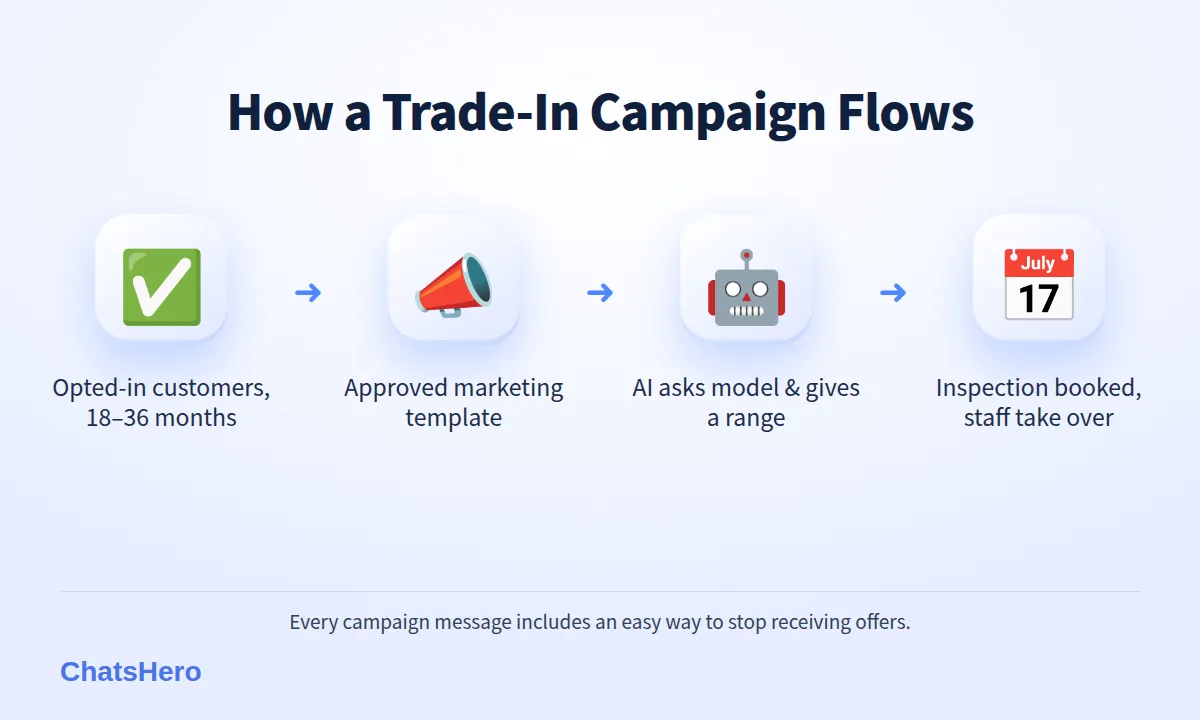
Segment → Template → Instant quote → Inspection → Upgrade
- Clean the list. Keep only opted-in customers, remove anyone who replied STOP (your team marks these in the sheet), and tag each by purchase date.
- Write one clear template. Name, old model, what you offer, how to reply, and how to stop. Get it approved as a marketing template.
- Prepare quote rules. Give the AI your trade-in price ranges by model, storage and condition, updated weekly.
- Reply instantly. When a customer replies, ask model, storage and condition (screen, battery, body), then give an estimated range.
- Book an inspection. Offer two or three slots. Explain that the final price is confirmed after staff check the phone in store.
- Hand over to staff. When the customer is ready to choose a new phone, or asks about instalment, the chat goes to a salesperson.
- Record and report. Every reply, quote and booking goes into Google Sheets; the daily report shows how the campaign is doing.
What does a good trade-in conversation look like?
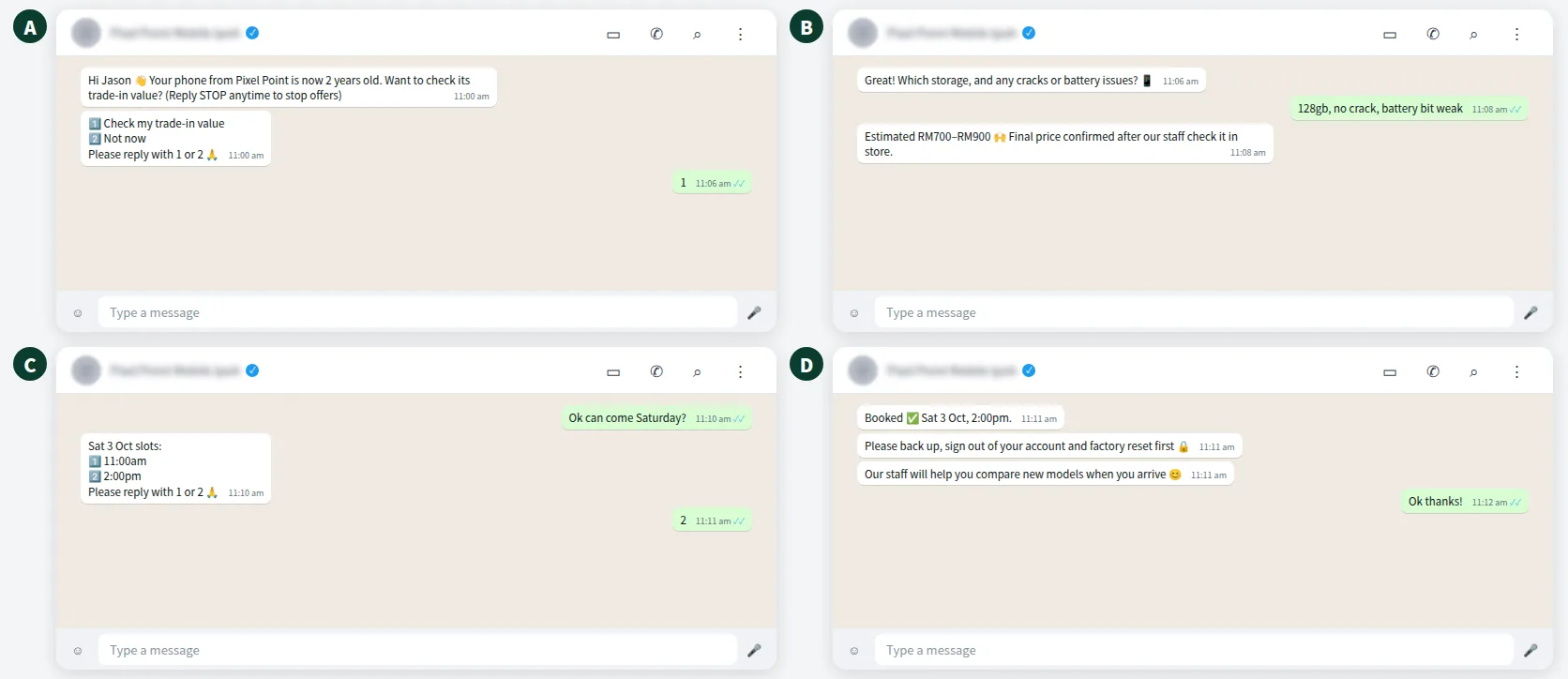
Here is an illustrative phone trade-in WhatsApp campaign chat for a fictional shop, Pixel Point Mobile in Ipoh. Note the opt-out in the first message, the price range rather than a single number, and the clear handover to staff.
Customers in Ipoh, Penang or Kuala Lumpur may reply in English, Malay or Chinese — often all three in one chat. ChatsHero replies in the customer's language 24/7; read how it handles mixed messages in our Bahasa Rojak guide.
Want to see how this looks with your own business? WhatsApp us and chat with the ChatsHero AI.
What should you never say in a trade-in or upgrade message?
Trade-in campaigns go wrong when the headline promise and the in-store price do not match. Misleading price claims can breach consumer protection law, and they certainly damage trust.
- Avoid "up to RM2,000" headlines unless a real phone in real condition gets that amount. Quote ranges and say "final after inspection".
- Avoid interest-free or guaranteed-approval claims when the upgrade uses an instalment plan. Approval belongs to the credit provider. The Hire Purchase (Amendment) Act 2026 came into force on 1 June 2026 (with a provider grace period to 31 March 2027, per Bank Negara Malaysia) and moves hire-purchase agreements to effective interest rate disclosure; it may apply to consumer goods such as phones sold on hire purchase – confirm with KPDN or your lawyer. Other credit plans may fall under the Consumer Credit Act 2025, in force since 1 March 2026, whose licensing regime started on 1 June 2026 with a transition period (confirm the end date with SKP). Not legal advice.
- Avoid fake urgency. "Last 2 hours!" on an offer that runs all month teaches customers to ignore you.
- State the conditions. Which models qualify, minimum condition, whether the phone must power on, and the campaign end date.
- Range, not headline"RM700–RM900 for 128GB, good condition".
- Final after checkSay it before the customer travels to your shop.
- Easy stop"Reply STOP to stop offers" in every campaign.
How do you protect customers' data on the old phone?
A traded-in phone may still hold photos, banking apps, chats and IC copies. Before accepting it, send a short checklist on WhatsApp:
- Back up photos, contacts and chats.
- Sign out of iCloud or Google and turn off device tracking.
- Remove the SIM and memory card.
- Factory reset the phone.
Ask staff to confirm the reset during inspection and never to open apps on a customer's device. It protects the customer and protects your shop under the PDPA. The checklist can be part of your bot's booking confirmation; ask our team how.
How do you measure whether the campaign worked?
Track four numbers per campaign: messages delivered, replies, inspections booked and upgrades completed. With ChatsHero, each reply and booking is recorded in Google Sheets automatically, and a daily summary goes to your team's WhatsApp group.
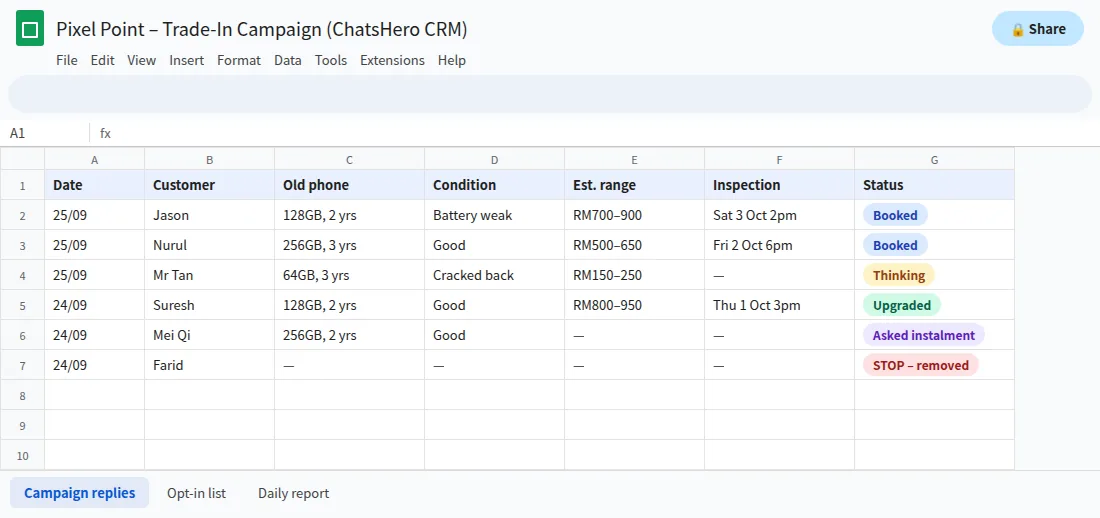
Also watch STOP replies and blocks. Your team marks each STOP in the sheet and removes that number before the next send; if more than a handful of people opt out, the offer or the timing was wrong. Before your next campaign, compare the two segments side by side in the sheet – the ChatsHero blog has more campaign ideas for retail shops.
Frequently Asked Questions
Do I need opt-in for a phone trade-in WhatsApp campaign?
Yes. Trade-in and upgrade offers are marketing messages. Meta's WhatsApp Business Policy requires opt-in permission, and under the PDPA customers can ask you to stop direct marketing at any time. Include an easy way to stop in every message.
How much does a trade-in campaign message cost on WhatsApp?
On the official API it is a marketing message, an assumed RM0.35 each in Malaysia (500 messages × RM0.35 ≈ RM175), billed by Meta to your own WhatsApp Business account. Rates can change, so check Meta's pricing page.
Should I quote an exact trade-in price on WhatsApp?
Quote an estimated range based on model, storage and condition, and say clearly that the final price is confirmed after in-store inspection. It avoids disappointment and misleading-price complaints.
Can I mention instalment plans in my upgrade campaign?
You can, but avoid interest-free or guaranteed-approval claims. Approval is decided by the credit provider, and disclosure rules depend on how the plan is structured, so follow your partner's requirements.
Which customers should receive the upgrade offer?
Opted-in customers whose phone is about 18 to 36 months old are a sensible place to start. Skip recent buyers and anyone who asked to stop receiving offers.
Can a chatbot give trade-in quotes automatically?
Yes, if you train it with your price ranges by model, storage and condition. ChatsHero can ask the questions, give the range, book an inspection slot and hand the chat to staff for the final sale.