Loan enquiry screening on WhatsApp works for licensed lenders when it stays a pre-screen, not a decision: the AI asks a few neutral questions, shares your document checklist and records the enquiry, while a licensed officer reviews every application. First confirm your product is allowed under Meta's WhatsApp Business Policy, show your KPKT licence details, never promise approval and handle IC copies and payslips under the PDPA.
Examples show a proposed workflow, not a guarantee that every account or plan supports it. Ask our team to confirm the channel, integration, permissions and delivery method for your setup. Staff-group notifications and group assistants require separate eligibility and integration checks; a standard one-to-one WhatsApp API account should not be assumed to access every existing staff group. Use approved individual notifications or a staff dashboard if group delivery is unavailable. Test the workflow and human handover before use.
WhatsApp's Business Messaging Policy says not to share or request full personal ID numbers, financial account numbers or other sensitive identifiers. Use WhatsApp for a checklist and appointment, not for full MyKad, bank-statement or payslip uploads. Collect required documents through your authorised secure portal or in person, with a privacy notice, limited access and a documented retention period. Healthcare chats should remain administrative; do not request clinical records or diagnose through the bot.
- Only licensed lenders should automate enquiries, and Meta prohibits payday loans, paycheck advances, peer-to-peer lending and debt collection on WhatsApp for Business — check your eligibility first.
- The chatbot pre-screens and collects; it never approves, rejects or promises a loan. A licensed officer decides every application.
- Ask 5–6 neutral questions: purpose, amount range, tenure, employment type, income range and preferred branch.
- Send a clear document checklist and ask for documents only after the customer agrees to your privacy notice.
- Treat IC copies, payslips and bank statements as high-risk personal data under the PDPA: restricted access, a retention period and deletion.
- Every enquiry lands in Google Sheets with a status, so no applicant waits in a buried chat.
Can a licensed lender use WhatsApp for loan enquiry screening?
Start with eligibility, not automation: a KPKT licence does not override Meta's rules.
Two sets of rules apply before you set up loan enquiry screening on WhatsApp. The first is Malaysian law. Moneylenders are licensed by the Ministry of Housing and Local Government (KPKT) under the Moneylenders Act 1951, and KPKT's guidance says every advertisement must show the licence number and date, the advertising permit number, the lender's name, address and phone number, and the interest rate offered. The same page sets the caps: 12% a year for secured loans and 18% a year for unsecured loans (see KPKT's moneylender FAQ).
The second is Meta's policy. The WhatsApp Business Policy prohibits using WhatsApp for Business to facilitate "payday loans, paycheck advances, peer-to-peer lending, debt collection, and bail bonds", as determined in Meta's sole discretion. That means:
- Payday-style or salary-advance products should not be offered or promoted on WhatsApp at all.
- P2P platforms are outside what WhatsApp allows.
- Collection messages — reminders to pay overdue loans, demand messages — must not be automated on WhatsApp.
If your product sits close to any of these categories, get proper advice and confirm your eligibility before you go live. Have your licence details ready: a responsible setup starts by showing them to the customer in the very first reply.
This is about enquiries and documents only. It is not about approval, disbursement or collection, which stay entirely with your licensed officers and your formal processes.
Why do loan enquiries on WhatsApp need screening at all?
If your website, Facebook page or Google listing shows a WhatsApp number, enquiries will come in there. The trouble is volume and timing. An enquiry can arrive at 10pm, it may be incomplete ("how much can I borrow?"), and some come from people outside your lending criteria, such as applicants outside your operating state or products you do not offer.
Without screening, officers can spend the morning asking the same five questions in dozens of chats. Serious applicants wait, and enquiries get lost between phones. Loan enquiry screening on WhatsApp fixes the admin, not the credit decision:
- Faster first replyEvery enquiry gets an instant, polite answer 24/7 in English, BM or Chinese.
- Complete filesOfficers start with purpose, amount range and a document checklist already sent.
- Clean recordsEach enquiry is logged in Google Sheets with a status and an owner.
It also protects customers. A consistent script means nobody is pressured, every applicant gets the same information about your licence and rates, and scam warnings are sent every time — not only when an officer remembers.
What questions should a WhatsApp chatbot ask when screening loan enquiries?
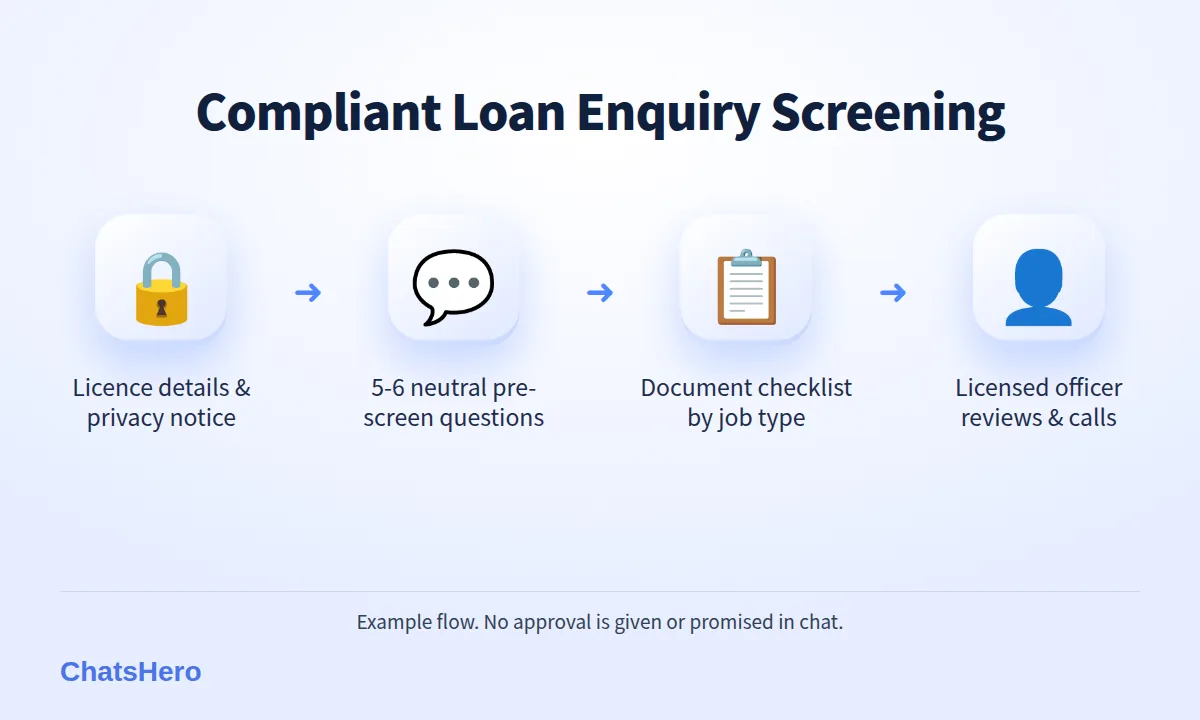
Keep the pre-screen short, neutral and relevant. Every question should help an officer prepare — not judge the applicant. Here is a sequence that works for a personal loan enquiry:
- Consent and identity of the lender. Open with your company name, "licensed by KPKT", your licence number and a link to your privacy notice. Ask the customer to reply 1 to continue.
- Purpose of the loan. Offer numbered options (1️⃣ business, 2️⃣ renovation, 3️⃣ education, 4️⃣ others) so replies are easy to record.
- Amount range and tenure. Ask for a range (RM5,000–RM10,000, for example), not an exact figure.
- Employment type. Salaried, self-employed or others — this decides which checklist to send.
- Monthly income range. A range is enough at this stage; the officer verifies with documents later.
- Preferred branch and callback time. So the right officer calls at a time that suits the customer.
What the bot should not ask in chat: online banking usernames, passwords or TAC codes, card numbers, or questions unrelated to your lending decision. Add a line to every flow: "We will never ask for your banking password or TAC." It is a simple way to help customers spot impersonation scams.
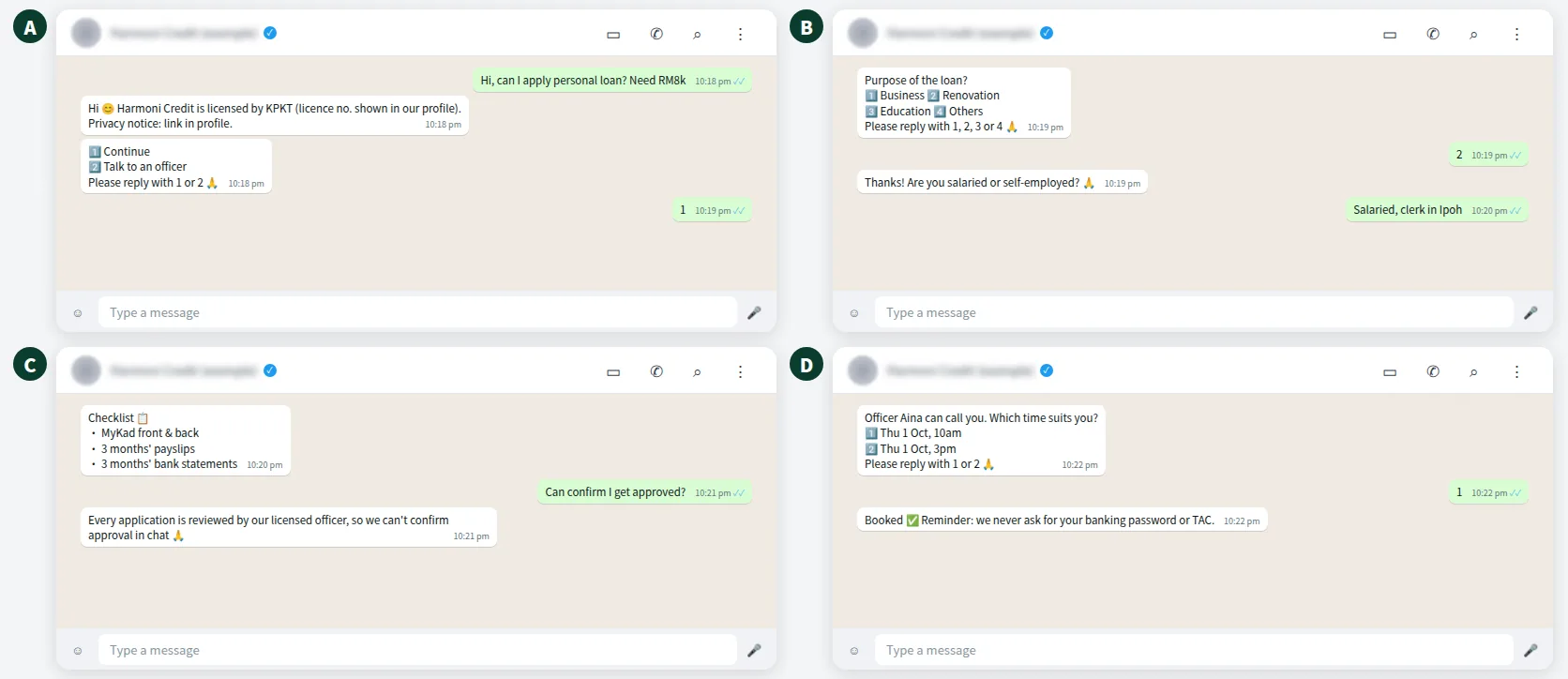
What the conversation looks like
Here is an illustrative flow for a fictional licensed lender, from a late-night enquiry to the officer's callback booking. Notice that the AI never says "approved" or "eligible".
What is a good loan document checklist for Malaysian applicants?
A clear checklist sent on WhatsApp saves a second trip to the branch. Tailor it to employment type and follow your own credit policy. A typical example:
| Applicant type | Typical documents (example) | Who checks |
|---|---|---|
| Salaried employee | MyKad (front and back), latest 3 months' payslips, latest 3 months' bank statements | Licensed officer |
| Self-employed | MyKad, SSM registration, latest 6 months' business bank statements | Licensed officer |
| Secured loan | Above, plus documents for the security offered | Officer + legal process |
| Any applicant | Signed consent to your privacy notice | Compliance / admin |
Two practical tips. First, tell customers what not to send, such as full bank log-in screenshots or documents of family members who are not part of the application. Second, say where the documents go and who can see them. Explaining this upfront is part of a fair process.
Remember the formal steps that follow screening are yours: under the Moneylenders Act, the borrower must receive a copy of the duly stamped moneylending agreement, and the agreement is explained and attested before funds are released. None of that happens inside a chatbot.
Want to see how this looks with your own business? WhatsApp us and chat with the ChatsHero AI.
How should lenders handle IC copies and payslips under the PDPA?
MyKad copies, payslips and bank statements are personal data under the Personal Data Protection Act 2010, as amended in 2024. From 1 June 2025, data breaches must be notified to the Commissioner within 72 hours and to affected individuals within seven days where significant harm is likely, and the DPO guideline counts financial information when deciding whether you must appoint a data protection officer.
A sensible document flow for loan enquiry screening on WhatsApp:
- Notice first, documents second. Ask for documents only after the customer has seen your privacy notice and agreed.
- Collect the minimum. Ask only for documents on your checklist for that applicant type.
- Use an authorised secure portal or an in-person check for required identity, bank or health documents. WhatsApp should provide the checklist and instructions, not request full identifiers or confidential records. Give a privacy notice, restrict access and delete data according to your lawful retention schedule.
- Set a retention period. Decide how long enquiry documents are kept if no application follows, and delete them after that.
- Log access. Know who opened which file, so you can answer customer requests and investigate incidents.
If a document would embarrass you in a data breach report, it should not be sitting in a shared phone.
Where does the human loan officer come in?
At every decision point. The AI handles greetings, questions, the checklist and records. A licensed officer handles everything that affects the customer's money:
| Task | WhatsApp AI | Licensed officer |
|---|---|---|
| Reply to enquiry 24/7 | Yes | — |
| Share licence details, rates as advertised, checklist | Yes | Reviews the script |
| Verify documents and income | No | Yes |
| Assess affordability and decide | No | Yes |
| Explain and sign the agreement | No | Yes, with attestation |
| Anything about overdue payments | No | Yes, outside WhatsApp automation |
With ChatsHero, auto-assign sends each screened enquiry to the right branch or officer, and a "Human Agent Needed" alert goes to your team's WhatsApp group when a customer asks something the AI must not answer — such as "Can you confirm I'll be approved?" The AI replies with a safe line ("Every application is reviewed by our licensed officer; we can't confirm approval in chat") and hands over.
How do you track loan enquiry screening in Google Sheets?
ChatsHero records each enquiry automatically in Google Sheets: date, first name, purpose, amount range, employment type, checklist sent, documents status and the assigned officer. Keep document files out of the sheet itself — the sheet should show status, not the documents.
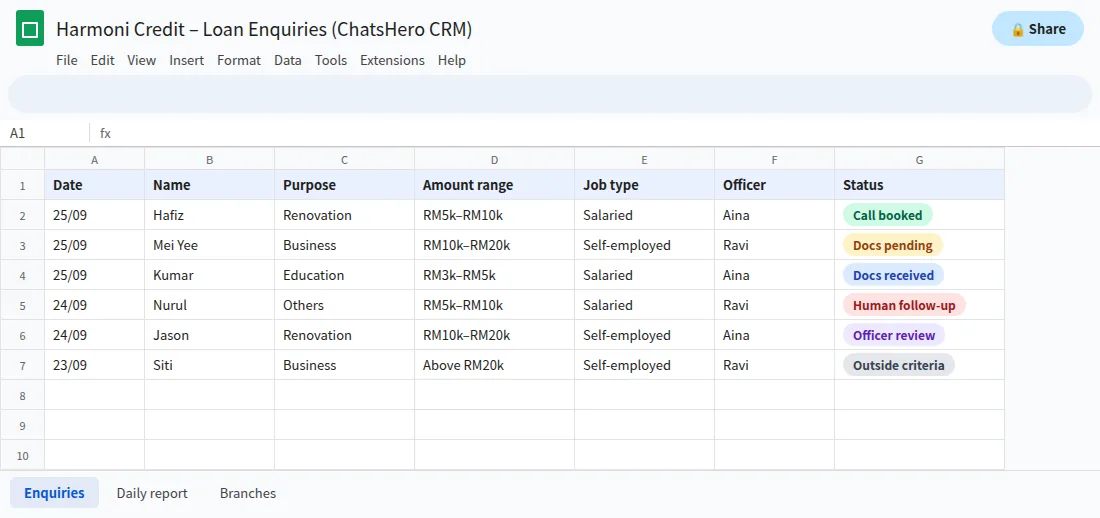
A daily report to your team's WhatsApp group shows new enquiries, enquiries waiting for documents and enquiries waiting for an officer's call. That makes follow-ups visible to the branch manager without anyone scrolling through chats. Compare ChatsHero plans to see which one fits your number of branches.
What should a licensed lender never automate on WhatsApp?
Keeping a clear list protects your licence, your WhatsApp number and your customers:
- No approval promises. Keep approval guarantees and "no documents" promises out of every message and every training document.
- No collection automation. Meta prohibits debt collection on WhatsApp for Business. Keep overdue follow-ups to your formal, lawful channels.
- No unsolicited blasts. Only message people who contacted you or opted in. Mass messaging to strangers damages your quality rating and invites reports.
- No rate quotes outside your advertised terms. The bot can repeat your advertised rates; personalised offers come from the officer after assessment.
Note also where the rules are heading. The Consumer Credit Commission's FAQ confirms that KPKT remains the regulator for conventional moneylenders and pawnbrokers, while BNPL, leasing and factoring businesses need a licence under the Consumer Credit Act 2025. That Act came into force on 1 March 2026 and licensing under Part V began on 1 June 2026, with a transition period whose end date should be confirmed with the Commission (SKP). Either way, the direction is the same: fair, transparent treatment of credit customers.
How do you set up compliant loan enquiry screening on WhatsApp?
With ChatsHero, you train the AI the way you would brief a new admin staff member: paste your licence details, advertised rates, checklist and privacy notice, add a screenshot of your current FAQ, and the AI builds the flow in Plan and Build modes. No prompt writing. Your compliance officer should review the final script before it goes live, and again whenever your ads or rates change.
Run it on the official WhatsApp Business API, which lowers the risk of restrictions compared with unofficial tools — though no provider can promise a number will never be restricted. Meta's per-message fees are billed to your own WhatsApp account, separate from your ChatsHero plan (see Meta's pricing). A good first milestone: have your compliance officer sign off the six questions and the checklist on paper before anything is built. The ChatsHero team can then turn that script into a bot, and the blog covers the related KPKT advertising rules.
Frequently Asked Questions
Is loan enquiry screening on WhatsApp allowed for licensed lenders?
It can be, but check two things first: your licence and advertising obligations under Malaysian law, and Meta's WhatsApp Business Policy, which prohibits payday loans, paycheck advances, peer-to-peer lending and debt collection. If your product is close to those categories, get advice and confirm eligibility before going live.
Can a WhatsApp chatbot approve or reject a loan?
It should not. A chatbot can ask pre-screen questions, share your checklist and record the enquiry, but a licensed officer should verify documents, assess affordability and make every credit decision.
What documents do Malaysian lenders usually ask for?
Commonly MyKad, recent payslips and bank statements for salaried applicants, and SSM registration plus business bank statements for the self-employed. Your own credit policy decides the final list.
Is it safe to collect IC copies on WhatsApp?
Use an authorised secure portal or an in-person check for required identity, bank or health documents. WhatsApp should provide the checklist and instructions, not request full identifiers or confidential records. Give a privacy notice, restrict access and delete data according to your lawful retention schedule.
What must a moneylender's WhatsApp ad or profile show?
KPKT's guidance says advertisements must show the licence number and date, the advertising permit number, the lender's name, address and phone number, and the interest rate offered. Check the latest KPKT requirements for your case.
Can I use WhatsApp to remind borrowers about overdue payments?
No. Meta's policy prohibits debt collection on WhatsApp for Business, so keep overdue matters to your formal, lawful channels and never automate them on WhatsApp.