Click-to-WhatsApp ads in Malaysia are Facebook and Instagram ads with a "Send WhatsApp message" button that opens a chat with your business. You set them up in Meta Ads Manager by choosing WhatsApp as the conversion location, start with a small test budget such as RM30 a day, and reply within 24 hours to unlock Meta's 72-hour free messaging window.
RM0.35 and RM0.06 in this article and its supplied illustrations are planning assumptions, not verified current Meta quotations. Gupshup's October announcement describes 1,000 free service replies per business phone number per month, then eligible service charges from 1 October 2026. Utility templates do not use that allowance. Inbound messages and qualifying 72-hour free entry point messages remain exempt. Confirm the recipient market, applicable rate card, free allowance and provider fees before budgeting. Figures below exclude tax and any unlisted costs.
Examples show a proposed workflow, not a guarantee that every account or plan supports it. Ask our team to confirm the channel, integration, permissions and delivery method for your setup. Staff-group notifications and group assistants require separate eligibility and integration checks; a standard one-to-one WhatsApp API account should not be assumed to access every existing staff group. Use approved individual notifications or a staff dashboard if group delivery is unavailable. Test the workflow and human handover before use.
- Click-to-WhatsApp ads send people from Facebook or Instagram straight into a WhatsApp chat with your business.
- In Meta Ads Manager, pick a campaign objective, then choose Messaging apps → WhatsApp as the conversion location.
- You control the ad budget; start small (for example RM30 a day for 7 days) and judge results on cost per conversation and sales.
- On the WhatsApp Business API, replying within 24 hours opens a 72-hour window of free messages with that customer.
- Write a clear pre-filled first message so customers only need to tap send.
- Speed wins: an AI assistant can answer ad leads 24/7 in English, BM and Chinese, then hand hot leads to your team.
What are Click-to-WhatsApp ads, and why do Malaysian SMEs use them?
A normal ad asks people to visit a website. A Click-to-WhatsApp ad asks them to start a chat.
Click-to-WhatsApp ads (Meta calls them "ads that click to WhatsApp") look like any other Facebook or Instagram post, Story or Reel, but the button says Send WhatsApp message. One tap opens WhatsApp with your business already selected and a short message ready to send.
For Malaysian SMEs, that fits how customers already buy. People ask about prices, stock, slots and delivery on WhatsApp long before they pay, and many small businesses do not have a website that converts well anyway. Instead of a landing page, the chat itself becomes the sales page.
The reach is large. DataReportal's Digital 2026 Malaysia report shows Facebook ad reach of 23.0 million and Instagram ad reach of 16.1 million people in Malaysia in late 2025, based on Meta's own advertising tools. Click-to-WhatsApp ads in Malaysia let you reach those audiences and continue the conversation where your customers are most comfortable.
What do you need before running Click-to-WhatsApp ads in Malaysia?
Get these ready first; the setup is much smoother when everything is already connected.
- Facebook Page + business portfolioAds run from your Page, managed in Meta Business Suite.
- A WhatsApp business numberLinked to the Page, on the WhatsApp Business app or the official API.
- Someone (or something) to replyAd leads arrive at night and on weekends too.
You also need a payment method in Ads Manager, a clear offer (a package, a promo or a free consultation) and simple answers to the questions every lead will ask: price, location, availability and how to pay.
Both can receive Click-to-WhatsApp ads. The free WhatsApp Business app suits one person replying from one phone. The official WhatsApp Business API is what you need for an AI chatbot, several team members on one number and records in Google Sheets. Meta's per-message fees, and the 72-hour free window, apply to the API.
How do you set up Click-to-WhatsApp ads in Meta Ads Manager?
Meta's own guide to creating ads that click to WhatsApp follows the same path. Here it is for a first campaign:
- Open Ads Manager and click Create. Engagement is the usual starting objective for conversations; the Sales and Leads objectives also offer messaging apps as a destination.
- Name the campaign clearly, for example "CTWA – Bridal Oct 2026", so you can find it later.
- Choose the conversion location: Messaging apps, then WhatsApp, and select the WhatsApp number linked to your Page.
- Set the budget and schedule. A daily budget with an end date keeps a test under control. Meta recommends running an ad for at least seven days.
- Define the audience: location (all of Malaysia, or a radius around your shop), age range and, if useful, language.
- Pick placements and the format: single image, video or carousel. Advantage+ placements let Meta show the ad across Facebook and Instagram feeds, Stories and Reels.
- Write the ad and the pre-filled message: the text the customer sees ready to send when WhatsApp opens.
- Review and publish. Meta checks the ad against its Advertising Standards before it goes live.
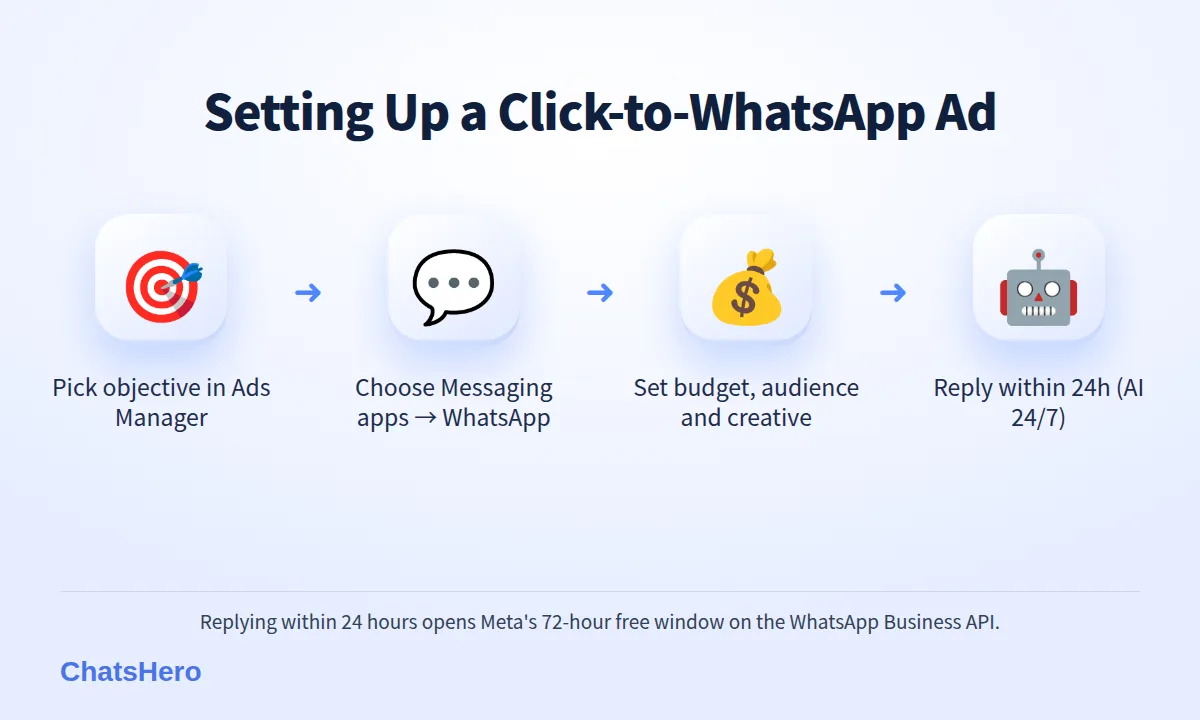
Menu names change from time to time, so if a label looks different in your account, look for the same idea: objective, conversion location, budget, audience, creative.
How much do Click-to-WhatsApp ads cost in Malaysia?
There are two separate costs, paid to Meta in two different places.
| Cost | Who sets it | How it works |
|---|---|---|
| Ad spend | You | Daily or lifetime budget in Ads Manager; the price per result depends on the auction, your audience and your creative |
| Messages in the first 72 hours | Meta | Free on the WhatsApp Business API when you reply within 24 hours of the customer's first message |
| Messages after 72 hours | Meta | Standard per-message rates, for example ≈ RM0.35 per marketing template and ≈ RM0.06 per utility template in Malaysia |
| ChatsHero plan (optional) | ChatsHero | Fixed monthly plan for the AI chatbot, separate from Meta's fees |
Ad spend is yours to control. An illustrative first test: RM30 a day for 7 days = RM210. Meta does not publish a fixed price per chat; your cost per conversation will depend on your offer, targeting and creative, so treat your first week as a measurement, not a verdict.
Messaging fees are where Click-to-WhatsApp ads have a real advantage. According to Meta's WhatsApp pricing documentation, when a customer messages you from one of these ads and you reply within 24 hours, a 72-hour free entry point window opens, during which your messages to that customer are free. That matters more from 1 October 2026, when Meta starts charging for ordinary eligible service replies above the monthly 1,000-message allowance per phone number inside the customer-service window; the 72-hour window after an ad click stays in place, as this summary of the change confirms. These fees are billed to your own WhatsApp account, not through your ChatsHero plan. You can compare our plans on the pricing page.
What should your ad and first WhatsApp reply say?
A good Click-to-WhatsApp ad makes one promise and makes starting the chat feel easy. A few rules that keep beginners out of trouble:
- Lead with the offer, not your company history: "Bridal packages from RM3,800, free fitting session" beats "Welcome to our boutique".
- Tell people what happens next: "Tap to WhatsApp us for the full package list."
- Write a pre-filled message the customer would actually say: "Hi, I want to know about the bridal packages". Meta explains how in its help article on pre-filled messages for ads that click to WhatsApp.
- Stay within Meta's rules: no exaggerated before-and-after claims, and extra care for regulated categories such as finance and health.
What the first few minutes of the chat look like
Here is an illustrative conversation for a fictional Melaka bridal studio, from an Instagram ad click to a booked showroom visit.
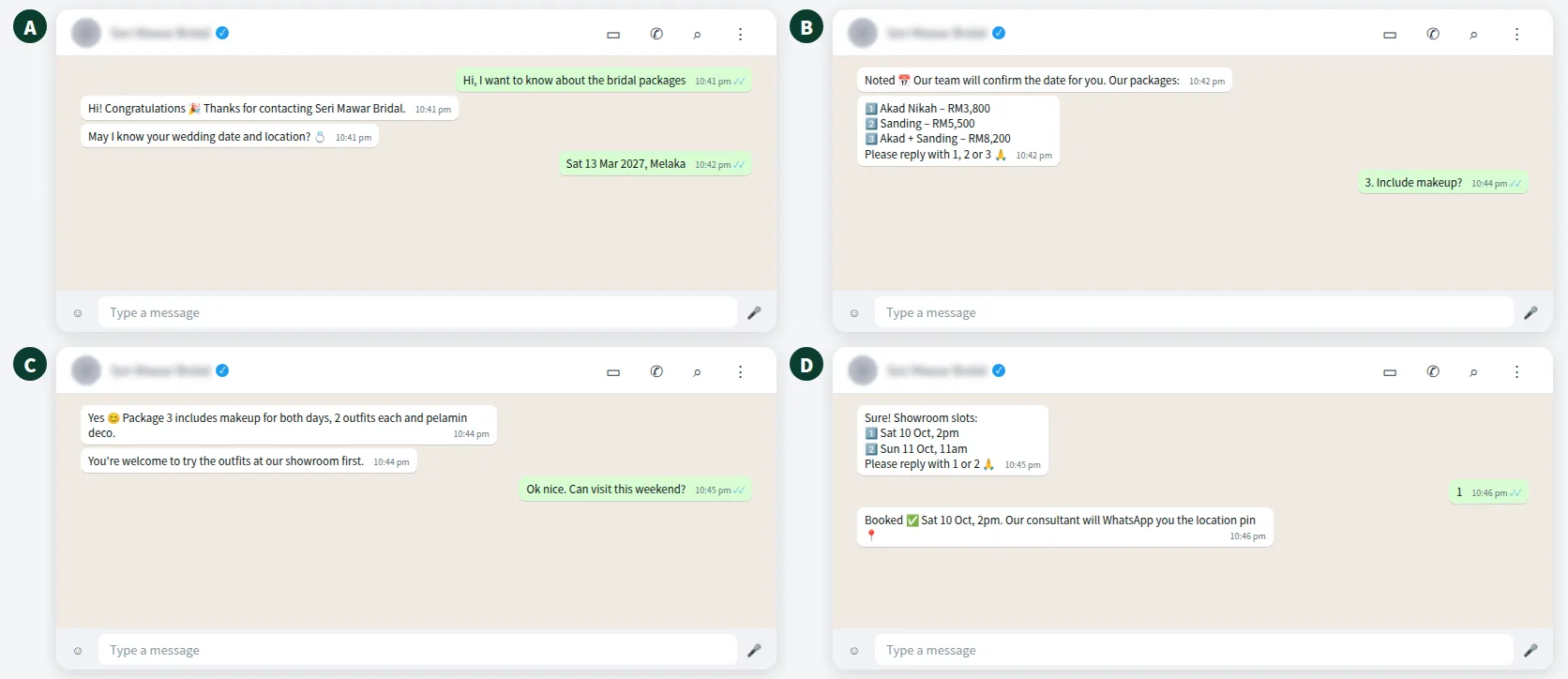
Notice the pattern: greet, ask one qualifying question, give options with numbers, then book a next step. The customer never has to type a paragraph.
Why does reply speed matter so much for Click-to-WhatsApp ads?
You pay for the click. A slow reply throws it away.
Someone who taps your ad at 10:40pm is interested right now. If the reply comes the next afternoon, they may have messaged two other shops, or simply lost interest. There is also a cost reason: the 72-hour free window only opens if you reply within 24 hours.
This is where an AI assistant earns its keep. ChatsHero replies to ad leads 24/7 in English, Bahasa Melayu and Chinese, answers common questions such as price, location and availability, and asks the qualifying questions you choose. When a customer is ready to book or has an unusual request, it passes the chat to your team with a "Human Agent Needed" alert in your WhatsApp group.
Want to see how this looks with your own business? WhatsApp us and chat with the ChatsHero AI.
How do you know if your Click-to-WhatsApp ads are working?
In Ads Manager, add the columns Messaging conversations started and Cost per messaging conversation started. They tell you how many chats each ad brought in and what each one cost.
That is only half the story, because the sale happens in WhatsApp. ChatsHero records each lead in Google Sheets with the details the AI collected, and your team updates the status when a customer books or pays. Give each ad its own pre-filled message and you can also note which ad a lead came from.
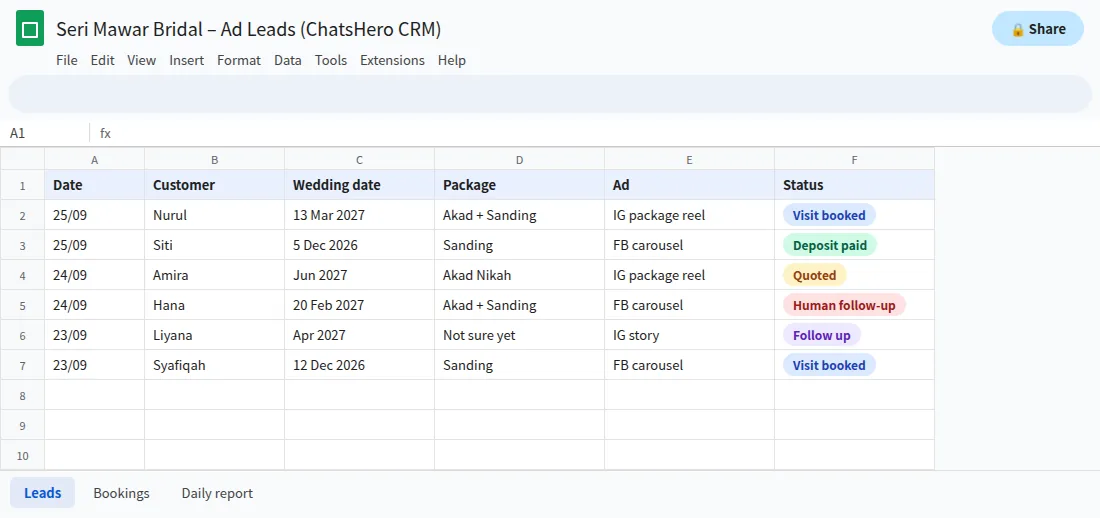
After a week, compare ad spend with the number of qualified leads and sales from the sheet. If one ad brings plenty of chats but no bookings, change the offer or the audience rather than simply adding budget.
What beginner mistakes should you avoid with WhatsApp ads?
| Mistake | Why it hurts | Better approach |
|---|---|---|
| Boosting a random post | No clear offer, so chats go nowhere | One ad, one offer, one next step |
| Tiny audience | Costs rise and delivery stalls | Start broad; Meta suggests large audiences for these ads |
| Replying only in office hours | Night leads go cold and miss the 24-hour reply | AI replies 24/7, humans take over for bookings |
| Changing the ad every day | Meta never finishes learning | Let a test run about 7 days before judging |
| Broadcasting to every ad lead later | Blocks and reports lower your quality rating | Send promotions only to customers who opted in |
On that last point: a chat from an ad is not permission to send promotions forever. Under Meta's rules and Malaysia's Personal Data Protection Act 2010, ask customers whether they want to hear about future offers, record their answer, and stop when they ask you to. A number with a poor quality rating can have its templates paused, which is a real setback for a small business.
Where should a beginner start this week?
Keep the first campaign small and simple: one offer, one Facebook and Instagram ad set, a daily budget you are comfortable losing while you learn, and a reply process that works at 11pm. Measure chats and sales for a week, then adjust.
If you would rather have us set up the replies, questions and Google Sheets tracking for you, our done-for-you WE-DO plan covers that; you can read more about ChatsHero and our work with Malaysian SMEs, or browse more marketing guides on the ChatsHero blog.
Frequently Asked Questions
What are Click-to-WhatsApp ads in Malaysia?
They are Facebook and Instagram ads with a Send WhatsApp message button. When a customer taps it, WhatsApp opens with your business and a pre-filled message, so the enquiry starts as a chat instead of a website visit.
Can I run Click-to-WhatsApp ads with the free WhatsApp Business app?
Yes, as long as the number is linked to your Facebook Page. You need the official WhatsApp Business API if you want an AI chatbot, several staff on one number or automatic records in Google Sheets.
Are WhatsApp messages from Click-to-WhatsApp ads free?
On the WhatsApp Business API, if you reply within 24 hours of the customer's first message from the ad, Meta opens a 72-hour window in which your messages to that customer are free. This window remains after Meta's 1 October 2026 pricing change.
How much budget should I start with?
Start with an amount you are comfortable testing, for example RM30 a day for 7 days (RM210). Judge the test on cost per conversation and on the bookings or sales recorded from those chats.
Which campaign objective should I choose?
Engagement with WhatsApp as the conversion location is the common starting point for conversation ads. Sales and Leads objectives also offer messaging apps as a destination once you want to optimise further.
Can I send promotions to everyone who messaged from my ad?
Only to customers who agreed to receive offers. Ask for opt-in, record it, and stop when a customer asks you to, in line with Meta's rules and Malaysia's PDPA. Marketing templates are illustrated here at RM0.35 each in Malaysia.