When someone taps one of your Click to WhatsApp ads and messages you, replying within 24 hours opens a free 72-hour window on the official WhatsApp Business API. For those 72 hours, every message you send — replies, follow-ups, even templates — carries no Meta messaging fee. From 1 October 2026, when normal replies start costing money, that window is worth more than ever.
RM0.35 and RM0.06 in this article and its supplied illustrations are planning assumptions, not verified current Meta quotations. Gupshup's October announcement describes 1,000 free service replies per business phone number per month, then eligible service charges from 1 October 2026. Utility templates do not use that allowance. Inbound messages and qualifying 72-hour free entry point messages remain exempt. Confirm the recipient market, applicable rate card, free allowance and provider fees before budgeting. Figures below exclude tax and any unlisted costs.
Examples show a proposed workflow, not a guarantee that every account or plan supports it. Ask our team to confirm the channel, integration, permissions and delivery method for your setup. Staff-group notifications and group assistants require separate eligibility and integration checks; a standard one-to-one WhatsApp API account should not be assumed to access every existing staff group. Use approved individual notifications or a staff dashboard if group delivery is unavailable. Test the workflow and human handover before use.
- A Click-to-WhatsApp ad (or a Facebook Page call-to-action button) is a “free entry point” into a chat.
- Reply within 24 hours and Meta opens a free window that lasts 72 hours from that reply.
- Inside the window, any message type is free — service replies, follow-ups and template messages.
- From 1 October 2026, eligible service replies above the monthly allowance in the 24-hour window are charged per message, but the ad-click 72-hour window stays free.
- Miss the first 24 hours and you lose it — an AI that replies at 11pm protects the window.
- Your ad spend is still paid to Meta Ads; the free window only covers WhatsApp messaging fees.
What are Click-to-WhatsApp ads?
The ad gets the tap. The first reply decides whether the next 72 hours are free.
Click-to-WhatsApp ads (often shortened to CTWA) are Facebook and Instagram ads with a “Send WhatsApp message” button. Instead of landing on a website, the customer opens a chat with your business, often with a pre-filled message like “Hi, I saw your ad”.
It suits purchases where people want to ask a quick question — price, slot, location — before they commit. A chat feels easier than a form.
On the official WhatsApp Business API, Meta treats these chats as a special “free entry point”. That is where the 72-hour window comes from.
How does the Click to WhatsApp ads 72 hour window work?
Meta’s pricing documentation sets out the rule in three parts:
- The customer messages you from a free entry point — a Click-to-WhatsApp ad or a Facebook Page call-to-action button.
- You reply within 24 hours, with any type of message. That reply is free, and a Free Entry Point window opens.
- The window stays open for 72 hours. While it is open, you can send any type of message to that person at no charge — including template messages.
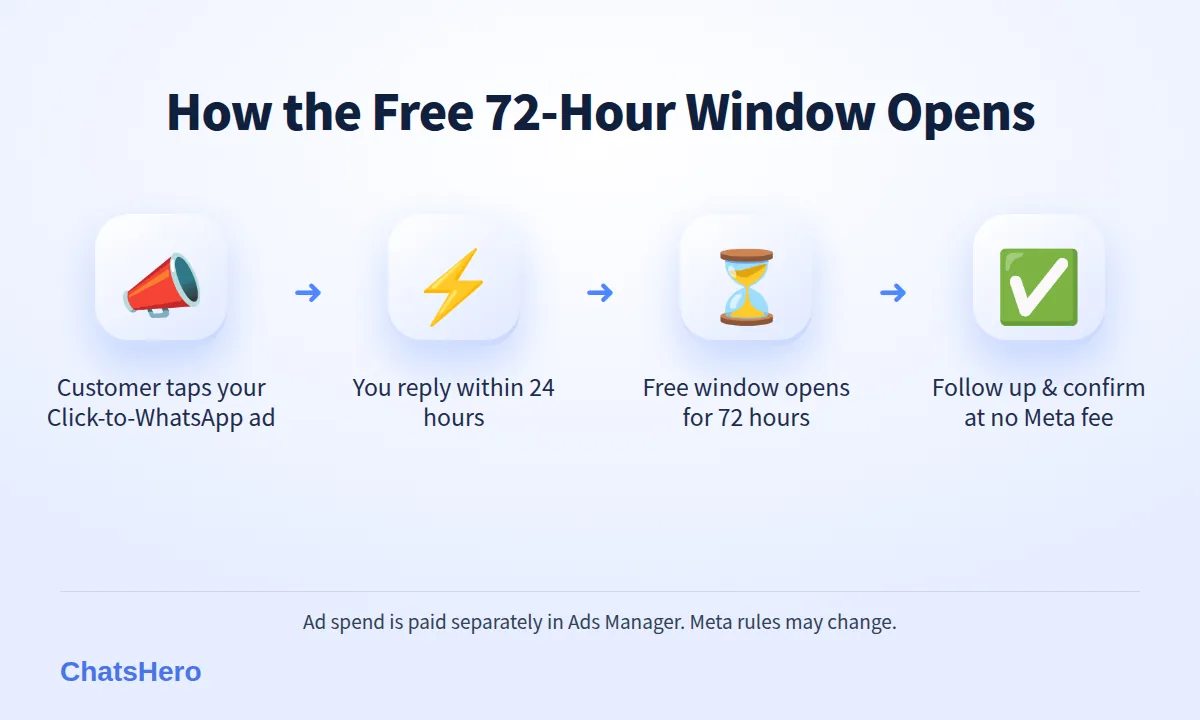
A simple example with made-up times: a customer taps your ad on Thu 1 Oct at 9:40pm. Your AI replies at 9:40pm. The free window runs until about Sun 4 Oct, 9:40pm. A follow-up on Saturday and a booking confirmation on Sunday cost nothing in Meta messaging fees.
If nobody replies within 24 hours, the free entry point is lost, and later messages follow normal pricing.
Why does the 72-hour window matter more after 1 October 2026?
Until now, replying to a customer inside the normal 24-hour customer-service window was free. That changes on 1 October 2026. According to this summary of Meta’s change, Meta will charge per message for non-template replies and for utility templates sent inside that window. The same announcement says the 72-hour free window after a Click-to-WhatsApp ad click remains in place.
| Situation (from 1 Oct 2026) | Meta messaging fee | How long |
|---|---|---|
| Customer came from a Click-to-WhatsApp ad, you replied within 24h | Free — any message type | 72 hours |
| Customer messaged you directly (not from an ad) | Replies charged per message | 24-hour window |
| You message first with a marketing template | Charged (≈RM0.35 in Malaysia) | Per message |
| You message first with a utility template | Charged (≈RM0.06 in Malaysia) | Per message |
Rates are approximate, vary by country and can change; Meta publishes the latest figures on its pricing page. These fees are billed to your own WhatsApp Business account, separately from any software plan.
Ad-driven chats now have a cost advantage. The same conversation that is charged when it starts organically is free for 72 hours when it starts from your ad.
How do you make sure you never miss the first 24 hours?
The window only opens if you reply within 24 hours. In practice, the real deadline is much shorter: a customer left waiting until the next afternoon may well have messaged a competitor by then.
- Ads run at night. Many people browse ads after work, when your team is offline.
- Weekends and public holidays can be when people plan home services, beauty treatments and family outings.
- Peak campaigns — 11.11, year-end sales, Hari Raya — can bring more chats than staff can handle.
An AI auto-reply on the official API answers every ad click within seconds, 24/7, in English, Bahasa Melayu and Chinese. That first reply opens the free window; the AI then answers price questions, offers slots and hands over to staff when needed.
What should you send during the free 72 hours?
Here is a simple plan, using a fictional business, Lumina Aircond Service in Penang, which runs Click-to-WhatsApp ads for aircond cleaning.
- Minute 0 — answer the question. Price per unit, service area and the next available slots, with numbered options.
- Minute 1 — qualify. How many units, which area, wall-mounted or cassette.
- Same night — offer a slot. Confirm the booking and say the team will verify it.
- Day 2 — gentle follow-up for anyone who went quiet: “Still need the service? Sat and Mon slots left.”
- Before hour 72 — last reminder and an invitation to opt in for future service reminders.
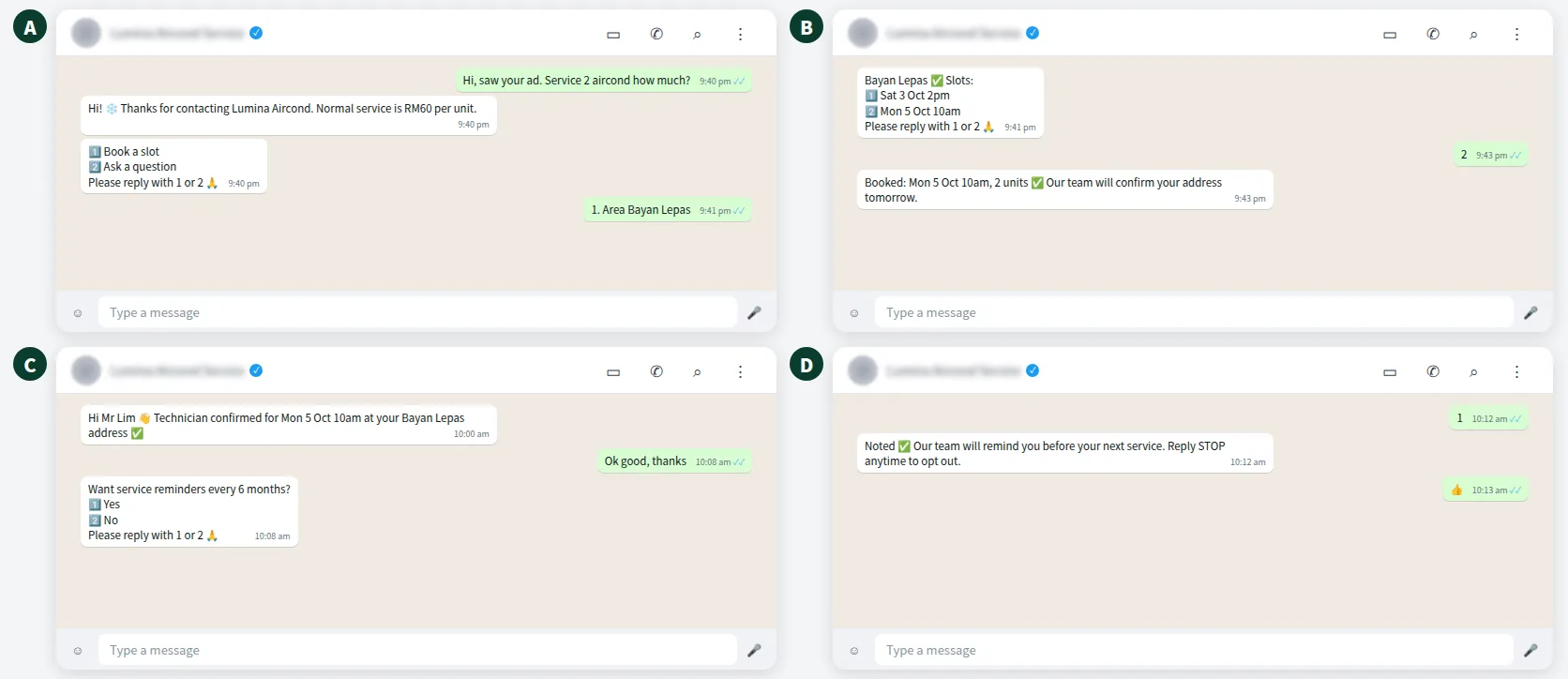
Asking for opt-in before the window closes matters. After 72 hours, any promo you send is a paid marketing template — and under Meta’s WhatsApp Business Messaging Policy, you need the customer’s permission to send it.
Want to see how this looks with your own business? WhatsApp us and chat with the ChatsHero AI.
How do you track which Click-to-WhatsApp ads bring real bookings?
Ads Manager tells you how many conversations started. It does not tell you which ones became paying customers.
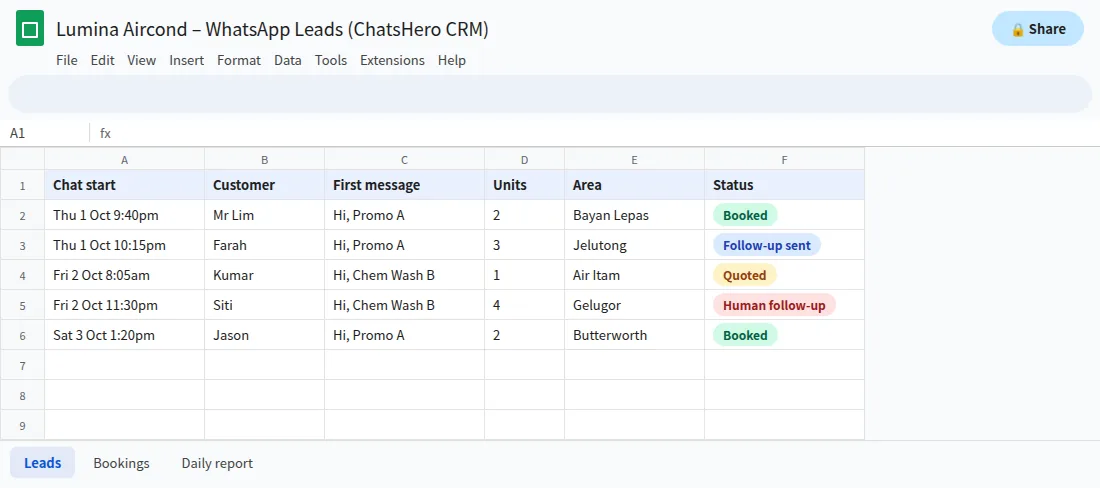
With ChatsHero, each chat can be recorded in Google Sheets with its start time, the customer’s first message and what they asked for, and your team updates the outcome. A simple trick: give each ad its own pre-filled message, such as “Hi, Promo A”, so the first message in the sheet shows your team which ad the customer tapped.
- Seconds, not hoursEach ad click gets a first reply straight away, well inside the 24 hours.
- Day-2 nudgeA follow-up the next day lands comfortably inside the 72 hours.
- Daily lead reportLeads and bookings summarised to your team’s WhatsApp group.
With bookings and first messages in one sheet, you can compare cost per booking — not just cost per chat — and move budget to the ads that actually sell. See plans on our pricing page.
What are the common mistakes with the free entry point window?
- Replying late. A reply after 24 hours does not open the free window.
- Assuming the ad itself is free. The window covers WhatsApp messaging fees only; you still pay for the ad in Ads Manager.
- Blasting after the window closes. Chatting once through an ad is not opt-in for weekly promos. Ask first.
- Sending a wall of text. Short replies with numbered choices (“Please reply with 1 or 2”) are easier for customers to answer.
- Using an unofficial tool. The free entry point is a feature of the official WhatsApp Business Platform. Unofficial blasting tools also carry a higher risk of your number being restricted.
Meta’s pricing rules change from time to time, so check the latest documentation before planning a big campaign.
Are Click-to-WhatsApp ads worth it for Malaysian SMEs?
For businesses where customers ask before they buy — home services, beauty, tuition, property, cars, F&B catering — they usually are, as long as someone (or something) replies fast. The free 72-hour window lowers messaging costs, but the bigger win is speed: a fast answer gives you the first chance at the booking.
A quick way to judge (illustrative figures only): if an ad costs RM5 per conversation and one in eight chats books an RM180 service, each booking costs about RM40 in ads. Track your own numbers for a month before deciding. If you would like help setting up the tracking sheet, our team can walk you through it; more WhatsApp marketing guides are on our blog.
Frequently Asked Questions
How does the Click to WhatsApp ads 72 hour free window work?
When a customer messages you from a Click-to-WhatsApp ad or a Facebook Page call-to-action button and you reply within 24 hours, Meta opens a free window for 72 hours. During that time, any message you send to that customer carries no WhatsApp messaging fee.
Are template messages free inside the 72-hour window?
Yes. According to Meta’s pricing documentation, you can send any type of message at no charge while the free entry point window is open, including templates.
Does the free window still exist after 1 October 2026?
Yes. Meta’s announced change charges normal eligible service replies above the monthly 1,000-message allowance per phone number inside the customer-service window, but the 72-hour free window after a Click-to-WhatsApp ad click remains in place. Always check Meta’s latest pricing page.
What happens if I reply after 24 hours?
The free entry point window does not open. Your messages then follow Meta’s normal per-message pricing.
Is the ad itself free?
No. You still pay for the ad in Meta Ads Manager. The 72-hour window only waives WhatsApp messaging fees.
Do I need the official WhatsApp Business API?
Yes. The free entry point window is part of the WhatsApp Business Platform pricing. ChatsHero runs on the official API and replies to ad clicks 24/7.