A good chatbot human handover happens when the AI reaches its limits: the customer asks for a person, is upset, wants a refund or discount, needs a custom quote, or the AI can’t answer confidently after two tries. The AI then tells the customer a staff member will continue, alerts your team in a WhatsApp group with a summary, and steps aside. In a 2026 Gartner survey (not Malaysia-specific), 87% of customers said an option to reach a human is essential.
Examples show a proposed workflow, not a guarantee that every account or plan supports it. Ask our team to confirm the channel, integration, permissions and delivery method for your setup. Staff-group notifications and group assistants require separate eligibility and integration checks; a standard one-to-one WhatsApp API account should not be assumed to access every existing staff group. Use approved individual notifications or a staff dashboard if group delivery is unavailable. Test the workflow and human handover before use.
- AI should handle the repetitive questions; people should handle judgement, emotion and money.
- Hand over immediately when a customer asks for a human — never trap them in a loop.
- Other key triggers: complaints, refunds, discounts, custom quotes, low confidence and hot leads ready to buy.
- WhatsApp’s Business Messaging Policy requires a prompt, clear and direct escalation path when you use automation.
- A “Human Agent Needed” alert in a WhatsApp group, with a chat summary, means the customer never repeats themselves.
- Tell the customer honestly when a person will reply, especially outside office hours.
Why does a WhatsApp chatbot need a human handover at all?
The best AI chatbot is not the one that answers everything. It is the one that knows when to stop.
A WhatsApp AI can answer prices, opening hours, menus and booking questions in seconds, 24/7, in English, Bahasa Melayu and Chinese. That covers many of the routine enquiries an SME receives every day. But some conversations need judgement, empathy or authority that only your team has — a refund, an upset customer, a big custom order.
Customers feel this strongly. In a 2026 Gartner survey of 3,566 B2B and B2C customers (a multi-market survey, not Malaysia-specific), 87% said it is essential for companies using GenAI to provide an option to reach a human agent. Gartner’s advice to service leaders was not to make AI a compulsory first step for every issue, and to keep clear escalation paths.
A smooth chatbot human handover is therefore not a weakness in your automation. It is what makes customers trust the automation in the first place.
What does WhatsApp’s policy say about handing over to a human?
On the official WhatsApp Business Platform, handover is not just good service — it is part of the rules. The WhatsApp Business Messaging Policy allows automation when you respond to customers, but says you must also have prompt, clear and direct escalation paths. The examples it lists include in-chat transfer to a human agent, a phone number, email, web support, an in-store visit or a support form.
For a Malaysian SME, the simplest compliant setup is an in-chat transfer: the customer stays in the same WhatsApp conversation and a staff member replies there. No new number, no form, no “please call our hotline between 9 and 5”.
Automation is allowed; a dead end is not. Every AI conversation should have an easy way to reach a person.
When should a chatbot hand over to a human? 7 triggers
These are the moments we recommend setting as handover triggers for most small businesses:
- The customer asks for a person. “Can I talk to someone?” should always work, first time. Never make them ask three times.
- The customer is upset or complaining. A late delivery, a wrong order or a rude experience needs a human apology and a human decision.
- Money decisions. Refunds, discounts, payment problems and disputes. The AI can say “our team will verify the payment”, but a person should decide.
- Custom quotes and large orders. A 200-pax company dinner, a bulk order or a special request is worth a salesperson’s time.
- The AI isn’t confident. If it can’t find the answer in its training, or the customer rephrases the same question twice, pass it on rather than guess.
- A hot lead is ready to buy. When a customer says “ok I want to confirm”, a person can close the deal and build the relationship.
- Sensitive topics. Anything involving personal documents, health or legal matters should go to trained staff, with personal data handled under the PDPA.
What should the AI handle, and what should your team handle?
A clear split stops both extremes — an AI that promises things it shouldn’t, and staff who waste hours on questions a bot could answer.
| Situation | AI handles | Human handles |
|---|---|---|
| Prices, menus, packages | ✅ Instant answer | Only for custom packages |
| Opening hours, location, parking | ✅ | — |
| Booking a date or slot | ✅ Collects details, records in Google Sheets | Confirms unusual requests |
| Payment received | Acknowledges: “our team will verify” | ✅ Verifies payment |
| Complaint or refund | Apologises and hands over | ✅ Decides and resolves |
| Discount request | Hands over | ✅ Decides |
| Large or custom order | Collects pax, date, budget | ✅ Quotes and closes |
Notice that the AI still does useful work before the handover: it collects the basics, so your staff start the conversation already knowing the date, pax and budget.
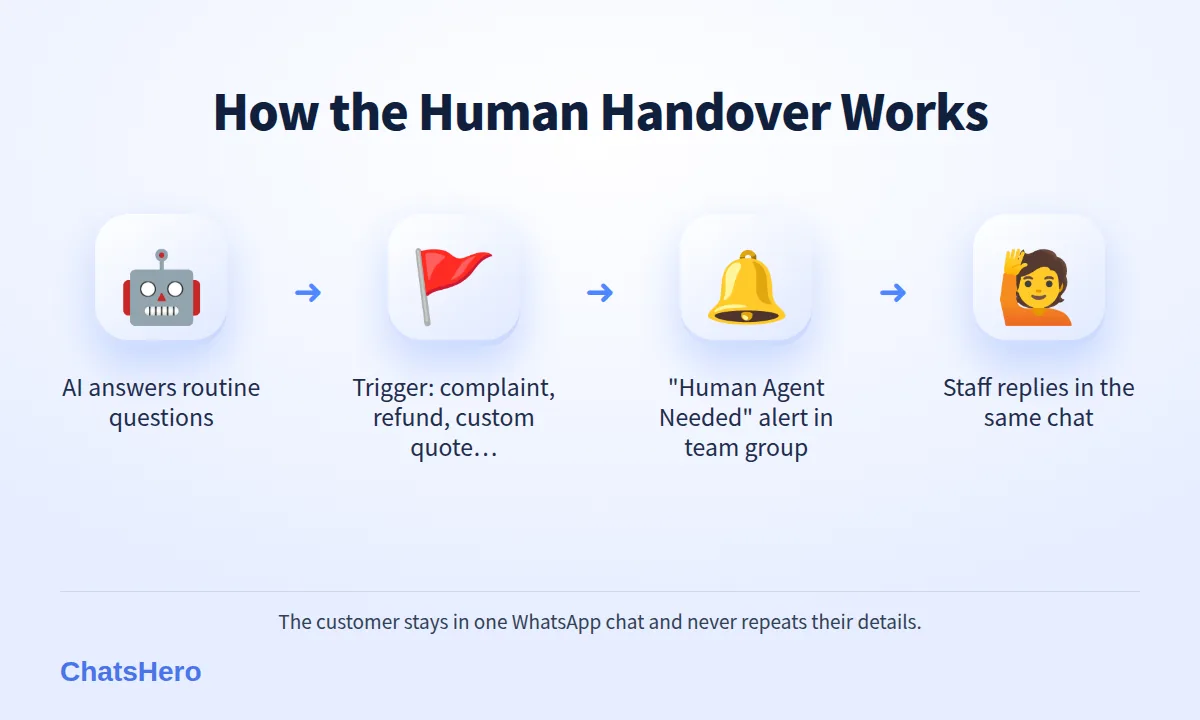
How does a smooth chatbot human handover work on WhatsApp?
Detect → Tell the customer → Alert the team → Human replies → AI steps back
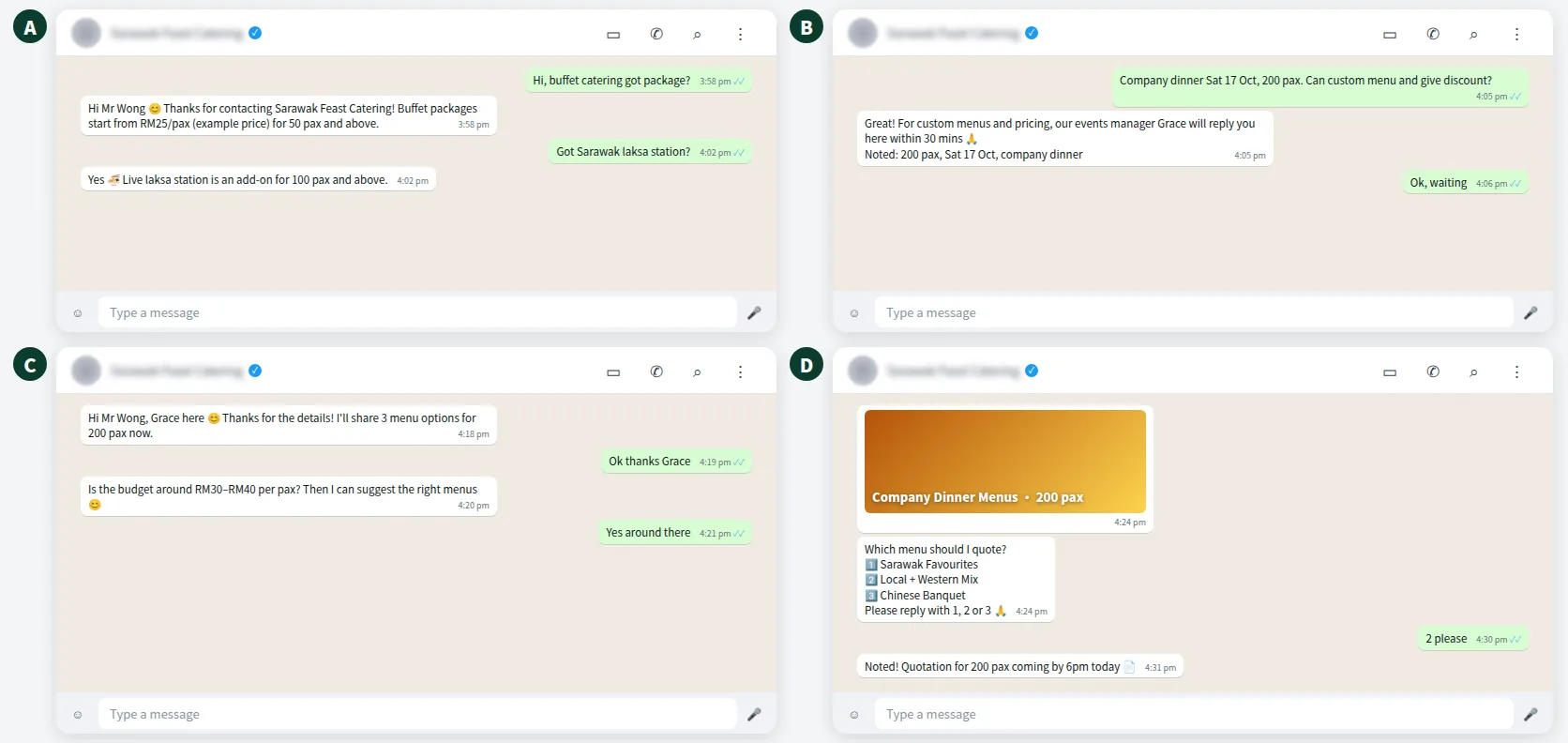
With ChatsHero, the flow looks like this. When a trigger is hit, the AI tells the customer honestly that a team member will continue, and a “Human Agent Needed” alert is posted in your team’s WhatsApp group with the customer’s name, number and a short summary of the chat. Whoever is free picks it up and replies in the same conversation. The customer never has to repeat themselves.
Here is an example from a fictional caterer in Kuching, Sarawak Feast Catering:
Because leads are also auto-assigned to your team, the alert can go to the right person — for example, event enquiries to the events manager and daily tiffin orders to the kitchen supervisor.
Want to see how this looks with your own business? WhatsApp us and chat with the ChatsHero AI.
What should the chatbot say when it hands over?
Keep it honest, specific and warm. Three rules: say that a person will reply, say when, and confirm what you already know so they don’t repeat it.
During office hours: “Thanks, Mr Wong! For a custom menu and pricing, our events manager Grace will reply you here within 30 minutes. I’ve passed her your details: 200 pax, Sat 17 Oct, company dinner 🙏”
After office hours: “Thanks for your patience 🙏 Our team is offline now and will reply here from 9am tomorrow. I’ve noted your request so you won’t need to explain again.”
When a customer is upset: “I’m really sorry about this. I’ve alerted our supervisor, who will contact you here shortly to sort it out.”
One small detail matters in Kuching and everywhere else in Malaysia: the handover message should be in the language the customer wrote in. If Mr Wong wrote half in Chinese, a reply in stiff formal English feels like a form letter (more on mixed-language chats).
How do you make sure no handover is missed?
A handover alert is only useful if someone acts on it. A few habits help:
- One groupSend all “Human Agent Needed” alerts to one team WhatsApp group.
- One ownerWhoever replies first says “taking this” in the group.
- One recordEach handover shows in Google Sheets until it is resolved.
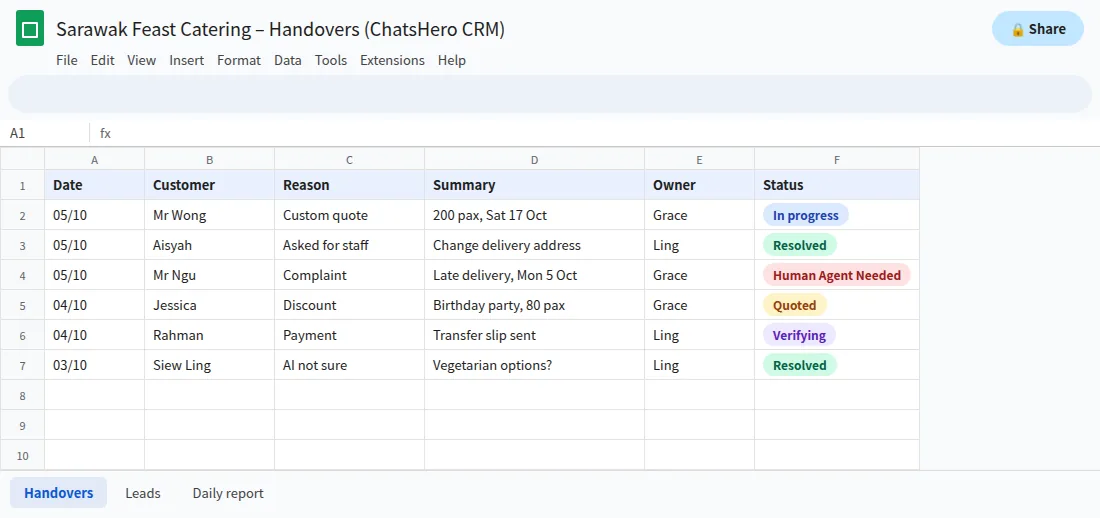
A daily report to the same WhatsApp group shows how many chats the AI handled, how many were handed over and which are still open. If the same question keeps being handed over, add the answer to the AI’s training so it can handle it next time.
Can a chatbot handle too little — or too much?
Both happen. If the AI hands over almost everything, your team is no better off. If it hands over almost nothing, customers get frustrated and you risk wrong promises. Review the handover list weekly for the first month: which triggers fire most, which answers can be trained, and which topics should always stay with people. A well-tuned chatbot human handover leaves your team with fewer, higher-value conversations.
Tuning is quick because ChatsHero is trained like ChatGPT: when a question keeps being handed over, paste the answer as text, a screenshot or a voice note and the bot learns it — no prompt writing. Setup help comes with every plan; if you’d rather have us build and tune it for you, that is what the WE-DO done-for-you plan is for. You can read how our team works on the About page.
Frequently Asked Questions
What is a chatbot human handover?
It is the moment an AI chatbot passes a conversation to a staff member — for example when the customer asks for a person, is upset, wants a refund or discount, or needs a custom quote. A good handover keeps the customer in the same chat and passes along a summary.
When should a WhatsApp chatbot hand over to a human?
Immediately when the customer asks for a person, and whenever there is a complaint, a money decision, a large or custom order, a sensitive topic, or the AI can’t answer confidently after two tries.
Does WhatsApp require a human escalation option?
Yes. WhatsApp’s Business Messaging Policy allows automation but requires prompt, clear and direct escalation paths, such as an in-chat transfer to a human agent, a phone number or email.
How does my team know when a customer needs a human?
With ChatsHero, a “Human Agent Needed” alert is posted in your team’s WhatsApp group with the customer’s details and a summary, and the handover is recorded in Google Sheets.
What if a customer needs a human outside office hours?
The AI should say honestly when the team will reply — for example “from 9am tomorrow” — and confirm it has noted the request, so the customer doesn’t need to explain again.
Will handing over to humans make my chatbot less useful?
No. The AI still answers routine questions and collects details first. Reviewing handovers weekly also shows which answers to add to the AI’s training, so fewer chats need a person over time.